曲面与立体
影片代码
import manimgx as m


class SurfacesHero(m.ThreeDScene):
    def construct(self) -> None:
        self.set_camera_orientation(phi=65 * m.DEGREES, theta=-50 * m.DEGREES)
        shapes = m.Group(
            m.Sphere(radius=0.9),
            m.Torus(major_radius=0.8, minor_radius=0.3),
            m.Cylinder(radius=0.7, height=1.6),
            m.Cone(base_radius=0.8, height=1.6),
            m.Cube(side_length=1.4),
            m.Icosahedron(edge_length=1.2),
        )
        shapes.arrange_in_grid(rows=2, buff=0.9)
        self.add(m.SunLight(4 * m.UP + 3 * m.OUT), m.AmbientLight(intensity=0.3))
        self.play(m.LaggedStart(*[m.FadeIn(shape) for shape in shapes], lag_ratio=0.15))
        self.wait()
曲面是由双变量函数生成的点集:在 u 和 v 各自取值范围内的 func(u, v)。球面、环面、柱面和
锥面是已为你生成函数的曲面。具有平面的立体是多面体,从立方体到二十面体。它们都显示在
3D 场景中,由其灯光着色。
曲面
代码
import numpy as np

import manimgx as m


class SurfaceExample(m.ThreeDScene):
    def construct(self) -> None:
        self.set_camera_orientation(phi=60 * m.DEGREES, theta=-60 * m.DEGREES)

        def mobius(u: float, v: float) -> np.ndarray:
            r = 2.5 + v * np.cos(u / 2)
            return np.array([r * np.cos(u), r * np.sin(u), v * np.sin(u / 2)])

        strip = m.Surface(
            mobius, u_range=(0, m.TAU), v_range=(-1, 1), resolution=(48, 6)
        )
        self.add(strip)
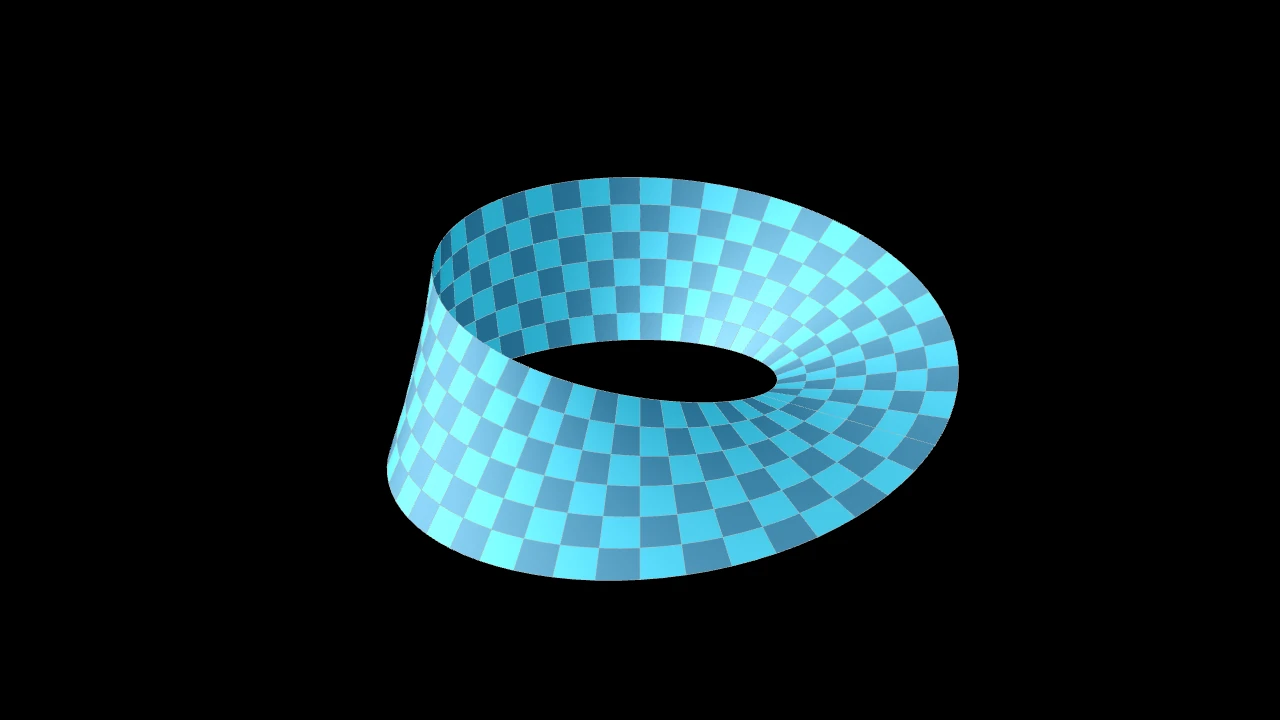
一个参数曲面:u 和 v 在各自范围上的点 func(u, v),
绘制为穿过这些点的光滑曲面;以两种蓝色棋盘格着色,带有细的浅灰色边,
并由三维场景的光照着色,除非另行设置样式。
各范围沿 u 和沿 v 被划分为 resolution 步,函数在网格各单元(即曲面的各面)
的角点处采样。所绘制的是穿过这些采样点的光滑曲面,而非平面:resolution 决定
它跟随函数的紧密程度,光照对其平滑着色,在曲面闭合于自身的接缝处(球体、
环面、圆柱体)也是如此。每个面保留各自的颜色,因此棋盘格保持清晰的格子,
描边绘制各面的边,随曲面弯曲。各面构成一个网格(一个
MeshMobject):它可以变形为其他网格(在变形为另一个
网格的过程中绘制为平面),而 Create 逐面绘制它,
每个面连同其边。
set_fill_by_checkerboard 和
set_fill_by_value 为其着色。
棋盘格调色板提供初始绘制;使用 set_fill_by_checkerboard 可在之后 重新为曲面着色。初始调色板和被忽略的兼容性选项不会保留为实例属性。
func该函数,从 (u, v) 映射到场景坐标中的一个点(在坐标轴上,即坐标的 c2p)。
u_rangeu 的范围,
(u_min, u_max)。v_rangev 的范围,
(v_min, v_max)。resolution曲面沿 u 和沿 v 方向拥有的面数:一个正整数同时用于两者, 或一对正整数
(u, v)。surface_piece_config为兼容 Manim 而接受;被忽略。
checkerboard_colors初始棋盘格颜色,依次轮换;False 表示仅使用填充色。
should_make_jagged为兼容 Manim 而接受;被忽略。
pre_function_handle_to_anchor_scale_factor为兼容 Manim 而接受; 被忽略。
color填充与描边共用的颜色(默认白色);None 表示该类的默认值。
fill_color填充的颜色;未给出时为
color。多个颜色沿sheen_direction构成渐变。fill_opacity填充的不透明度,取值从 0 到 1(默认 0:无填充)。
stroke_color描边的颜色;未给出时为
color。多个颜色构成渐变。stroke_opacity描边的不透明度,取值从 0 到 1(默认 1)。
stroke_width描边的宽度,以场景单位的百分之一计(默认 4;0:无描边)。
background_stroke_color绘制于填充之后的轮廓颜色(默认黑色)。
background_stroke_opacity轮廓的不透明度,取值从 0 到 1(默认 1)。
background_stroke_width轮廓的宽度,以场景单位的百分之一计(默认 0:无)。
sheen_factor颜色朝
sheen_direction变亮的程度,取值从 -1 到 1(默认 0); 负值变暗。sheen_direction颜色变亮的方向(默认
UL)。joint_type描边在路径转折处的连接方式:圆角、斜切或斜接,按二维场景的绘制方式 (参见 LineJointType;默认 AUTO:斜接)。
cap_style描边在其显示的每一端的端点样式(开放路径的端点、虚线的端点):圆头、平头 或方头,按二维场景的绘制方式(参见 CapStyleType;默认 AUTO:平头)。
shade_in_3d三维场景的光是否对该 mobject 着色。
material其表面在三维场景中如何反射场景的光(参见 Material);None:Manim 的着色(默认)。
namemobject 的名称;未给出时为其类名。
z_index其在绘制顺序中的位置:索引较高者绘制于较低者之上 (默认 0)。
targetMoveToTarget将 mobject 移动至的状态。
还接受 样式关键字。
源码
manimgx\mobjects\three_d.py
曲面在 (u, v) 处的点:其函数的值。
u第一个参数。
v第二个参数。
返回 该点,以场景坐标表示,即曲面创建时的位置(在被移动之前)。
将各面按棋盘格着色:各颜色依次轮换,沿 u 和沿 v 方向。
网格中位于 (i, j) 处的面取 colors 中第 i + j 个位置的颜色,
循环使用:两种颜色构成棋盘格,更多颜色则构成对角条纹。
它替换 set_fill_by_value 所赋予的颜色。
*colors各颜色,依次轮换。
opacity各面的不透明度,从 0 到 1;None 表示保持各自原有的值。
源码
manimgx\mobjects\three_d.py
代码
import numpy as np

import manimgx as m


class SurfaceSetFillByValueExample(m.ThreeDScene):
    def construct(self) -> None:
        self.set_camera_orientation(
            phi=65 * m.DEGREES, theta=-130 * m.DEGREES
        )
        axes = m.ThreeDAxes(
            x_range=(0, 5),
            y_range=(0, 5),
            z_range=(-1, 1, 0.5),
            x_length=7,
            y_length=7,
            z_length=3,
        )
        surface = m.Surface(
            lambda u, v: axes.c2p(u, v, np.sin(u) * np.cos(v)),
            u_range=(0, 5),
            v_range=(0, 5),
            resolution=8,
        )
        surface.set_fill_by_value(
            axes, colorscale=[(m.RED, -0.5), (m.YELLOW, 0), (m.GREEN, 0.5)]
        )
        self.add(axes, surface)
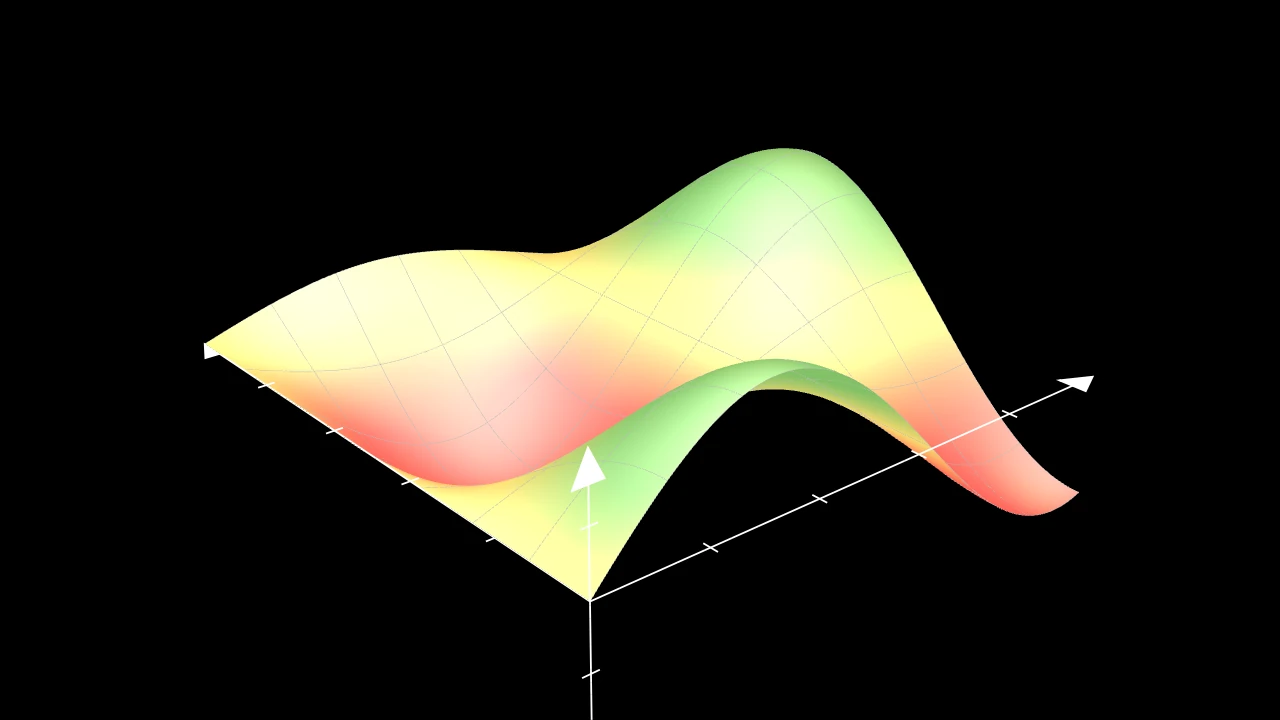
按坐标轴上的某一坐标逐点为曲面着色:默认为其高度 z,映射到颜色标尺。
曲面的每个采样点都有其沿 axis 的坐标,各值在曲面上混合后再由颜色标尺
映射:颜色随曲面平滑变化,一个角跨越颜色标尺某色的面会显示该色。
颜色即为填充色,按填充色的方式被光照处理,具有填充的不透明度:之后设置的
填充色(set_fill、
set_color)会替换它们,
set_fill_by_checkerboard 亦然。
若未提供颜色标尺,则发出警告并保持颜色不变。
axes以其坐标为曲面着色的坐标轴。
colorscale颜色:均匀分布在坐标轴沿
axis的范围上,或(color, value)对,各对跨越各自的值;在之间混合, 在两端之外保持不变。axis坐标:0 为 x,1 为 y,2 为 z。
colors颜色标尺的旧称,为兼容 Manim 而接受: 当
colorscale为 None 时使用。
源码
manimgx\mobjects\three_d.py
347 348 349 350 351 352 353 354 355 356 357 358 359 360 361 362 363 364 365 366 367 368 369 370 371 372 373 374 375 376 377 378 379 380 381 382 383 384 385 386 387 388 389 390 391 392 393 394 395 396 397 398 399 400 401 402 403 404 405 406 407 408 409 410 411 412 413 414 415 416 417 418 419 420 421 422 423 424 425 426 427 428 429 430 431 432 433 434 435 436 437 438 439 | |
代码
import manimgx as m


class SphereExample(m.ThreeDScene):
    def construct(self) -> None:
        self.set_camera_orientation(phi=70 * m.DEGREES, theta=-90 * m.DEGREES)
        self.add(
            m.Sphere(center=(-4, 0, 0), radius=1.5),
            m.Sphere(radius=1.5, resolution=(12, 6)).set_color(m.GREEN),
            m.Sphere(
                center=(4, 0, 0),
                radius=1.5,
                v_range=(0, m.PI / 2),
                checkerboard_colors=[m.RED, m.YELLOW],
            ),
        )
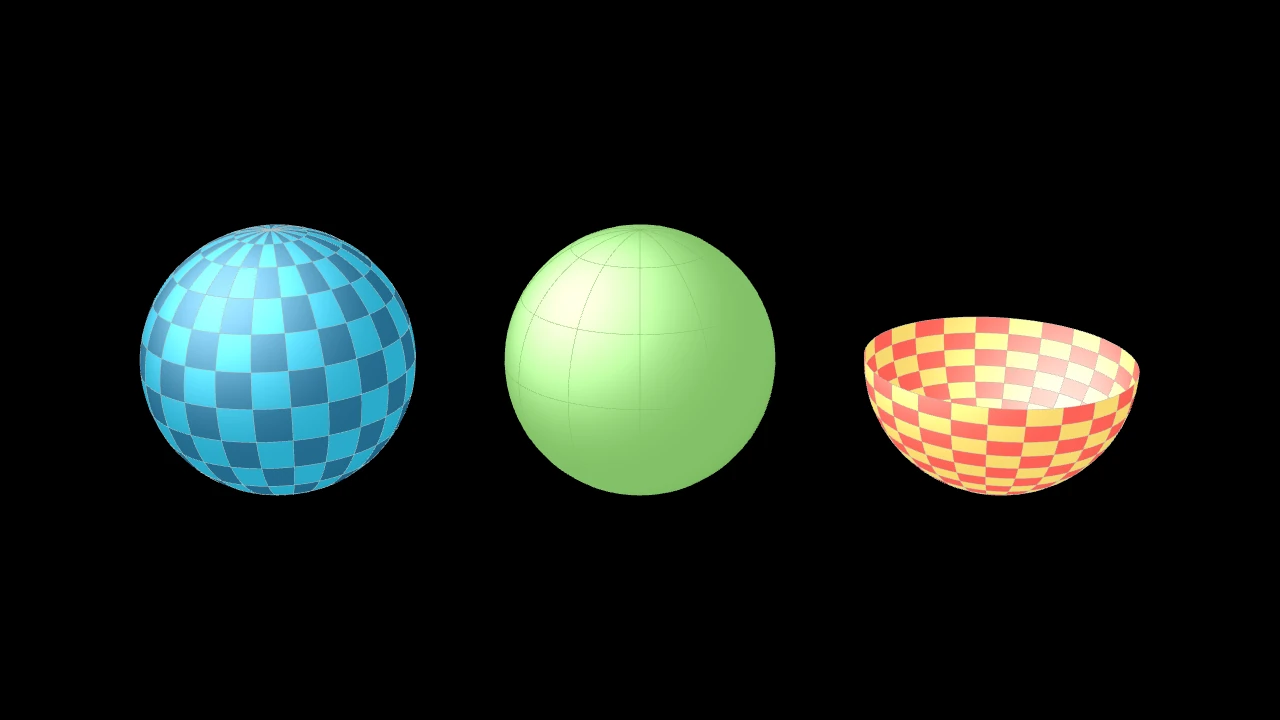
一个球体:以两种蓝色棋盘格着色,并由三维场景的光照着色, 除非另行设置样式。
它是一个 Surface,以 u 为经度、v 为自南极(底部,沿 z 方向) 量的角度:它们的范围可以截取球体的一部分。
center其中心所在的位置。
radius其半径,以场景单位计。
resolution其环绕方向和从极到极方向拥有的面数:一个数同时用于两者, 或
(u, v);None 为 (24, 12)。u_range经度的范围,以弧度计:(0, τ) 走完一整圈。
v_range自南极量的角度范围,以弧度计:(0, π) 从一极到另一极。
surface_piece_config为兼容 Manim 而接受;被忽略。
checkerboard_colors各面按棋盘格着色所用的颜色,沿 u 和 v 依次轮换(默认为
BLUE_D和BLUE_E,锥体为 False;False:仅使用填充色)。should_make_jagged为兼容 Manim 而接受;被忽略。
pre_function_handle_to_anchor_scale_factor为兼容 Manim 而接受;被忽略。
color填充与描边共用的颜色(默认白色);None 表示该类的默认值。
fill_color填充的颜色;未给出时为
color。多个颜色沿sheen_direction构成渐变。fill_opacity填充的不透明度,取值从 0 到 1(默认 0:无填充)。
stroke_color描边的颜色;未给出时为
color。多个颜色构成渐变。stroke_opacity描边的不透明度,取值从 0 到 1(默认 1)。
stroke_width描边的宽度,以场景单位的百分之一计(默认 4;0:无描边)。
background_stroke_color绘制于填充之后的轮廓颜色(默认黑色)。
background_stroke_opacity轮廓的不透明度,取值从 0 到 1(默认 1)。
background_stroke_width轮廓的宽度,以场景单位的百分之一计(默认 0:无)。
sheen_factor颜色朝
sheen_direction变亮的程度,取值从 -1 到 1(默认 0); 负值变暗。sheen_direction颜色变亮的方向(默认
UL)。joint_type描边在路径转折处的连接方式:圆角、斜切或斜接,按二维场景的绘制方式 (参见 LineJointType;默认 AUTO:斜接)。
cap_style描边在其显示的每一端的端点样式(开放路径的端点、虚线的端点):圆头、平头 或方头,按二维场景的绘制方式(参见 CapStyleType;默认 AUTO:平头)。
shade_in_3d三维场景的光是否对该 mobject 着色。
material其表面在三维场景中如何反射场景的光(参见 Material);None:Manim 的着色(默认)。
namemobject 的名称;未给出时为其类名。
z_index其在绘制顺序中的位置:索引较高者绘制于较低者之上 (默认 0)。
targetMoveToTarget将 mobject 移动至的状态。
源码
manimgx\mobjects\three_d.py
球体在某经度和自南极量的角度处的点,即其围绕原点创建时的位置。
u经度,以弧度计,从 x 轴起逆时针方向。
v自南极量的角度,以弧度计:0 在底部,π 在顶部。
返回 该点,相对于球体的中心。
代码
import manimgx as m


class TorusExample(m.ThreeDScene):
    def construct(self) -> None:
        self.set_camera_orientation(phi=65 * m.DEGREES, theta=-60 * m.DEGREES)
        self.add(
            m.Torus(major_radius=2, minor_radius=0.7).shift(3 * m.LEFT),
            m.Torus(
                major_radius=2,
                minor_radius=0.7,
                u_range=(0, 1.5 * m.PI),
                checkerboard_colors=[m.ORANGE, m.YELLOW],
            ).shift(3 * m.RIGHT),
        )
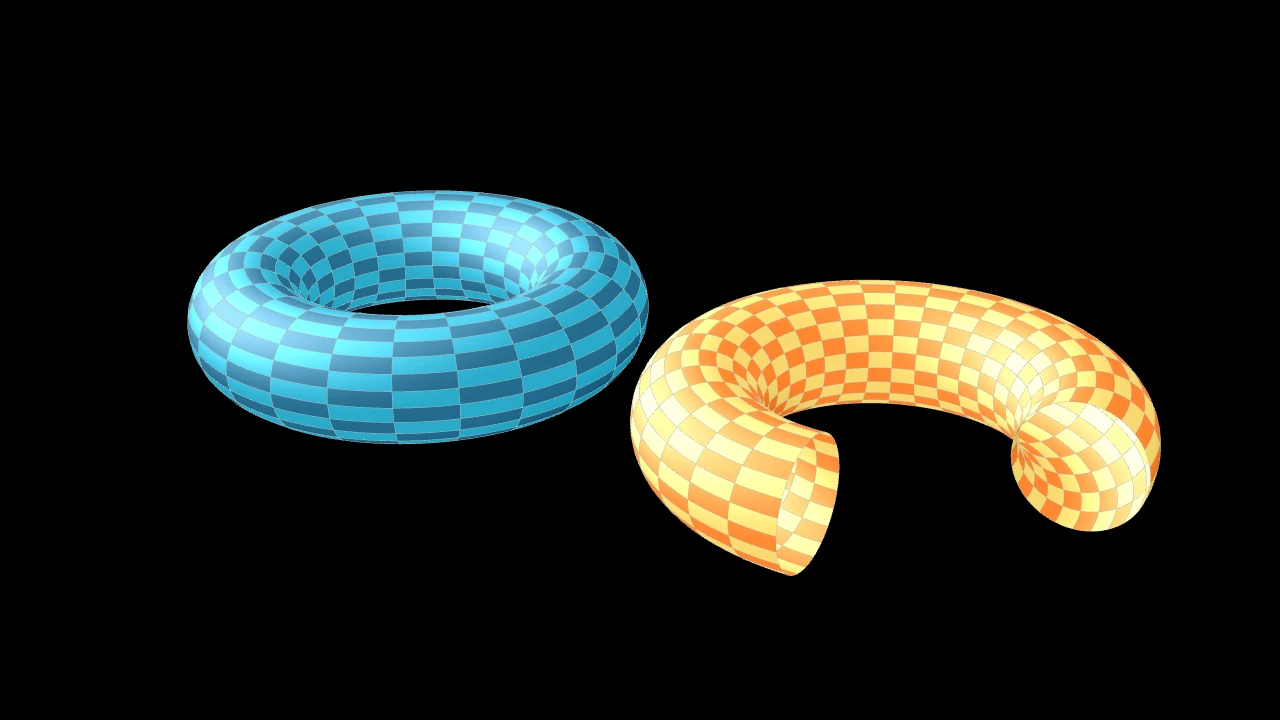
一个环面:xy 平面中绕一个圆周的管子,中心位于原点;以两种蓝色棋盘格着色, 并由三维场景的光照着色,除非另行设置样式。
它是一个 Surface,以 u 为绕其轴(z 轴)的角度、v 为绕其管子的 角度:它们的范围可以截取环面的一部分。
major_radius管子所环绕的圆的半径:从环面中心到管子中线的距离, 以场景单位计。
minor_radius管子的半径,以场景单位计。
u_range绕其轴的角度范围,以弧度计:(0, τ) 走完一整圈。
v_range绕其管子的角度范围,以弧度计。
resolution其绕轴方向和绕管方向拥有的面数:一个数同时用于两者, 或
(u, v);None 为 (24, 24)。surface_piece_config为兼容 Manim 而接受;被忽略。
checkerboard_colors各面按棋盘格着色所用的颜色,沿 u 和 v 依次轮换(默认为
BLUE_D和BLUE_E,锥体为 False;False:仅使用填充色)。should_make_jagged为兼容 Manim 而接受;被忽略。
pre_function_handle_to_anchor_scale_factor为兼容 Manim 而接受;被忽略。
color填充与描边共用的颜色(默认白色);None 表示该类的默认值。
fill_color填充的颜色;未给出时为
color。多个颜色沿sheen_direction构成渐变。fill_opacity填充的不透明度,取值从 0 到 1(默认 0:无填充)。
stroke_color描边的颜色;未给出时为
color。多个颜色构成渐变。stroke_opacity描边的不透明度,取值从 0 到 1(默认 1)。
stroke_width描边的宽度,以场景单位的百分之一计(默认 4;0:无描边)。
background_stroke_color绘制于填充之后的轮廓颜色(默认黑色)。
background_stroke_opacity轮廓的不透明度,取值从 0 到 1(默认 1)。
background_stroke_width轮廓的宽度,以场景单位的百分之一计(默认 0:无)。
sheen_factor颜色朝
sheen_direction变亮的程度,取值从 -1 到 1(默认 0); 负值变暗。sheen_direction颜色变亮的方向(默认
UL)。joint_type描边在路径转折处的连接方式:圆角、斜切或斜接,按二维场景的绘制方式 (参见 LineJointType;默认 AUTO:斜接)。
cap_style描边在其显示的每一端的端点样式(开放路径的端点、虚线的端点):圆头、平头 或方头,按二维场景的绘制方式(参见 CapStyleType;默认 AUTO:平头)。
shade_in_3d三维场景的光是否对该 mobject 着色。
material其表面在三维场景中如何反射场景的光(参见 Material);None:Manim 的着色(默认)。
namemobject 的名称;未给出时为其类名。
z_index其在绘制顺序中的位置:索引较高者绘制于较低者之上 (默认 0)。
targetMoveToTarget将 mobject 移动至的状态。
源码
manimgx\mobjects\three_d.py
环面的点,即其围绕原点创建时,在绕轴的某角度和绕管子的某角度处的点。
u绕轴的角度,以弧度计,从 x 轴起逆时针方向。
v绕管子的角度,以弧度计:0 在其内侧。
返回 该点,以场景坐标表示。
源码
manimgx\mobjects\three_d.py
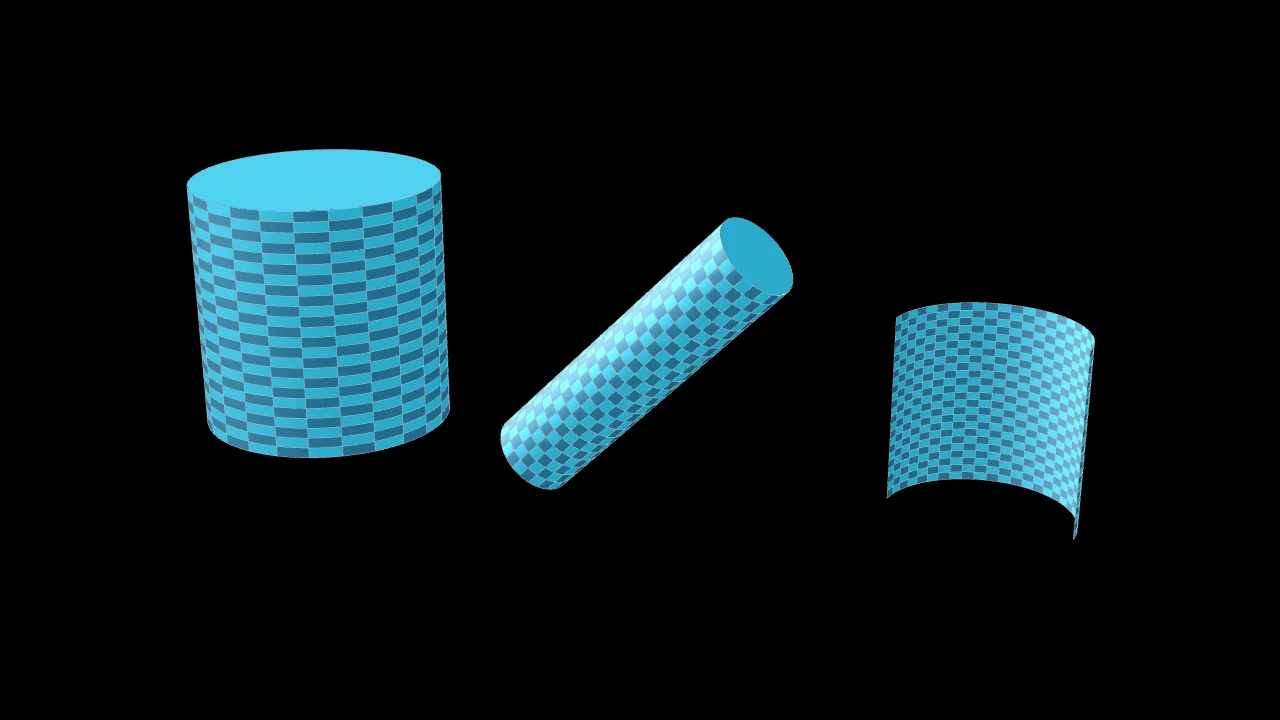
代码
import manimgx as m


class CylinderExample(m.ThreeDScene):
    def construct(self) -> None:
        self.set_camera_orientation(phi=70 * m.DEGREES, theta=-60 * m.DEGREES)
        self.add(
            m.Cylinder(radius=1.5, height=3).shift(4.5 * m.LEFT),
            m.Cylinder(radius=0.5, height=4, direction=m.X_AXIS + m.Z_AXIS),
            m.Cylinder(show_ends=False, v_range=(0, m.PI)).shift(4 * m.RIGHT),
        )
一个圆柱体,中心位于原点,其轴沿 direction 方向:以两种蓝色棋盘格着色,
两端由圆盘封闭,并由三维场景的光照着色,除非另行设置样式。
它是一个 Surface,以 u 为沿其轴的高度、v 为绕其轴的角度:
v_range 可以截取一个切片。
radius其半径,以场景单位计。
height其高度,沿其轴方向,以场景单位计。
direction其轴的方向。
v_range绕其轴的角度范围,以弧度计:(0, τ) 走完一整圈。
show_ends是否用圆盘封闭其两端。
resolution其沿轴方向和环绕方向拥有的面数:一个数同时用于两者, 或
(u, v)。surface_piece_config为兼容 Manim 而接受;被忽略。
checkerboard_colors各面按棋盘格着色所用的颜色,沿 u 和 v 依次轮换(默认为
BLUE_D和BLUE_E,锥体为 False;False:仅使用填充色)。should_make_jagged为兼容 Manim 而接受;被忽略。
pre_function_handle_to_anchor_scale_factor为兼容 Manim 而接受;被忽略。
color填充与描边共用的颜色(默认白色);None 表示该类的默认值。
fill_color填充的颜色;未给出时为
color。多个颜色沿sheen_direction构成渐变。fill_opacity填充的不透明度,取值从 0 到 1(默认 0:无填充)。
stroke_color描边的颜色;未给出时为
color。多个颜色构成渐变。stroke_opacity描边的不透明度,取值从 0 到 1(默认 1)。
stroke_width描边的宽度,以场景单位的百分之一计(默认 4;0:无描边)。
background_stroke_color绘制于填充之后的轮廓颜色(默认黑色)。
background_stroke_opacity轮廓的不透明度,取值从 0 到 1(默认 1)。
background_stroke_width轮廓的宽度,以场景单位的百分之一计(默认 0:无)。
sheen_factor颜色朝
sheen_direction变亮的程度,取值从 -1 到 1(默认 0); 负值变暗。sheen_direction颜色变亮的方向(默认
UL)。joint_type描边在路径转折处的连接方式:圆角、斜切或斜接,按二维场景的绘制方式 (参见 LineJointType;默认 AUTO:斜接)。
cap_style描边在其显示的每一端的端点样式(开放路径的端点、虚线的端点):圆头、平头 或方头,按二维场景的绘制方式(参见 CapStyleType;默认 AUTO:平头)。
shade_in_3d三维场景的光是否对该 mobject 着色。
material其表面在三维场景中如何反射场景的光(参见 Material);None:Manim 的着色(默认)。
namemobject 的名称;未给出时为其类名。
z_index其在绘制顺序中的位置:索引较高者绘制于较低者之上 (默认 0)。
targetMoveToTarget将 mobject 移动至的状态。
源码
manimgx\mobjects\three_d.py
将曲面的轴转向某一方向,同时撤销其之前的方向。
两次旋转均绕原点进行,保留对曲面的其他更改。
direction轴的方向,从锥体的底面指向其顶点。
源码
manimgx\mobjects\three_d.py
圆柱体的点,即其沿 z 方向创建且中心位于原点时,在沿轴的某高度和绕轴的 某角度处的点。
u沿轴方向的高度,以场景单位计,自中点起算。
v绕轴的角度,以弧度计。
返回 该点,以场景坐标表示。
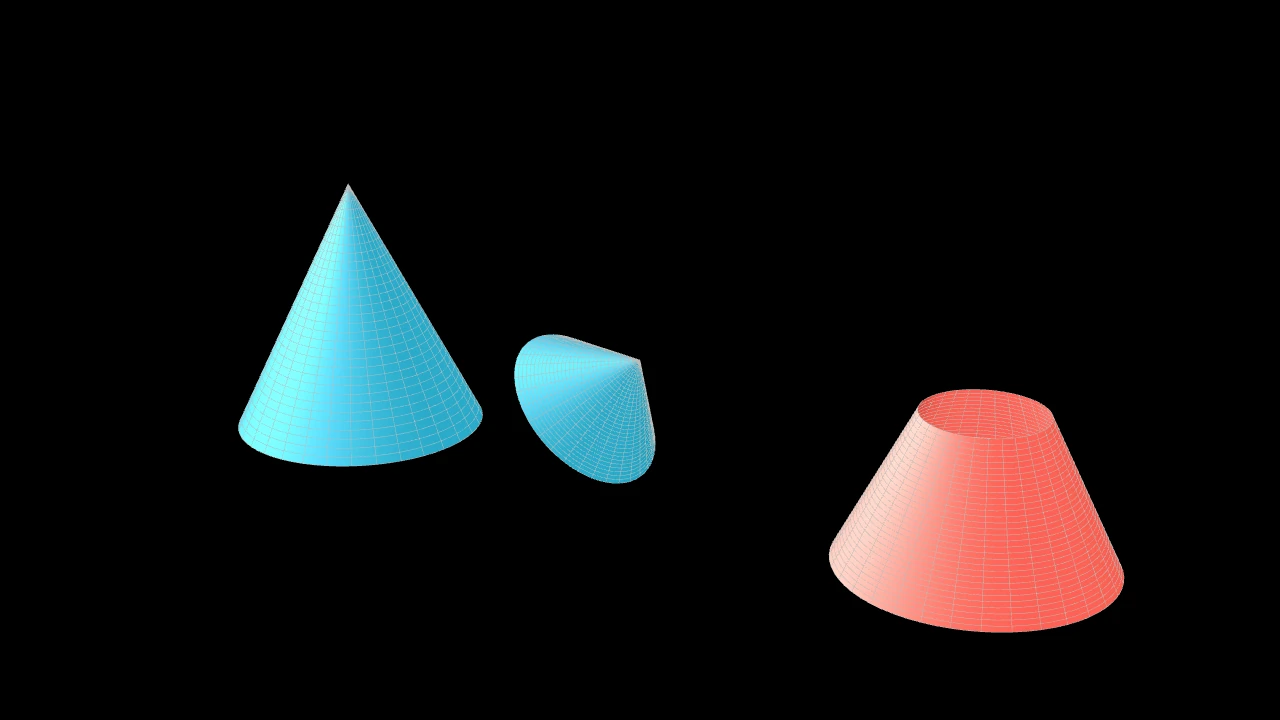
代码
import manimgx as m


class ConeExample(m.ThreeDScene):
    def construct(self) -> None:
        self.set_camera_orientation(phi=70 * m.DEGREES, theta=-60 * m.DEGREES)
        frustum = m.Cone(base_radius=1.5, height=3, u_min=1.5, fill_color=m.RED)
        self.add(
            m.Cone(base_radius=1.5, height=3).shift(4 * m.LEFT + 1.5 * m.OUT),
            m.Cone(direction=m.X_AXIS + m.Z_AXIS, show_base=True),
            frustum.shift(4 * m.RIGHT + 1.5 * m.OUT),
        )
一个锥体,其顶点位于原点,沿 direction 方向从其底面指出;蓝色,
由三维场景的光照着色,底面开口,除非另行设置样式。
它是一个 Surface,以 u 为沿其侧面自顶点的距离、
v 为绕其轴的角度:v_range 可以截取一个切片,u_min 截去其尖端。
它为单色,非棋盘格,除非给定 checkerboard_colors。
base_radius其底面的半径,以场景单位计。
height其高度,从底面到顶点,以场景单位计。
direction其指向的方向,从底面到顶点。
show_base是否用一个圆盘封闭其底面。
v_range绕其轴的角度范围,以弧度计:(0, τ) 走完一整圈。
u_min其侧面起始处,作为沿侧面自顶点的距离,以场景单位计: 大于 0 时截去尖端。
resolution曲面沿 u 和沿 v 方向拥有的面数:一个正整数同时用于两者, 或一对正整数
(u, v)(默认 32)。surface_piece_config为兼容 Manim 而接受;被忽略。
checkerboard_colors各面按棋盘格着色所用的颜色,沿 u 和 v 依次轮换(默认为
BLUE_D和BLUE_E,锥体为 False;False:仅使用填充色)。should_make_jagged为兼容 Manim 而接受;被忽略。
pre_function_handle_to_anchor_scale_factor为兼容 Manim 而接受;被忽略。
color填充与描边共用的颜色(默认白色);None 表示该类的默认值。
fill_color填充的颜色;未给出时为
color。多个颜色沿sheen_direction构成渐变。fill_opacity填充的不透明度,取值从 0 到 1(默认 0:无填充)。
stroke_color描边的颜色;未给出时为
color。多个颜色构成渐变。stroke_opacity描边的不透明度,取值从 0 到 1(默认 1)。
stroke_width描边的宽度,以场景单位的百分之一计(默认 4;0:无描边)。
background_stroke_color绘制于填充之后的轮廓颜色(默认黑色)。
background_stroke_opacity轮廓的不透明度,取值从 0 到 1(默认 1)。
background_stroke_width轮廓的宽度,以场景单位的百分之一计(默认 0:无)。
sheen_factor颜色朝
sheen_direction变亮的程度,取值从 -1 到 1(默认 0); 负值变暗。sheen_direction颜色变亮的方向(默认
UL)。joint_type描边在路径转折处的连接方式:圆角、斜切或斜接,按二维场景的绘制方式 (参见 LineJointType;默认 AUTO:斜接)。
cap_style描边在其显示的每一端的端点样式(开放路径的端点、虚线的端点):圆头、平头 或方头,按二维场景的绘制方式(参见 CapStyleType;默认 AUTO:平头)。
shade_in_3d三维场景的光是否对该 mobject 着色。
material其表面在三维场景中如何反射场景的光(参见 Material);None:Manim 的着色(默认)。
namemobject 的名称;未给出时为其类名。
z_index其在绘制顺序中的位置:索引较高者绘制于较低者之上 (默认 0)。
targetMoveToTarget将 mobject 移动至的状态。
源码
manimgx\mobjects\three_d.py
其底面的圆盘,以其填充色着色:在 show_base 时作为锥体的一部分。
将曲面的轴转向某一方向,同时撤销其之前的方向。
两次旋转均绕原点进行,保留对曲面的其他更改。
direction轴的方向,从锥体的底面指向其顶点。
源码
manimgx\mobjects\three_d.py
锥体的点,即其向上(沿 z 方向)创建且顶点位于原点时,在沿侧面自顶点的 某距离和绕轴的某角度处的点。
u自顶点沿侧面的距离,以场景单位计。
v绕轴的角度,以弧度计。
返回 该点,以场景坐标表示。
源码
manimgx\mobjects\three_d.py
立体
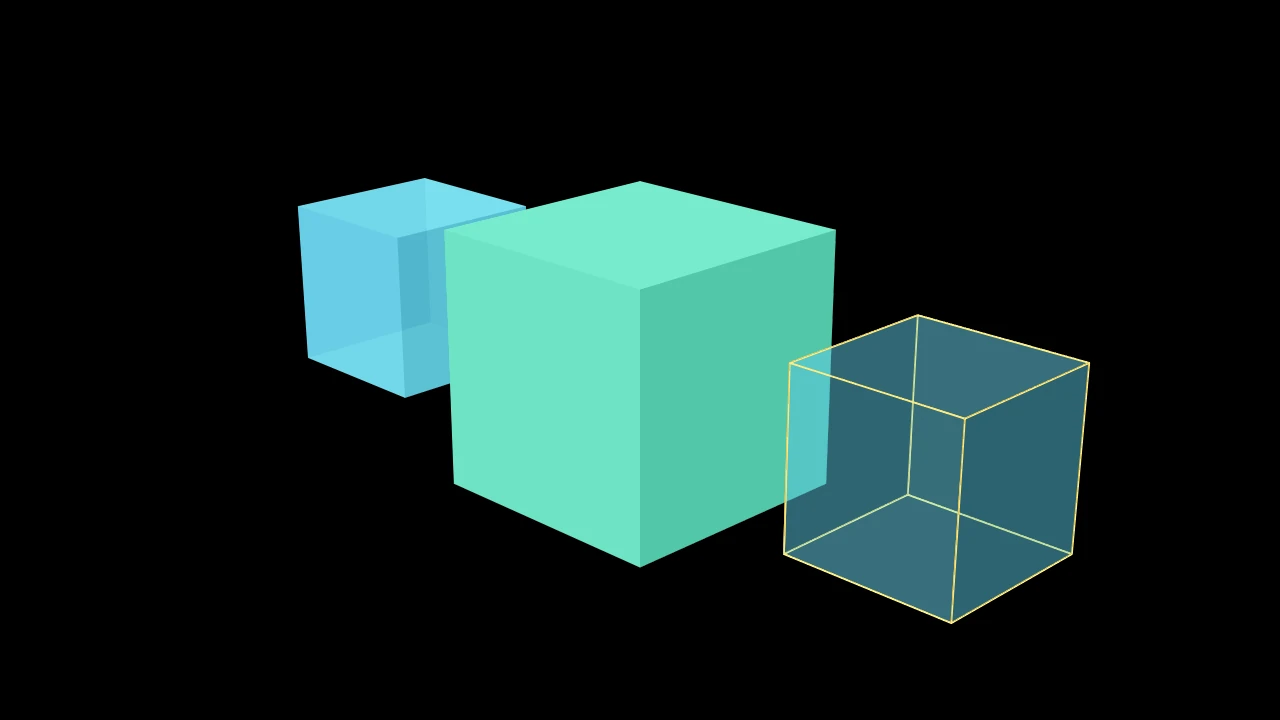
代码
import manimgx as m


class CubeExample(m.ThreeDScene):
    def construct(self) -> None:
        self.set_camera_orientation(phi=70 * m.DEGREES, theta=-45 * m.DEGREES)
        cubes = m.Group(
            m.Cube(),
            m.Cube(side_length=3, fill_color=m.TEAL, fill_opacity=1),
            m.Cube(fill_opacity=0.3, stroke_width=2, stroke_color=m.YELLOW),
        ).arrange(buff=1.5)
        self.add(cubes)
一个立方体:六个正方形面,中心位于原点,各边沿坐标轴方向; 蓝色,四分之三不透明,无边线,并由三维场景的光照着色, 除非另行设置样式。
side_length其边的长度,以场景单位计。
color填充与描边共用的颜色(默认白色);None 表示该类的默认值。
fill_color填充的颜色;未给出时为
color。多个颜色沿sheen_direction构成渐变。fill_opacity填充的不透明度,取值从 0 到 1(默认 0:无填充)。
stroke_color描边的颜色;未给出时为
color。多个颜色构成渐变。stroke_opacity描边的不透明度,取值从 0 到 1(默认 1)。
stroke_width描边的宽度,以场景单位的百分之一计(默认 4;0:无描边)。
background_stroke_color绘制于填充之后的轮廓颜色(默认黑色)。
background_stroke_opacity轮廓的不透明度,取值从 0 到 1(默认 1)。
background_stroke_width轮廓的宽度,以场景单位的百分之一计(默认 0:无)。
sheen_factor颜色朝
sheen_direction变亮的程度,取值从 -1 到 1(默认 0); 负值变暗。sheen_direction颜色变亮的方向(默认
UL)。joint_type描边在路径转折处的连接方式:圆角、斜切或斜接,按二维场景的绘制方式 (参见 LineJointType;默认 AUTO:斜接)。
cap_style描边在其显示的每一端的端点样式(开放路径的端点、虚线的端点):圆头、平头 或方头,按二维场景的绘制方式(参见 CapStyleType;默认 AUTO:平头)。
shade_in_3d三维场景的光是否对该 mobject 着色。
material其表面在三维场景中如何反射场景的光(参见 Material);None:Manim 的着色(默认)。
namemobject 的名称;未给出时为其类名。
z_index其在绘制顺序中的位置:索引较高者绘制于较低者之上 (默认 0)。
targetMoveToTarget将 mobject 移动至的状态。
还接受 样式关键字。
源码
manimgx\mobjects\three_d.py
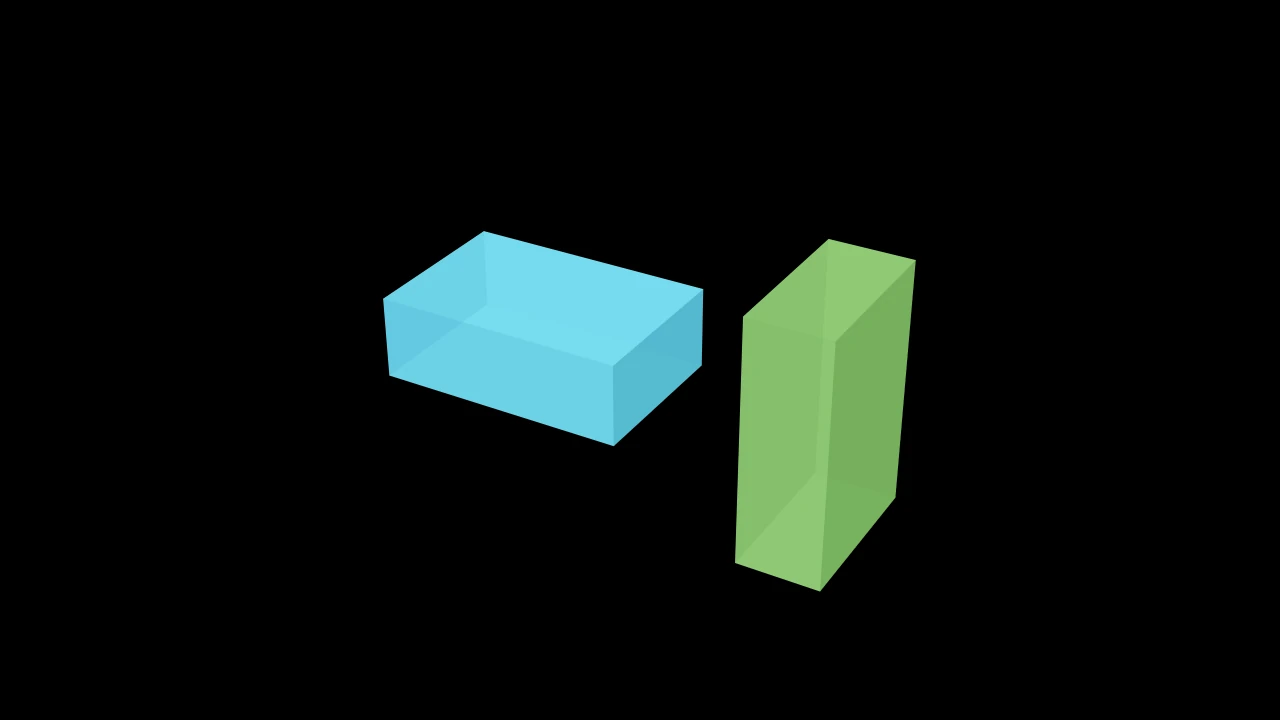
一个长方体:一个被拉伸至其宽度、高度和深度的 Cube; 蓝色,四分之三不透明,无边线,并由三维场景的光照着色, 除非另行设置样式。
dimensions其沿 x、y 和 z 方向的尺寸,以场景单位计;None 为 (3, 2, 1)。
color填充与描边共用的颜色(默认白色);None 表示该类的默认值。
fill_color填充的颜色;未给出时为
color。多个颜色沿sheen_direction构成渐变。fill_opacity填充的不透明度,取值从 0 到 1(默认 0:无填充)。
stroke_color描边的颜色;未给出时为
color。多个颜色构成渐变。stroke_opacity描边的不透明度,取值从 0 到 1(默认 1)。
stroke_width描边的宽度,以场景单位的百分之一计(默认 4;0:无描边)。
background_stroke_color绘制于填充之后的轮廓颜色(默认黑色)。
background_stroke_opacity轮廓的不透明度,取值从 0 到 1(默认 1)。
background_stroke_width轮廓的宽度,以场景单位的百分之一计(默认 0:无)。
sheen_factor颜色朝
sheen_direction变亮的程度,取值从 -1 到 1(默认 0); 负值变暗。sheen_direction颜色变亮的方向(默认
UL)。joint_type描边在路径转折处的连接方式:圆角、斜切或斜接,按二维场景的绘制方式 (参见 LineJointType;默认 AUTO:斜接)。
cap_style描边在其显示的每一端的端点样式(开放路径的端点、虚线的端点):圆头、平头 或方头,按二维场景的绘制方式(参见 CapStyleType;默认 AUTO:平头)。
shade_in_3d三维场景的光是否对该 mobject 着色。
material其表面在三维场景中如何反射场景的光(参见 Material);None:Manim 的着色(默认)。
namemobject 的名称;未给出时为其类名。
z_index其在绘制顺序中的位置:索引较高者绘制于较低者之上 (默认 0)。
targetMoveToTarget将 mobject 移动至的状态。
还接受 样式关键字。
源码
manimgx\mobjects\three_d.py
代码
import manimgx as m


class PolyhedronExample(m.ThreeDScene):
    def construct(self) -> None:
        self.set_camera_orientation(phi=70 * m.DEGREES, theta=30 * m.DEGREES)
        corners = [[1, 1, 0], [1, -1, 0], [-1, -1, 0], [-1, 1, 0], [0, 0, 2]]
        faces = [[0, 1, 4], [1, 2, 4], [2, 3, 4], [3, 0, 4], [0, 1, 2, 3]]
        pyramid = m.Polyhedron(corners, faces).scale(1.5).shift(m.IN)
        self.add(pyramid)
        self.play(pyramid.graph[4].animate.move_to([1, 1, 2]), run_time=2)
一个多面体:其各面为穿过顶点的多边形,以及其顶点和边的图; 蓝色半不透明的面,顶点处有白色点,由三维场景的光照着色, 除非另行设置样式。
各面为其 faces,一组 Polygon,
其轮廓绘制各边;其 graph 是一个
Graph,顶点为 Dot3D,graph[i] 为索引 i 的
顶点,其自身的边在未配置时不可见。各面跟随顶点:移动一个顶点,一个更新器
使穿过它的各面随之更新。初始坐标和图选项是构造输入;之后的位置属于图,
faces_list 定义各面。
vertex_coords各顶点的点,以场景坐标表示。
faces_list各面,每个为其顶点索引的列表,按环绕该面的顺序排列。
faces_config用于各面的 样式关键字,覆盖 其默认值(半不透明,三维着色);None 为无。
graph_config
源码
manimgx\mobjects\three_d.py
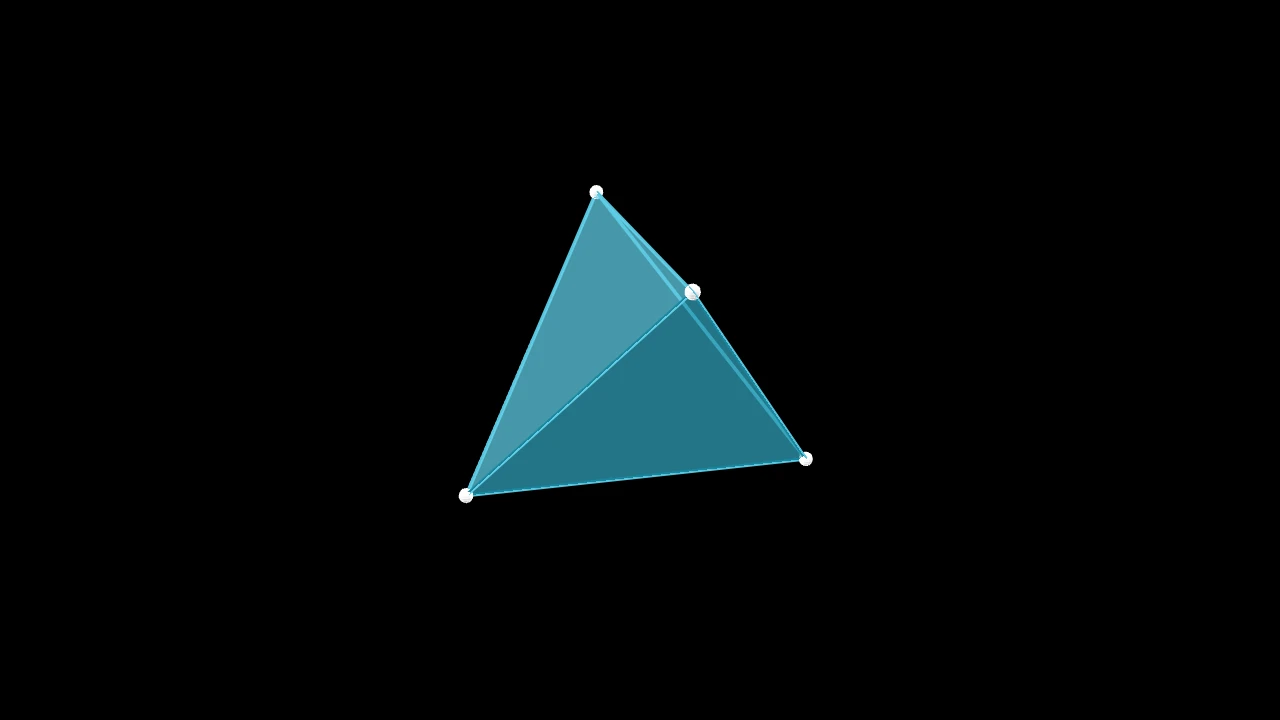
一个正四面体:四个三角形面,中心位于原点;一个 Polyhedron,蓝色半不透明的面,顶点处有白色点, 除非另行设置样式。
edge_length其边的长度,以场景单位计。
faces_config用于各面的 样式关键字,覆盖其默认值: 半不透明,由三维场景的光照着色(默认 None:无)。
graph_config
源码
manimgx\mobjects\three_d.py
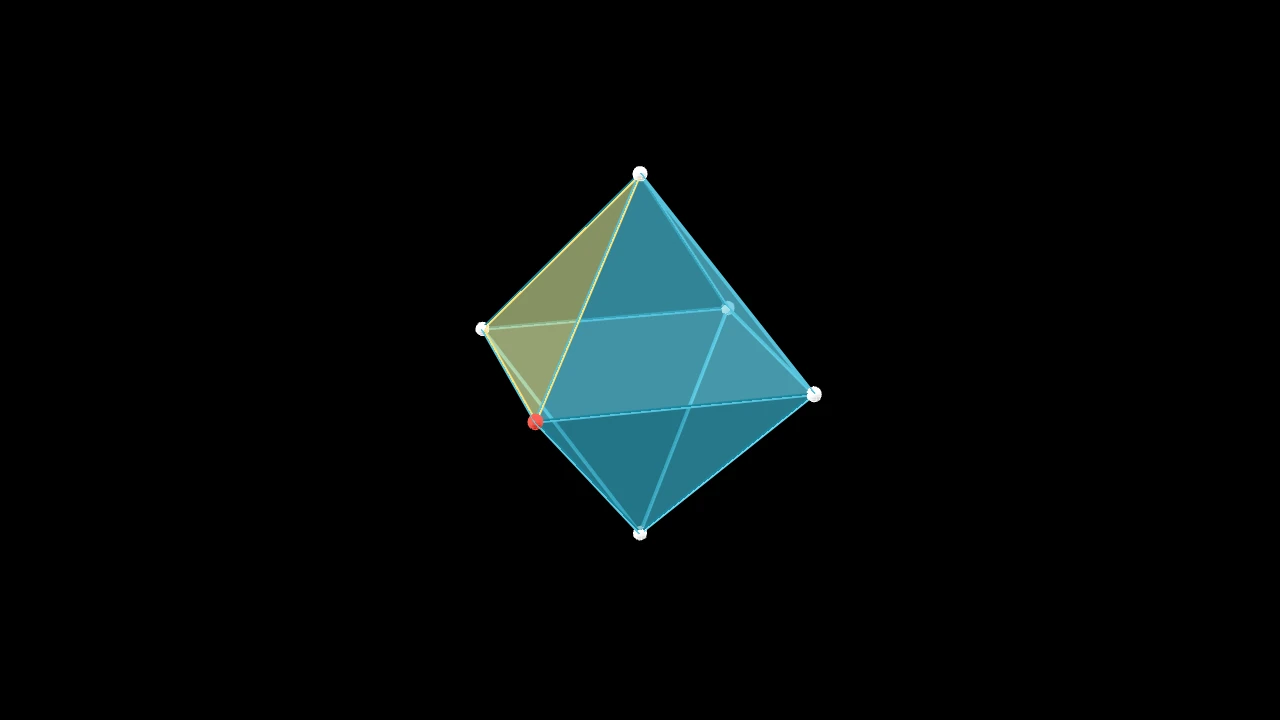
一个正八面体:八个三角形面,其顶点位于坐标轴上,中心位于原点;一个 Polyhedron,蓝色半不透明的面,顶点处有白色点, 除非另行设置样式。
edge_length其边的长度,以场景单位计。
faces_config用于各面的 样式关键字,覆盖其默认值: 半不透明,由三维场景的光照着色(默认 None:无)。
graph_config
源码
manimgx\mobjects\three_d.py
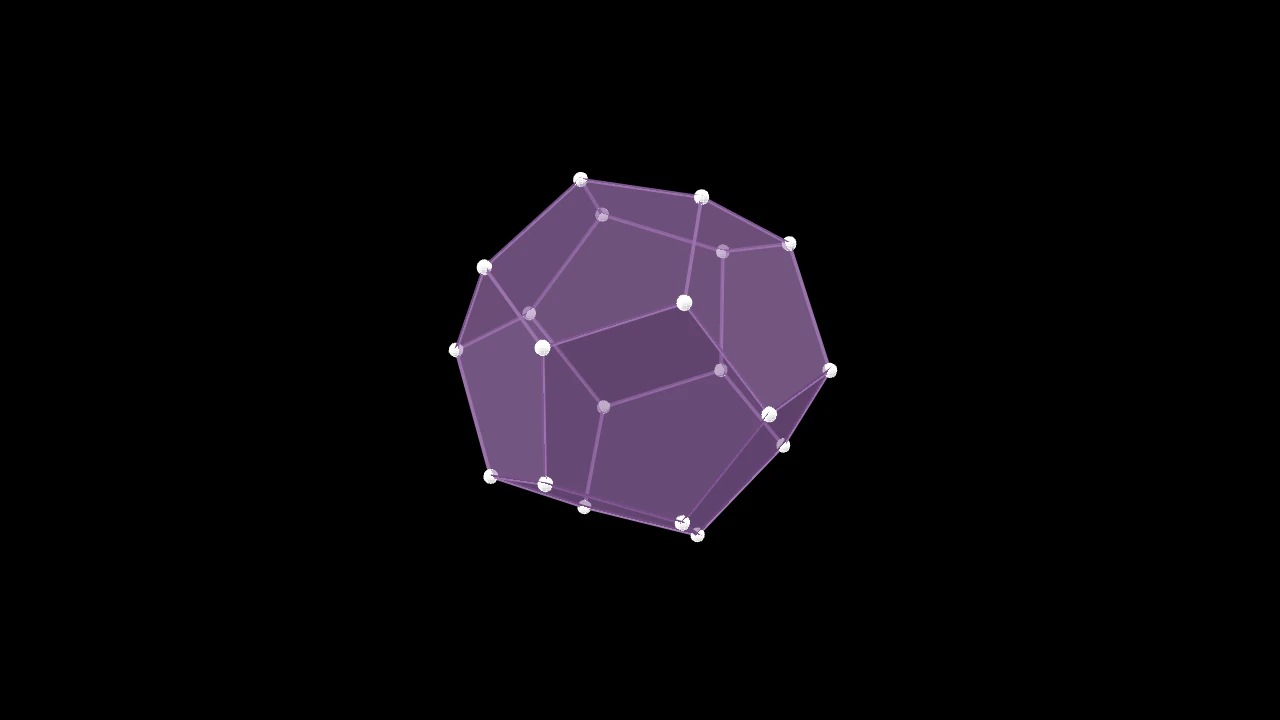
一个正十二面体:十二个五边形面,中心位于原点;一个 Polyhedron,蓝色半不透明的面,顶点处有白色点, 除非另行设置样式。
edge_length其边的长度,以场景单位计。
faces_config用于各面的 样式关键字,覆盖其默认值: 半不透明,由三维场景的光照着色(默认 None:无)。
graph_config
源码
manimgx\mobjects\three_d.py
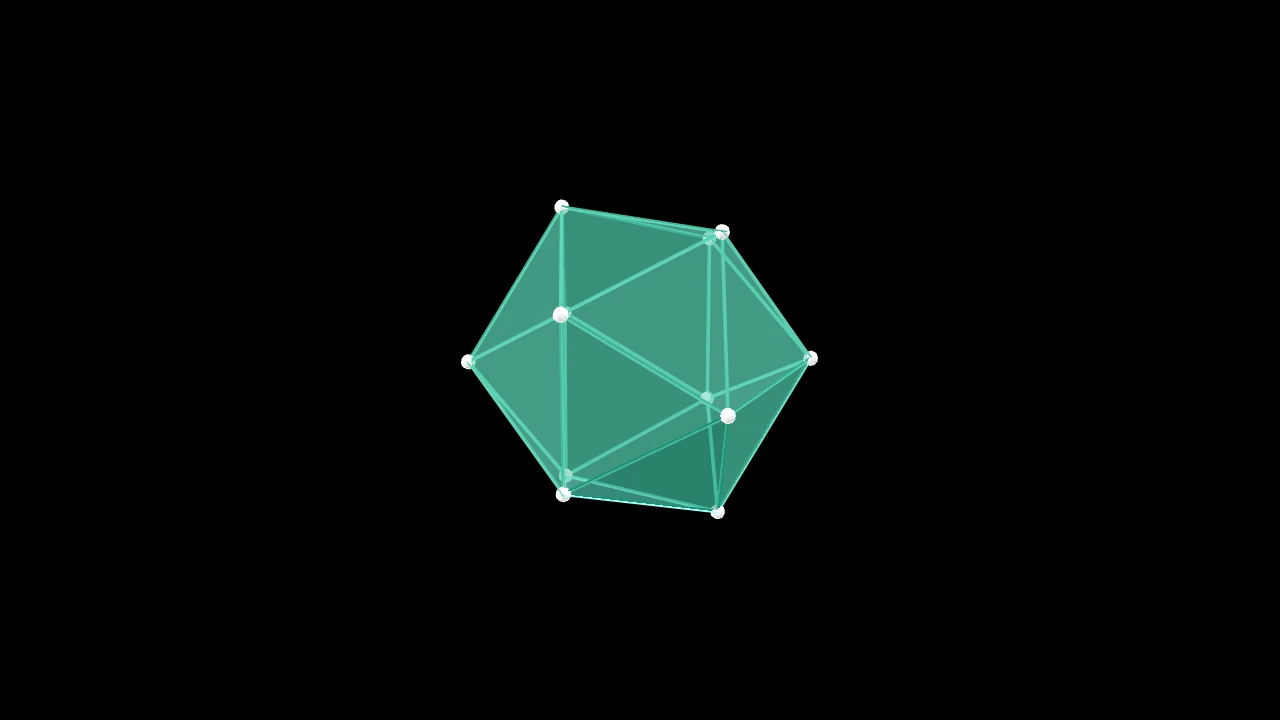
一个正二十面体:二十个三角形面,中心位于原点;一个 Polyhedron,蓝色半不透明的面,顶点处有白色点, 除非另行设置样式。
edge_length其边的长度,以场景单位计。
faces_config用于各面的 样式关键字,覆盖其默认值: 半不透明,由三维场景的光照着色(默认 None:无)。
graph_config
源码
manimgx\mobjects\three_d.py
代码
import numpy as np

import manimgx as m


class ConvexHull3DExample(m.ThreeDScene):
    def construct(self) -> None:
        self.set_camera_orientation(phi=70 * m.DEGREES, theta=30 * m.DEGREES)
        points = np.random.default_rng(1).uniform(-2, 2, size=(30, 3))
        hull = m.ConvexHull3D(*points, faces_config={"color": m.GREEN})
        self.add(hull, *(m.Dot3D(p, color=m.YELLOW) for p in points))
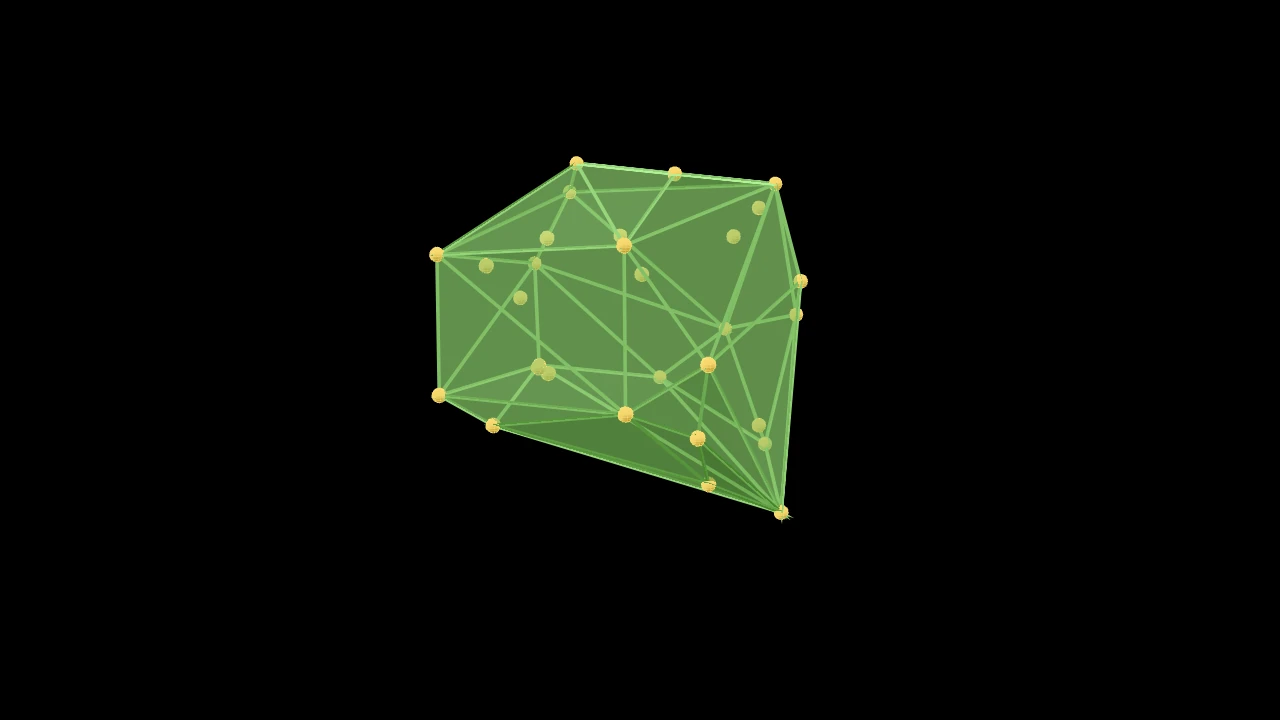
三维空间中若干点的凸包:包围它们的最小凸多面体,其各面为三角形;一个 Polyhedron,蓝色半不透明的面,顶点处有白色点, 除非另行设置样式。
其顶点为位于包上的点(内部的点被排除),其各面按从外侧看逆时针方向缠绕。 少于四个点会引发 ValueError。
*points各点,以场景坐标表示。
tolerance一个点超出某面多远才算作在该面之外,以场景单位计。
faces_config用于各面的 样式关键字,覆盖其默认值: 半不透明,由三维场景的光照着色(默认 None:无)。
graph_config
源码
manimgx\mobjects\three_d.py
空间中的线与点
代码
import manimgx as m


class Line3DExample(m.ThreeDScene):
    def construct(self) -> None:
        self.set_camera_orientation(phi=65 * m.DEGREES, theta=-45 * m.DEGREES)
        axes = m.ThreeDAxes(x_range=(-3, 3), y_range=(-3, 3), z_range=(-2, 2))
        line = m.Line3D(axes.c2p(-2, 0, 0), axes.c2p(1, 2, 1.5), thickness=0.05)
        self.add(axes, line.set_color(m.YELLOW))
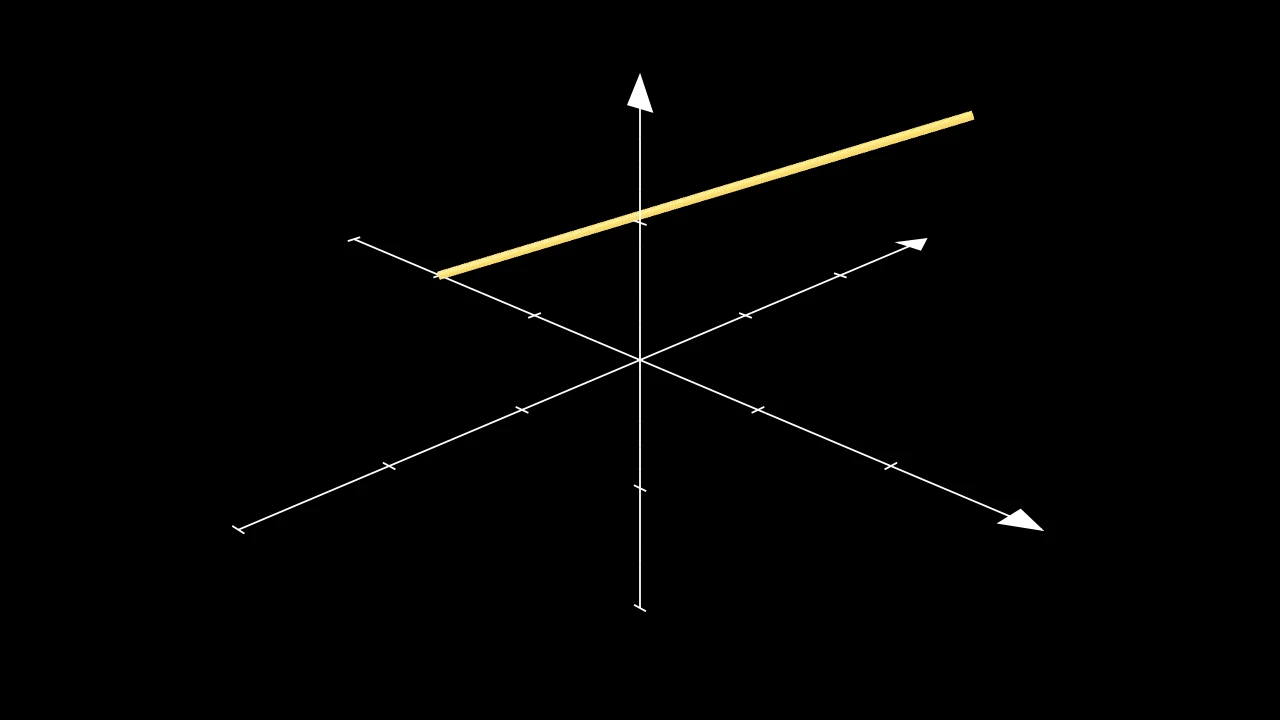
三维空间中的一条直线:从一个点到另一个点的细圆柱体;以两种蓝色棋盘格着色, 并由三维场景的光照着色,除非另行设置样式。
一端可以是 mobject:直线则从(或到)该 mobject 上朝向另一端最远的点起(止) (参见 get_boundary_point)。
start直线的起点:一个点,或一个 mobject。
end直线的终点:一个点,或一个 mobject。
thickness其半径,以场景单位计。
resolution其环绕方向拥有的面数(沿其方向为 2),或
(along, around)。surface_piece_config为兼容 Manim 而接受;被忽略。
checkerboard_colors各面按棋盘格着色所用的颜色,沿 u 和 v 依次轮换(默认为
BLUE_D和BLUE_E,锥体为 False;False:仅使用填充色)。should_make_jagged为兼容 Manim 而接受;被忽略。
pre_function_handle_to_anchor_scale_factor为兼容 Manim 而接受;被忽略。
color填充与描边共用的颜色(默认白色);None 表示该类的默认值。
fill_color填充的颜色;未给出时为
color。多个颜色沿sheen_direction构成渐变。fill_opacity填充的不透明度,取值从 0 到 1(默认 0:无填充)。
stroke_color描边的颜色;未给出时为
color。多个颜色构成渐变。stroke_opacity描边的不透明度,取值从 0 到 1(默认 1)。
stroke_width描边的宽度,以场景单位的百分之一计(默认 4;0:无描边)。
background_stroke_color绘制于填充之后的轮廓颜色(默认黑色)。
background_stroke_opacity轮廓的不透明度,取值从 0 到 1(默认 1)。
background_stroke_width轮廓的宽度,以场景单位的百分之一计(默认 0:无)。
sheen_factor颜色朝
sheen_direction变亮的程度,取值从 -1 到 1(默认 0); 负值变暗。sheen_direction颜色变亮的方向(默认
UL)。joint_type描边在路径转折处的连接方式:圆角、斜切或斜接,按二维场景的绘制方式 (参见 LineJointType;默认 AUTO:斜接)。
cap_style描边在其显示的每一端的端点样式(开放路径的端点、虚线的端点):圆头、平头 或方头,按二维场景的绘制方式(参见 CapStyleType;默认 AUTO:平头)。
shade_in_3d三维场景的光是否对该 mobject 着色。
material其表面在三维场景中如何反射场景的光(参见 Material);None:Manim 的着色(默认)。
namemobject 的名称;未给出时为其类名。
z_index其在绘制顺序中的位置:索引较高者绘制于较低者之上 (默认 0)。
targetMoveToTarget将 mobject 移动至的状态。
源码
manimgx\mobjects\three_d.py
代码
import manimgx as m


class Line3DParallelToExample(m.ThreeDScene):
    def construct(self) -> None:
        self.set_camera_orientation(
            phi=60 * m.DEGREES, theta=-45 * m.DEGREES
        )
        line = m.Line3D(2 * m.RIGHT, m.UP + m.OUT, color=m.RED)
        parallel = m.Line3D.parallel_to(line, color=m.YELLOW)
        self.add(m.ThreeDAxes(), line, parallel)
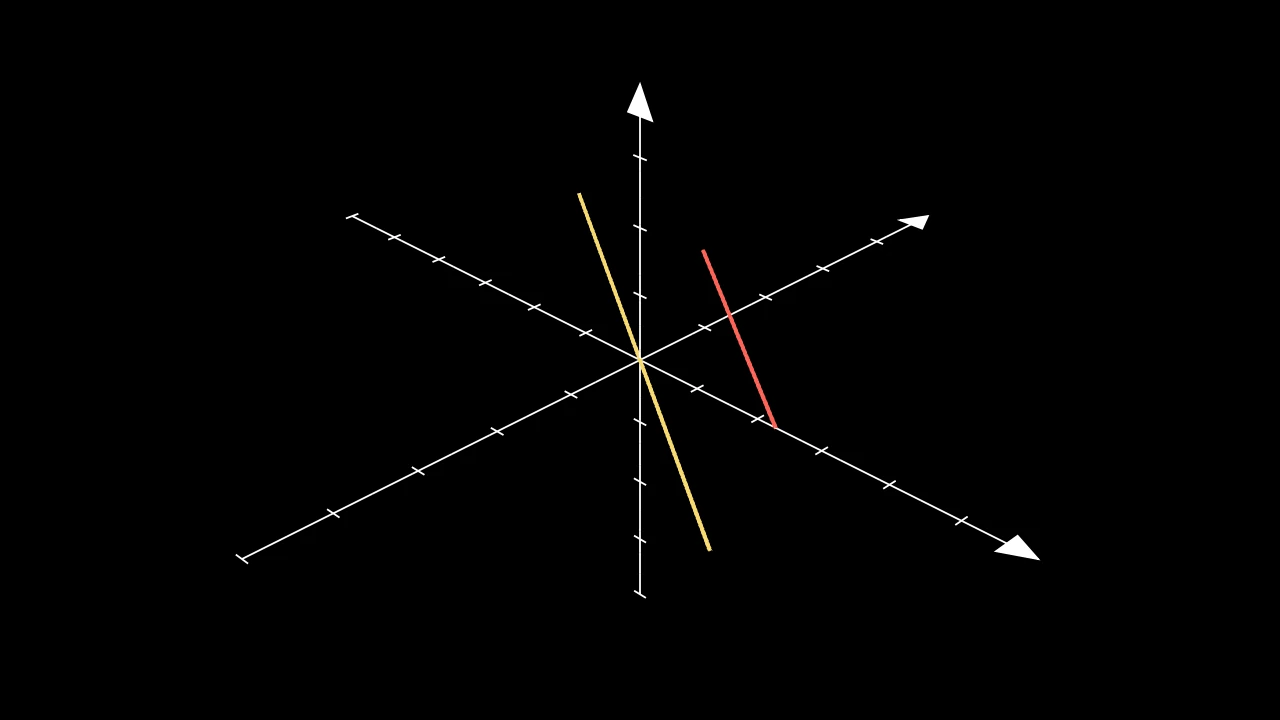
过某点作一条与另一直线平行的直线:长 length,以该点为中心。
Line3D.parallel_to(line, point=ORIGIN, length=5, **kwargs)
line所要平行的直线。
point新直线以之为中心的点。
length新直线的长度,以场景单位计。
thickness直线的半径,以场景单位计(默认 0.02)。
resolution直线环绕方向拥有的面数(沿其方向为 2),或
(along, around)(默认 24)。surface_piece_config为兼容 Manim 而接受;被忽略。
checkerboard_colors各面按棋盘格着色所用的颜色,沿 u 和 v 依次轮换(默认为
BLUE_D和BLUE_E,锥体为 False;False:仅使用填充色)。should_make_jagged为兼容 Manim 而接受;被忽略。
pre_function_handle_to_anchor_scale_factor为兼容 Manim 而接受;被忽略。
color填充与描边共用的颜色(默认白色);None 表示该类的默认值。
fill_color填充的颜色;未给出时为
color。多个颜色沿sheen_direction构成渐变。fill_opacity填充的不透明度,取值从 0 到 1(默认 0:无填充)。
stroke_color描边的颜色;未给出时为
color。多个颜色构成渐变。stroke_opacity描边的不透明度,取值从 0 到 1(默认 1)。
stroke_width描边的宽度,以场景单位的百分之一计(默认 4;0:无描边)。
background_stroke_color绘制于填充之后的轮廓颜色(默认黑色)。
background_stroke_opacity轮廓的不透明度,取值从 0 到 1(默认 1)。
background_stroke_width轮廓的宽度,以场景单位的百分之一计(默认 0:无)。
sheen_factor颜色朝
sheen_direction变亮的程度,取值从 -1 到 1(默认 0); 负值变暗。sheen_direction颜色变亮的方向(默认
UL)。joint_type描边在路径转折处的连接方式:圆角、斜切或斜接,按二维场景的绘制方式 (参见 LineJointType;默认 AUTO:斜接)。
cap_style描边在其显示的每一端的端点样式(开放路径的端点、虚线的端点):圆头、平头 或方头,按二维场景的绘制方式(参见 CapStyleType;默认 AUTO:平头)。
shade_in_3d三维场景的光是否对该 mobject 着色。
material其表面在三维场景中如何反射场景的光(参见 Material);None:Manim 的着色(默认)。
namemobject 的名称;未给出时为其类名。
z_index其在绘制顺序中的位置:索引较高者绘制于较低者之上 (默认 0)。
targetMoveToTarget将 mobject 移动至的状态。
返回 一条新直线。
源码
manimgx\mobjects\three_d.py
代码
import manimgx as m


class Line3DPerpendicularToExample(m.ThreeDScene):
    def construct(self) -> None:
        self.set_camera_orientation(
            phi=60 * m.DEGREES, theta=-45 * m.DEGREES
        )
        line = m.Line3D(2 * m.RIGHT, m.UP + m.OUT, color=m.RED)
        perpendicular = m.Line3D.perpendicular_to(line, color=m.BLUE)
        self.add(m.ThreeDAxes(), line, perpendicular)
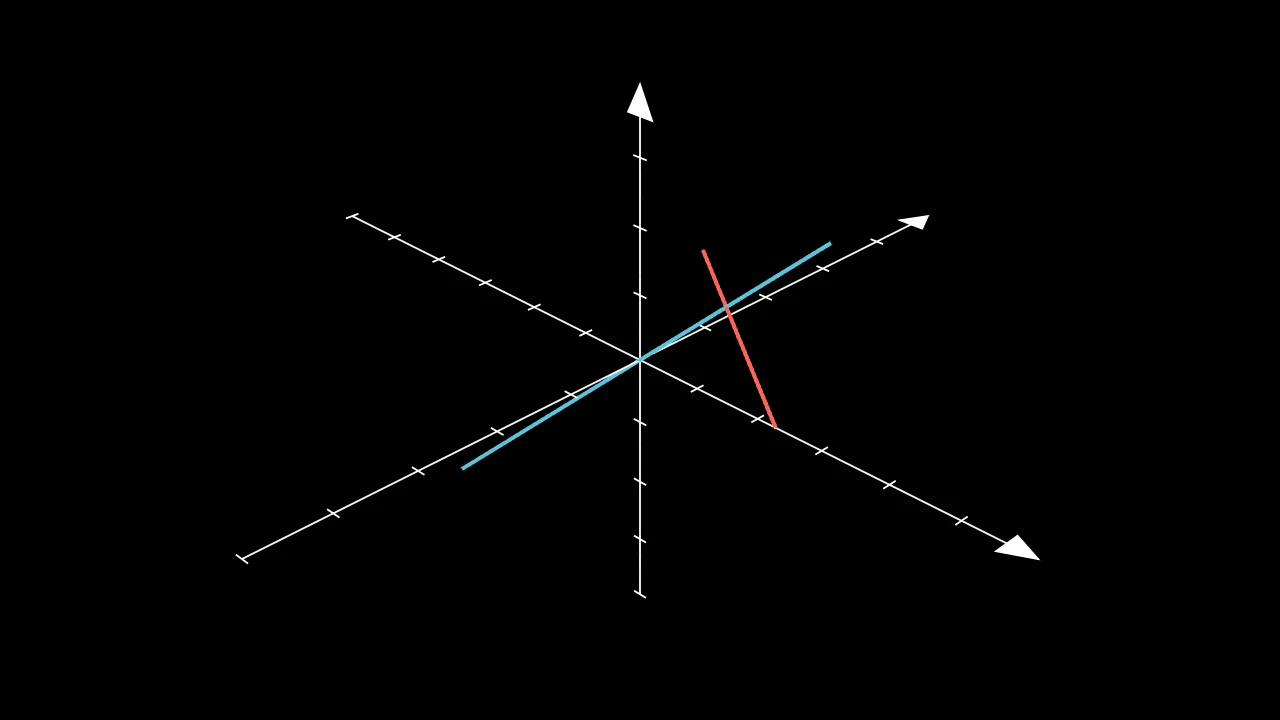
过某点作一条与另一直线垂直的直线:在直线与该点所确定的平面内,
长 length,以该点为中心。
直线上的一点(与直线不构成平面)会引发 ValueError。
Line3D.perpendicular_to(line, point=ORIGIN, length=5, **kwargs)
line所要垂直的直线。
point新直线以之为中心的点,不在直线上。
length新直线的长度,以场景单位计。
thickness直线的半径,以场景单位计(默认 0.02)。
resolution直线环绕方向拥有的面数(沿其方向为 2),或
(along, around)(默认 24)。surface_piece_config为兼容 Manim 而接受;被忽略。
checkerboard_colors各面按棋盘格着色所用的颜色,沿 u 和 v 依次轮换(默认为
BLUE_D和BLUE_E,锥体为 False;False:仅使用填充色)。should_make_jagged为兼容 Manim 而接受;被忽略。
pre_function_handle_to_anchor_scale_factor为兼容 Manim 而接受;被忽略。
color填充与描边共用的颜色(默认白色);None 表示该类的默认值。
fill_color填充的颜色;未给出时为
color。多个颜色沿sheen_direction构成渐变。fill_opacity填充的不透明度,取值从 0 到 1(默认 0:无填充)。
stroke_color描边的颜色;未给出时为
color。多个颜色构成渐变。stroke_opacity描边的不透明度,取值从 0 到 1(默认 1)。
stroke_width描边的宽度,以场景单位的百分之一计(默认 4;0:无描边)。
background_stroke_color绘制于填充之后的轮廓颜色(默认黑色)。
background_stroke_opacity轮廓的不透明度,取值从 0 到 1(默认 1)。
background_stroke_width轮廓的宽度,以场景单位的百分之一计(默认 0:无)。
sheen_factor颜色朝
sheen_direction变亮的程度,取值从 -1 到 1(默认 0); 负值变暗。sheen_direction颜色变亮的方向(默认
UL)。joint_type描边在路径转折处的连接方式:圆角、斜切或斜接,按二维场景的绘制方式 (参见 LineJointType;默认 AUTO:斜接)。
cap_style描边在其显示的每一端的端点样式(开放路径的端点、虚线的端点):圆头、平头 或方头,按二维场景的绘制方式(参见 CapStyleType;默认 AUTO:平头)。
shade_in_3d三维场景的光是否对该 mobject 着色。
material其表面在三维场景中如何反射场景的光(参见 Material);None:Manim 的着色(默认)。
namemobject 的名称;未给出时为其类名。
z_index其在绘制顺序中的位置:索引较高者绘制于较低者之上 (默认 0)。
targetMoveToTarget将 mobject 移动至的状态。
返回 一条新直线。
源码
manimgx\mobjects\three_d.py
代码
import manimgx as m


class Arrow3DExample(m.ThreeDScene):
    def construct(self) -> None:
        self.set_camera_orientation(phi=65 * m.DEGREES, theta=-45 * m.DEGREES)
        axes = m.ThreeDAxes(x_range=(-3, 3), y_range=(-3, 3), z_range=(-2, 2))
        arrows = [
            m.Arrow3D(axes.c2p(0, 0, 0), axes.c2p(*end), color=color)
            for end, color in (
                ((2, 0, 0), m.RED),
                ((0, 2, 0), m.GREEN),
                ((0, 0, 2), m.BLUE),
                ((1.5, 1.5, 1.5), m.YELLOW),
            )
        ]
        self.add(axes, *arrows)
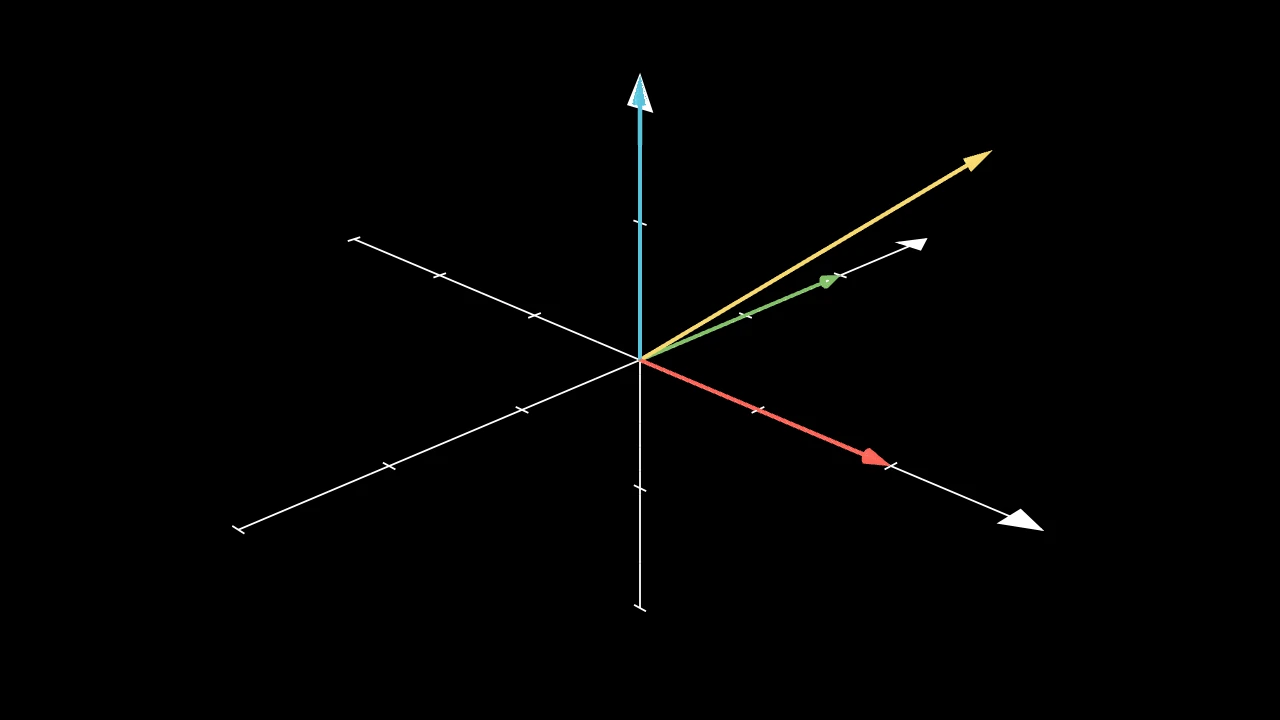
三维空间中的一个箭头:从 start 起的细圆柱体,末端为一个顶点在 end 处的
锥体;未指定颜色时为白色,由三维场景的光照着色。
start箭头的起点。
end其箭尖顶点所在的位置。
thickness其杆的半径,以场景单位计。
height其箭尖的长度,即一个 Cone,以场景单位计。
base_radius其箭尖底面的半径,以场景单位计。
resolution其杆环绕方向拥有的面数(沿其方向为 2),或
(along, around)。surface_piece_config为兼容 Manim 而接受;被忽略。
checkerboard_colors各面按棋盘格着色所用的颜色,沿 u 和 v 依次轮换(默认为
BLUE_D和BLUE_E,锥体为 False;False:仅使用填充色)。should_make_jagged为兼容 Manim 而接受;被忽略。
pre_function_handle_to_anchor_scale_factor为兼容 Manim 而接受;被忽略。
color填充与描边共用的颜色(默认白色);None 表示该类的默认值。
fill_color填充的颜色;未给出时为
color。多个颜色沿sheen_direction构成渐变。fill_opacity填充的不透明度,取值从 0 到 1(默认 0:无填充)。
stroke_color描边的颜色;未给出时为
color。多个颜色构成渐变。stroke_opacity描边的不透明度,取值从 0 到 1(默认 1)。
stroke_width描边的宽度,以场景单位的百分之一计(默认 4;0:无描边)。
background_stroke_color绘制于填充之后的轮廓颜色(默认黑色)。
background_stroke_opacity轮廓的不透明度,取值从 0 到 1(默认 1)。
background_stroke_width轮廓的宽度,以场景单位的百分之一计(默认 0:无)。
sheen_factor颜色朝
sheen_direction变亮的程度,取值从 -1 到 1(默认 0); 负值变暗。sheen_direction颜色变亮的方向(默认
UL)。joint_type描边在路径转折处的连接方式:圆角、斜切或斜接,按二维场景的绘制方式 (参见 LineJointType;默认 AUTO:斜接)。
cap_style描边在其显示的每一端的端点样式(开放路径的端点、虚线的端点):圆头、平头 或方头,按二维场景的绘制方式(参见 CapStyleType;默认 AUTO:平头)。
shade_in_3d三维场景的光是否对该 mobject 着色。
material其表面在三维场景中如何反射场景的光(参见 Material);None:Manim 的着色(默认)。
namemobject 的名称;未给出时为其类名。
z_index其在绘制顺序中的位置:索引较高者绘制于较低者之上 (默认 0)。
targetMoveToTarget将 mobject 移动至的状态。
源码
manimgx\mobjects\three_d.py
代码
import manimgx as m


class Dot3DExample(m.ThreeDScene):
    def construct(self) -> None:
        self.set_camera_orientation(phi=70 * m.DEGREES, theta=-45 * m.DEGREES)
        axes = m.ThreeDAxes(x_range=(-3, 3), y_range=(-3, 3), z_range=(-2, 2))
        self.add(
            axes,
            m.Dot3D(axes.c2p(0, 0, 1.5), radius=0.2, color=m.RED),
            m.Dot3D(axes.c2p(2, 0, 0), radius=0.2, color=m.BLUE),
            m.Dot3D(axes.c2p(0, 2, 0), radius=0.2, color=m.YELLOW),
        )
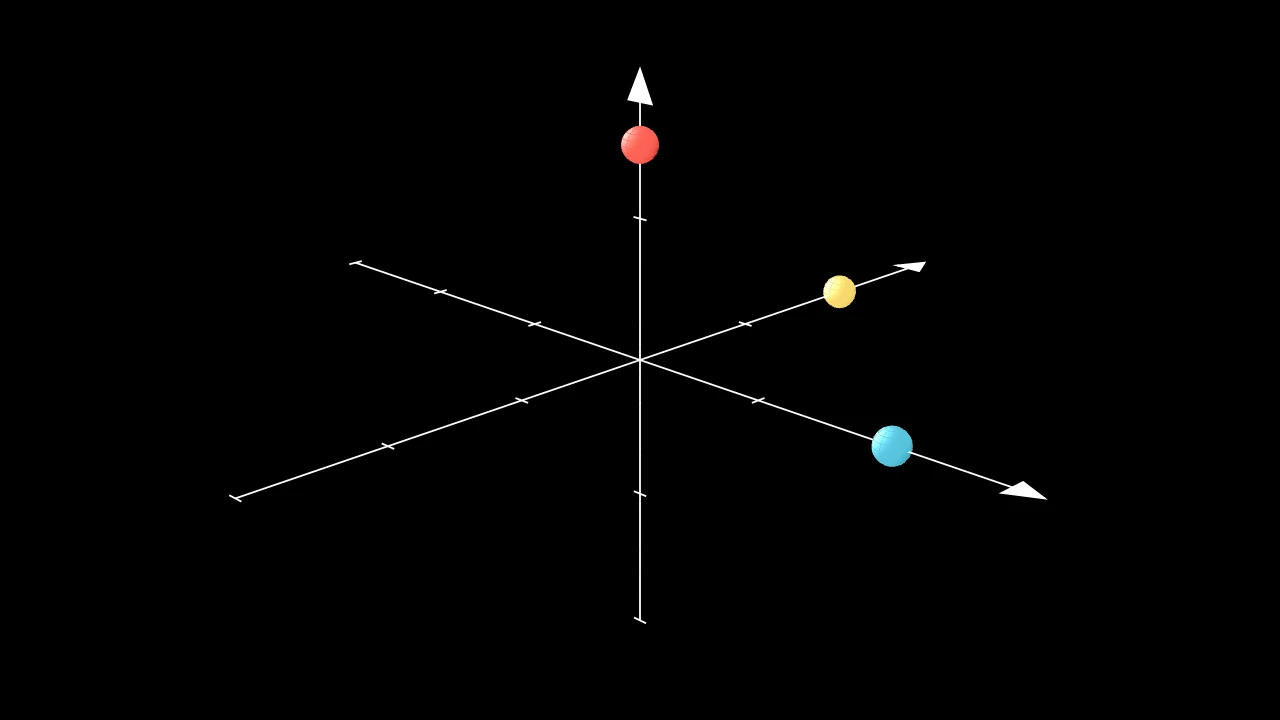
三维空间中的一个点:一个小球体,未指定颜色时为白色。
m.Dot3D(point=ORIGIN, radius=DEFAULT_DOT_RADIUS, resolution=(8, 8), **kwargs)
point其中心所在的位置。
radius其半径,以场景单位计。
resolution其环绕方向和从极到极方向拥有的面数:一个数同时用于两者, 或
(u, v);None 为 (24, 12)。surface_piece_config为兼容 Manim 而接受;被忽略。
checkerboard_colors各面按棋盘格着色所用的颜色,沿 u 和 v 依次轮换(默认为
BLUE_D和BLUE_E,锥体为 False;False:仅使用填充色)。should_make_jagged为兼容 Manim 而接受;被忽略。
pre_function_handle_to_anchor_scale_factor为兼容 Manim 而接受;被忽略。
color填充与描边共用的颜色(默认白色);None 表示该类的默认值。
fill_color填充的颜色;未给出时为
color。多个颜色沿sheen_direction构成渐变。fill_opacity填充的不透明度,取值从 0 到 1(默认 0:无填充)。
stroke_color描边的颜色;未给出时为
color。多个颜色构成渐变。stroke_opacity描边的不透明度,取值从 0 到 1(默认 1)。
stroke_width描边的宽度,以场景单位的百分之一计(默认 4;0:无描边)。
background_stroke_color绘制于填充之后的轮廓颜色(默认黑色)。
background_stroke_opacity轮廓的不透明度,取值从 0 到 1(默认 1)。
background_stroke_width轮廓的宽度,以场景单位的百分之一计(默认 0:无)。
sheen_factor颜色朝
sheen_direction变亮的程度,取值从 -1 到 1(默认 0); 负值变暗。sheen_direction颜色变亮的方向(默认
UL)。joint_type描边在路径转折处的连接方式:圆角、斜切或斜接,按二维场景的绘制方式 (参见 LineJointType;默认 AUTO:斜接)。
cap_style描边在其显示的每一端的端点样式(开放路径的端点、虚线的端点):圆头、平头 或方头,按二维场景的绘制方式(参见 CapStyleType;默认 AUTO:平头)。
shade_in_3d三维场景的光是否对该 mobject 着色。
material其表面在三维场景中如何反射场景的光(参见 Material);None:Manim 的着色(默认)。
namemobject 的名称;未给出时为其类名。
z_index其在绘制顺序中的位置:索引较高者绘制于较低者之上 (默认 0)。
targetMoveToTarget将 mobject 移动至的状态。
源码
manimgx\mobjects\three_d.py
网格
代码
import numpy as np

import manimgx as m


class MeshMobjectExample(m.Scene):
    def construct(self) -> None:
        vertices = np.array([[-3, -2.5, 0], [3, -2.5, 0], [0, 3, 0]])
        colors = np.array([[1, 0, 0, 1], [0, 1, 0, 1], [0, 0, 1, 1]])
        triangle = m.MeshMobject(
            vertices, np.array([[0, 1, 2]]), vertex_colors=colors
        )
        self.play(m.FadeIn(triangle))
网格:顶点间的三角形,以单色、每顶点一色或 图片填充;默认白色不透明除非设置样式。
任意两个网格可相互变形,不论其三角形如何:三角形较少的一方
增加一些坍缩为点的三角形。在 (Create) 中绘制时,网格
按三角形顺序逐个出现。三维场景的光照
仅在 shade_in_3d=True 时对其着色。
vertices顶点,场景坐标:(n, 3) 数组;None 为空 网格。
triangles三角形:(m, 3) 数组,为
vertices的索引。vertex_colors每个顶点的颜色,跨每个三角形混合:(n, 4) 数组,红、绿、蓝和不透明度,从 0 到 1;None 为样式的 颜色。
uvs每个顶点在图片中的位置:(n, 2) 数组,坐标从 0 到 1,(0, 0) 为图片左上角。
texture图片:(h, w, 4) 数组,RGBA 值从 0 到 255,或 Camera,其视图每帧重新绘制。
color填充与描边共用的颜色(默认白色);None 表示该类的默认值。
fill_color填充的颜色;未给出时为
color。多个颜色沿sheen_direction构成渐变。fill_opacity填充的不透明度,取值从 0 到 1(默认 0:无填充)。
stroke_color描边的颜色;未给出时为
color。多个颜色构成渐变。stroke_opacity描边的不透明度,取值从 0 到 1(默认 1)。
stroke_width描边的宽度,以场景单位的百分之一计(默认 4;0:无描边)。
background_stroke_color绘制于填充之后的轮廓颜色(默认黑色)。
background_stroke_opacity轮廓的不透明度,取值从 0 到 1(默认 1)。
background_stroke_width轮廓的宽度,以场景单位的百分之一计(默认 0:无)。
sheen_factor颜色朝
sheen_direction变亮的程度,取值从 -1 到 1(默认 0); 负值变暗。sheen_direction颜色变亮的方向(默认
UL)。joint_type描边在路径转折处的连接方式:圆角、斜切或斜接,按二维场景的绘制方式 (参见 LineJointType;默认 AUTO:斜接)。
cap_style描边在其显示的每一端的端点样式(开放路径的端点、虚线的端点):圆头、平头 或方头,按二维场景的绘制方式(参见 CapStyleType;默认 AUTO:平头)。
shade_in_3d三维场景的光是否对该 mobject 着色。
material其表面在三维场景中如何反射场景的光(参见 Material);None:Manim 的着色(默认)。
namemobject 的名称;未给出时为其类名。
z_index其在绘制顺序中的位置:索引较高者绘制于较低者之上 (默认 0)。
targetMoveToTarget将 mobject 移动至的状态。
还接受 样式关键字。
源码
manimgx\mobject.py
球坐标
球坐标所对应的向量(参见 cartesian_to_spherical)。
spherical长度 r、方位角 θ 和极角 φ,以弧度为单位。
返回 向量 (r cos θ sin φ, r sin θ sin φ, r cos φ)。
源码
manimgx\drawing\geometry.py
向量的球坐标。
vec该向量。
返回 其长度 r、方位角 θ(其 xy 部分相对于 x 轴的角度,从 −π 到 π)以及 极角 φ(相对于 z 轴,从 0 到 π);零向量返回全零。
源码
manimgx\drawing\geometry.py
Surface 的关键字,但不包括其函数、范围和分辨率, 供设置这些的形状(球体、圆柱体、……)使用:其棋盘格,以及样式关键字。
surface_piece_config为兼容 Manim 而接受;被忽略。
checkerboard_colors各面按棋盘格着色所用的颜色,沿 u 和 v 依次轮换(默认为
BLUE_D和BLUE_E,锥体为 False;False:仅使用填充色)。should_make_jagged为兼容 Manim 而接受;被忽略。
pre_function_handle_to_anchor_scale_factor为兼容 Manim 而接受;被忽略。
color填充与描边共用的颜色(默认白色);None 表示该类的默认值。
fill_color填充的颜色;未给出时为
color。多个颜色沿sheen_direction构成渐变。fill_opacity填充的不透明度,取值从 0 到 1(默认 0:无填充)。
stroke_color描边的颜色;未给出时为
color。多个颜色构成渐变。stroke_opacity描边的不透明度,取值从 0 到 1(默认 1)。
stroke_width描边的宽度,以场景单位的百分之一计(默认 4;0:无描边)。
background_stroke_color绘制于填充之后的轮廓颜色(默认黑色)。
background_stroke_opacity轮廓的不透明度,取值从 0 到 1(默认 1)。
background_stroke_width轮廓的宽度,以场景单位的百分之一计(默认 0:无)。
sheen_factor颜色朝
sheen_direction变亮的程度,取值从 -1 到 1(默认 0); 负值变暗。sheen_direction颜色变亮的方向(默认
UL)。joint_type描边在路径转折处的连接方式:圆角、斜切或斜接,按二维场景的绘制方式 (参见 LineJointType;默认 AUTO:斜接)。
cap_style描边在其显示的每一端的端点样式(开放路径的端点、虚线的端点):圆头、平头 或方头,按二维场景的绘制方式(参见 CapStyleType;默认 AUTO:平头)。
shade_in_3d三维场景的光是否对该 mobject 着色。
material其表面在三维场景中如何反射场景的光(参见 Material);None:Manim 的着色(默认)。
namemobject 的名称;未给出时为其类名。
z_index其在绘制顺序中的位置:索引较高者绘制于较低者之上 (默认 0)。
targetMoveToTarget将 mobject 移动至的状态。
Surface 的关键字,但不包括其函数和范围, 供将它们传递下去的形状(Cone)使用:其分辨率和棋盘格, 以及样式关键字。
resolution曲面沿 u 和沿 v 方向拥有的面数:一个正整数同时用于两者, 或一对正整数
(u, v)(默认 32)。surface_piece_config为兼容 Manim 而接受;被忽略。
checkerboard_colors各面按棋盘格着色所用的颜色,沿 u 和 v 依次轮换(默认为
BLUE_D和BLUE_E,锥体为 False;False:仅使用填充色)。should_make_jagged为兼容 Manim 而接受;被忽略。
pre_function_handle_to_anchor_scale_factor为兼容 Manim 而接受;被忽略。
color填充与描边共用的颜色(默认白色);None 表示该类的默认值。
fill_color填充的颜色;未给出时为
color。多个颜色沿sheen_direction构成渐变。fill_opacity填充的不透明度,取值从 0 到 1(默认 0:无填充)。
stroke_color描边的颜色;未给出时为
color。多个颜色构成渐变。stroke_opacity描边的不透明度,取值从 0 到 1(默认 1)。
stroke_width描边的宽度,以场景单位的百分之一计(默认 4;0:无描边)。
background_stroke_color绘制于填充之后的轮廓颜色(默认黑色)。
background_stroke_opacity轮廓的不透明度,取值从 0 到 1(默认 1)。
background_stroke_width轮廓的宽度,以场景单位的百分之一计(默认 0:无)。
sheen_factor颜色朝
sheen_direction变亮的程度,取值从 -1 到 1(默认 0); 负值变暗。sheen_direction颜色变亮的方向(默认
UL)。joint_type描边在路径转折处的连接方式:圆角、斜切或斜接,按二维场景的绘制方式 (参见 LineJointType;默认 AUTO:斜接)。
cap_style描边在其显示的每一端的端点样式(开放路径的端点、虚线的端点):圆头、平头 或方头,按二维场景的绘制方式(参见 CapStyleType;默认 AUTO:平头)。
shade_in_3d三维场景的光是否对该 mobject 着色。
material其表面在三维场景中如何反射场景的光(参见 Material);None:Manim 的着色(默认)。
namemobject 的名称;未给出时为其类名。
z_index其在绘制顺序中的位置:索引较高者绘制于较低者之上 (默认 0)。
targetMoveToTarget将 mobject 移动至的状态。
曲面沿 u 和沿 v 方向拥有的面数:一个正整数同时用于两者,
或一对正整数 (u, v)(默认 32)。
Polyhedron 的各面及其顶点和边的图的外观, 供自行设置顶点和面的多面体(Tetrahedron、 ConvexHull3D、……)使用。
Line3D 的关键字,但不包括其两端,供将它们传递下去的 方法(parallel_to、 perpendicular_to)使用:其粗细和分辨率, 以及曲面关键字。
thickness直线的半径,以场景单位计(默认 0.02)。
resolution直线环绕方向拥有的面数(沿其方向为 2),或
(along, around)(默认 24)。surface_piece_config为兼容 Manim 而接受;被忽略。
checkerboard_colors各面按棋盘格着色所用的颜色,沿 u 和 v 依次轮换(默认为
BLUE_D和BLUE_E,锥体为 False;False:仅使用填充色)。should_make_jagged为兼容 Manim 而接受;被忽略。
pre_function_handle_to_anchor_scale_factor为兼容 Manim 而接受;被忽略。
color填充与描边共用的颜色(默认白色);None 表示该类的默认值。
fill_color填充的颜色;未给出时为
color。多个颜色沿sheen_direction构成渐变。fill_opacity填充的不透明度,取值从 0 到 1(默认 0:无填充)。
stroke_color描边的颜色;未给出时为
color。多个颜色构成渐变。stroke_opacity描边的不透明度,取值从 0 到 1(默认 1)。
stroke_width描边的宽度,以场景单位的百分之一计(默认 4;0:无描边)。
background_stroke_color绘制于填充之后的轮廓颜色(默认黑色)。
background_stroke_opacity轮廓的不透明度,取值从 0 到 1(默认 1)。
background_stroke_width轮廓的宽度,以场景单位的百分之一计(默认 0:无)。
sheen_factor颜色朝
sheen_direction变亮的程度,取值从 -1 到 1(默认 0); 负值变暗。sheen_direction颜色变亮的方向(默认
UL)。joint_type描边在路径转折处的连接方式:圆角、斜切或斜接,按二维场景的绘制方式 (参见 LineJointType;默认 AUTO:斜接)。
cap_style描边在其显示的每一端的端点样式(开放路径的端点、虚线的端点):圆头、平头 或方头,按二维场景的绘制方式(参见 CapStyleType;默认 AUTO:平头)。
shade_in_3d三维场景的光是否对该 mobject 着色。
material其表面在三维场景中如何反射场景的光(参见 Material);None:Manim 的着色(默认)。
namemobject 的名称;未给出时为其类名。
z_index其在绘制顺序中的位置:索引较高者绘制于较低者之上 (默认 0)。
targetMoveToTarget将 mobject 移动至的状态。