多边形
影片代码
import manimgx as m


class PolygonsHero(m.Scene):
    def construct(self) -> None:
        shapes = m.VGroup(
            m.Triangle(color=m.BLUE),
            m.Square(side_length=1.8, color=m.GREEN),
            m.Rectangle(width=2.6, height=1.5, color=m.YELLOW),
            m.RoundedRectangle(width=2.6, height=1.5, corner_radius=0.4, color=m.TEAL),
            m.RegularPolygon(n=6, color=m.RED),
            m.Star(color=m.GOLD),
        )
        names = [
            "Triangle",
            "Square",
            "Rectangle",
            "RoundedRectangle",
            "RegularPolygon",
            "Star",
        ]
        cells = m.VGroup()
        for shape, name in zip(shapes, names, strict=True):
            label = m.Text(name, font="monospace", font_size=26)
            cells.add(m.VGroup(shape, label.next_to(shape, m.DOWN, buff=0.4)))
        cells.arrange_in_grid(rows=2, buff=(1, 0.8))
        self.play(m.LaggedStart(*[m.Create(cell[0]) for cell in cells], lag_ratio=0.15))
        self.play(m.FadeIn(m.VGroup(*[cell[1] for cell in cells])))
        self.wait()
多边形是由直边构成的形状,从一个角到下一个角,再从最后一个角回到第一个角。将你的角点传给 m.Polygon,或者使用一个现成的:三角形、正方形、矩形、正多边形、星形。每个多边形都可以圆角化其角。
多角形(polygram)是在一个形状中的若干个多边形;多边形是只有一个的多角形。
代码
import manimgx as m


class PolygonExample(m.Scene):
    def construct(self) -> None:
        triangle = m.Polygon([-6, -2, 0], [-1.5, -2, 0], [-3.5, 2.5, 0])
        arrowhead = m.Polygon(
            [1, -2.5, 0],
            [6, 0, 0],
            [1, 2.5, 0],
            [2.5, 0, 0],
            color=m.YELLOW,
            fill_opacity=0.5,
        )
        self.play(m.Create(triangle), m.Create(arrowhead))
多边形:从每个顶点到下一个的直边,以及从最后一个回到第一个; 未加样式时为蓝色。
*vertices顶点,按绕其顺序。
color填充与描边共用的颜色(默认白色);None 表示该类的默认值。
fill_color填充的颜色;未给出时为
color。多个颜色沿sheen_direction构成渐变。fill_opacity填充的不透明度,取值从 0 到 1(默认 0:无填充)。
stroke_color描边的颜色;未给出时为
color。多个颜色构成渐变。stroke_opacity描边的不透明度,取值从 0 到 1(默认 1)。
stroke_width描边的宽度,以场景单位的百分之一计(默认 4;0:无描边)。
background_stroke_color绘制于填充之后的轮廓颜色(默认黑色)。
background_stroke_opacity轮廓的不透明度,取值从 0 到 1(默认 1)。
background_stroke_width轮廓的宽度,以场景单位的百分之一计(默认 0:无)。
sheen_factor颜色朝
sheen_direction变亮的程度,取值从 -1 到 1(默认 0); 负值变暗。sheen_direction颜色变亮的方向(默认
UL)。joint_type描边在路径转折处的连接方式:圆角、斜切或斜接,按二维场景的绘制方式 (参见 LineJointType;默认 AUTO:斜接)。
cap_style描边在其显示的每一端的端点样式(开放路径的端点、虚线的端点):圆头、平头 或方头,按二维场景的绘制方式(参见 CapStyleType;默认 AUTO:平头)。
shade_in_3d三维场景的光是否对该 mobject 着色。
material其表面在三维场景中如何反射场景的光(参见 Material);None:Manim 的着色(默认)。
namemobject 的名称;未给出时为其类名。
z_index其在绘制顺序中的位置:索引较高者绘制于较低者之上 (默认 0)。
targetMoveToTarget将 mobject 移动至的状态。
还接受 样式关键字。
源码
manimgx\mobjects\shapes.py
代码
import numpy as np

import manimgx as m


class PolygramExample(m.Scene):
    def construct(self) -> None:
        r = np.sqrt(3)
        hexagram = m.Polygram(
            [[0, 2, 0], [-r, -1, 0], [r, -1, 0]],
            [[-r, 1, 0], [0, -2, 0], [r, 1, 0]],
        )
        framed = m.Polygram(
            [[-2, -2, 0], [2, -2, 0], [2, 2, 0], [-2, 2, 0]],
            [[-1, -1, 0], [-1, 1, 0], [1, 1, 0], [1, -1, 0]],
            color=m.YELLOW,
            fill_opacity=0.5,
        )
        self.play(m.Create(m.VGroup(hexagram, framed).arrange(buff=2)))
由穿过顶点组的直边构成的形状:每组为一个闭合路径,从顶点到顶点再回到第一个; 未加样式时为蓝色。
各组构成一个 mobject,一起填充和描边。重叠处,填充按其路径绕各点的次数计数: 一个反向运行的内部组是一个洞。
顶点按所给方式使用:之后更改其数组不会改变任何形状。
*vertex_groups顶点组,每组按绕其路径的顺序。
color填充与描边共用的颜色(默认白色);None 表示该类的默认值。
fill_color填充的颜色;未给出时为
color。多个颜色沿sheen_direction构成渐变。fill_opacity填充的不透明度,取值从 0 到 1(默认 0:无填充)。
stroke_color描边的颜色;未给出时为
color。多个颜色构成渐变。stroke_opacity描边的不透明度,取值从 0 到 1(默认 1)。
stroke_width描边的宽度,以场景单位的百分之一计(默认 4;0:无描边)。
background_stroke_color绘制于填充之后的轮廓颜色(默认黑色)。
background_stroke_opacity轮廓的不透明度,取值从 0 到 1(默认 1)。
background_stroke_width轮廓的宽度,以场景单位的百分之一计(默认 0:无)。
sheen_factor颜色朝
sheen_direction变亮的程度,取值从 -1 到 1(默认 0); 负值变暗。sheen_direction颜色变亮的方向(默认
UL)。joint_type描边在路径转折处的连接方式:圆角、斜切或斜接,按二维场景的绘制方式 (参见 LineJointType;默认 AUTO:斜接)。
cap_style描边在其显示的每一端的端点样式(开放路径的端点、虚线的端点):圆头、平头 或方头,按二维场景的绘制方式(参见 CapStyleType;默认 AUTO:平头)。
shade_in_3d三维场景的光是否对该 mobject 着色。
material其表面在三维场景中如何反射场景的光(参见 Material);None:Manim 的着色(默认)。
namemobject 的名称;未给出时为其类名。
z_index其在绘制顺序中的位置:索引较高者绘制于较低者之上 (默认 0)。
targetMoveToTarget将 mobject 移动至的状态。
还接受 样式关键字。
源码
manimgx\mobjects\shapes.py
多边星的顶点,按其所在闭合路径分组。
返回 一个 (n, 3) 点数组的列表,每条闭合路径一个。
源码
manimgx\mobjects\shapes.py

代码
import manimgx as m


class PolygramRoundCornersExample(m.Scene):
    def construct(self) -> None:
        square = m.Square(2.8, color=m.YELLOW)
        shapes = m.VGroup(
            m.Star(outer_radius=1.5),
            m.Star(outer_radius=1.5).round_corners(0.25),
            square.round_corners([0.1, 0.4, 0.8, 1.2]),
            m.Triangle(radius=1.6, color=m.GREEN).round_corners(-0.5),
        ).arrange(buff=0.5)
        self.add(shapes)
圆整多边星的角:用与两边相切的 radius 弧替换每个角。
弧至多在每边一半处相切:对某角过大的半径会被缩小。负半径向另一方向圆整, 切入一个凹弧。
radius弧的半径,以场景单位计;或每组的每个角一个半径的列表, 从其第二个顶点的角起(其第一个顶点的角最后),在各角上重复: 其长度必须整除角数。
evenly_distribute_anchors是否将直边分成与弧的曲线大致等长的曲线, 使轮廓的点沿其均匀分布(变换随后更均匀地移动它们)。
components_per_rounded_corner每条弧经多少个锚点绘制:2 为一条三次贝塞尔曲线。
源码
manimgx\mobjects\shapes.py
1505 1506 1507 1508 1509 1510 1511 1512 1513 1514 1515 1516 1517 1518 1519 1520 1521 1522 1523 1524 1525 1526 1527 1528 1529 1530 1531 1532 1533 1534 1535 1536 1537 1538 1539 1540 1541 1542 1543 1544 1545 1546 1547 1548 1549 1550 1551 1552 1553 1554 1555 1556 1557 1558 1559 1560 1561 1562 1563 1564 1565 1566 1567 1568 1569 1570 1571 1572 1573 1574 1575 1576 1577 1578 1579 1580 1581 1582 1583 1584 1585 1586 1587 1588 1589 1590 | |
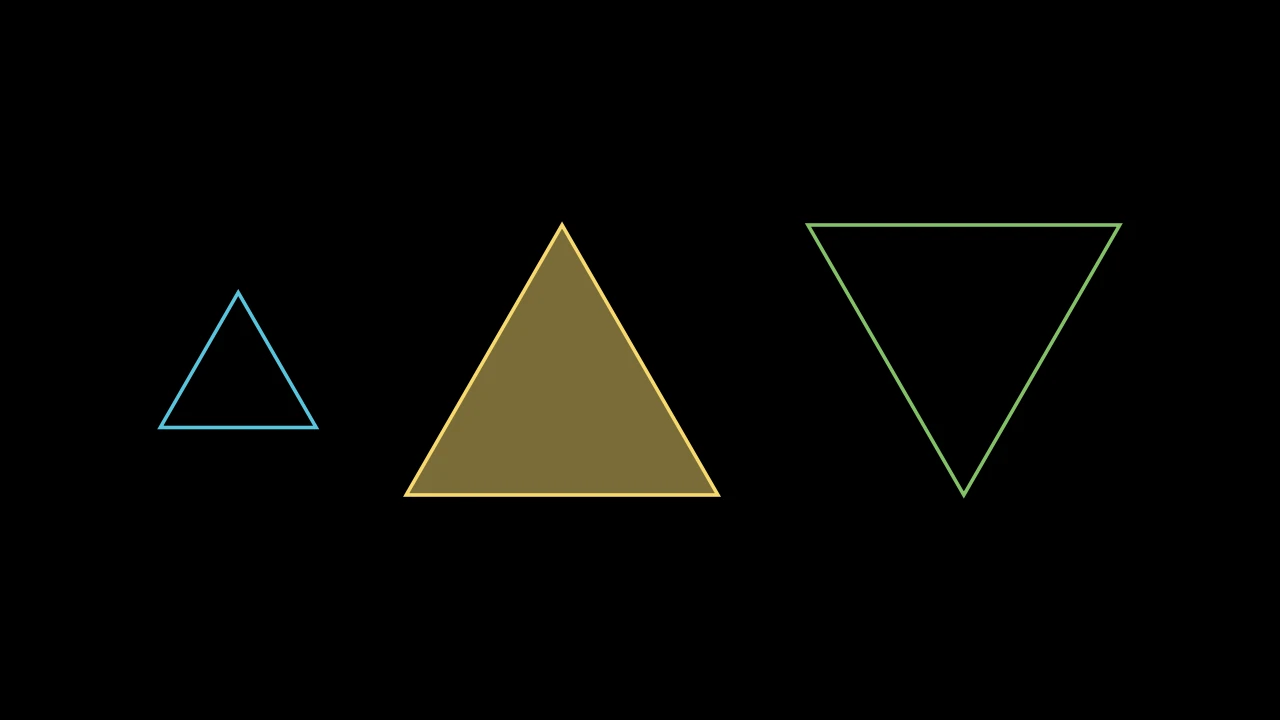
等边三角形,朝上,其顶点在半径为 1 的圆上,除非另给;未加样式时为蓝色。
radius其顶点所在圆的半径,以场景单位计(默认 1)。
start_angle其第一个顶点的角度,以弧度计,从正 x 轴起逆时针(默认 None:顶点数为奇数时 正上方有一个顶点,为偶数时在右侧)。
color填充与描边共用的颜色(默认白色);None 表示该类的默认值。
fill_color填充的颜色;未给出时为
color。多个颜色沿sheen_direction构成渐变。fill_opacity填充的不透明度,取值从 0 到 1(默认 0:无填充)。
stroke_color描边的颜色;未给出时为
color。多个颜色构成渐变。stroke_opacity描边的不透明度,取值从 0 到 1(默认 1)。
stroke_width描边的宽度,以场景单位的百分之一计(默认 4;0:无描边)。
background_stroke_color绘制于填充之后的轮廓颜色(默认黑色)。
background_stroke_opacity轮廓的不透明度,取值从 0 到 1(默认 1)。
background_stroke_width轮廓的宽度,以场景单位的百分之一计(默认 0:无)。
sheen_factor颜色朝
sheen_direction变亮的程度,取值从 -1 到 1(默认 0); 负值变暗。sheen_direction颜色变亮的方向(默认
UL)。joint_type描边在路径转折处的连接方式:圆角、斜切或斜接,按二维场景的绘制方式 (参见 LineJointType;默认 AUTO:斜接)。
cap_style描边在其显示的每一端的端点样式(开放路径的端点、虚线的端点):圆头、平头 或方头,按二维场景的绘制方式(参见 CapStyleType;默认 AUTO:平头)。
shade_in_3d三维场景的光是否对该 mobject 着色。
material其表面在三维场景中如何反射场景的光(参见 Material);None:Manim 的着色(默认)。
namemobject 的名称;未给出时为其类名。
z_index其在绘制顺序中的位置:索引较高者绘制于较低者之上 (默认 0)。
targetMoveToTarget将 mobject 移动至的状态。
源码
manimgx\mobjects\shapes.py
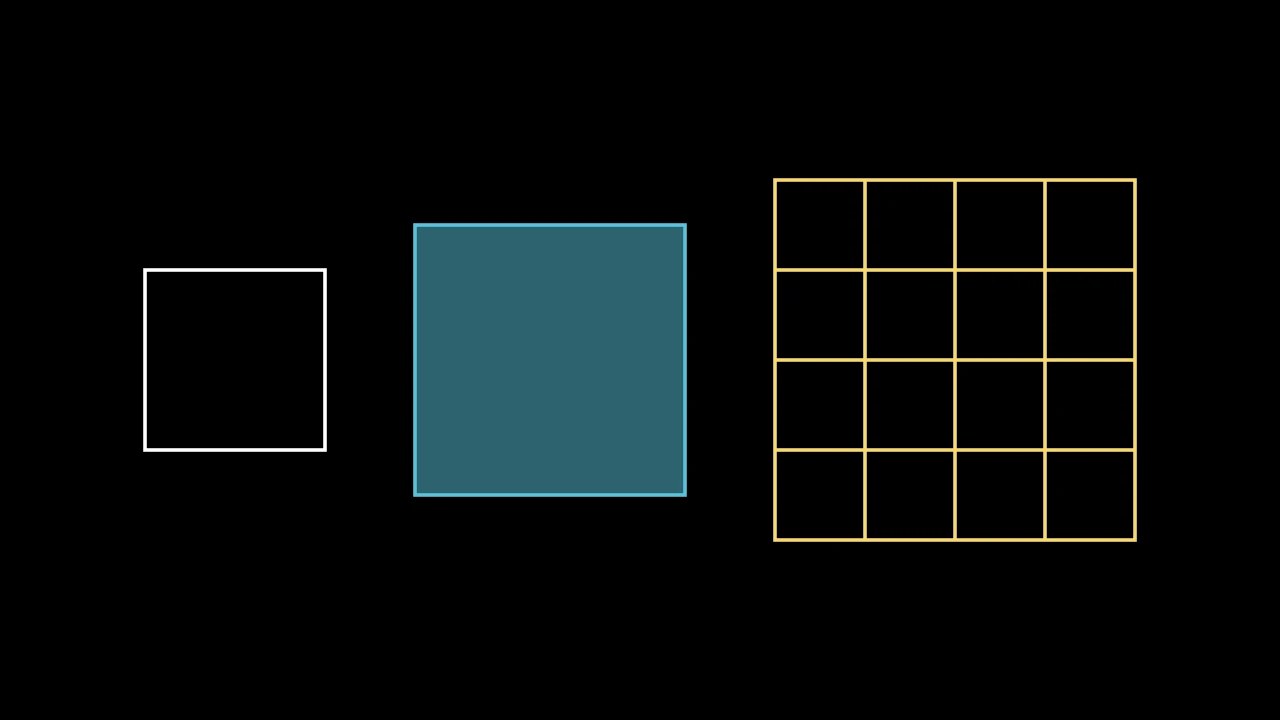
正方形,未指定大小时边长 2,圆心在原点;未加样式时为白色。
side_length其边长,以场景单位计。
grid_xstep其网格竖线之间的距离,从其左边起,以场景单位计(默认 None:无竖线)。
grid_ystep其网格横线之间的距离,从其顶边起,以场景单位计(默认 None:无横线)。
mark_paths_closed为兼容 Manim 而接受;被忽略。
color填充与描边共用的颜色(默认白色);None 表示该类的默认值。
fill_color填充的颜色;未给出时为
color。多个颜色沿sheen_direction构成渐变。fill_opacity填充的不透明度,取值从 0 到 1(默认 0:无填充)。
stroke_color描边的颜色;未给出时为
color。多个颜色构成渐变。stroke_opacity描边的不透明度,取值从 0 到 1(默认 1)。
stroke_width描边的宽度,以场景单位的百分之一计(默认 4;0:无描边)。
background_stroke_color绘制于填充之后的轮廓颜色(默认黑色)。
background_stroke_opacity轮廓的不透明度,取值从 0 到 1(默认 1)。
background_stroke_width轮廓的宽度,以场景单位的百分之一计(默认 0:无)。
sheen_factor颜色朝
sheen_direction变亮的程度,取值从 -1 到 1(默认 0); 负值变暗。sheen_direction颜色变亮的方向(默认
UL)。joint_type描边在路径转折处的连接方式:圆角、斜切或斜接,按二维场景的绘制方式 (参见 LineJointType;默认 AUTO:斜接)。
cap_style描边在其显示的每一端的端点样式(开放路径的端点、虚线的端点):圆头、平头 或方头,按二维场景的绘制方式(参见 CapStyleType;默认 AUTO:平头)。
shade_in_3d三维场景的光是否对该 mobject 着色。
material其表面在三维场景中如何反射场景的光(参见 Material);None:Manim 的着色(默认)。
namemobject 的名称;未给出时为其类名。
z_index其在绘制顺序中的位置:索引较高者绘制于较低者之上 (默认 0)。
targetMoveToTarget将 mobject 移动至的状态。
源码
manimgx\mobjects\shapes.py
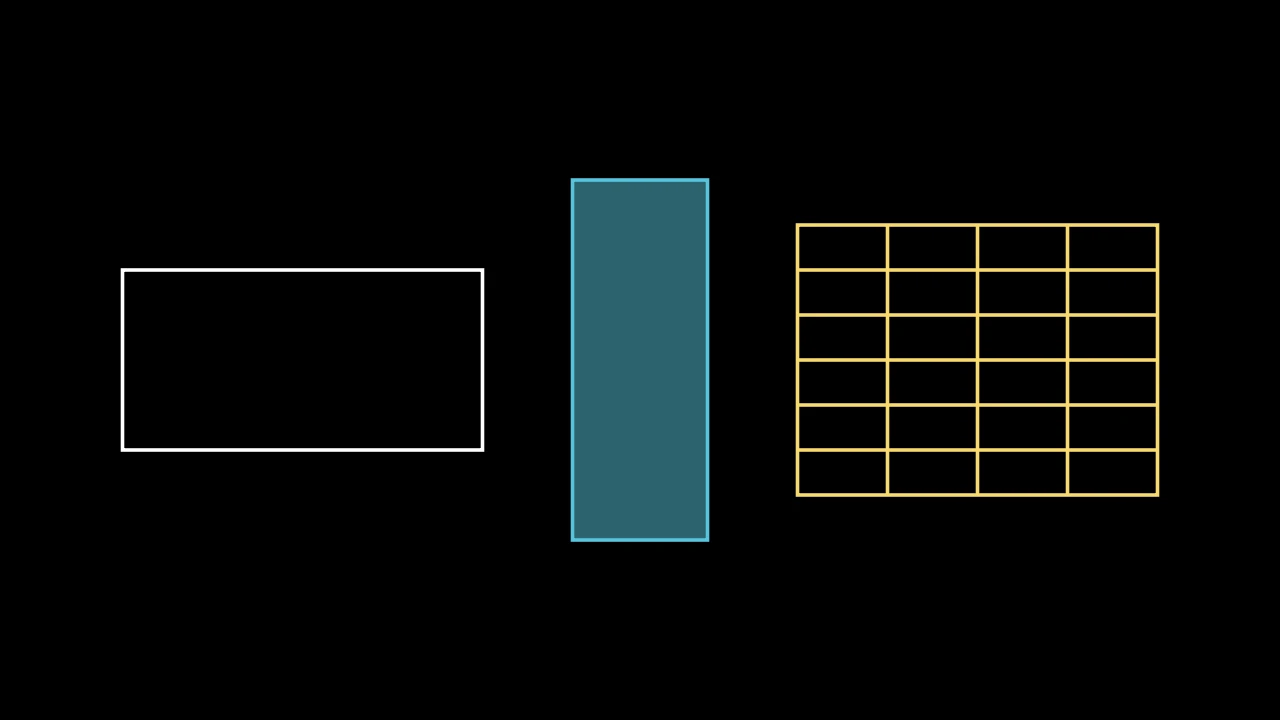
代码
import manimgx as m


class RectangleExample(m.Scene):
    def construct(self) -> None:
        grid = m.Rectangle(
            m.YELLOW, height=3, width=4, grid_xstep=1, grid_ystep=0.5
        )
        rectangles = m.VGroup(
            m.Rectangle(),
            m.Rectangle(m.BLUE, height=4, width=1.5, fill_opacity=0.5),
            grid,
        ).arrange(buff=1)
        self.add(rectangles)
矩形,未指定大小时宽 4 高 2,圆心在原点;未加样式时为白色。
其顶点从右上角起逆时针排列。带 grid_xstep 或 grid_ystep 时划分为网格:
跨越的线,即其 grid_lines,以其 color 绘制。
color其颜色,可按位置给出(
Rectangle(BLUE));None 表示白色。height其高度,以场景单位计。
width其宽度,以场景单位计。
grid_xstep其网格竖线之间的距离,从其左边起,以场景单位计;None 表示无。
grid_ystep其网格横线之间的距离,从其顶边起,以场景单位计;None 表示无。
mark_paths_closed为兼容 Manim 而接受;被忽略。
fill_color填充的颜色;未给出时为
color。多个颜色沿sheen_direction构成渐变。fill_opacity填充的不透明度,取值从 0 到 1(默认 0:无填充)。
stroke_color描边的颜色;未给出时为
color。多个颜色构成渐变。stroke_opacity描边的不透明度,取值从 0 到 1(默认 1)。
stroke_width描边的宽度,以场景单位的百分之一计(默认 4;0:无描边)。
background_stroke_color绘制于填充之后的轮廓颜色(默认黑色)。
background_stroke_opacity轮廓的不透明度,取值从 0 到 1(默认 1)。
background_stroke_width轮廓的宽度,以场景单位的百分之一计(默认 0:无)。
sheen_factor颜色朝
sheen_direction变亮的程度,取值从 -1 到 1(默认 0); 负值变暗。sheen_direction颜色变亮的方向(默认
UL)。joint_type描边在路径转折处的连接方式:圆角、斜切或斜接,按二维场景的绘制方式 (参见 LineJointType;默认 AUTO:斜接)。
cap_style描边在其显示的每一端的端点样式(开放路径的端点、虚线的端点):圆头、平头 或方头,按二维场景的绘制方式(参见 CapStyleType;默认 AUTO:平头)。
shade_in_3d三维场景的光是否对该 mobject 着色。
material其表面在三维场景中如何反射场景的光(参见 Material);None:Manim 的着色(默认)。
namemobject 的名称;未给出时为其类名。
z_index其在绘制顺序中的位置:索引较高者绘制于较低者之上 (默认 0)。
targetMoveToTarget将 mobject 移动至的状态。
还接受 样式关键字。
源码
manimgx\mobjects\shapes.py
其网格的线:竖线组再接横线组,即其拥有的;一个子对象, 除非为空(无网格时)。
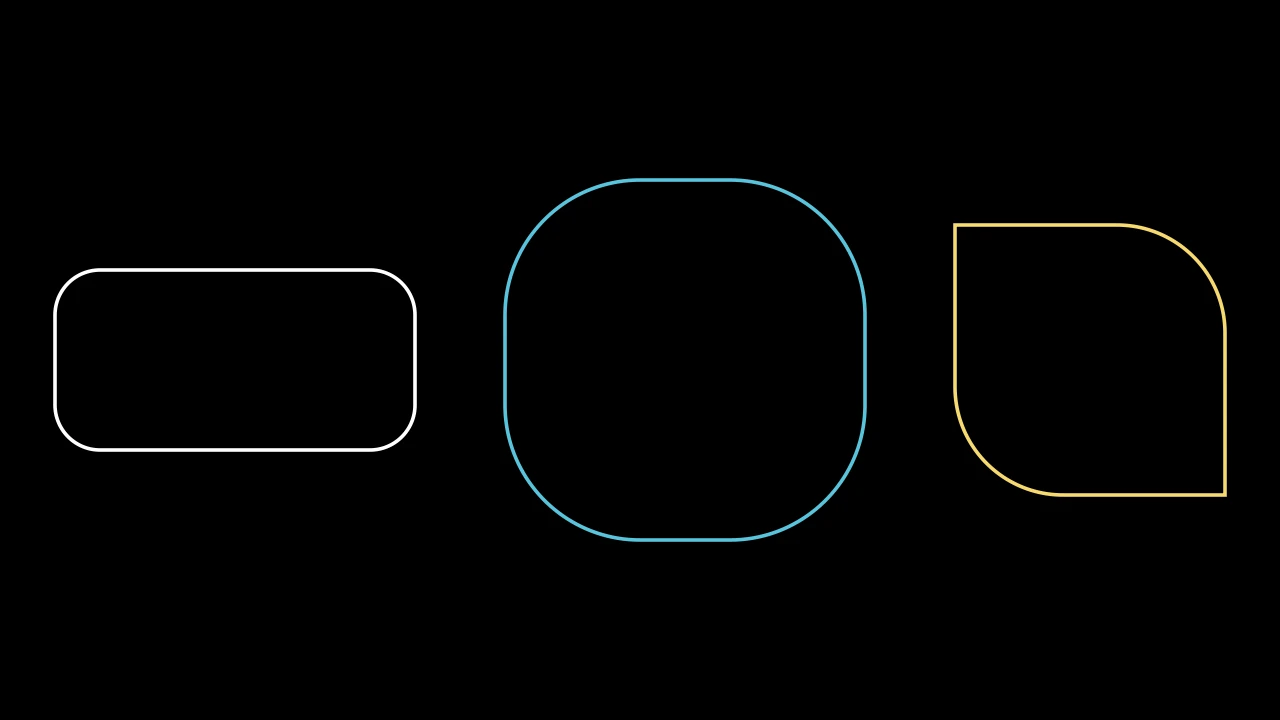
代码
import manimgx as m


class RoundedRectangleExample(m.Scene):
    def construct(self) -> None:
        leaf = m.RoundedRectangle([0, 1.2, 0, 1.2], height=3, width=3)
        rectangles = m.VGroup(
            m.RoundedRectangle(),
            m.RoundedRectangle(1.5, height=4, width=4, color=m.BLUE),
            leaf.set_color(m.YELLOW),
        ).arrange(buff=1)
        self.add(rectangles)
圆角矩形,未指定大小时宽 4 高 2;未加样式时为白色。
corner_radius其角的半径,以场景单位计;或其左上、左下、右下、右上角 半径的列表,按此顺序,一或两个时重复(见 round_corners)。
height其高度,以场景单位计(默认 2)。
width其宽度,以场景单位计(默认 4)。
grid_xstep其网格竖线之间的距离,从其左边起,以场景单位计(默认 None:无竖线)。
grid_ystep其网格横线之间的距离,从其顶边起,以场景单位计(默认 None:无横线)。
mark_paths_closed为兼容 Manim 而接受;被忽略。
color填充与描边共用的颜色(默认白色);None 表示该类的默认值。
fill_color填充的颜色;未给出时为
color。多个颜色沿sheen_direction构成渐变。fill_opacity填充的不透明度,取值从 0 到 1(默认 0:无填充)。
stroke_color描边的颜色;未给出时为
color。多个颜色构成渐变。stroke_opacity描边的不透明度,取值从 0 到 1(默认 1)。
stroke_width描边的宽度,以场景单位的百分之一计(默认 4;0:无描边)。
background_stroke_color绘制于填充之后的轮廓颜色(默认黑色)。
background_stroke_opacity轮廓的不透明度,取值从 0 到 1(默认 1)。
background_stroke_width轮廓的宽度,以场景单位的百分之一计(默认 0:无)。
sheen_factor颜色朝
sheen_direction变亮的程度,取值从 -1 到 1(默认 0); 负值变暗。sheen_direction颜色变亮的方向(默认
UL)。joint_type描边在路径转折处的连接方式:圆角、斜切或斜接,按二维场景的绘制方式 (参见 LineJointType;默认 AUTO:斜接)。
cap_style描边在其显示的每一端的端点样式(开放路径的端点、虚线的端点):圆头、平头 或方头,按二维场景的绘制方式(参见 CapStyleType;默认 AUTO:平头)。
shade_in_3d三维场景的光是否对该 mobject 着色。
material其表面在三维场景中如何反射场景的光(参见 Material);None:Manim 的着色(默认)。
namemobject 的名称;未给出时为其类名。
z_index其在绘制顺序中的位置:索引较高者绘制于较低者之上 (默认 0)。
targetMoveToTarget将 mobject 移动至的状态。
源码
manimgx\mobjects\shapes.py
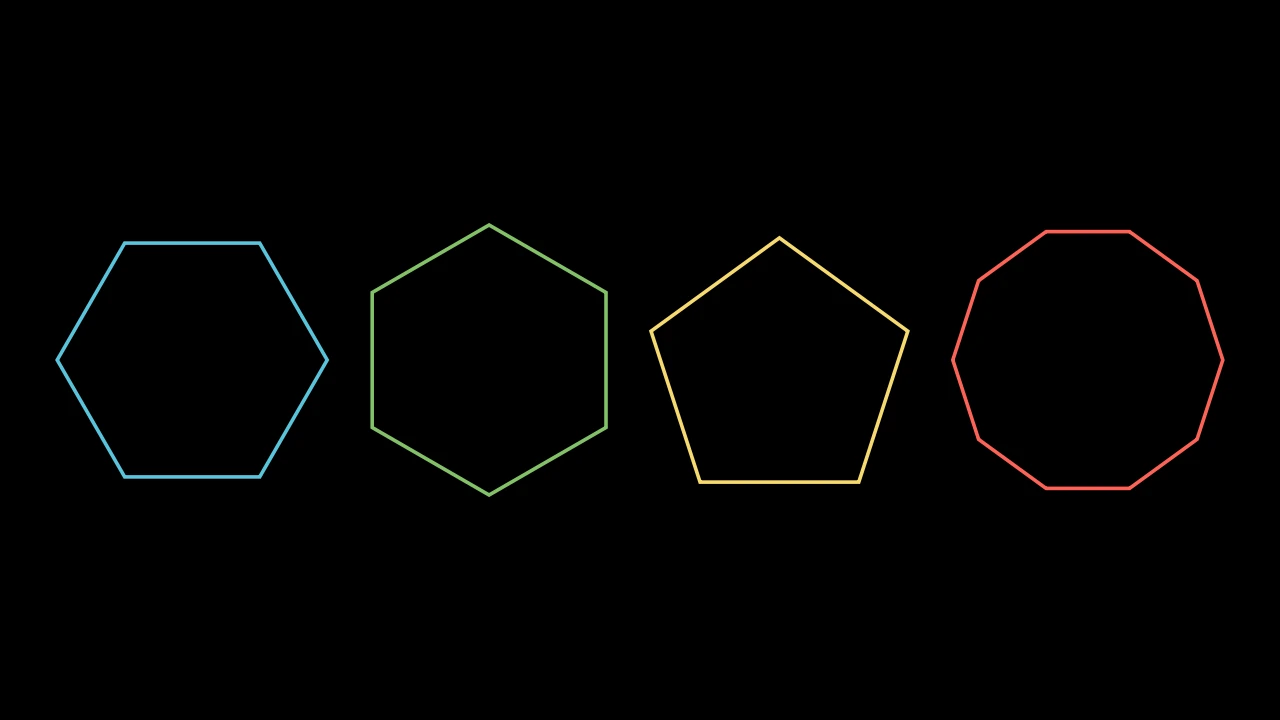
代码
import manimgx as m


class RegularPolygonExample(m.Scene):
    def construct(self) -> None:
        polygons = m.VGroup(
            m.RegularPolygon(radius=1.5),
            m.RegularPolygon(radius=1.5, start_angle=m.PI / 6, color=m.GREEN),
            m.RegularPolygon(5, radius=1.5, color=m.YELLOW),
            m.RegularPolygon(10, radius=1.5, color=m.RED),
        ).arrange(buff=0.5)
        self.add(polygons)
正多边形:n 个顶点均匀分布于圆上,依次相连;未加样式时为蓝色。
n其顶点和边的数量。
radius其顶点所在圆的半径,以场景单位计(默认 1)。
start_angle其第一个顶点的角度,以弧度计,从正 x 轴起逆时针(默认 None:顶点数为奇数时 正上方有一个顶点,为偶数时在右侧)。
color填充与描边共用的颜色(默认白色);None 表示该类的默认值。
fill_color填充的颜色;未给出时为
color。多个颜色沿sheen_direction构成渐变。fill_opacity填充的不透明度,取值从 0 到 1(默认 0:无填充)。
stroke_color描边的颜色;未给出时为
color。多个颜色构成渐变。stroke_opacity描边的不透明度,取值从 0 到 1(默认 1)。
stroke_width描边的宽度,以场景单位的百分之一计(默认 4;0:无描边)。
background_stroke_color绘制于填充之后的轮廓颜色(默认黑色)。
background_stroke_opacity轮廓的不透明度,取值从 0 到 1(默认 1)。
background_stroke_width轮廓的宽度,以场景单位的百分之一计(默认 0:无)。
sheen_factor颜色朝
sheen_direction变亮的程度,取值从 -1 到 1(默认 0); 负值变暗。sheen_direction颜色变亮的方向(默认
UL)。joint_type描边在路径转折处的连接方式:圆角、斜切或斜接,按二维场景的绘制方式 (参见 LineJointType;默认 AUTO:斜接)。
cap_style描边在其显示的每一端的端点样式(开放路径的端点、虚线的端点):圆头、平头 或方头,按二维场景的绘制方式(参见 CapStyleType;默认 AUTO:平头)。
shade_in_3d三维场景的光是否对该 mobject 着色。
material其表面在三维场景中如何反射场景的光(参见 Material);None:Manim 的着色(默认)。
namemobject 的名称;未给出时为其类名。
z_index其在绘制顺序中的位置:索引较高者绘制于较低者之上 (默认 0)。
targetMoveToTarget将 mobject 移动至的状态。
源码
manimgx\mobjects\shapes.py
代码
import manimgx as m


class RegularPolygramExample(m.Scene):
    def construct(self) -> None:
        polygrams = m.VGroup(
            m.RegularPolygram(5, radius=2),
            m.RegularPolygram(7, density=3, radius=2, color=m.YELLOW),
            m.RegularPolygram(6, radius=2, color=m.GREEN),
        ).arrange(buff=1)
        self.play(m.Create(polygrams, run_time=3))
正则星形多边形:圆上均匀分布的点,每个连接到其后第 density 步的点;
未加样式时为蓝色。
密度为 1 时为正多边形;5 个点密度为 2 构成五角星。当点数和密度有公因子时, 各点构成那么多正则多边星,每个从前一个转过:6 个点密度为 2 构成两个三角形, 即六角星。
num_vertices圆上有多少个点。
density每个点连接到其后多少步的点:1 为多边形。
radius圆的半径,以场景单位计。
start_angle第一个点的角度,以弧度计,从正 x 轴起逆时针;None 表示 每个正则多边星有奇数个点时正上方有一个点,偶数时在右侧。
color填充与描边共用的颜色(默认白色);None 表示该类的默认值。
fill_color填充的颜色;未给出时为
color。多个颜色沿sheen_direction构成渐变。fill_opacity填充的不透明度,取值从 0 到 1(默认 0:无填充)。
stroke_color描边的颜色;未给出时为
color。多个颜色构成渐变。stroke_opacity描边的不透明度,取值从 0 到 1(默认 1)。
stroke_width描边的宽度,以场景单位的百分之一计(默认 4;0:无描边)。
background_stroke_color绘制于填充之后的轮廓颜色(默认黑色)。
background_stroke_opacity轮廓的不透明度,取值从 0 到 1(默认 1)。
background_stroke_width轮廓的宽度,以场景单位的百分之一计(默认 0:无)。
sheen_factor颜色朝
sheen_direction变亮的程度,取值从 -1 到 1(默认 0); 负值变暗。sheen_direction颜色变亮的方向(默认
UL)。joint_type描边在路径转折处的连接方式:圆角、斜切或斜接,按二维场景的绘制方式 (参见 LineJointType;默认 AUTO:斜接)。
cap_style描边在其显示的每一端的端点样式(开放路径的端点、虚线的端点):圆头、平头 或方头,按二维场景的绘制方式(参见 CapStyleType;默认 AUTO:平头)。
shade_in_3d三维场景的光是否对该 mobject 着色。
material其表面在三维场景中如何反射场景的光(参见 Material);None:Manim 的着色(默认)。
namemobject 的名称;未给出时为其类名。
z_index其在绘制顺序中的位置:索引较高者绘制于较低者之上 (默认 0)。
targetMoveToTarget将 mobject 移动至的状态。
还接受 样式关键字。
源码
manimgx\mobjects\shapes.py
代码
import manimgx as m


class StarExample(m.Scene):
    def construct(self) -> None:
        stars = m.VGroup(
            m.Star(outer_radius=1.5),
            m.Star(7, outer_radius=1.5, color=m.YELLOW),
            m.Star(7, outer_radius=1.5, density=3, color=m.RED),
            m.Star(12, outer_radius=1.5, inner_radius=1, color=m.GREEN),
        ).arrange(buff=0.5)
        self.play(m.Create(stars, run_time=3))
星形:圆上 n 个点,每两点之间在更小圆上有一个顶点;未加样式时为蓝色。
除非给出,内半径取使星形成为其 n 个点在 density 下的
RegularPolygram 轮廓的那个:其边沿正则多边星的线。
m.Star(n=5, *, outer_radius=1, inner_radius=None, density=2, start_angle=TAU / 4, **kwargs)
n其点数。
outer_radius其点所在圆的半径,以场景单位计。
inner_radius其内顶点所在圆的半径,以场景单位计;None 表示由
density设定。density无
inner_radius时,其轮廓所属正则多边星的密度:越高其点越细。 必须大于 0 且小于n / 2。start_angle其第一个点的角度,以弧度计,从正 x 轴起逆时针(默认四分之一圈: 正上方);None 表示
n为奇数时正上方有一个点,偶数时在右侧。color填充与描边共用的颜色(默认白色);None 表示该类的默认值。
fill_color填充的颜色;未给出时为
color。多个颜色沿sheen_direction构成渐变。fill_opacity填充的不透明度,取值从 0 到 1(默认 0:无填充)。
stroke_color描边的颜色;未给出时为
color。多个颜色构成渐变。stroke_opacity描边的不透明度,取值从 0 到 1(默认 1)。
stroke_width描边的宽度,以场景单位的百分之一计(默认 4;0:无描边)。
background_stroke_color绘制于填充之后的轮廓颜色(默认黑色)。
background_stroke_opacity轮廓的不透明度,取值从 0 到 1(默认 1)。
background_stroke_width轮廓的宽度,以场景单位的百分之一计(默认 0:无)。
sheen_factor颜色朝
sheen_direction变亮的程度,取值从 -1 到 1(默认 0); 负值变暗。sheen_direction颜色变亮的方向(默认
UL)。joint_type描边在路径转折处的连接方式:圆角、斜切或斜接,按二维场景的绘制方式 (参见 LineJointType;默认 AUTO:斜接)。
cap_style描边在其显示的每一端的端点样式(开放路径的端点、虚线的端点):圆头、平头 或方头,按二维场景的绘制方式(参见 CapStyleType;默认 AUTO:平头)。
shade_in_3d三维场景的光是否对该 mobject 着色。
material其表面在三维场景中如何反射场景的光(参见 Material);None:Manim 的着色(默认)。
namemobject 的名称;未给出时为其类名。
z_index其在绘制顺序中的位置:索引较高者绘制于较低者之上 (默认 0)。
targetMoveToTarget将 mobject 移动至的状态。
还接受 样式关键字。
源码
manimgx\mobjects\shapes.py
代码
import manimgx as m


class ArcPolygonExample(m.Scene):
    def construct(self) -> None:
        a, b, c = [0, 0, 0], [2.5, 0, 0], [0, 2.5, 0]
        sides = [{"radius": 2, "color": m.RED}, {"angle": 0}, {"angle": 1}]
        shapes = m.VGroup(
            m.ArcPolygon(a, b, c),
            m.ArcPolygon(a, b, c, radius=2, fill_opacity=0.5).set_color(m.BLUE),
            m.ArcPolygon(a, b, c, angle=-m.PI / 3).set_color(m.GREEN),
            m.ArcPolygon(a, b, c, arc_config=sides),
        ).arrange(buff=0.6)
        self.play(m.Create(shapes, run_time=4))
边为弧线的多边形:从每个顶点到下一个的 ArcBetweenPoints, 以及从最后一个回到第一个;未加样式时为白色。
绕顶点逆时针行进,正角度的弧向外凸,负角度的弧向内弯。其轮廓沿弧线,
以其样式填充和描边。弧线也是其子对象,即其
arcs,以各自样式绘制于轮廓之上(未加样式时为白色,
除非 arc_config 另行指定):要为整体上色,也需为它们上色,如同
set_color 等族方法所做。
m.ArcPolygon(*vertices, angle=PI / 4, radius=None, arc_config=None, **kwargs)
*vertices顶点,按绕其顺序。
angle每条弧所转过的角度,以弧度计,除非给出
radius或arc_config。radius每条弧的半径,以场景单位计,代替
angle,除非给出arc_config; None(或 0)表示使用angle。arc_config弧线的 ArcBetweenPoints 关键字,代替
angle和radius: 每条弧一组,或每边一组的列表,第一个顶点的边在前。color填充与描边共用的颜色(默认白色);None 表示该类的默认值。
fill_color填充的颜色;未给出时为
color。多个颜色沿sheen_direction构成渐变。fill_opacity填充的不透明度,取值从 0 到 1(默认 0:无填充)。
stroke_color描边的颜色;未给出时为
color。多个颜色构成渐变。stroke_opacity描边的不透明度,取值从 0 到 1(默认 1)。
stroke_width描边的宽度,以场景单位的百分之一计(默认 4;0:无描边)。
background_stroke_color绘制于填充之后的轮廓颜色(默认黑色)。
background_stroke_opacity轮廓的不透明度,取值从 0 到 1(默认 1)。
background_stroke_width轮廓的宽度,以场景单位的百分之一计(默认 0:无)。
sheen_factor颜色朝
sheen_direction变亮的程度,取值从 -1 到 1(默认 0); 负值变暗。sheen_direction颜色变亮的方向(默认
UL)。joint_type描边在路径转折处的连接方式:圆角、斜切或斜接,按二维场景的绘制方式 (参见 LineJointType;默认 AUTO:斜接)。
cap_style描边在其显示的每一端的端点样式(开放路径的端点、虚线的端点):圆头、平头 或方头,按二维场景的绘制方式(参见 CapStyleType;默认 AUTO:平头)。
shade_in_3d三维场景的光是否对该 mobject 着色。
material其表面在三维场景中如何反射场景的光(参见 Material);None:Manim 的着色(默认)。
namemobject 的名称;未给出时为其类名。
z_index其在绘制顺序中的位置:索引较高者绘制于较低者之上 (默认 0)。
targetMoveToTarget将 mobject 移动至的状态。
还接受 样式关键字。
源码
manimgx\mobjects\shapes.py
弧线,每边一条,第一个顶点的边在前;它们也是其子对象。
代码
import manimgx as m


class ArcPolygonFromArcsExample(m.Scene):
    def construct(self) -> None:
        a, b, c = [-5.5, -1.3, 0], [-2.5, -1.3, 0], [-4, 1.3, 0]
        pairs = (a, b), (b, c), (c, a)
        sides = [m.ArcBetweenPoints(p, q, radius=3) for p, q in pairs]
        reuleaux = m.ArcPolygonFromArcs(*sides, fill_opacity=0.5)
        left = m.Arc(start_angle=m.PI / 2, angle=m.PI).shift(1.5 * m.RIGHT)
        right = m.Arc(start_angle=-m.PI / 2, angle=m.PI).shift(4.5 * m.RIGHT)
        stadium = m.ArcPolygonFromArcs(left, right, fill_opacity=0.5)
        reuleaux.set_color(m.BLUE)
        stadium.set_color(m.GREEN)
        self.play(m.Create(reuleaux), m.Create(stadium))
由弧线构成的闭合形状:依次每条弧,在不相接处用直线连接到下一条, 最后一条连回第一条;未加样式时为白色。
其轮廓以其样式填充和描边。弧线也是其子对象,即其 arcs,以各自样式绘制于轮廓之上: 要为整体上色,也需为它们上色,如同 set_color 等族方法所做。
*arcs弧线,按绕其顺序:Arc 或 ArcBetweenPoints。
color填充与描边共用的颜色(默认白色);None 表示该类的默认值。
fill_color填充的颜色;未给出时为
color。多个颜色沿sheen_direction构成渐变。fill_opacity填充的不透明度,取值从 0 到 1(默认 0:无填充)。
stroke_color描边的颜色;未给出时为
color。多个颜色构成渐变。stroke_opacity描边的不透明度,取值从 0 到 1(默认 1)。
stroke_width描边的宽度,以场景单位的百分之一计(默认 4;0:无描边)。
background_stroke_color绘制于填充之后的轮廓颜色(默认黑色)。
background_stroke_opacity轮廓的不透明度,取值从 0 到 1(默认 1)。
background_stroke_width轮廓的宽度,以场景单位的百分之一计(默认 0:无)。
sheen_factor颜色朝
sheen_direction变亮的程度,取值从 -1 到 1(默认 0); 负值变暗。sheen_direction颜色变亮的方向(默认
UL)。joint_type描边在路径转折处的连接方式:圆角、斜切或斜接,按二维场景的绘制方式 (参见 LineJointType;默认 AUTO:斜接)。
cap_style描边在其显示的每一端的端点样式(开放路径的端点、虚线的端点):圆头、平头 或方头,按二维场景的绘制方式(参见 CapStyleType;默认 AUTO:平头)。
shade_in_3d三维场景的光是否对该 mobject 着色。
material其表面在三维场景中如何反射场景的光(参见 Material);None:Manim 的着色(默认)。
namemobject 的名称;未给出时为其类名。
z_index其在绘制顺序中的位置:索引较高者绘制于较低者之上 (默认 0)。
targetMoveToTarget将 mobject 移动至的状态。
还接受 样式关键字。
源码
manimgx\mobjects\shapes.py
弧线,按顺序;它们也是其子对象。
屏幕的形状
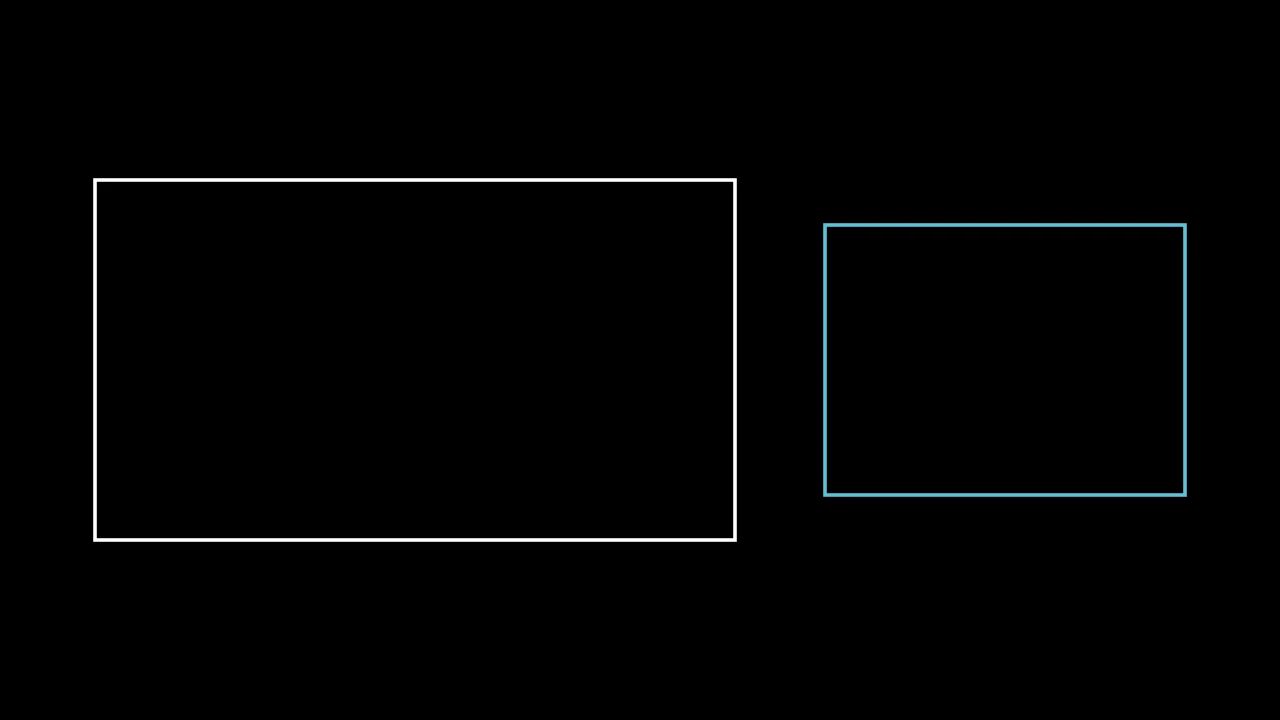
具有屏幕比例的矩形,未另给时为 16:9 且高 4,圆心在原点;未加样式时为白色。
aspect_ratio其宽除以高。
height其高度,以场景单位计。
color填充与描边共用的颜色(默认白色);None 表示该类的默认值。
fill_color填充的颜色;未给出时为
color。多个颜色沿sheen_direction构成渐变。fill_opacity填充的不透明度,取值从 0 到 1(默认 0:无填充)。
stroke_color描边的颜色;未给出时为
color。多个颜色构成渐变。stroke_opacity描边的不透明度,取值从 0 到 1(默认 1)。
stroke_width描边的宽度,以场景单位的百分之一计(默认 4;0:无描边)。
background_stroke_color绘制于填充之后的轮廓颜色(默认黑色)。
background_stroke_opacity轮廓的不透明度,取值从 0 到 1(默认 1)。
background_stroke_width轮廓的宽度,以场景单位的百分之一计(默认 0:无)。
sheen_factor颜色朝
sheen_direction变亮的程度,取值从 -1 到 1(默认 0); 负值变暗。sheen_direction颜色变亮的方向(默认
UL)。joint_type描边在路径转折处的连接方式:圆角、斜切或斜接,按二维场景的绘制方式 (参见 LineJointType;默认 AUTO:斜接)。
cap_style描边在其显示的每一端的端点样式(开放路径的端点、虚线的端点):圆头、平头 或方头,按二维场景的绘制方式(参见 CapStyleType;默认 AUTO:平头)。
shade_in_3d三维场景的光是否对该 mobject 着色。
material其表面在三维场景中如何反射场景的光(参见 Material);None:Manim 的着色(默认)。
namemobject 的名称;未给出时为其类名。
z_index其在绘制顺序中的位置:索引较高者绘制于较低者之上 (默认 0)。
targetMoveToTarget将 mobject 移动至的状态。
还接受 样式关键字。
源码
manimgx\mobjects\shapes.py
与画框等高的屏幕矩形,圆心在原点:未另给时为 16:9 比例,即画框自身的轮廓; 未加样式时为白色。
其高为画框的高(未另行配置时为 8 单位),无论给定何种 height。
aspect_ratio其宽除以高(默认 16 / 9)。
height其高度,以场景单位计(默认 4)。
color填充与描边共用的颜色(默认白色);None 表示该类的默认值。
fill_color填充的颜色;未给出时为
color。多个颜色沿sheen_direction构成渐变。fill_opacity填充的不透明度,取值从 0 到 1(默认 0:无填充)。
stroke_color描边的颜色;未给出时为
color。多个颜色构成渐变。stroke_opacity描边的不透明度,取值从 0 到 1(默认 1)。
stroke_width描边的宽度,以场景单位的百分之一计(默认 4;0:无描边)。
background_stroke_color绘制于填充之后的轮廓颜色(默认黑色)。
background_stroke_opacity轮廓的不透明度,取值从 0 到 1(默认 1)。
background_stroke_width轮廓的宽度,以场景单位的百分之一计(默认 0:无)。
sheen_factor颜色朝
sheen_direction变亮的程度,取值从 -1 到 1(默认 0); 负值变暗。sheen_direction颜色变亮的方向(默认
UL)。joint_type描边在路径转折处的连接方式:圆角、斜切或斜接,按二维场景的绘制方式 (参见 LineJointType;默认 AUTO:斜接)。
cap_style描边在其显示的每一端的端点样式(开放路径的端点、虚线的端点):圆头、平头 或方头,按二维场景的绘制方式(参见 CapStyleType;默认 AUTO:平头)。
shade_in_3d三维场景的光是否对该 mobject 着色。
material其表面在三维场景中如何反射场景的光(参见 Material);None:Manim 的着色(默认)。
namemobject 的名称;未给出时为其类名。
z_index其在绘制顺序中的位置:索引较高者绘制于较低者之上 (默认 0)。
targetMoveToTarget将 mobject 移动至的状态。
源码
manimgx\mobjects\shapes.py
RegularPolygon 除顶点数外的关键字, 供传递它们的类使用:其大小和转向,以及样式关键字。
radius其顶点所在圆的半径,以场景单位计(默认 1)。
start_angle其第一个顶点的角度,以弧度计,从正 x 轴起逆时针(默认 None:顶点数为奇数时 正上方有一个顶点,为偶数时在右侧)。
color填充与描边共用的颜色(默认白色);None 表示该类的默认值。
fill_color填充的颜色;未给出时为
color。多个颜色沿sheen_direction构成渐变。fill_opacity填充的不透明度,取值从 0 到 1(默认 0:无填充)。
stroke_color描边的颜色;未给出时为
color。多个颜色构成渐变。stroke_opacity描边的不透明度,取值从 0 到 1(默认 1)。
stroke_width描边的宽度,以场景单位的百分之一计(默认 4;0:无描边)。
background_stroke_color绘制于填充之后的轮廓颜色(默认黑色)。
background_stroke_opacity轮廓的不透明度,取值从 0 到 1(默认 1)。
background_stroke_width轮廓的宽度,以场景单位的百分之一计(默认 0:无)。
sheen_factor颜色朝
sheen_direction变亮的程度,取值从 -1 到 1(默认 0); 负值变暗。sheen_direction颜色变亮的方向(默认
UL)。joint_type描边在路径转折处的连接方式:圆角、斜切或斜接,按二维场景的绘制方式 (参见 LineJointType;默认 AUTO:斜接)。
cap_style描边在其显示的每一端的端点样式(开放路径的端点、虚线的端点):圆头、平头 或方头,按二维场景的绘制方式(参见 CapStyleType;默认 AUTO:平头)。
shade_in_3d三维场景的光是否对该 mobject 着色。
material其表面在三维场景中如何反射场景的光(参见 Material);None:Manim 的着色(默认)。
namemobject 的名称;未给出时为其类名。
z_index其在绘制顺序中的位置:索引较高者绘制于较低者之上 (默认 0)。
targetMoveToTarget将 mobject 移动至的状态。
Rectangle 的关键字,供传递它们的类使用:其大小和网格, 以及样式关键字。
height其高度,以场景单位计(默认 2)。
width其宽度,以场景单位计(默认 4)。
grid_xstep其网格竖线之间的距离,从其左边起,以场景单位计(默认 None:无竖线)。
grid_ystep其网格横线之间的距离,从其顶边起,以场景单位计(默认 None:无横线)。
mark_paths_closed为兼容 Manim 而接受;被忽略。
color填充与描边共用的颜色(默认白色);None 表示该类的默认值。
fill_color填充的颜色;未给出时为
color。多个颜色沿sheen_direction构成渐变。fill_opacity填充的不透明度,取值从 0 到 1(默认 0:无填充)。
stroke_color描边的颜色;未给出时为
color。多个颜色构成渐变。stroke_opacity描边的不透明度,取值从 0 到 1(默认 1)。
stroke_width描边的宽度,以场景单位的百分之一计(默认 4;0:无描边)。
background_stroke_color绘制于填充之后的轮廓颜色(默认黑色)。
background_stroke_opacity轮廓的不透明度,取值从 0 到 1(默认 1)。
background_stroke_width轮廓的宽度,以场景单位的百分之一计(默认 0:无)。
sheen_factor颜色朝
sheen_direction变亮的程度,取值从 -1 到 1(默认 0); 负值变暗。sheen_direction颜色变亮的方向(默认
UL)。joint_type描边在路径转折处的连接方式:圆角、斜切或斜接,按二维场景的绘制方式 (参见 LineJointType;默认 AUTO:斜接)。
cap_style描边在其显示的每一端的端点样式(开放路径的端点、虚线的端点):圆头、平头 或方头,按二维场景的绘制方式(参见 CapStyleType;默认 AUTO:平头)。
shade_in_3d三维场景的光是否对该 mobject 着色。
material其表面在三维场景中如何反射场景的光(参见 Material);None:Manim 的着色(默认)。
namemobject 的名称;未给出时为其类名。
z_index其在绘制顺序中的位置:索引较高者绘制于较低者之上 (默认 0)。
targetMoveToTarget将 mobject 移动至的状态。
ScreenRectangle 的关键字,供传递它们的矩形使用: 其比例和高度,以及样式关键字。
aspect_ratio其宽除以高(默认 16 / 9)。
height其高度,以场景单位计(默认 4)。
color填充与描边共用的颜色(默认白色);None 表示该类的默认值。
fill_color填充的颜色;未给出时为
color。多个颜色沿sheen_direction构成渐变。fill_opacity填充的不透明度,取值从 0 到 1(默认 0:无填充)。
stroke_color描边的颜色;未给出时为
color。多个颜色构成渐变。stroke_opacity描边的不透明度,取值从 0 到 1(默认 1)。
stroke_width描边的宽度,以场景单位的百分之一计(默认 4;0:无描边)。
background_stroke_color绘制于填充之后的轮廓颜色(默认黑色)。
background_stroke_opacity轮廓的不透明度,取值从 0 到 1(默认 1)。
background_stroke_width轮廓的宽度,以场景单位的百分之一计(默认 0:无)。
sheen_factor颜色朝
sheen_direction变亮的程度,取值从 -1 到 1(默认 0); 负值变暗。sheen_direction颜色变亮的方向(默认
UL)。joint_type描边在路径转折处的连接方式:圆角、斜切或斜接,按二维场景的绘制方式 (参见 LineJointType;默认 AUTO:斜接)。
cap_style描边在其显示的每一端的端点样式(开放路径的端点、虚线的端点):圆头、平头 或方头,按二维场景的绘制方式(参见 CapStyleType;默认 AUTO:平头)。
shade_in_3d三维场景的光是否对该 mobject 着色。
material其表面在三维场景中如何反射场景的光(参见 Material);None:Manim 的着色(默认)。
namemobject 的名称;未给出时为其类名。
z_index其在绘制顺序中的位置:索引较高者绘制于较低者之上 (默认 0)。
targetMoveToTarget将 mobject 移动至的状态。