标注
影片代码
import manimgx as m


class AnnotationsHero(m.Scene):
    def construct(self) -> None:
        formula = m.MathTex(r"a^2 + b^2 = c^2", font_size=72).shift(1.5 * m.UP)
        brace = m.Brace(formula[0][:5], m.DOWN, color=m.YELLOW)
        note = brace.get_text("the legs")
        frame = m.SurroundingRectangle(formula[0][6:], color=m.BLUE)
        a, b, c = [-1.5, -3, 0], [1.5, -3, 0], [1.5, -0.8, 0]
        triangle = m.Polygon(a, b, c, color=m.WHITE)
        right = m.RightAngle(m.Line(b, a), m.Line(b, c), length=0.35, color=m.GREEN)
        angle = m.Angle(m.Line(a, b), m.Line(a, c), radius=0.8, color=m.RED)
        self.play(m.Write(formula))
        self.play(m.GrowFromCenter(brace), m.FadeIn(note), m.Create(frame))
        self.play(m.Create(triangle), m.Create(right), m.Create(angle))
        self.wait()
标注指向另一个 mobject,为其加框、贴标签或度量它。大多数标注在创建时接收该 mobject 并与之贴合:与其边等长的花括号、环绕其周围的边框、其下方的线条。此后 它们不会跟随该 mobject;若要使其跟随,需用 always_redraw 在每一帧重新绘制。
花括号
代码
import manimgx as m


class BraceExample(m.Scene):
    def construct(self) -> None:
        square = m.Square(side_length=3, color=m.BLUE, fill_opacity=0.5)
        self.add(square)
        self.play(
            m.GrowFromCenter(m.Brace(square)),
            m.GrowFromCenter(m.Brace(square, m.RIGHT, color=m.YELLOW)),
            m.GrowFromCenter(m.Brace(square, m.UP, buff=0.5, color=m.GREEN)),
        )
沿 mobject 某一边的花括号,长度与 mobject 在该方向的宽度相同: 填充白色,无轮廓线,除非另行设置样式。
花括号位于 mobject 包围盒以外 buff 处,在 direction 所指向的一侧,
横跨 mobject 在该方向上的范围,其尖端朝外;mobject 本身保持不变。
get_text 和
get_tex 可在其尖端处添加标签。
m.Brace(mobject, direction=DOWN, buff=0.2, sharpness=2, **kwargs)
mobject要加花括号的 mobject。
direction花括号所在的一侧,以方向表示(DOWN:下方)。
buffmobject 与花括号之间的间距,以场景单位表示。
sharpness花括号尖端和两端的尖锐程度:值越高,其卷曲越窄。
color填充与描边共用的颜色(默认白色);None 表示该类的默认值。
fill_color填充的颜色;未给出时为
color。多个颜色沿sheen_direction构成渐变。fill_opacity填充的不透明度,取值从 0 到 1(默认 0:无填充)。
stroke_color描边的颜色;未给出时为
color。多个颜色构成渐变。stroke_opacity描边的不透明度,取值从 0 到 1(默认 1)。
stroke_width描边的宽度,以场景单位的百分之一计(默认 4;0:无描边)。
background_stroke_color绘制于填充之后的轮廓颜色(默认黑色)。
background_stroke_opacity轮廓的不透明度,取值从 0 到 1(默认 1)。
background_stroke_width轮廓的宽度,以场景单位的百分之一计(默认 0:无)。
sheen_factor颜色朝
sheen_direction变亮的程度,取值从 -1 到 1(默认 0); 负值变暗。sheen_direction颜色变亮的方向(默认
UL)。joint_type描边在路径转折处的连接方式:圆角、斜切或斜接,按二维场景的绘制方式 (参见 LineJointType;默认 AUTO:斜接)。
cap_style描边在其显示的每一端的端点样式(开放路径的端点、虚线的端点):圆头、平头 或方头,按二维场景的绘制方式(参见 CapStyleType;默认 AUTO:平头)。
shade_in_3d三维场景的光是否对该 mobject 着色。
material其表面在三维场景中如何反射场景的光(参见 Material);None:Manim 的着色(默认)。
namemobject 的名称;未给出时为其类名。
z_index其在绘制顺序中的位置:索引较高者绘制于较低者之上 (默认 0)。
targetMoveToTarget将 mobject 移动至的状态。
还接受 样式关键字。
源码
manimgx\mobjects\annotations.py
将一个 mobject 放在花括号的尖端处,在其外侧。
mob要放置在该处的 mobject。
use_next_to是否将其放在尖端旁边,位于花括号所指向的一侧 (其方向四舍五入到八个罗盘方向之一);若否,则其中心从尖端 沿花括号方向移动其宽度的一半加
buff的距离。buff两者之间的间距,以场景单位表示(默认 0.25)。
aligned_edge两个对象在它们相遇侧旁对齐所沿的边,以方向表示:当方向为 RIGHT 和 UP 时, 它们的顶部对齐(默认 ORIGIN:居中)。
submobject_to_align要放在另一对象旁边的 mobject 的一部分,代替其位置;其余部分随其移动 (默认 None:整个 mobject)。
index_of_submobject_to_align每个 mobject 中要对齐部分的索引:此对象的部分放在另一对象的部分旁边 (默认 None:各自的全部)。
coor_mask哪些坐标可以改变:mobject 沿其移动的每个轴为 1,保持不变的轴为 0 (默认 (1, 1, 1))。
源码
manimgx\mobjects\annotations.py
代码
import manimgx as m


class BraceGetTextExample(m.Scene):
    def construct(self) -> None:
        line = m.Line([-3, -1.5, 0], [3, 1.5, 0], color=m.ORANGE)
        normal = line.copy().rotate(m.PI / 2).get_unit_vector()
        below, side = m.Brace(line), m.Brace(line, normal)
        self.add(line, below, side)
        self.play(
            m.Write(below.get_text("Horizontal distance")),
            m.Write(side.get_tex("x - x_1")),
        )
在花括号尖端处制作一个 LaTeX 文本标签,放置方式如同 put_at_tip。
*text标签,以 LaTeX 表示:每部分一个字符串(参见 Tex)。
buff两者之间的间距,以场景单位表示(默认 0.25)。
aligned_edge两个对象在它们相遇侧旁对齐所沿的边,以方向表示:当方向为 RIGHT 和 UP 时, 它们的顶部对齐(默认 ORIGIN:居中)。
submobject_to_align要放在另一对象旁边的 mobject 的一部分,代替其位置;其余部分随其移动 (默认 None:整个 mobject)。
index_of_submobject_to_align每个 mobject 中要对齐部分的索引:此对象的部分放在另一对象的部分旁边 (默认 None:各自的全部)。
coor_mask哪些坐标可以改变:mobject 沿其移动的每个轴为 1,保持不变的轴为 0 (默认 (1, 1, 1))。
返回 一个新的 Tex,位于尖端处;需将其添加到场景中。
源码
manimgx\mobjects\annotations.py
在花括号尖端处制作一个 LaTeX 数学标签,放置方式如同 put_at_tip。
*tex标签,以 LaTeX 表示:每部分一个字符串(参见 MathTex)。
buff两者之间的间距,以场景单位表示(默认 0.25)。
aligned_edge两个对象在它们相遇侧旁对齐所沿的边,以方向表示:当方向为 RIGHT 和 UP 时, 它们的顶部对齐(默认 ORIGIN:居中)。
submobject_to_align要放在另一对象旁边的 mobject 的一部分,代替其位置;其余部分随其移动 (默认 None:整个 mobject)。
index_of_submobject_to_align每个 mobject 中要对齐部分的索引:此对象的部分放在另一对象的部分旁边 (默认 None:各自的全部)。
coor_mask哪些坐标可以改变:mobject 沿其移动的每个轴为 1,保持不变的轴为 0 (默认 (1, 1, 1))。
返回 一个新的 MathTex,位于尖端处;需将其添加到场景中。
源码
manimgx\mobjects\annotations.py
花括号所指向的方向:从其中心到其尖端。
返回 一个单位向量。
源码
manimgx\mobjects\annotations.py
横跨两点之间线段的花括号。
m.BraceBetweenPoints(point_1, point_2, direction=ORIGIN, **kwargs)
point_1一端。
point_2另一端。
direction花括号所在的一侧,以方向表示;ORIGIN(默认值)表示 从
point_1到point_2行进方向的右侧(对于从左到右的两点, 即下方)。buffmobject 与花括号之间的间距,以场景单位表示(默认 0.2)。
sharpness花括号尖端和两端的尖锐程度:值越高,其卷曲越窄 (默认 2)。
color填充与描边共用的颜色(默认白色);None 表示该类的默认值。
fill_color填充的颜色;未给出时为
color。多个颜色沿sheen_direction构成渐变。fill_opacity填充的不透明度,取值从 0 到 1(默认 0:无填充)。
stroke_color描边的颜色;未给出时为
color。多个颜色构成渐变。stroke_opacity描边的不透明度,取值从 0 到 1(默认 1)。
stroke_width描边的宽度,以场景单位的百分之一计(默认 4;0:无描边)。
background_stroke_color绘制于填充之后的轮廓颜色(默认黑色)。
background_stroke_opacity轮廓的不透明度,取值从 0 到 1(默认 1)。
background_stroke_width轮廓的宽度,以场景单位的百分之一计(默认 0:无)。
sheen_factor颜色朝
sheen_direction变亮的程度,取值从 -1 到 1(默认 0); 负值变暗。sheen_direction颜色变亮的方向(默认
UL)。joint_type描边在路径转折处的连接方式:圆角、斜切或斜接,按二维场景的绘制方式 (参见 LineJointType;默认 AUTO:斜接)。
cap_style描边在其显示的每一端的端点样式(开放路径的端点、虚线的端点):圆头、平头 或方头,按二维场景的绘制方式(参见 CapStyleType;默认 AUTO:平头)。
shade_in_3d三维场景的光是否对该 mobject 着色。
material其表面在三维场景中如何反射场景的光(参见 Material);None:Manim 的着色(默认)。
namemobject 的名称;未给出时为其类名。
z_index其在绘制顺序中的位置:索引较高者绘制于较低者之上 (默认 0)。
targetMoveToTarget将 mobject 移动至的状态。
源码
manimgx\mobjects\annotations.py
沿圆弧弯曲的花括号,位于其外侧或内侧。
m.ArcBrace(arc=None, direction=RIGHT, **kwargs)
arc要加花括号的圆弧;None 表示半径为 1、从 -1 到 1 弧度的圆弧。
directionRIGHT 表示花括号在圆弧外侧,LEFT 表示在内侧。
buffmobject 与花括号之间的间距,以场景单位表示(默认 0.2)。
sharpness花括号尖端和两端的尖锐程度:值越高,其卷曲越窄 (默认 2)。
color填充与描边共用的颜色(默认白色);None 表示该类的默认值。
fill_color填充的颜色;未给出时为
color。多个颜色沿sheen_direction构成渐变。fill_opacity填充的不透明度,取值从 0 到 1(默认 0:无填充)。
stroke_color描边的颜色;未给出时为
color。多个颜色构成渐变。stroke_opacity描边的不透明度,取值从 0 到 1(默认 1)。
stroke_width描边的宽度,以场景单位的百分之一计(默认 4;0:无描边)。
background_stroke_color绘制于填充之后的轮廓颜色(默认黑色)。
background_stroke_opacity轮廓的不透明度,取值从 0 到 1(默认 1)。
background_stroke_width轮廓的宽度,以场景单位的百分之一计(默认 0:无)。
sheen_factor颜色朝
sheen_direction变亮的程度,取值从 -1 到 1(默认 0); 负值变暗。sheen_direction颜色变亮的方向(默认
UL)。joint_type描边在路径转折处的连接方式:圆角、斜切或斜接,按二维场景的绘制方式 (参见 LineJointType;默认 AUTO:斜接)。
cap_style描边在其显示的每一端的端点样式(开放路径的端点、虚线的端点):圆头、平头 或方头,按二维场景的绘制方式(参见 CapStyleType;默认 AUTO:平头)。
shade_in_3d三维场景的光是否对该 mobject 着色。
material其表面在三维场景中如何反射场景的光(参见 Material);None:Manim 的着色(默认)。
namemobject 的名称;未给出时为其类名。
z_index其在绘制顺序中的位置:索引较高者绘制于较低者之上 (默认 0)。
targetMoveToTarget将 mobject 移动至的状态。
源码
manimgx\mobjects\annotations.py
代码
import manimgx as m


class BraceLabelExample(m.Scene):
    def construct(self) -> None:
        square = m.Square(side_length=3, color=m.BLUE, fill_opacity=0.5)
        side = m.BraceLabel(square, "a", font_size=72)
        diagonal = m.BraceLabel(square, r"a\sqrt{2}", m.UR, font_size=72)
        self.add(square)
        self.play(m.Write(side), m.Write(diagonal))
沿 mobject 某一边的花括号,以及在其尖端处的标签:除非另行指定 标签类,否则为数学式。
obj要加花括号的 mobject。
text标签:一个字符串,或多个(作为 MathTex 的 各部分)。
brace_direction花括号所在的一侧,以方向表示。
label_constructor标签的类:MathTex,或其他文本类。
font_size标签的字号。
buffmobject 与花括号之间的间距,以场景单位表示。
brace_config花括号关键字,覆盖
buff。color填充与描边共用的颜色(默认白色);None 表示该类的默认值。
fill_color填充的颜色;未给出时为
color。多个颜色沿sheen_direction构成渐变。fill_opacity填充的不透明度,取值从 0 到 1(默认 0:无填充)。
stroke_color描边的颜色;未给出时为
color。多个颜色构成渐变。stroke_opacity描边的不透明度,取值从 0 到 1(默认 1)。
stroke_width描边的宽度,以场景单位的百分之一计(默认 4;0:无描边)。
background_stroke_color绘制于填充之后的轮廓颜色(默认黑色)。
background_stroke_opacity轮廓的不透明度,取值从 0 到 1(默认 1)。
background_stroke_width轮廓的宽度,以场景单位的百分之一计(默认 0:无)。
sheen_factor颜色朝
sheen_direction变亮的程度,取值从 -1 到 1(默认 0); 负值变暗。sheen_direction颜色变亮的方向(默认
UL)。joint_type描边在路径转折处的连接方式:圆角、斜切或斜接,按二维场景的绘制方式 (参见 LineJointType;默认 AUTO:斜接)。
cap_style描边在其显示的每一端的端点样式(开放路径的端点、虚线的端点):圆头、平头 或方头,按二维场景的绘制方式(参见 CapStyleType;默认 AUTO:平头)。
shade_in_3d三维场景的光是否对该 mobject 着色。
material其表面在三维场景中如何反射场景的光(参见 Material);None:Manim 的着色(默认)。
namemobject 的名称;未给出时为其类名。
z_index其在绘制顺序中的位置:索引较高者绘制于较低者之上 (默认 0)。
targetMoveToTarget将 mobject 移动至的状态。
还接受 样式关键字。
源码
manimgx\mobjects\annotations.py
花括号,一个组成部分。
位于花括号尖端处的标签:一个组成部分。
用由标签类以 text 生成的新标签替换原标签,放在花括号的
尖端处。
*text新标签的字符串。
font_size文本的大小:一个 em 为
font_size / 96场景单位,默认时为 0.5, 48(Text 按其大写字母确定大小:48 时高 0.449 单位)。typst_preamble在文档之前设置的 Typst 代码:
#set和#show规则、#let定义、导入(默认为 "")。font_paths字体文件(.ttf、.otf、.ttc、.otc)的目录,在 manimgx 附带的字体之前 连同其子目录一起搜索;指向文件的路径不添加任何内容 (默认为 None)。
should_centermobject 是否居中于原点(默认为 True)。
height将 mobject 缩放至的高度,以场景单位计,而非按
font_size确定大小 (默认为 None)。width将 mobject 缩放至的宽度,以场景单位计,而非按
font_size确定大小; 若同时给出height,则宽度最后设置(默认为 None)。package_pathTypst 包导入的目录,将包存放为
namespace/name/version目录:#import "@preview/name:1.0.0"读取preview/name/1.0.0(默认为 None: 除 mitex 外无任何包,mitex 由 manimgx 的引擎持有)。不下载任何内容。background_stroke_color绘制于填充之后的轮廓颜色(默认黑色)。
background_stroke_opacity轮廓的不透明度,取值从 0 到 1(默认 1)。
background_stroke_width轮廓的宽度,以场景单位的百分之一计(默认 0:无)。
sheen_factor颜色朝
sheen_direction变亮的程度,取值从 -1 到 1(默认 0); 负值变暗。sheen_direction颜色变亮的方向(默认
UL)。joint_type描边在路径转折处的连接方式:圆角、斜切或斜接,按二维场景的绘制方式 (参见 LineJointType;默认 AUTO:斜接)。
cap_style描边在其显示的每一端的端点样式(开放路径的端点、虚线的端点):圆头、平头 或方头,按二维场景的绘制方式(参见 CapStyleType;默认 AUTO:平头)。
shade_in_3d三维场景的光是否对该 mobject 着色。
material其表面在三维场景中如何反射场景的光(参见 Material);None:Manim 的着色(默认)。
namemobject 的名称;未给出时为其类名。
z_index其在绘制顺序中的位置:索引较高者绘制于较低者之上 (默认 0)。
targetMoveToTarget将 mobject 移动至的状态。
还接受 样式关键字。
源码
manimgx\mobjects\annotations.py
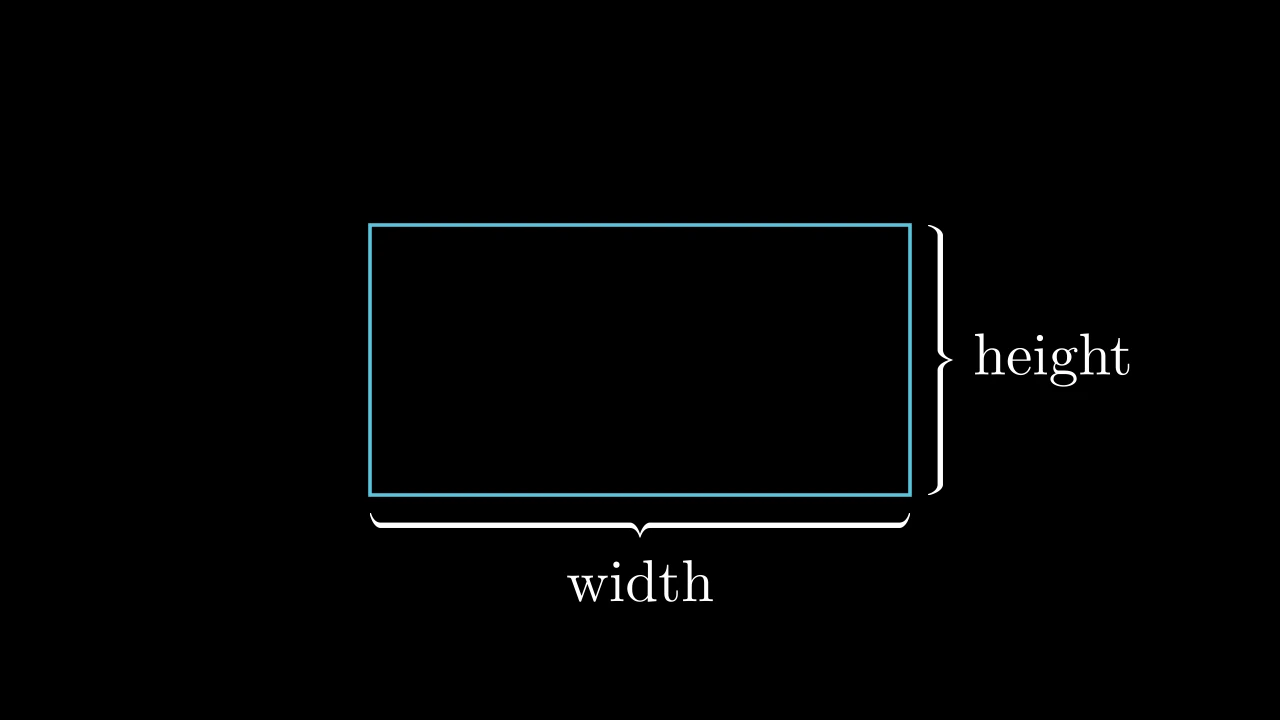
沿 mobject 某一边的花括号,以及在其尖端处的文本标签:一个 标签为 Text 的 BraceLabel。
m.BraceText(obj, text, label_constructor=Text, **kwargs)
obj要加花括号的 mobject。
text标签的文本。
label_constructor标签的类。
brace_direction花括号所在的一侧,以方向表示(默认 DOWN:下方)。
font_size标签的字号(默认 48)。
buffmobject 与花括号之间的间距,以场景单位表示(默认 0.2)。
brace_config花括号关键字,覆盖
buff(默认 None)。color填充与描边共用的颜色(默认白色);None 表示该类的默认值。
fill_color填充的颜色;未给出时为
color。多个颜色沿sheen_direction构成渐变。fill_opacity填充的不透明度,取值从 0 到 1(默认 0:无填充)。
stroke_color描边的颜色;未给出时为
color。多个颜色构成渐变。stroke_opacity描边的不透明度,取值从 0 到 1(默认 1)。
stroke_width描边的宽度,以场景单位的百分之一计(默认 4;0:无描边)。
background_stroke_color绘制于填充之后的轮廓颜色(默认黑色)。
background_stroke_opacity轮廓的不透明度,取值从 0 到 1(默认 1)。
background_stroke_width轮廓的宽度,以场景单位的百分之一计(默认 0:无)。
sheen_factor颜色朝
sheen_direction变亮的程度,取值从 -1 到 1(默认 0); 负值变暗。sheen_direction颜色变亮的方向(默认
UL)。joint_type描边在路径转折处的连接方式:圆角、斜切或斜接,按二维场景的绘制方式 (参见 LineJointType;默认 AUTO:斜接)。
cap_style描边在其显示的每一端的端点样式(开放路径的端点、虚线的端点):圆头、平头 或方头,按二维场景的绘制方式(参见 CapStyleType;默认 AUTO:平头)。
shade_in_3d三维场景的光是否对该 mobject 着色。
material其表面在三维场景中如何反射场景的光(参见 Material);None:Manim 的着色(默认)。
namemobject 的名称;未给出时为其类名。
z_index其在绘制顺序中的位置:索引较高者绘制于较低者之上 (默认 0)。
targetMoveToTarget将 mobject 移动至的状态。
源码
manimgx\mobjects\annotations.py
边框与标记
代码
import manimgx as m


class SurroundingRectangleExample(m.Scene):
    def construct(self) -> None:
        formula = m.MathTex(r"e^{i\pi} + 1 = 0", font_size=96)
        words = m.Text("Euler's identity").next_to(formula, m.DOWN, buff=1)
        self.add(formula, words)
        self.play(
            m.Create(m.SurroundingRectangle(formula, buff=0.3)),
            m.Create(
                m.SurroundingRectangle(words, corner_radius=0.2, color=m.BLUE)
            ),
        )
围绕 mobject 的矩形:围绕它们的包围盒,将它们全部包含在内,
带有边距;亮黄色(PURE_YELLOW),除非另行设置样式。
其尺寸和位置在创建时确定,之后不再跟随这些 mobject。
m.SurroundingRectangle(*mobjects, buff=SMALL_BUFF, corner_radius=0.0, **kwargs)
*mobjects要环绕的 mobject。
buff围绕它们的边距,以场景单位表示:一个值用于所有边,或 (水平, 垂直)。
corner_radius其圆角的半径,以场景单位表示:0 表示直角。
color填充与描边共用的颜色(默认白色);None 表示该类的默认值。
fill_color填充的颜色;未给出时为
color。多个颜色沿sheen_direction构成渐变。fill_opacity填充的不透明度,取值从 0 到 1(默认 0:无填充)。
stroke_color描边的颜色;未给出时为
color。多个颜色构成渐变。stroke_opacity描边的不透明度,取值从 0 到 1(默认 1)。
stroke_width描边的宽度,以场景单位的百分之一计(默认 4;0:无描边)。
background_stroke_color绘制于填充之后的轮廓颜色(默认黑色)。
background_stroke_opacity轮廓的不透明度,取值从 0 到 1(默认 1)。
background_stroke_width轮廓的宽度,以场景单位的百分之一计(默认 0:无)。
sheen_factor颜色朝
sheen_direction变亮的程度,取值从 -1 到 1(默认 0); 负值变暗。sheen_direction颜色变亮的方向(默认
UL)。joint_type描边在路径转折处的连接方式:圆角、斜切或斜接,按二维场景的绘制方式 (参见 LineJointType;默认 AUTO:斜接)。
cap_style描边在其显示的每一端的端点样式(开放路径的端点、虚线的端点):圆头、平头 或方头,按二维场景的绘制方式(参见 CapStyleType;默认 AUTO:平头)。
shade_in_3d三维场景的光是否对该 mobject 着色。
material其表面在三维场景中如何反射场景的光(参见 Material);None:Manim 的着色(默认)。
namemobject 的名称;未给出时为其类名。
z_index其在绘制顺序中的位置:索引较高者绘制于较低者之上 (默认 0)。
targetMoveToTarget将 mobject 移动至的状态。
还接受 样式关键字。
源码
manimgx\mobjects\annotations.py
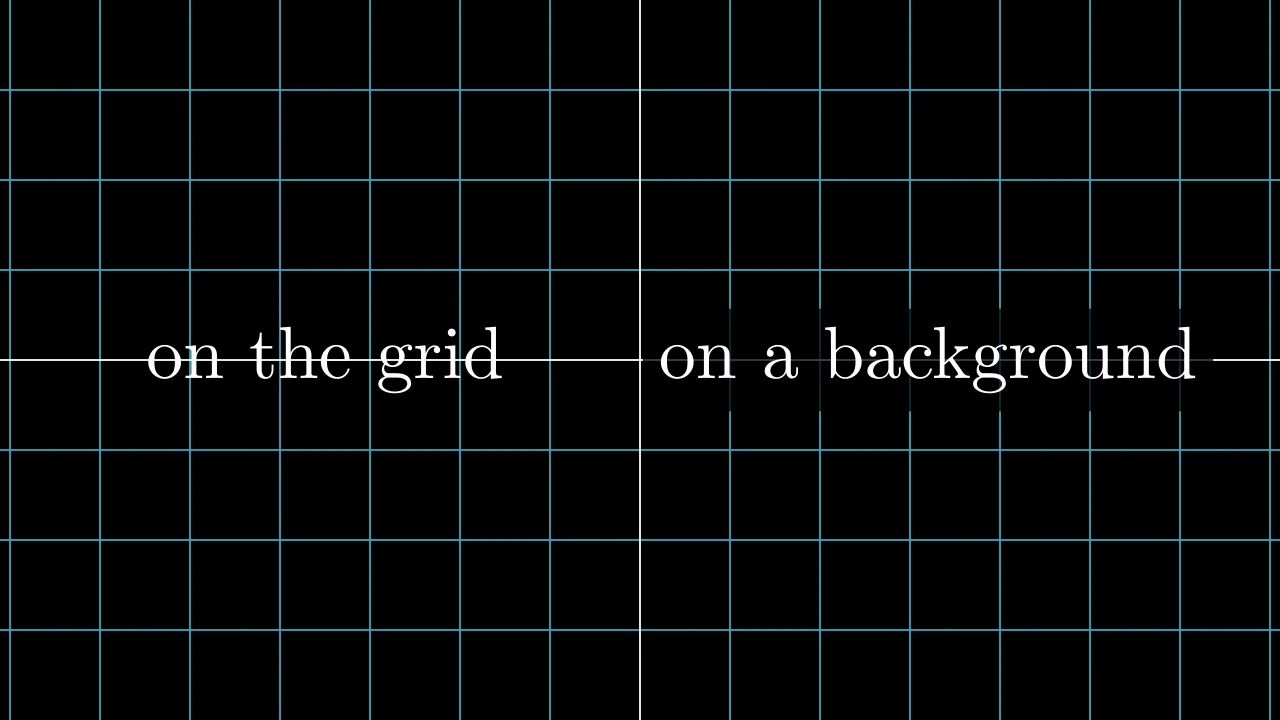
代码
import manimgx as m


class BackgroundRectangleExample(m.Scene):
    def construct(self) -> None:
        bare = m.Text("on the grid", font_size=60).shift(3.5 * m.LEFT)
        backed = m.Text("on a background", font_size=60).shift(3.2 * m.RIGHT)
        background = m.BackgroundRectangle(backed, buff=0.2)
        self.add(m.NumberPlane(), bare, background, backed)
位于 mobject 后面的矩形,使用背景颜色且四分之三不透明, 使它们从背后的内容中凸显出来;没有轮廓线。
其颜色在创建时取场景的背景色,除非另行指定。它位于 mobject 之后:在它们之前将其添加到场景中。
*mobjects要位于其后的 mobject。
buff围绕它们的边距,以场景单位表示:一个值用于所有边,或 (水平, 垂直)。
corner_radius其圆角的半径,以场景单位表示:0 表示直角。
color填充与描边共用的颜色(默认白色);None 表示该类的默认值。
fill_color填充的颜色;未给出时为
color。多个颜色沿sheen_direction构成渐变。fill_opacity填充的不透明度,取值从 0 到 1(默认 0:无填充)。
stroke_color描边的颜色;未给出时为
color。多个颜色构成渐变。stroke_opacity描边的不透明度,取值从 0 到 1(默认 1)。
stroke_width描边的宽度,以场景单位的百分之一计(默认 4;0:无描边)。
background_stroke_color绘制于填充之后的轮廓颜色(默认黑色)。
background_stroke_opacity轮廓的不透明度,取值从 0 到 1(默认 1)。
background_stroke_width轮廓的宽度,以场景单位的百分之一计(默认 0:无)。
sheen_factor颜色朝
sheen_direction变亮的程度,取值从 -1 到 1(默认 0); 负值变暗。sheen_direction颜色变亮的方向(默认
UL)。joint_type描边在路径转折处的连接方式:圆角、斜切或斜接,按二维场景的绘制方式 (参见 LineJointType;默认 AUTO:斜接)。
cap_style描边在其显示的每一端的端点样式(开放路径的端点、虚线的端点):圆头、平头 或方头,按二维场景的绘制方式(参见 CapStyleType;默认 AUTO:平头)。
shade_in_3d三维场景的光是否对该 mobject 着色。
material其表面在三维场景中如何反射场景的光(参见 Material);None:Manim 的着色(默认)。
namemobject 的名称;未给出时为其类名。
z_index其在绘制顺序中的位置:索引较高者绘制于较低者之上 (默认 0)。
targetMoveToTarget将 mobject 移动至的状态。
还接受 样式关键字。
源码
manimgx\mobjects\annotations.py
围绕 mobject 制作的矩形的关键字,作为 SurroundingRectangle 或 BackgroundRectangle 的是:其边距和其圆角, 以及样式关键字(适用于会传递它们的类)。
buff围绕 mobject 的边距,以场景单位表示:一个值用于所有边,或 (水平, 垂直)(默认为:环绕矩形周围 0.1,背景矩形后面 0)。
corner_radius矩形圆角的半径,以场景单位表示(默认 0:直角)。
color填充与描边共用的颜色(默认白色);None 表示该类的默认值。
fill_color填充的颜色;未给出时为
color。多个颜色沿sheen_direction构成渐变。fill_opacity填充的不透明度,取值从 0 到 1(默认 0:无填充)。
stroke_color描边的颜色;未给出时为
color。多个颜色构成渐变。stroke_opacity描边的不透明度,取值从 0 到 1(默认 1)。
stroke_width描边的宽度,以场景单位的百分之一计(默认 4;0:无描边)。
background_stroke_color绘制于填充之后的轮廓颜色(默认黑色)。
background_stroke_opacity轮廓的不透明度,取值从 0 到 1(默认 1)。
background_stroke_width轮廓的宽度,以场景单位的百分之一计(默认 0:无)。
sheen_factor颜色朝
sheen_direction变亮的程度,取值从 -1 到 1(默认 0); 负值变暗。sheen_direction颜色变亮的方向(默认
UL)。joint_type描边在路径转折处的连接方式:圆角、斜切或斜接,按二维场景的绘制方式 (参见 LineJointType;默认 AUTO:斜接)。
cap_style描边在其显示的每一端的端点样式(开放路径的端点、虚线的端点):圆头、平头 或方头,按二维场景的绘制方式(参见 CapStyleType;默认 AUTO:平头)。
shade_in_3d三维场景的光是否对该 mobject 着色。
material其表面在三维场景中如何反射场景的光(参见 Material);None:Manim 的着色(默认)。
namemobject 的名称;未给出时为其类名。
z_index其在绘制顺序中的位置:索引较高者绘制于较低者之上 (默认 0)。
targetMoveToTarget将 mobject 移动至的状态。
位于 mobject 下方的线:与其等宽,在其下方 buff 处;白色,除非另行设置样式。
其尺寸和位置在创建时确定,之后不再跟随该 mobject。
m.Underline(mobject, buff=SMALL_BUFF, **kwargs)
mobject要加下划线的 mobject。
buffmobject 与线之间的间距,以场景单位表示。
path_arc直线所弯曲的角度,以弧度计:0 为直;否则为从起点到终点的弧, 为正时逆时针(行进时向右弯),为负时顺时针(默认 0)。
color填充和描边共用的颜色(默认白色;Circle 的为 红色);None 表示类的默认值。
tip_lengthnormal_vector路径所在平面的法向量(默认 OUT)。为兼容 Manim 而接受;被忽略且不保留。
tip_style路径所生成尖端的样式关键字(默认 None:无)。除非在此给出,否则尖端的
fill_color和stroke_color取路径的颜色。fill_color填充的颜色;未给出时为
color。多个颜色沿sheen_direction构成渐变。fill_opacity填充的不透明度,取值从 0 到 1(默认 0:无填充)。
stroke_color描边的颜色;未给出时为
color。多个颜色构成渐变。stroke_opacity描边的不透明度,取值从 0 到 1(默认 1)。
stroke_width描边的宽度,以场景单位的百分之一计(默认 4;0:无描边)。
background_stroke_color绘制于填充之后的轮廓颜色(默认黑色)。
background_stroke_opacity轮廓的不透明度,取值从 0 到 1(默认 1)。
background_stroke_width轮廓的宽度,以场景单位的百分之一计(默认 0:无)。
sheen_factor颜色朝
sheen_direction变亮的程度,取值从 -1 到 1(默认 0); 负值变暗。sheen_direction颜色变亮的方向(默认
UL)。joint_type描边在路径转折处的连接方式:圆角、斜切或斜接,按二维场景的绘制方式 (参见 LineJointType;默认 AUTO:斜接)。
cap_style描边在其显示的每一端的端点样式(开放路径的端点、虚线的端点):圆头、平头 或方头,按二维场景的绘制方式(参见 CapStyleType;默认 AUTO:平头)。
shade_in_3d三维场景的光是否对该 mobject 着色。
material其表面在三维场景中如何反射场景的光(参见 Material);None:Manim 的着色(默认)。
namemobject 的名称;未给出时为其类名。
z_index其在绘制顺序中的位置:索引较高者绘制于较低者之上 (默认 0)。
targetMoveToTarget将 mobject 移动至的状态。
源码
manimgx\mobjects\annotations.py
叉号,即 X 形:从 mobject 包围盒的对角到对角的两条线,或 原点处边长为 2 的正方形的对角线;红色,宽 6,除非另行设置样式。
mobject要划叉的 mobject:叉号被拉伸覆盖其包围盒;None 表示不针对任何对象。
stroke_color其线条的颜色。
stroke_width其线条的宽度,以百分之一场景单位表示。
scale_factor相对包围盒(或正方形)放大的倍数, 以其中心为基准。
color其线条的颜色,代替
stroke_color;None 表示使用前者。background_stroke_color绘制于填充之后的轮廓颜色(默认黑色)。
background_stroke_opacity轮廓的不透明度,取值从 0 到 1(默认 1)。
background_stroke_width轮廓的宽度,以场景单位的百分之一计(默认 0:无)。
sheen_factor颜色朝
sheen_direction变亮的程度,取值从 -1 到 1(默认 0); 负值变暗。sheen_direction颜色变亮的方向(默认
UL)。joint_type描边在路径转折处的连接方式:圆角、斜切或斜接,按二维场景的绘制方式 (参见 LineJointType;默认 AUTO:斜接)。
cap_style描边在其显示的每一端的端点样式(开放路径的端点、虚线的端点):圆头、平头 或方头,按二维场景的绘制方式(参见 CapStyleType;默认 AUTO:平头)。
shade_in_3d三维场景的光是否对该 mobject 着色。
material其表面在三维场景中如何反射场景的光(参见 Material);None:Manim 的着色(默认)。
namemobject 的名称;未给出时为其类名。
z_index其在绘制顺序中的位置:索引较高者绘制于较低者之上 (默认 0)。
targetMoveToTarget将 mobject 移动至的状态。
还接受 样式关键字。
源码
manimgx\mobjects\annotations.py

代码
import manimgx as m


class AnnotationDotExample(m.Scene):
    def construct(self) -> None:
        arc = m.Arc(radius=3, angle=m.PI, color=m.GREY).shift(1.5 * m.DOWN)
        start = m.AnnotationDot(point=arc.get_start())
        end = m.AnnotationDot(point=arc.get_end())
        top = m.AnnotationDot(
            0.25, point=arc.get_top(), fill_color=m.YELLOW, stroke_color=m.RED
        )
        self.add(arc, start, end, top)
用于标记点的点:比 Dot 略大,未加样式时为蓝色 且带粗白色轮廓。
其颜色为 fill_color 和 stroke_color,color 不会改变它们。
m.AnnotationDot(radius=DEFAULT_DOT_RADIUS * 1.3, *, point=ORIGIN, **kwargs)
radius其半径,以场景单位计(默认 0.104,为点的 1.3 倍)。
point其圆心所在位置。
color填充和描边共用的颜色(默认白色;Circle 的为 红色);None 表示类的默认值。
tip_lengthnormal_vector路径所在平面的法向量(默认 OUT)。为兼容 Manim 而接受;被忽略且不保留。
tip_style路径所生成尖端的样式关键字(默认 None:无)。除非在此给出,否则尖端的
fill_color和stroke_color取路径的颜色。fill_color填充的颜色;未给出时为
color。多个颜色沿sheen_direction构成渐变。fill_opacity填充的不透明度,取值从 0 到 1(默认 0:无填充)。
stroke_color描边的颜色;未给出时为
color。多个颜色构成渐变。stroke_opacity描边的不透明度,取值从 0 到 1(默认 1)。
stroke_width描边的宽度,以场景单位的百分之一计(默认 4;0:无描边)。
background_stroke_color绘制于填充之后的轮廓颜色(默认黑色)。
background_stroke_opacity轮廓的不透明度,取值从 0 到 1(默认 1)。
background_stroke_width轮廓的宽度,以场景单位的百分之一计(默认 0:无)。
sheen_factor颜色朝
sheen_direction变亮的程度,取值从 -1 到 1(默认 0); 负值变暗。sheen_direction颜色变亮的方向(默认
UL)。joint_type描边在路径转折处的连接方式:圆角、斜切或斜接,按二维场景的绘制方式 (参见 LineJointType;默认 AUTO:斜接)。
cap_style描边在其显示的每一端的端点样式(开放路径的端点、虚线的端点):圆头、平头 或方头,按二维场景的绘制方式(参见 CapStyleType;默认 AUTO:平头)。
shade_in_3d三维场景的光是否对该 mobject 着色。
material其表面在三维场景中如何反射场景的光(参见 Material);None:Manim 的着色(默认)。
namemobject 的名称;未给出时为其类名。
z_index其在绘制顺序中的位置:索引较高者绘制于较低者之上 (默认 0)。
targetMoveToTarget将 mobject 移动至的状态。
还接受 箭头关键字。
源码
manimgx\mobjects\shapes.py
标签
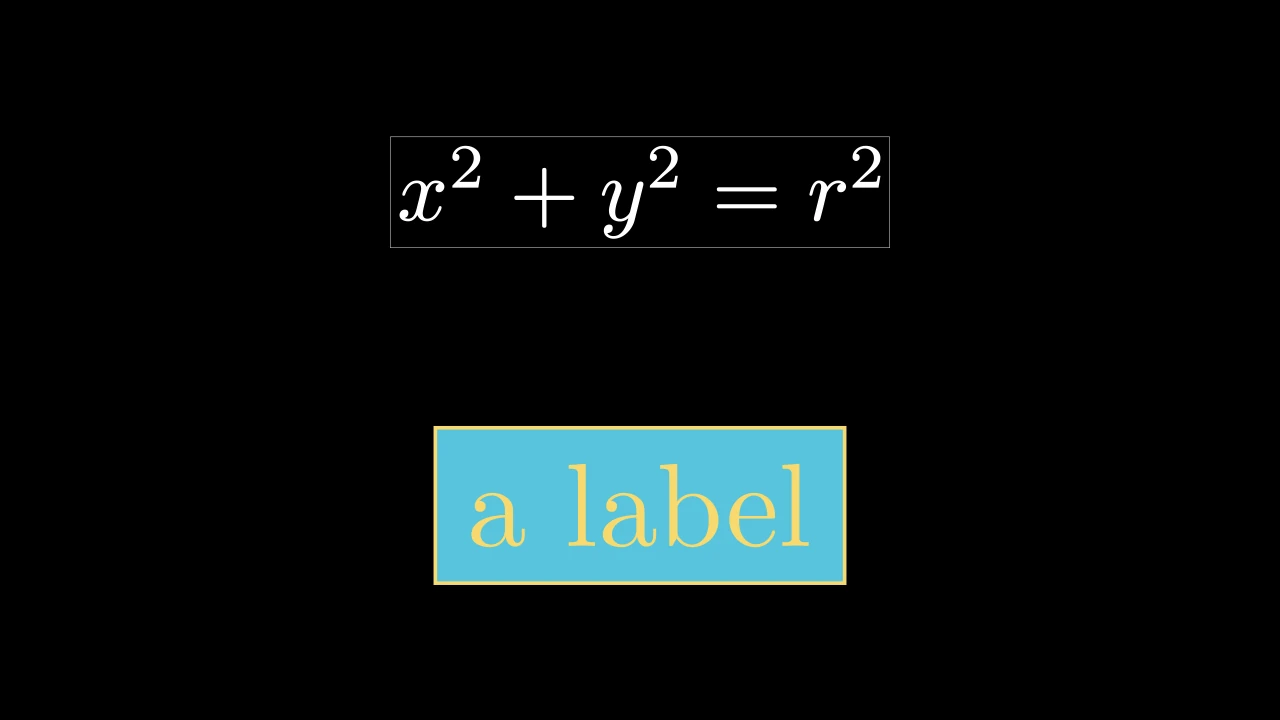
代码
import manimgx as m


class LabelExample(m.Scene):
    def construct(self) -> None:
        plain = m.Label("x^2 + y^2 = r^2")
        styled = m.Label(
            m.Text("a label", color=m.YELLOW),
            box_config={"color": m.BLUE, "buff": 0.2},
            frame_config={"color": m.YELLOW, "stroke_width": 4, "buff": 0.2},
        )
        self.add(m.VGroup(plain, styled).arrange(m.DOWN, buff=1).scale(2))
位于背景之上、边框之中的标签:文本或数学式,置于一个使用背景色 的不透明矩形之上,外围有一圈细白色轮廓。
字符串会被排版为数学式,白色,字号 48(参见 MathTex);文本或数学 mobject 则按原样使用。其各部分 为其子 mobject,按绘制顺序排列:其 background_rect、其 rendered_label 和其 frame。
label标签:一个字符串,排版为数学式,或一个文本/数学 mobject。
label_config针对字符串 标签的 MathTex 关键字, 默认为白色、字号 48。
box_config针对背景的 环绕矩形关键字, 默认边距 0.05 且不透明填充(参见 BackgroundRectangle)。
frame_config针对边框的 环绕矩形关键字, 默认白色、边距 0.05 且宽 0.5 的轮廓线。
color填充与描边共用的颜色(默认白色);None 表示该类的默认值。
fill_color填充的颜色;未给出时为
color。多个颜色沿sheen_direction构成渐变。fill_opacity填充的不透明度,取值从 0 到 1(默认 0:无填充)。
stroke_color描边的颜色;未给出时为
color。多个颜色构成渐变。stroke_opacity描边的不透明度,取值从 0 到 1(默认 1)。
stroke_width描边的宽度,以场景单位的百分之一计(默认 4;0:无描边)。
background_stroke_color绘制于填充之后的轮廓颜色(默认黑色)。
background_stroke_opacity轮廓的不透明度,取值从 0 到 1(默认 1)。
background_stroke_width轮廓的宽度,以场景单位的百分之一计(默认 0:无)。
sheen_factor颜色朝
sheen_direction变亮的程度,取值从 -1 到 1(默认 0); 负值变暗。sheen_direction颜色变亮的方向(默认
UL)。joint_type描边在路径转折处的连接方式:圆角、斜切或斜接,按二维场景的绘制方式 (参见 LineJointType;默认 AUTO:斜接)。
cap_style描边在其显示的每一端的端点样式(开放路径的端点、虚线的端点):圆头、平头 或方头,按二维场景的绘制方式(参见 CapStyleType;默认 AUTO:平头)。
shade_in_3d三维场景的光是否对该 mobject 着色。
material其表面在三维场景中如何反射场景的光(参见 Material);None:Manim 的着色(默认)。
namemobject 的名称;未给出时为其类名。
z_index其在绘制顺序中的位置:索引较高者绘制于较低者之上 (默认 0)。
targetMoveToTarget将 mobject 移动至的状态。
还接受 样式关键字。
源码
manimgx\mobjects\annotations.py
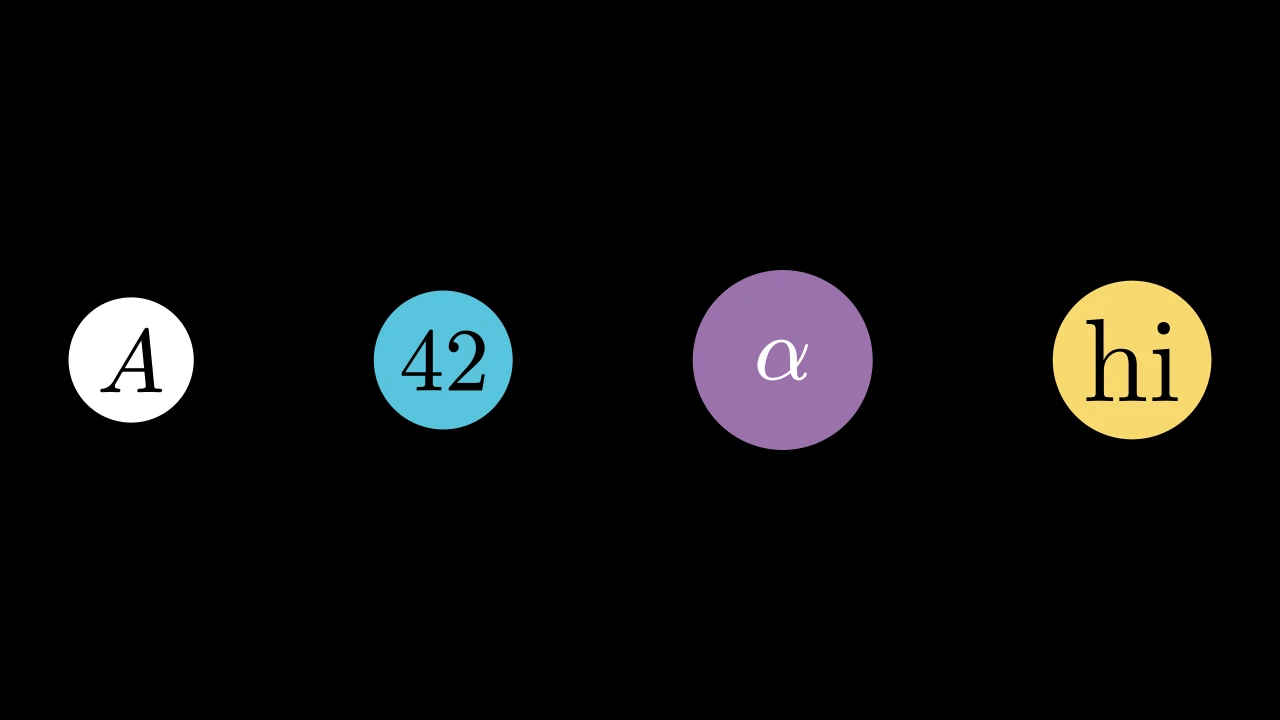
代码
import manimgx as m


class LabeledDotExample(m.Scene):
    def construct(self) -> None:
        dots = m.VGroup(
            m.LabeledDot("A"),
            m.LabeledDot("42", color=m.BLUE),
            m.LabeledDot(m.MathTex(r"\alpha"), color=m.PURPLE, radius=0.5),
            m.LabeledDot(m.Text("hi", color=m.BLACK), color=m.YELLOW),
        ).arrange(buff=1)
        self.add(dots.scale(2))
中间带标签的点:一个刚好能容纳标签的圆盘,除非给定半径; 白色,无轮廓线,除非另行设置样式。
它在原点处创建,标签居中于其上,是其子 mobject。
m.LabeledDot(label, radius=None, buff=SMALL_BUFF, **kwargs)
label标签:一个字符串,排版为黑色的数学式(参见 MathTex),或一个 mobject,按原样使用。
radius其半径,以场景单位表示;None 表示标签包围盒对角线的一半 加
buff。buff当半径适配标签时,标签各角与点边缘之间的边距,以场景 单位表示。
color填充和描边共用的颜色(默认白色;Circle 的为 红色);None 表示类的默认值。
tip_lengthnormal_vector路径所在平面的法向量(默认 OUT)。为兼容 Manim 而接受;被忽略且不保留。
tip_style路径所生成尖端的样式关键字(默认 None:无)。除非在此给出,否则尖端的
fill_color和stroke_color取路径的颜色。fill_color填充的颜色;未给出时为
color。多个颜色沿sheen_direction构成渐变。fill_opacity填充的不透明度,取值从 0 到 1(默认 0:无填充)。
stroke_color描边的颜色;未给出时为
color。多个颜色构成渐变。stroke_opacity描边的不透明度,取值从 0 到 1(默认 1)。
stroke_width描边的宽度,以场景单位的百分之一计(默认 4;0:无描边)。
background_stroke_color绘制于填充之后的轮廓颜色(默认黑色)。
background_stroke_opacity轮廓的不透明度,取值从 0 到 1(默认 1)。
background_stroke_width轮廓的宽度,以场景单位的百分之一计(默认 0:无)。
sheen_factor颜色朝
sheen_direction变亮的程度,取值从 -1 到 1(默认 0); 负值变暗。sheen_direction颜色变亮的方向(默认
UL)。joint_type描边在路径转折处的连接方式:圆角、斜切或斜接,按二维场景的绘制方式 (参见 LineJointType;默认 AUTO:斜接)。
cap_style描边在其显示的每一端的端点样式(开放路径的端点、虚线的端点):圆头、平头 或方头,按二维场景的绘制方式(参见 CapStyleType;默认 AUTO:平头)。
shade_in_3d三维场景的光是否对该 mobject 着色。
material其表面在三维场景中如何反射场景的光(参见 Material);None:Manim 的着色(默认)。
namemobject 的名称;未给出时为其类名。
z_index其在绘制顺序中的位置:索引较高者绘制于较低者之上 (默认 0)。
targetMoveToTarget将 mobject 移动至的状态。
还接受 箭头关键字。
源码
manimgx\mobjects\annotations.py
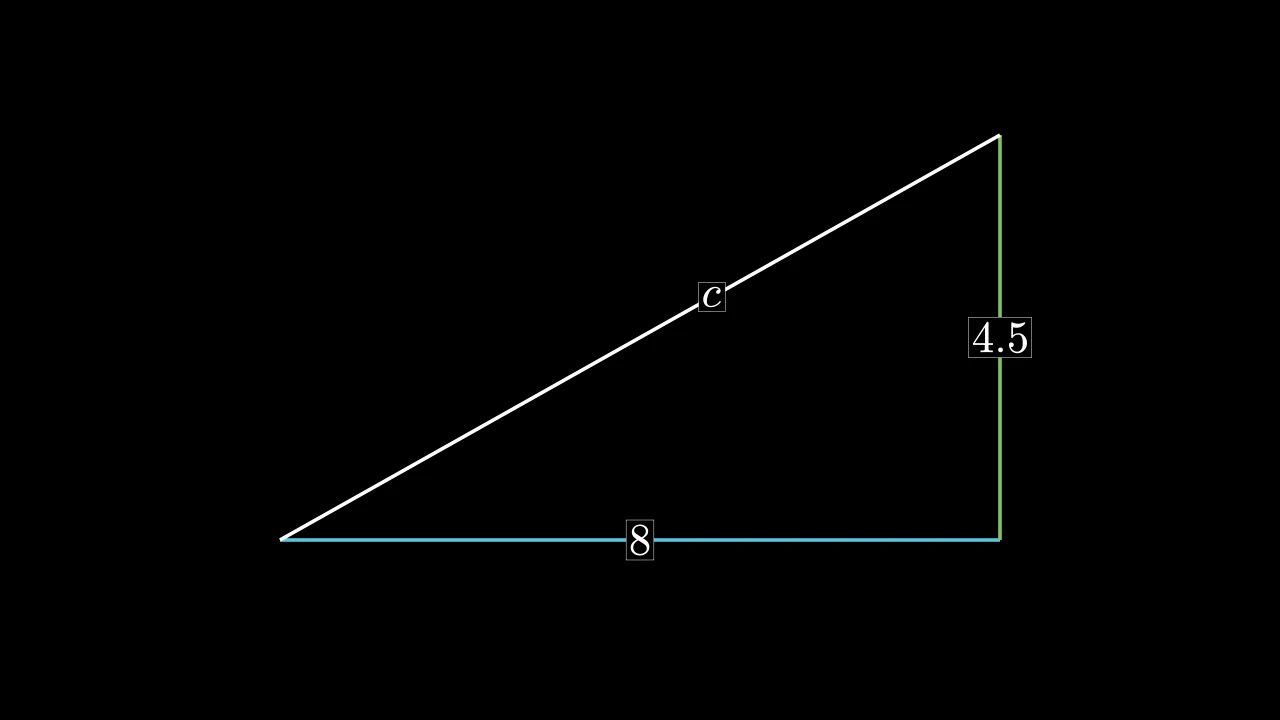
代码
import manimgx as m


class LabeledLineExample(m.Scene):
    def construct(self) -> None:
        a, b, c = [-4, -2, 0], [4, -2, 0], [4, 2.5, 0]
        sides = m.VGroup(
            m.LabeledLine("8", start=a, end=b, color=m.BLUE),
            m.LabeledLine("4.5", start=b, end=c, color=m.GREEN),
            m.LabeledLine("c", start=c, end=a, label_position=0.4),
        )
        self.add(sides)
带有标签的线:一个 Label 居中于从线的起点到终点
沿途 label_position 比例处;白色,除非另行设置样式。
标签是一个子 mobject,即线的 label。它 被放置在两端之间的直线路径上,即使线是弯折的也是如此。
label标签:一个字符串,排版为数学式,或一个文本/数学 mobject。
label_position标签的位置,以从线的起点 (0) 到终点 (1) 的 比例表示。
label_config针对字符串 标签的 MathTex 关键字 (参见 Label)。
box_config针对标签背景的 环绕矩形关键字。
frame_config针对标签边框的 环绕矩形关键字。
start线的起点:一个点,或一个 mobject(参见 Line)。
end线的终点:一个点,或一个 mobject。
buff直线距每端缩短多少,以场景单位计;短于两倍它的直线保留其端点(默认 0)。
path_arc直线所弯曲的角度,以弧度计:0 为直;否则为从起点到终点的弧, 为正时逆时针(行进时向右弯),为负时顺时针(默认 0)。
color填充和描边共用的颜色(默认白色;Circle 的为 红色);None 表示类的默认值。
tip_lengthnormal_vector路径所在平面的法向量(默认 OUT)。为兼容 Manim 而接受;被忽略且不保留。
tip_style路径所生成尖端的样式关键字(默认 None:无)。除非在此给出,否则尖端的
fill_color和stroke_color取路径的颜色。fill_color填充的颜色;未给出时为
color。多个颜色沿sheen_direction构成渐变。fill_opacity填充的不透明度,取值从 0 到 1(默认 0:无填充)。
stroke_color描边的颜色;未给出时为
color。多个颜色构成渐变。stroke_opacity描边的不透明度,取值从 0 到 1(默认 1)。
stroke_width描边的宽度,以场景单位的百分之一计(默认 4;0:无描边)。
background_stroke_color绘制于填充之后的轮廓颜色(默认黑色)。
background_stroke_opacity轮廓的不透明度,取值从 0 到 1(默认 1)。
background_stroke_width轮廓的宽度,以场景单位的百分之一计(默认 0:无)。
sheen_factor颜色朝
sheen_direction变亮的程度,取值从 -1 到 1(默认 0); 负值变暗。sheen_direction颜色变亮的方向(默认
UL)。joint_type描边在路径转折处的连接方式:圆角、斜切或斜接,按二维场景的绘制方式 (参见 LineJointType;默认 AUTO:斜接)。
cap_style描边在其显示的每一端的端点样式(开放路径的端点、虚线的端点):圆头、平头 或方头,按二维场景的绘制方式(参见 CapStyleType;默认 AUTO:平头)。
shade_in_3d三维场景的光是否对该 mobject 着色。
material其表面在三维场景中如何反射场景的光(参见 Material);None:Manim 的着色(默认)。
namemobject 的名称;未给出时为其类名。
z_index其在绘制顺序中的位置:索引较高者绘制于较低者之上 (默认 0)。
targetMoveToTarget将 mobject 移动至的状态。
源码
manimgx\mobjects\annotations.py
标签,一个子 mobject。
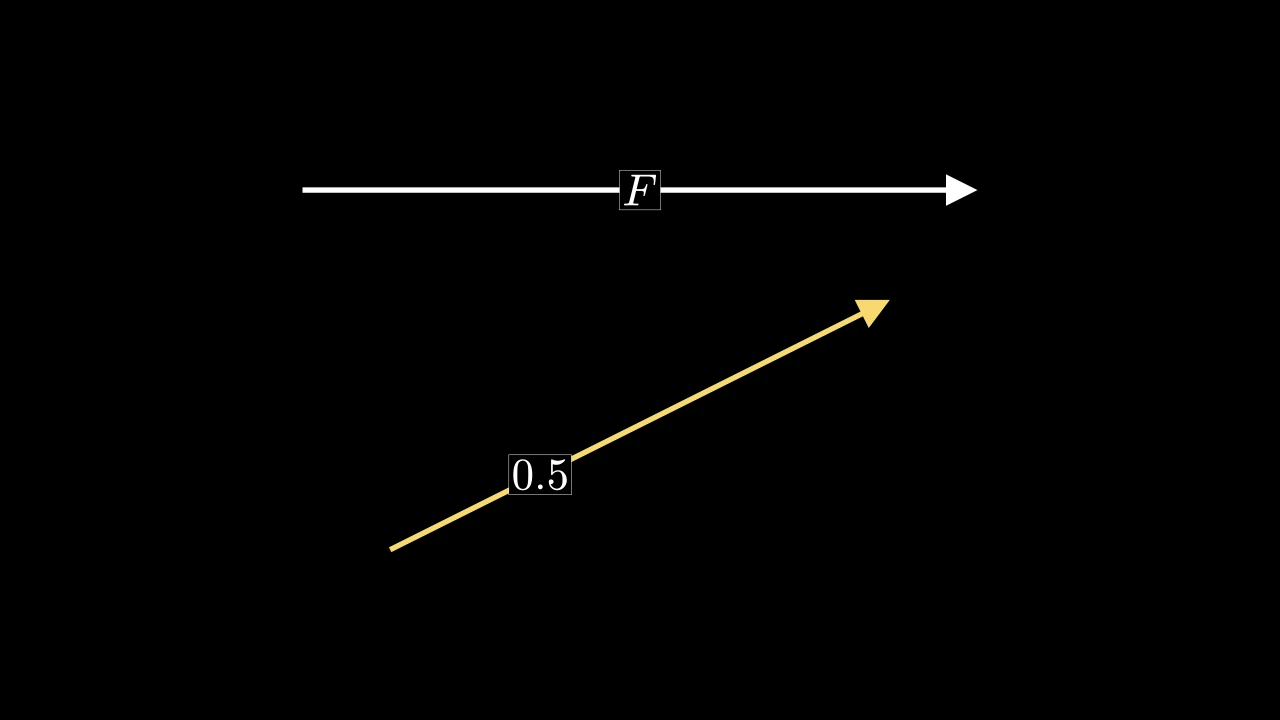
代码
import manimgx as m


class LabeledArrowExample(m.Scene):
    def construct(self) -> None:
        arrows = m.VGroup(
            m.LabeledArrow("F", start=4 * m.LEFT, end=4 * m.RIGHT),
            m.LabeledArrow(
                "0.5",
                label_position=0.3,
                start=3 * m.LEFT + m.DOWN,
                end=3 * m.RIGHT + 2 * m.UP,
                color=m.YELLOW,
            ),
        ).arrange(m.DOWN, buff=1)
        self.add(arrows)
带有标签的箭头:一个作为 Arrow 的
LabeledLine,在其两端各留 0.25 的间距,除非另行指定
buff;白色,除非另行设置样式。
label标签:一个字符串,排版为数学式,或一个文本/数学 mobject。
label_position标签的位置,以从箭头起点 (0) 到箭尖点 (1) 的 比例表示。
label_config针对字符串 标签的 MathTex 关键字 (参见 Label)。
box_config针对标签背景的 环绕矩形关键字。
frame_config针对标签边框的 环绕矩形关键字。
start箭头的起点:一个点,或一个 mobject(参见 Line)。
end箭头指向的位置:一个点,或一个 mobject。
buff直线距每端缩短多少,以场景单位计;短于两倍它的直线保留其端点(默认 0)。
path_arc直线所弯曲的角度,以弧度计:0 为直;否则为从起点到终点的弧, 为正时逆时针(行进时向右弯),为负时顺时针(默认 0)。
color填充和描边共用的颜色(默认白色;Circle 的为 红色);None 表示类的默认值。
tip_lengthnormal_vector路径所在平面的法向量(默认 OUT)。为兼容 Manim 而接受;被忽略且不保留。
tip_style路径所生成尖端的样式关键字(默认 None:无)。除非在此给出,否则尖端的
fill_color和stroke_color取路径的颜色。fill_color填充的颜色;未给出时为
color。多个颜色沿sheen_direction构成渐变。fill_opacity填充的不透明度,取值从 0 到 1(默认 0:无填充)。
stroke_color描边的颜色;未给出时为
color。多个颜色构成渐变。stroke_opacity描边的不透明度,取值从 0 到 1(默认 1)。
stroke_width描边的宽度,以场景单位的百分之一计(默认 4;0:无描边)。
background_stroke_color绘制于填充之后的轮廓颜色(默认黑色)。
background_stroke_opacity轮廓的不透明度,取值从 0 到 1(默认 1)。
background_stroke_width轮廓的宽度,以场景单位的百分之一计(默认 0:无)。
sheen_factor颜色朝
sheen_direction变亮的程度,取值从 -1 到 1(默认 0); 负值变暗。sheen_direction颜色变亮的方向(默认
UL)。joint_type描边在路径转折处的连接方式:圆角、斜切或斜接,按二维场景的绘制方式 (参见 LineJointType;默认 AUTO:斜接)。
cap_style描边在其显示的每一端的端点样式(开放路径的端点、虚线的端点):圆头、平头 或方头,按二维场景的绘制方式(参见 CapStyleType;默认 AUTO:平头)。
shade_in_3d三维场景的光是否对该 mobject 着色。
material其表面在三维场景中如何反射场景的光(参见 Material);None:Manim 的着色(默认)。
namemobject 的名称;未给出时为其类名。
z_index其在绘制顺序中的位置:索引较高者绘制于较低者之上 (默认 0)。
targetMoveToTarget将 mobject 移动至的状态。
源码
manimgx\mobjects\annotations.py
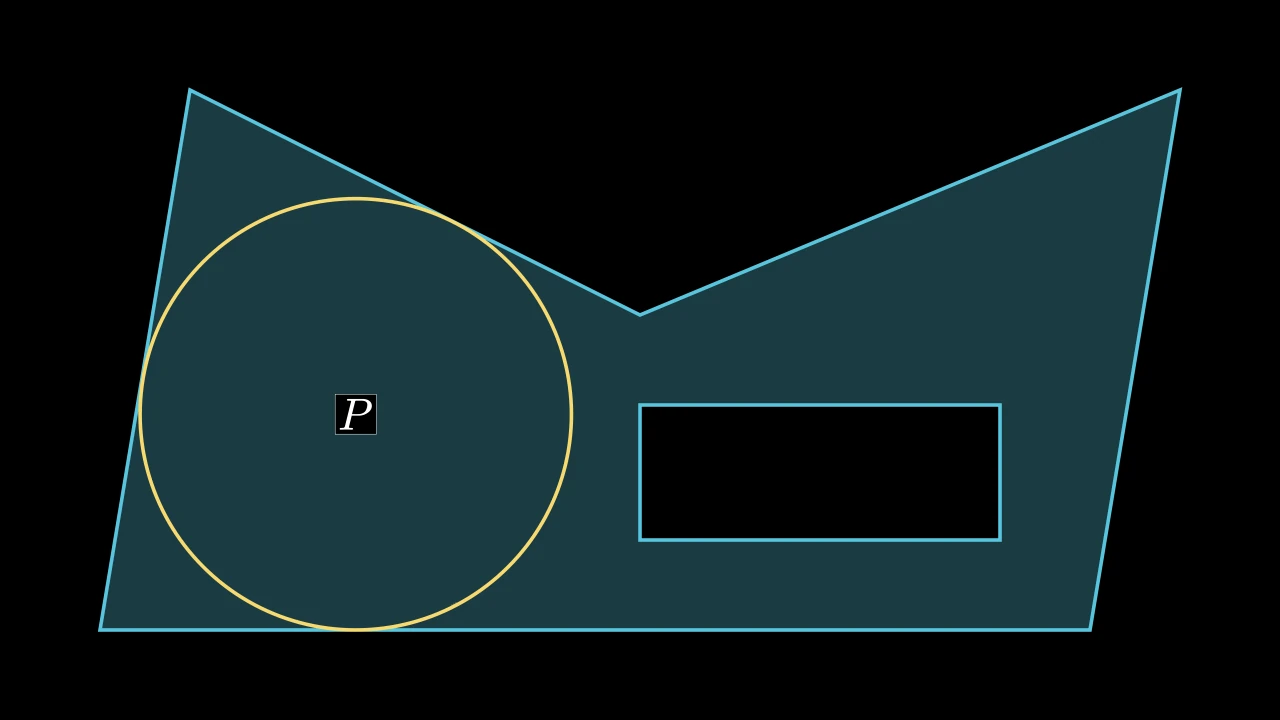
代码
import manimgx as m


class LabeledPolygramExample(m.Scene):
    def construct(self) -> None:
        outline = [[-6, -3, 0], [5, -3, 0], [6, 3, 0], [0, 0.5, 0], [-5, 3, 0]]
        hole = [[0, -2, 0], [0, -0.5, 0], [4, -0.5, 0], [4, -2, 0]]
        shape = m.LabeledPolygram(outline, hole, label="P", fill_opacity=0.3)
        reach = m.Circle(shape.radius, color=m.YELLOW).move_to(shape.pole)
        self.add(shape, reach)
带有内部标签的多边形,标签位于其不可及极点处:即
其内部距离边缘最远的点,在 precision 精度内求得;蓝色,除非另行设置样式。
第一组顶点为其外轮廓,其余各组为孔洞,标签会被排除在这些孔洞之外。标签
是一个子 mobject,即 label;
pole 为其所在位置,radius 为该位置到最近边缘的距离。
*vertex_groups各顶点组,每组为一条闭合路径(参见 Polygram):先外轮廓,再其孔洞。
label标签:一个字符串,排版为数学式,或一个文本/数学 mobject。
precision多边形边缘最大距离所允许的误差, 以场景单位表示。多个标签位置都可能满足此半径容差。
label_config针对字符串 标签的 MathTex 关键字 (参见 Label)。
box_config针对标签背景的 环绕矩形关键字。
frame_config针对标签边框的 环绕矩形关键字。
color填充与描边共用的颜色(默认白色);None 表示该类的默认值。
fill_color填充的颜色;未给出时为
color。多个颜色沿sheen_direction构成渐变。fill_opacity填充的不透明度,取值从 0 到 1(默认 0:无填充)。
stroke_color描边的颜色;未给出时为
color。多个颜色构成渐变。stroke_opacity描边的不透明度,取值从 0 到 1(默认 1)。
stroke_width描边的宽度,以场景单位的百分之一计(默认 4;0:无描边)。
background_stroke_color绘制于填充之后的轮廓颜色(默认黑色)。
background_stroke_opacity轮廓的不透明度,取值从 0 到 1(默认 1)。
background_stroke_width轮廓的宽度,以场景单位的百分之一计(默认 0:无)。
sheen_factor颜色朝
sheen_direction变亮的程度,取值从 -1 到 1(默认 0); 负值变暗。sheen_direction颜色变亮的方向(默认
UL)。joint_type描边在路径转折处的连接方式:圆角、斜切或斜接,按二维场景的绘制方式 (参见 LineJointType;默认 AUTO:斜接)。
cap_style描边在其显示的每一端的端点样式(开放路径的端点、虚线的端点):圆头、平头 或方头,按二维场景的绘制方式(参见 CapStyleType;默认 AUTO:平头)。
shade_in_3d三维场景的光是否对该 mobject 着色。
material其表面在三维场景中如何反射场景的光(参见 Material);None:Manim 的着色(默认)。
namemobject 的名称;未给出时为其类名。
z_index其在绘制顺序中的位置:索引较高者绘制于较低者之上 (默认 0)。
targetMoveToTarget将 mobject 移动至的状态。
还接受 样式关键字。
源码
manimgx\mobjects\annotations.py
标签,一个子 mobject。
角
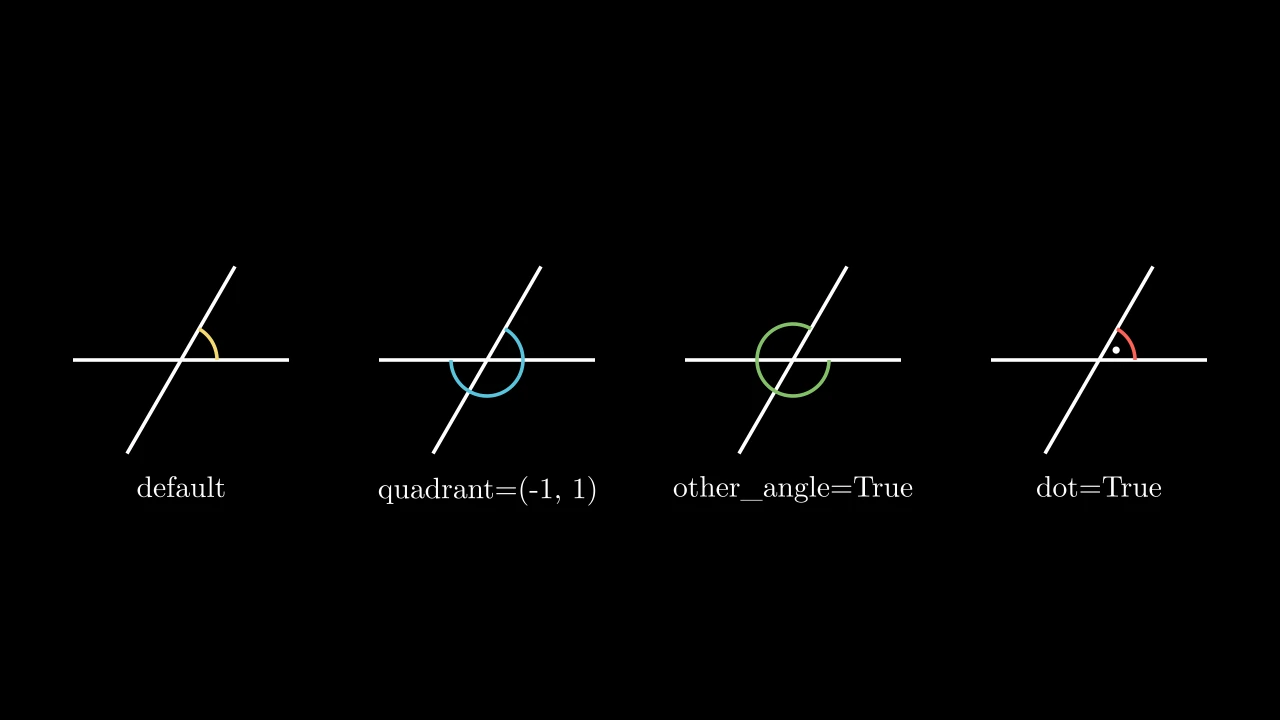
代码
import manimgx as m


class AngleExample(m.Scene):
    def construct(self) -> None:
        line1 = m.Line(1.2 * m.LEFT, 1.2 * m.RIGHT)
        line2 = m.Line(1.2 * m.DOWN, 1.2 * m.UP).rotate(-30 * m.DEGREES)
        angles = [
            m.Angle(line1, line2, color=m.YELLOW),
            m.Angle(line1, line2, quadrant=(-1, 1), color=m.BLUE),
            m.Angle(line1, line2, other_angle=True, color=m.GREEN),
            m.Angle(line1, line2, dot=True, color=m.RED),
        ]
        labels = ["default", "quadrant=(-1, 1)", "other_angle=True", "dot=True"]
        panels = m.VGroup()
        for angle in angles:
            panels.add(m.VGroup(line1.copy(), line2.copy(), angle))
        panels.arrange(buff=1)
        for panel, label in zip(panels, labels):
            text = m.Text(label, font_size=24).next_to(panel, m.DOWN)
            self.add(panel, text)
两直线间角的标记:关于其交叉点的弧,从沿第一条直线的一侧逆时针到沿第二条 直线的一侧;未加样式时为白色。
直线被视为无限长,因此无需到达交叉点。从交叉点起,quadrant 选择每侧沿其直线
的方向,other_angle 改为顺时针,标记整圈的其余部分:两者共同选择所标记的角,
可超过半圈。带 elbow 时,标记为两段线段,在两侧间成角,如直角标记。屏幕平面
内的平行线产生空标记,值为 0。
line1角所从测量的直线。
line2角所至测量的直线。
radius弧的半径,或直角标记的边长,以场景单位计;None 表示 0.4,或短直线时 为从交叉点到侧所指较近端距离的三分之二,当其小于 0.6 时。
quadrant每侧从交叉点出发的方向:每条线一个符号,
line1在前;1 沿该线 方向(从其起点指向终点),-1 则反向指向起点。other_angle弧是否改为从第一侧到第二侧顺时针运行,标记整圈的其余部分。
dot是否在弧内放一个点(直角标记无点)。
dot_radius点的半径,以场景单位计;None 表示弧半径的十分之一。
dot_distance点距交叉点多远,以弧半径的分数计。
dot_color点的颜色。
elbow是否用直角标记代替弧标记角。
color填充与描边共用的颜色(默认白色);None 表示该类的默认值。
fill_color填充的颜色;未给出时为
color。多个颜色沿sheen_direction构成渐变。fill_opacity填充的不透明度,取值从 0 到 1(默认 0:无填充)。
stroke_color描边的颜色;未给出时为
color。多个颜色构成渐变。stroke_opacity描边的不透明度,取值从 0 到 1(默认 1)。
stroke_width描边的宽度,以场景单位的百分之一计(默认 4;0:无描边)。
background_stroke_color绘制于填充之后的轮廓颜色(默认黑色)。
background_stroke_opacity轮廓的不透明度,取值从 0 到 1(默认 1)。
background_stroke_width轮廓的宽度,以场景单位的百分之一计(默认 0:无)。
sheen_factor颜色朝
sheen_direction变亮的程度,取值从 -1 到 1(默认 0); 负值变暗。sheen_direction颜色变亮的方向(默认
UL)。joint_type描边在路径转折处的连接方式:圆角、斜切或斜接,按二维场景的绘制方式 (参见 LineJointType;默认 AUTO:斜接)。
cap_style描边在其显示的每一端的端点样式(开放路径的端点、虚线的端点):圆头、平头 或方头,按二维场景的绘制方式(参见 CapStyleType;默认 AUTO:平头)。
shade_in_3d三维场景的光是否对该 mobject 着色。
material其表面在三维场景中如何反射场景的光(参见 Material);None:Manim 的着色(默认)。
namemobject 的名称;未给出时为其类名。
z_index其在绘制顺序中的位置:索引较高者绘制于较低者之上 (默认 0)。
targetMoveToTarget将 mobject 移动至的状态。
还接受 样式关键字。
源码
manimgx\mobjects\shapes.py
3546 3547 3548 3549 3550 3551 3552 3553 3554 3555 3556 3557 3558 3559 3560 3561 3562 3563 3564 3565 3566 3567 3568 3569 3570 3571 3572 3573 3574 3575 3576 3577 3578 3579 3580 3581 3582 3583 3584 3585 3586 3587 3588 3589 3590 3591 3592 3593 3594 3595 3596 3597 3598 3599 3600 3601 3602 3603 3604 3605 3606 3607 3608 3609 3610 3611 3612 3613 3614 3615 3616 3617 3618 3619 3620 3621 3622 3623 3624 3625 3626 3627 3628 3629 3630 3631 3632 3633 3634 3635 3636 3637 3638 3639 3640 3641 3642 3643 3644 3645 3646 3647 | |
所标记角的大小:从第一侧到第二侧逆时针,或带 other_angle 时顺时针且为负。
以直角标记的角无值:查询它会引发异常。
degrees是否以度而非弧度给出。
返回 角,以弧度(或度)计,范围 -TAU 到 TAU。
源码
manimgx\mobjects\shapes.py
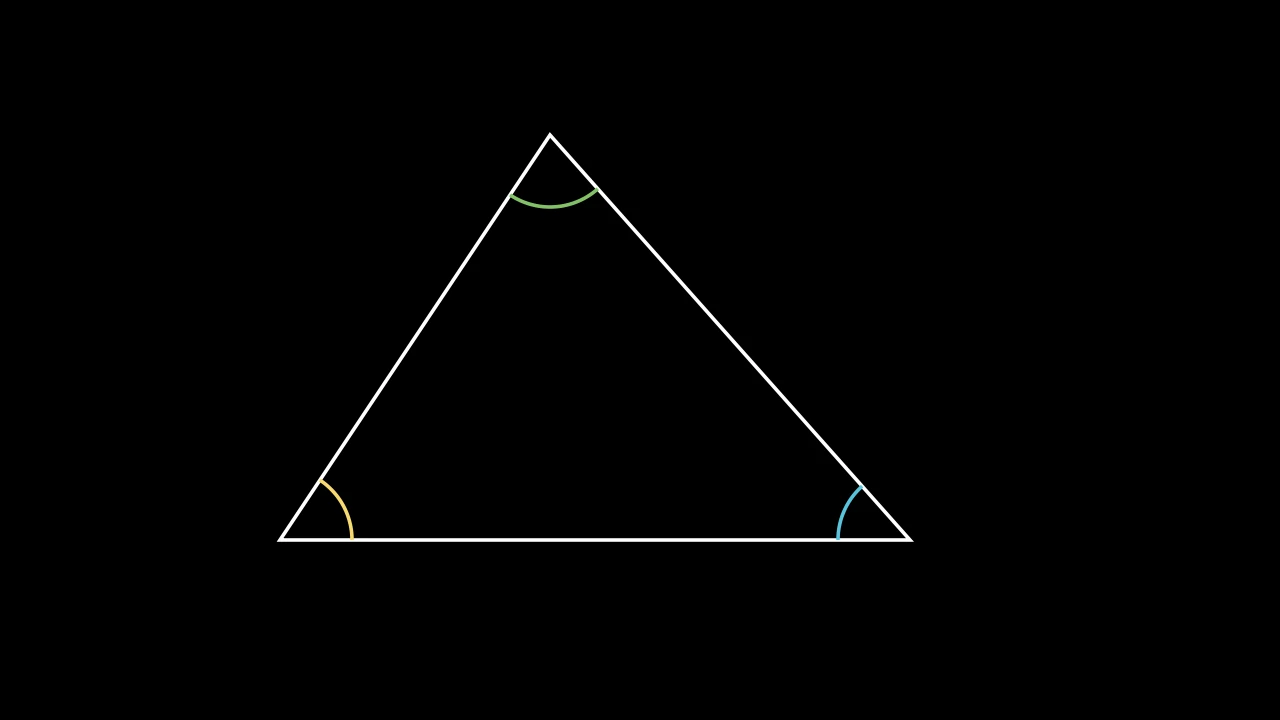
代码
import manimgx as m


class AngleFromThreePointsExample(m.Scene):
    def construct(self) -> None:
        a, b, c = [-4, -2, 0], [3, -2, 0], [-1, 2.5, 0]
        angles = m.VGroup(
            m.Angle.from_three_points(b, a, c, radius=0.8, color=m.YELLOW),
            m.Angle.from_three_points(c, b, a, radius=0.8, color=m.BLUE),
            m.Angle.from_three_points(a, c, b, radius=0.8, color=m.GREEN),
        )
        self.add(m.Polygon(a, b, c, color=m.WHITE), angles)
角 ABC 的标记:在 B 处,从朝 A 的直线逆时针到朝 C 的直线。
A第一侧上一点。
B顶点。
C第二侧上一点。
radius弧的半径,或直角标记的边长,以场景单位计(默认 None:0.4,或短直线时 为从交叉点到侧所指较近端距离的三分之二,当其小于 0.6 时)。
elbow是否用直角标记(两段在其两侧间成角的线段)代替弧标记角(默认 False)。
quadrant角的每侧从交叉点出发的方向:每条线一个符号,第一条线在前;1 沿该线方向 (从其起点指向终点),-1 则反向指向起点(默认 (1, 1))。
other_angle弧是否从第一侧到第二侧顺时针运行,而非逆时针:此时标记整圈的其余部分 (默认 False)。
dot是否在弧内放一个点,如直角有时标记的那样(默认 False;直角标记无点)。
dot_radius点的半径,以场景单位计(默认 None:弧半径的十分之一)。
dot_distance点距交叉点多远,以弧半径的分数计(默认 0.55)。
dot_color点的颜色(默认白色)。
color填充与描边共用的颜色(默认白色);None 表示该类的默认值。
fill_color填充的颜色;未给出时为
color。多个颜色沿sheen_direction构成渐变。fill_opacity填充的不透明度,取值从 0 到 1(默认 0:无填充)。
stroke_color描边的颜色;未给出时为
color。多个颜色构成渐变。stroke_opacity描边的不透明度,取值从 0 到 1(默认 1)。
stroke_width描边的宽度,以场景单位的百分之一计(默认 4;0:无描边)。
background_stroke_color绘制于填充之后的轮廓颜色(默认黑色)。
background_stroke_opacity轮廓的不透明度,取值从 0 到 1(默认 1)。
background_stroke_width轮廓的宽度,以场景单位的百分之一计(默认 0:无)。
sheen_factor颜色朝
sheen_direction变亮的程度,取值从 -1 到 1(默认 0); 负值变暗。sheen_direction颜色变亮的方向(默认
UL)。joint_type描边在路径转折处的连接方式:圆角、斜切或斜接,按二维场景的绘制方式 (参见 LineJointType;默认 AUTO:斜接)。
cap_style描边在其显示的每一端的端点样式(开放路径的端点、虚线的端点):圆头、平头 或方头,按二维场景的绘制方式(参见 CapStyleType;默认 AUTO:平头)。
shade_in_3d三维场景的光是否对该 mobject 着色。
material其表面在三维场景中如何反射场景的光(参见 Material);None:Manim 的着色(默认)。
namemobject 的名称;未给出时为其类名。
z_index其在绘制顺序中的位置:索引较高者绘制于较低者之上 (默认 0)。
targetMoveToTarget将 mobject 移动至的状态。
返回 一个新角。
源码
manimgx\mobjects\shapes.py
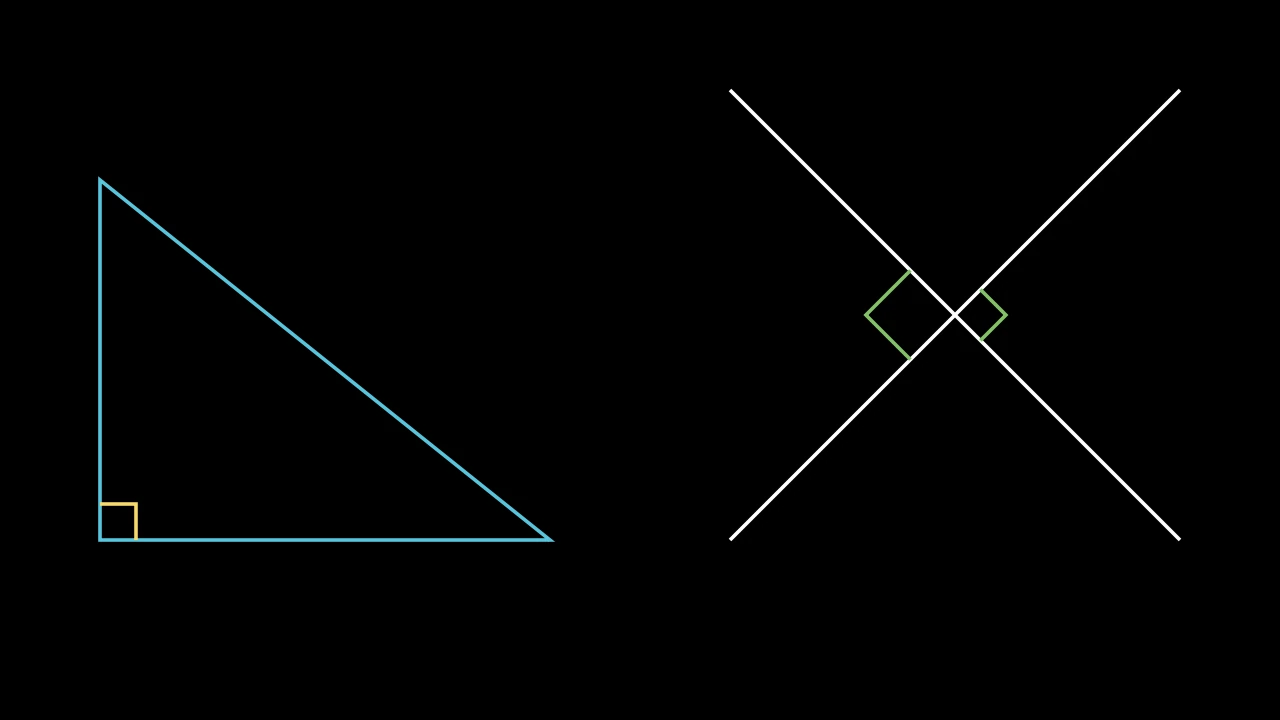
代码
import manimgx as m


class RightAngleExample(m.Scene):
    def construct(self) -> None:
        a, b, c = [-6, -2, 0], [-1, -2, 0], [-6, 2, 0]
        triangle = m.Polygon(a, b, c, color=m.BLUE)
        corner = m.RightAngle(m.Line(a, b), m.Line(a, c), color=m.YELLOW)
        line1 = m.Line([1, -2, 0], [6, 3, 0])
        line2 = m.Line([1, 3, 0], [6, -2, 0])
        marks = m.VGroup(
            m.RightAngle(line1, line2),
            m.RightAngle(line1, line2, length=0.7, quadrant=(-1, -1)),
        ).set_color(m.GREEN)
        self.add(triangle, corner, line1, line2, marks)
两直线间直角的标记:以直角标记的 Angle;未加样式时为白色。
两直线无需垂直:此时直角标记为平行四边形的一角。
line1第一条直线。
line2第二条直线。
length直角标记边长的长度,以场景单位计;None 表示 0.4,或短直线时更小 (见 Angle)。
quadrant角的每侧从交叉点出发的方向:每条线一个符号,第一条线在前;1 沿该线方向 (从其起点指向终点),-1 则反向指向起点(默认 (1, 1))。
other_angle弧是否从第一侧到第二侧顺时针运行,而非逆时针:此时标记整圈的其余部分 (默认 False)。
dot是否在弧内放一个点,如直角有时标记的那样(默认 False;直角标记无点)。
dot_radius点的半径,以场景单位计(默认 None:弧半径的十分之一)。
dot_distance点距交叉点多远,以弧半径的分数计(默认 0.55)。
dot_color点的颜色(默认白色)。
color填充与描边共用的颜色(默认白色);None 表示该类的默认值。
fill_color填充的颜色;未给出时为
color。多个颜色沿sheen_direction构成渐变。fill_opacity填充的不透明度,取值从 0 到 1(默认 0:无填充)。
stroke_color描边的颜色;未给出时为
color。多个颜色构成渐变。stroke_opacity描边的不透明度,取值从 0 到 1(默认 1)。
stroke_width描边的宽度,以场景单位的百分之一计(默认 4;0:无描边)。
background_stroke_color绘制于填充之后的轮廓颜色(默认黑色)。
background_stroke_opacity轮廓的不透明度,取值从 0 到 1(默认 1)。
background_stroke_width轮廓的宽度,以场景单位的百分之一计(默认 0:无)。
sheen_factor颜色朝
sheen_direction变亮的程度,取值从 -1 到 1(默认 0); 负值变暗。sheen_direction颜色变亮的方向(默认
UL)。joint_type描边在路径转折处的连接方式:圆角、斜切或斜接,按二维场景的绘制方式 (参见 LineJointType;默认 AUTO:斜接)。
cap_style描边在其显示的每一端的端点样式(开放路径的端点、虚线的端点):圆头、平头 或方头,按二维场景的绘制方式(参见 CapStyleType;默认 AUTO:平头)。
shade_in_3d三维场景的光是否对该 mobject 着色。
material其表面在三维场景中如何反射场景的光(参见 Material);None:Manim 的着色(默认)。
namemobject 的名称;未给出时为其类名。
z_index其在绘制顺序中的位置:索引较高者绘制于较低者之上 (默认 0)。
targetMoveToTarget将 mobject 移动至的状态。
源码
manimgx\mobjects\shapes.py
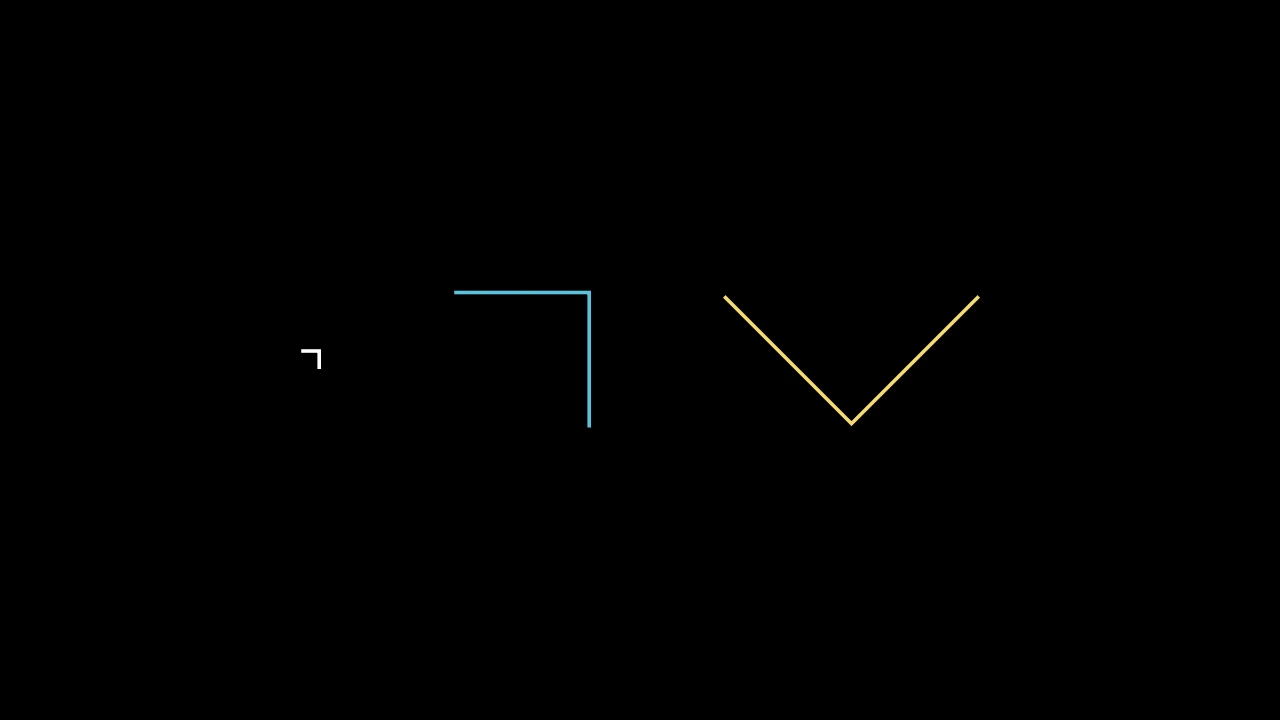
直角的标记:两段长 width 的线段在直角处相接;未加样式时为白色。
在原点制作,标记正 x 轴和正 y 轴间的直角:从 (0, width) 跨到其角
(width, width),再下到 (width, 0);angle 关于原点旋转。要标记两直线
间的角,见 RightAngle。
width每段线段的长度,以场景单位计。
angle关于原点旋转的角度,以弧度计,逆时针。
color填充与描边共用的颜色(默认白色);None 表示该类的默认值。
fill_color填充的颜色;未给出时为
color。多个颜色沿sheen_direction构成渐变。fill_opacity填充的不透明度,取值从 0 到 1(默认 0:无填充)。
stroke_color描边的颜色;未给出时为
color。多个颜色构成渐变。stroke_opacity描边的不透明度,取值从 0 到 1(默认 1)。
stroke_width描边的宽度,以场景单位的百分之一计(默认 4;0:无描边)。
background_stroke_color绘制于填充之后的轮廓颜色(默认黑色)。
background_stroke_opacity轮廓的不透明度,取值从 0 到 1(默认 1)。
background_stroke_width轮廓的宽度,以场景单位的百分之一计(默认 0:无)。
sheen_factor颜色朝
sheen_direction变亮的程度,取值从 -1 到 1(默认 0); 负值变暗。sheen_direction颜色变亮的方向(默认
UL)。joint_type描边在路径转折处的连接方式:圆角、斜切或斜接,按二维场景的绘制方式 (参见 LineJointType;默认 AUTO:斜接)。
cap_style描边在其显示的每一端的端点样式(开放路径的端点、虚线的端点):圆头、平头 或方头,按二维场景的绘制方式(参见 CapStyleType;默认 AUTO:平头)。
shade_in_3d三维场景的光是否对该 mobject 着色。
material其表面在三维场景中如何反射场景的光(参见 Material);None:Manim 的着色(默认)。
namemobject 的名称;未给出时为其类名。
z_index其在绘制顺序中的位置:索引较高者绘制于较低者之上 (默认 0)。
targetMoveToTarget将 mobject 移动至的状态。
还接受 样式关键字。
源码
manimgx\mobjects\shapes.py
next_to 如何将一个 mobject 放置在另一个旁边:其关键字, 但不包括方向,供传递它们的方法使用。
buff两者之间的间距,以场景单位表示(默认 0.25)。
aligned_edge两个对象在它们相遇侧旁对齐所沿的边,以方向表示:当方向为 RIGHT 和 UP 时, 它们的顶部对齐(默认 ORIGIN:居中)。
submobject_to_align要放在另一对象旁边的 mobject 的一部分,代替其位置;其余部分随其移动 (默认 None:整个 mobject)。
index_of_submobject_to_align每个 mobject 中要对齐部分的索引:此对象的部分放在另一对象的部分旁边 (默认 None:各自的全部)。
coor_mask哪些坐标可以改变:mobject 沿其移动的每个轴为 1,保持不变的轴为 0 (默认 (1, 1, 1))。
两者之间的间距,以场景单位表示(默认 0.25)。
Typst 的关键字,用于传递它们的类:文本和 LaTeX。
除此之外,它们还接受[外观关键字][manimgx.drawing.paint.Look]和 绘制关键字,后者在排版赋予各部分的颜色之上 重新着色。
font_size文本的大小:一个 em 为
font_size / 96场景单位,默认时为 0.5, 48(Text 按其大写字母确定大小:48 时高 0.449 单位)。typst_preamble在文档之前设置的 Typst 代码:
#set和#show规则、#let定义、导入(默认为 "")。font_paths字体文件(.ttf、.otf、.ttc、.otc)的目录,在 manimgx 附带的字体之前 连同其子目录一起搜索;指向文件的路径不添加任何内容 (默认为 None)。
should_centermobject 是否居中于原点(默认为 True)。
height将 mobject 缩放至的高度,以场景单位计,而非按
font_size确定大小 (默认为 None)。width将 mobject 缩放至的宽度,以场景单位计,而非按
font_size确定大小; 若同时给出height,则宽度最后设置(默认为 None)。package_pathTypst 包导入的目录,将包存放为
namespace/name/version目录:#import "@preview/name:1.0.0"读取preview/name/1.0.0(默认为 None: 除 mitex 外无任何包,mitex 由 manimgx 的引擎持有)。不下载任何内容。background_stroke_color绘制于填充之后的轮廓颜色(默认黑色)。
background_stroke_opacity轮廓的不透明度,取值从 0 到 1(默认 1)。
background_stroke_width轮廓的宽度,以场景单位的百分之一计(默认 0:无)。
sheen_factor颜色朝
sheen_direction变亮的程度,取值从 -1 到 1(默认 0); 负值变暗。sheen_direction颜色变亮的方向(默认
UL)。joint_type描边在路径转折处的连接方式:圆角、斜切或斜接,按二维场景的绘制方式 (参见 LineJointType;默认 AUTO:斜接)。
cap_style描边在其显示的每一端的端点样式(开放路径的端点、虚线的端点):圆头、平头 或方头,按二维场景的绘制方式(参见 CapStyleType;默认 AUTO:平头)。
shade_in_3d三维场景的光是否对该 mobject 着色。
material其表面在三维场景中如何反射场景的光(参见 Material);None:Manim 的着色(默认)。
namemobject 的名称;未给出时为其类名。
z_index其在绘制顺序中的位置:索引较高者绘制于较低者之上 (默认 0)。
targetMoveToTarget将 mobject 移动至的状态。color填充与描边共用的颜色。
opacity填充与描边共用的不透明度,取值从 0 到 1。
fill_color填充的颜色。
fill_opacity填充的不透明度,取值从 0 到 1。
stroke_color描边的颜色。
stroke_opacity描边的不透明度,取值从 0 到 1。
stroke_width描边的宽度,以场景单位的百分之一计。
Angle 除两直线外的关键字(供制作它的方法使用)。
radius弧的半径,或直角标记的边长,以场景单位计(默认 None:0.4,或短直线时 为从交叉点到侧所指较近端距离的三分之二,当其小于 0.6 时)。
elbow是否用直角标记(两段在其两侧间成角的线段)代替弧标记角(默认 False)。
quadrant角的每侧从交叉点出发的方向:每条线一个符号,第一条线在前;1 沿该线方向 (从其起点指向终点),-1 则反向指向起点(默认 (1, 1))。
other_angle弧是否从第一侧到第二侧顺时针运行,而非逆时针:此时标记整圈的其余部分 (默认 False)。
dot是否在弧内放一个点,如直角有时标记的那样(默认 False;直角标记无点)。
dot_radius点的半径,以场景单位计(默认 None:弧半径的十分之一)。
dot_distance点距交叉点多远,以弧半径的分数计(默认 0.55)。
dot_color点的颜色(默认白色)。
color填充与描边共用的颜色(默认白色);None 表示该类的默认值。
fill_color填充的颜色;未给出时为
color。多个颜色沿sheen_direction构成渐变。fill_opacity填充的不透明度,取值从 0 到 1(默认 0:无填充)。
stroke_color描边的颜色;未给出时为
color。多个颜色构成渐变。stroke_opacity描边的不透明度,取值从 0 到 1(默认 1)。
stroke_width描边的宽度,以场景单位的百分之一计(默认 4;0:无描边)。
background_stroke_color绘制于填充之后的轮廓颜色(默认黑色)。
background_stroke_opacity轮廓的不透明度,取值从 0 到 1(默认 1)。
background_stroke_width轮廓的宽度,以场景单位的百分之一计(默认 0:无)。
sheen_factor颜色朝
sheen_direction变亮的程度,取值从 -1 到 1(默认 0); 负值变暗。sheen_direction颜色变亮的方向(默认
UL)。joint_type描边在路径转折处的连接方式:圆角、斜切或斜接,按二维场景的绘制方式 (参见 LineJointType;默认 AUTO:斜接)。
cap_style描边在其显示的每一端的端点样式(开放路径的端点、虚线的端点):圆头、平头 或方头,按二维场景的绘制方式(参见 CapStyleType;默认 AUTO:平头)。
shade_in_3d三维场景的光是否对该 mobject 着色。
material其表面在三维场景中如何反射场景的光(参见 Material);None:Manim 的着色(默认)。
namemobject 的名称;未给出时为其类名。
z_index其在绘制顺序中的位置:索引较高者绘制于较低者之上 (默认 0)。
targetMoveToTarget将 mobject 移动至的状态。
Angle 除半径和直角标记外的关键字(直角设置它们): 标记哪个角,及其点,以及样式关键字。
quadrant角的每侧从交叉点出发的方向:每条线一个符号,第一条线在前;1 沿该线方向 (从其起点指向终点),-1 则反向指向起点(默认 (1, 1))。
other_angle弧是否从第一侧到第二侧顺时针运行,而非逆时针:此时标记整圈的其余部分 (默认 False)。
dot是否在弧内放一个点,如直角有时标记的那样(默认 False;直角标记无点)。
dot_radius点的半径,以场景单位计(默认 None:弧半径的十分之一)。
dot_distance点距交叉点多远,以弧半径的分数计(默认 0.55)。
dot_color点的颜色(默认白色)。
color填充与描边共用的颜色(默认白色);None 表示该类的默认值。
fill_color填充的颜色;未给出时为
color。多个颜色沿sheen_direction构成渐变。fill_opacity填充的不透明度,取值从 0 到 1(默认 0:无填充)。
stroke_color描边的颜色;未给出时为
color。多个颜色构成渐变。stroke_opacity描边的不透明度,取值从 0 到 1(默认 1)。
stroke_width描边的宽度,以场景单位的百分之一计(默认 4;0:无描边)。
background_stroke_color绘制于填充之后的轮廓颜色(默认黑色)。
background_stroke_opacity轮廓的不透明度,取值从 0 到 1(默认 1)。
background_stroke_width轮廓的宽度,以场景单位的百分之一计(默认 0:无)。
sheen_factor颜色朝
sheen_direction变亮的程度,取值从 -1 到 1(默认 0); 负值变暗。sheen_direction颜色变亮的方向(默认
UL)。joint_type描边在路径转折处的连接方式:圆角、斜切或斜接,按二维场景的绘制方式 (参见 LineJointType;默认 AUTO:斜接)。
cap_style描边在其显示的每一端的端点样式(开放路径的端点、虚线的端点):圆头、平头 或方头,按二维场景的绘制方式(参见 CapStyleType;默认 AUTO:平头)。
shade_in_3d三维场景的光是否对该 mobject 着色。
material其表面在三维场景中如何反射场景的光(参见 Material);None:Manim 的着色(默认)。
namemobject 的名称;未给出时为其类名。
z_index其在绘制顺序中的位置:索引较高者绘制于较低者之上 (默认 0)。
targetMoveToTarget将 mobject 移动至的状态。