线与箭头
影片代码
import manimgx as m


class LinesAndArrows(m.Scene):
    def construct(self) -> None:
        line = m.Line(m.LEFT, m.RIGHT)
        dashed = m.DashedLine(m.LEFT, m.RIGHT, color=m.BLUE)
        arrow = m.Arrow(m.LEFT, m.RIGHT, buff=0, color=m.YELLOW)
        double = m.DoubleArrow(m.LEFT, m.RIGHT, buff=0, color=m.GREEN)
        curved = m.CurvedArrow(m.LEFT, m.RIGHT, color=m.PINK)
        stealth = m.Line(m.LEFT, m.RIGHT, color=m.ORANGE).add_tip(
            tip_shape=m.StealthTip
        )
        shapes = m.VGroup(line, dashed, arrow, double, curved, stealth)
        names = m.VGroup(
            m.Text("Line", font="monospace", font_size=26),
            m.Text("DashedLine", font="monospace", font_size=26),
            m.Text("Arrow", font="monospace", font_size=26),
            m.Text("DoubleArrow", font="monospace", font_size=26),
            m.Text("CurvedArrow", font="monospace", font_size=26),
            m.Text("StealthTip", font="monospace", font_size=26),
        )
        cells = m.VGroup()
        for shape, name in zip(shapes, names, strict=True):
            name.next_to(shape, m.DOWN, buff=0.4)
            cells.add(m.VGroup(shape, name))
        cells.arrange_in_grid(rows=2, buff=(1.4, 1))
        self.play(m.LaggedStart(*[m.Create(shape) for shape in shapes], lag_ratio=0.2))
        self.play(m.FadeIn(names))
        self.wait()
线连接两个点。箭头是末端带有箭头尖端的线,用于指示方向;向量是从原点出发的箭头。线、箭头和弧都可以在任一端以箭头尖端结束,尖端可以是本页末尾列出的任何形状。
线的一端也可以是一个 mobject:此时线从该 mobject 的边缘开始延伸,从而连接两个形状而不穿过它们。
代码
import manimgx as m


class LineExample(m.Scene):
    def construct(self) -> None:
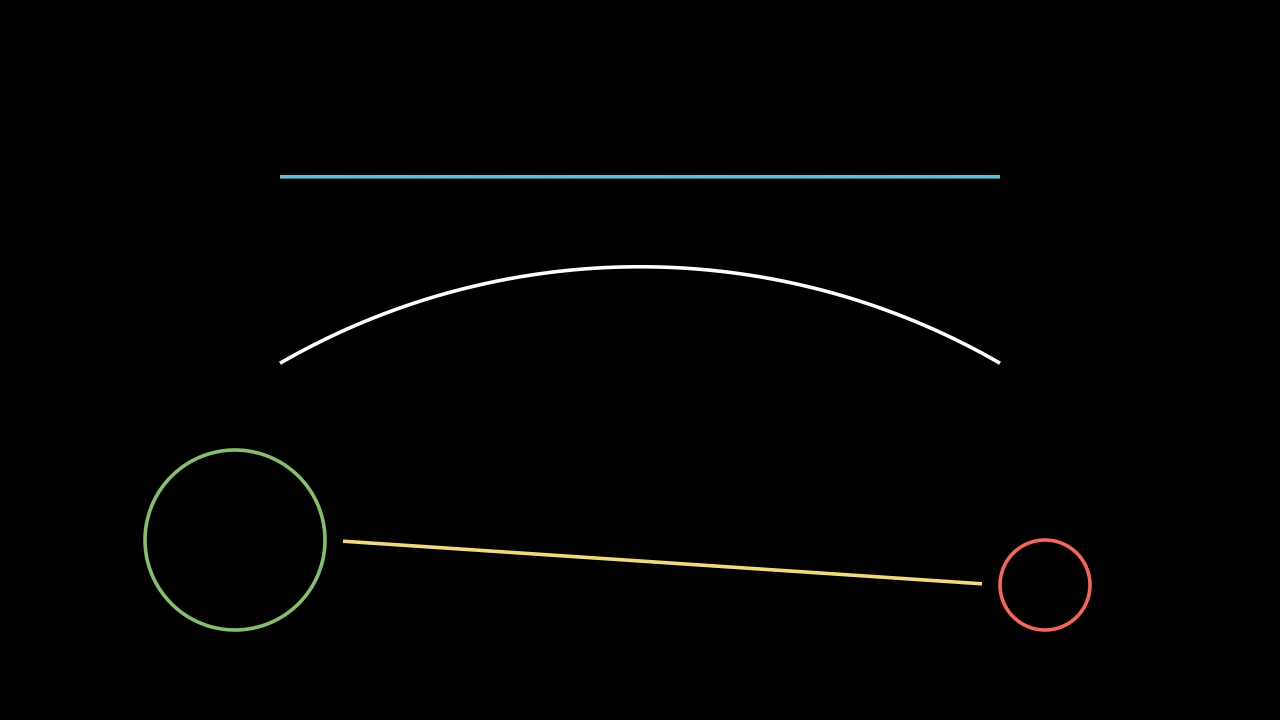
        straight = m.Line(4 * m.LEFT, 4 * m.RIGHT, color=m.BLUE)
        bent = m.Line(4 * m.LEFT, 4 * m.RIGHT, path_arc=-m.PI / 3)
        m.VGroup(straight, bent).arrange(m.DOWN, buff=1).shift(m.UP)
        left = m.Circle(radius=1, color=m.GREEN).move_to([-4.5, -2, 0])
        right = m.Circle(radius=0.5, color=m.RED).move_to([4.5, -2.5, 0])
        link = m.Line(left, right, buff=0.2, color=m.YELLOW)
        self.add(straight, bent, left, right, link)
从一点到另一点的直线,未加样式时为白色;或其间弯曲 path_arc 的弧。
一端可为 mobject:直线则从(或到)其朝向另一端最远的点开始(或结束) (见 get_boundary_point),因此两形状 间的直线从轮廓到轮廓。直线在创建时定位,之后不跟随 mobject。
start直线起点:一个点或一个 mobject。
end直线终点:一个点或一个 mobject。
buff距每端缩短多少,以场景单位计(弯曲时沿其);短于两倍它的直线保留其端点。
path_arc所弯曲的角度,以弧度计:0 为直;否则为弧,为正时逆时针, 行进时向右弯(见 ArcBetweenPoints)。
color填充和描边共用的颜色(默认白色;Circle 的为 红色);None 表示类的默认值。
tip_lengthnormal_vector路径所在平面的法向量(默认 OUT)。为兼容 Manim 而接受;被忽略且不保留。
tip_style路径所生成尖端的样式关键字(默认 None:无)。除非在此给出,否则尖端的
fill_color和stroke_color取路径的颜色。fill_color填充的颜色;未给出时为
color。多个颜色沿sheen_direction构成渐变。fill_opacity填充的不透明度,取值从 0 到 1(默认 0:无填充)。
stroke_color描边的颜色;未给出时为
color。多个颜色构成渐变。stroke_opacity描边的不透明度,取值从 0 到 1(默认 1)。
stroke_width描边的宽度,以场景单位的百分之一计(默认 4;0:无描边)。
background_stroke_color绘制于填充之后的轮廓颜色(默认黑色)。
background_stroke_opacity轮廓的不透明度,取值从 0 到 1(默认 1)。
background_stroke_width轮廓的宽度,以场景单位的百分之一计(默认 0:无)。
sheen_factor颜色朝
sheen_direction变亮的程度,取值从 -1 到 1(默认 0); 负值变暗。sheen_direction颜色变亮的方向(默认
UL)。joint_type描边在路径转折处的连接方式:圆角、斜切或斜接,按二维场景的绘制方式 (参见 LineJointType;默认 AUTO:斜接)。
cap_style描边在其显示的每一端的端点样式(开放路径的端点、虚线的端点):圆头、平头 或方头,按二维场景的绘制方式(参见 CapStyleType;默认 AUTO:平头)。
shade_in_3d三维场景的光是否对该 mobject 着色。
material其表面在三维场景中如何反射场景的光(参见 Material);None:Manim 的着色(默认)。
namemobject 的名称;未给出时为其类名。
z_index其在绘制顺序中的位置:索引较高者绘制于较低者之上 (默认 0)。
targetMoveToTarget将 mobject 移动至的状态。
还接受 箭头关键字。
源码
manimgx\mobjects\shapes.py
将直线弯曲一个新角度:在其创建端点间重建,直或为弧。
在其创建处(或上次重建处)重建,无论此后移到何处,并保留其缓冲。
new_value角度,以弧度计:0 为直;否则为弧,为正时逆时针。
源码
manimgx\mobjects\shapes.py
代码
import manimgx as m


class LinePutStartAndEndOnExample(m.Scene):
    def construct(self) -> None:
        a, b, c = [-4, -2, 0], [0, 2.5, 0], [4, -2, 0]
        dots = m.VGroup(*(m.Dot(p, radius=0.12) for p in (a, b, c)))
        line = m.Line(a, b, color=m.BLUE)
        self.add(dots, line)
        self.play(line.animate.put_start_and_end_on(b, c))
        self.play(line.animate.put_start_and_end_on(c, a))
移动、旋转并缩放直线使其从 start 到 end,包含尖端;其形状保持,
按比例缩放(箭头的尖端保持其大小)。
两端重合的直线在新两端间重建。
start其起点目标位置:若有起点尖端则为该尖端的点。
end其终点目标位置:若有终点尖端则为该尖端的点。
源码
manimgx\mobjects\shapes.py
直线上距某点最近的点:该点在直线上的正交投影,可超出端点。
point要投影的点。
返回 直线上的点,以场景坐标表示。
源码
manimgx\mobjects\shapes.py
旋转直线使其 角度 为 angle:关于其起点,
除非另给一点。
angle新角度,以弧度计,从正 x 轴起逆时针。
about_point旋转所绕的点;None 表示其起点。
源码
manimgx\mobjects\shapes.py
代码
import manimgx as m


class LineSetLengthExample(m.Scene):
    def construct(self) -> None:
        line = m.Line(m.LEFT, m.RIGHT, color=m.BLUE).shift(m.UP)
        arrow = m.Arrow(m.LEFT, m.RIGHT, color=m.YELLOW).shift(m.DOWN)
        self.add(line, arrow)
        self.play(line.animate.set_length(10), arrow.animate.set_length(10))
        self.play(line.animate.set_length(4), arrow.animate.set_length(4))
关于圆心将直线缩放到某长度,包含尖端(箭头的尖端保持其大小)。
length新长度,从起点到终点,以场景单位计。
源码
manimgx\mobjects\shapes.py
代码
import manimgx as m


class DashedLineExample(m.Scene):
    def construct(self) -> None:
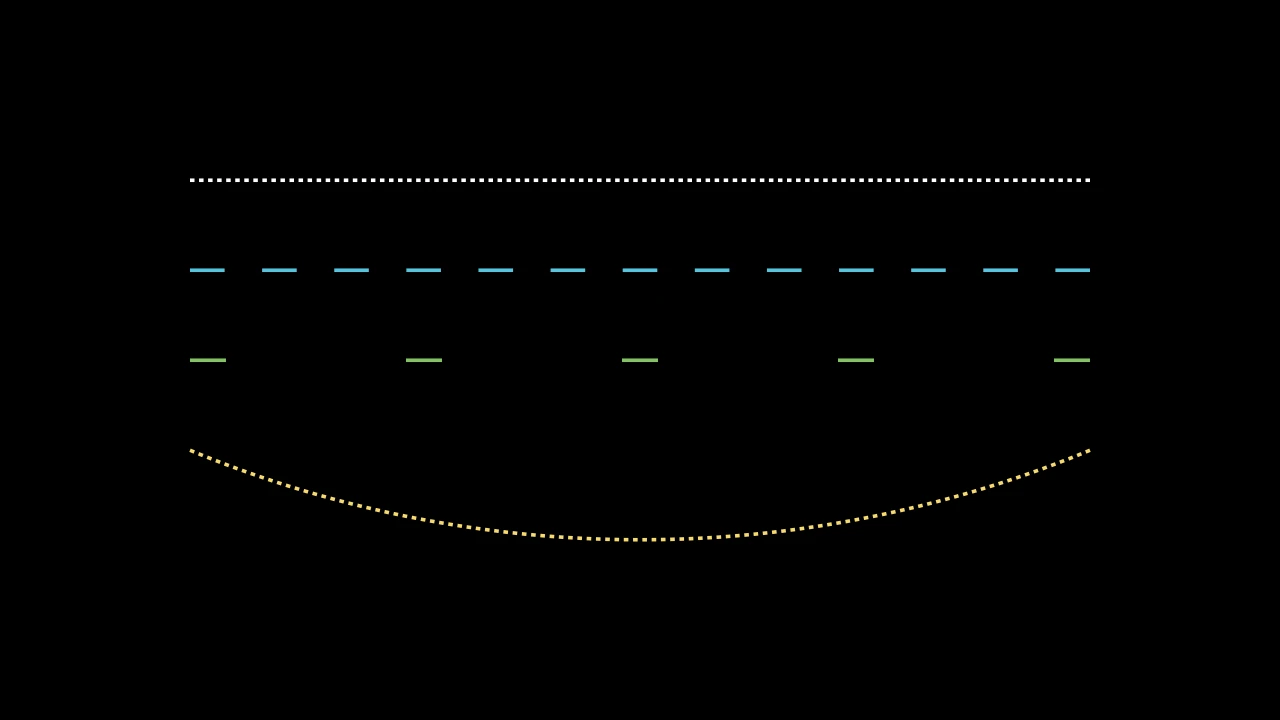
        start, end = 5 * m.LEFT, 5 * m.RIGHT
        lines = m.VGroup(
            m.DashedLine(start, end),
            m.DashedLine(start, end, dash_length=0.4, color=m.BLUE),
            m.DashedLine(start, end, dash_length=0.4, dashed_ratio=0.2),
            m.DashedLine(start, end, path_arc=m.PI / 4, color=m.YELLOW),
        ).arrange(m.DOWN, buff=1)
        lines[2].set_color(m.GREEN)
        self.add(lines)
以虚线绘制的直线,未加样式时为白色。
虚线是直线描边分段绘制:整数段,至少两段,从端到端均匀分布,每段约
dash_length 长,按直线的 cap_style 结束。它保持为一条路径,像
Line 一样定位、弯曲和加尖端,起止于直线端点;其控制柄为
其虚线的控制柄,即第一条和最后一条虚线的。虚线在创建时计数,并随其缩放。
start直线起点:一个点或一个 mobject(见 Line)。
end直线终点:一个点或一个 mobject。
buff距每端缩短多少,以场景单位计。
path_arc所弯曲的角度,以弧度计:0 为直。
dash_length每段虚线的长度,以场景单位计(默认 0.05):约为此值, 以整数段虚线跨整条直线。
dashed_ratio虚线覆盖直线的比例,从 0 到 1;其余为间隙。
color填充和描边共用的颜色(默认白色;Circle 的为 红色);None 表示类的默认值。
tip_lengthnormal_vector路径所在平面的法向量(默认 OUT)。为兼容 Manim 而接受;被忽略且不保留。
tip_style路径所生成尖端的样式关键字(默认 None:无)。除非在此给出,否则尖端的
fill_color和stroke_color取路径的颜色。fill_color填充的颜色;未给出时为
color。多个颜色沿sheen_direction构成渐变。fill_opacity填充的不透明度,取值从 0 到 1(默认 0:无填充)。
stroke_color描边的颜色;未给出时为
color。多个颜色构成渐变。stroke_opacity描边的不透明度,取值从 0 到 1(默认 1)。
stroke_width描边的宽度,以场景单位的百分之一计(默认 4;0:无描边)。
background_stroke_color绘制于填充之后的轮廓颜色(默认黑色)。
background_stroke_opacity轮廓的不透明度,取值从 0 到 1(默认 1)。
background_stroke_width轮廓的宽度,以场景单位的百分之一计(默认 0:无)。
sheen_factor颜色朝
sheen_direction变亮的程度,取值从 -1 到 1(默认 0); 负值变暗。sheen_direction颜色变亮的方向(默认
UL)。joint_type描边在路径转折处的连接方式:圆角、斜切或斜接,按二维场景的绘制方式 (参见 LineJointType;默认 AUTO:斜接)。
cap_style描边在其显示的每一端的端点样式(开放路径的端点、虚线的端点):圆头、平头 或方头,按二维场景的绘制方式(参见 CapStyleType;默认 AUTO:平头)。
shade_in_3d三维场景的光是否对该 mobject 着色。
material其表面在三维场景中如何反射场景的光(参见 Material);None:Manim 的着色(默认)。
namemobject 的名称;未给出时为其类名。
z_index其在绘制顺序中的位置:索引较高者绘制于较低者之上 (默认 0)。
targetMoveToTarget将 mobject 移动至的状态。
还接受 箭头关键字。
源码
manimgx\mobjects\shapes.py
代码
import manimgx as m


class ArrowExample(m.Scene):
    def construct(self) -> None:
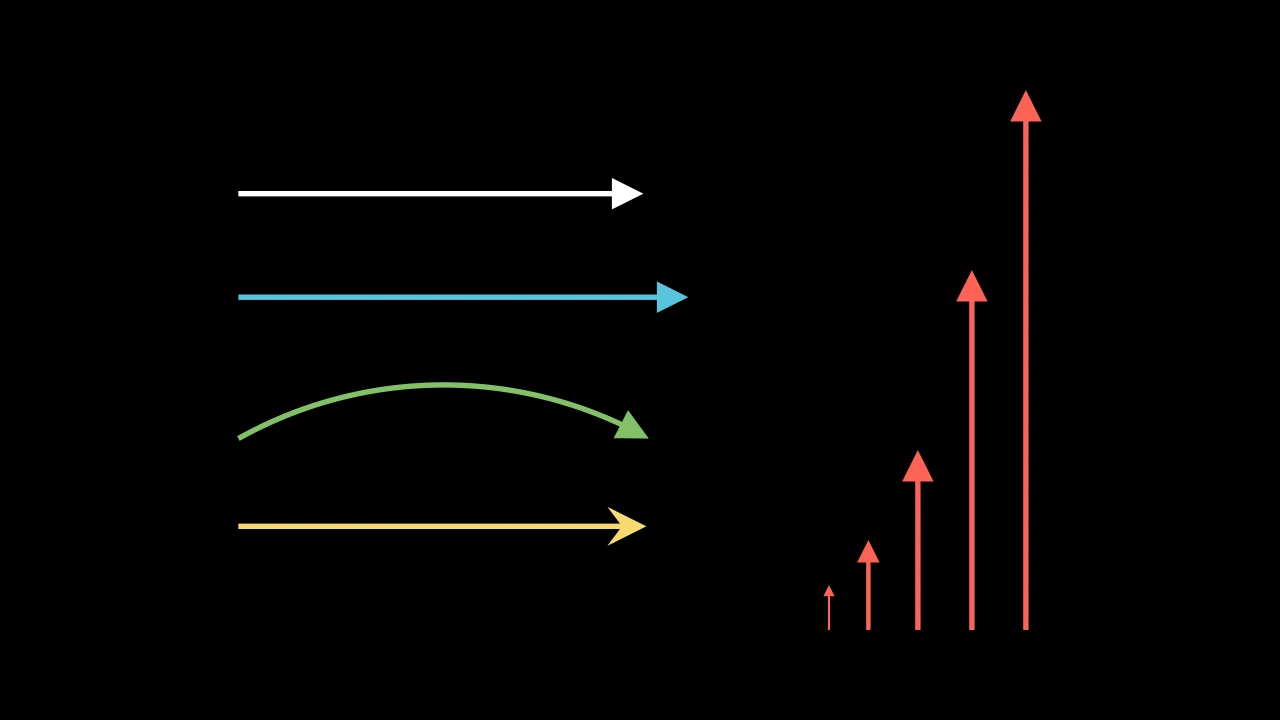
        a, b = 2.5 * m.LEFT, 2.5 * m.RIGHT
        arrows = m.VGroup(
            m.Arrow(a, b),
            m.Arrow(a, b, buff=0, color=m.BLUE),
            m.Arrow(a, b, path_arc=-m.PI / 3, color=m.GREEN),
            m.Arrow(a, b, tip_shape=m.StealthTip, color=m.YELLOW),
        ).arrange(m.DOWN, buff=0.8, aligned_edge=m.LEFT)
        shorts = m.VGroup()
        for length in (0.5, 1, 2, 4, 6):
            shorts.add(m.Arrow(m.ORIGIN, length * m.UP, buff=0, color=m.RED))
        shorts.arrange(aligned_edge=m.DOWN)
        self.add(m.VGroup(arrows, shorts).arrange(buff=1.5))
箭头:一条带终点尖端的直线,距所连两点各缩短 buff;未加样式时为白色,
描边宽 6。
短箭头按比例绘制:其尖端至多为其长度的 max_tip_length_to_length_ratio,
描边至多每单位长度 max_stroke_width_to_length_ratio 宽。缩放时保持尖端大小
(见 scale)。
m.Arrow(start=LEFT, end=RIGHT, *, buff=MED_SMALL_BUFF, max_tip_length_to_length_ratio=0.25, max_stroke_width_to_length_ratio=5, tip_shape=ArrowTriangleFilledTip, **kwargs)
start箭头起点:一个点或一个 mobject(见 Line)。
end箭头指向处:一个点或一个 mobject。
buff距每端缩短多少,以场景单位计(默认 0.25):两 mobject 间的箭头 在每端留有间隙。
max_tip_length_to_length_ratio尖端最长可为多长,为其长度的比例。
max_stroke_width_to_length_ratio描边最宽可为多宽,以每场景单位长度的 百分之一场景单位计。
tip_shape其尖端的类。
path_arc直线所弯曲的角度,以弧度计:0 为直;否则为从起点到终点的弧, 为正时逆时针(行进时向右弯),为负时顺时针(默认 0)。
color填充和描边共用的颜色(默认白色;Circle 的为 红色);None 表示类的默认值。
tip_lengthnormal_vector路径所在平面的法向量(默认 OUT)。为兼容 Manim 而接受;被忽略且不保留。
tip_style路径所生成尖端的样式关键字(默认 None:无)。除非在此给出,否则尖端的
fill_color和stroke_color取路径的颜色。fill_color填充的颜色;未给出时为
color。多个颜色沿sheen_direction构成渐变。fill_opacity填充的不透明度,取值从 0 到 1(默认 0:无填充)。
stroke_color描边的颜色;未给出时为
color。多个颜色构成渐变。stroke_opacity描边的不透明度,取值从 0 到 1(默认 1)。
stroke_width描边的宽度,以场景单位的百分之一计(默认 4;0:无描边)。
background_stroke_color绘制于填充之后的轮廓颜色(默认黑色)。
background_stroke_opacity轮廓的不透明度,取值从 0 到 1(默认 1)。
background_stroke_width轮廓的宽度,以场景单位的百分之一计(默认 0:无)。
sheen_factor颜色朝
sheen_direction变亮的程度,取值从 -1 到 1(默认 0); 负值变暗。sheen_direction颜色变亮的方向(默认
UL)。joint_type描边在路径转折处的连接方式:圆角、斜切或斜接,按二维场景的绘制方式 (参见 LineJointType;默认 AUTO:斜接)。
cap_style描边在其显示的每一端的端点样式(开放路径的端点、虚线的端点):圆头、平头 或方头,按二维场景的绘制方式(参见 CapStyleType;默认 AUTO:平头)。
shade_in_3d三维场景的光是否对该 mobject 着色。
material其表面在三维场景中如何反射场景的光(参见 Material);None:Manim 的着色(默认)。
namemobject 的名称;未给出时为其类名。
z_index其在绘制顺序中的位置:索引较高者绘制于较低者之上 (默认 0)。
targetMoveToTarget将 mobject 移动至的状态。
源码
manimgx\mobjects\shapes.py
代码
import manimgx as m


class ArrowScaleExample(m.Scene):
    def construct(self) -> None:
        kept = m.Arrow(m.LEFT, m.RIGHT, color=m.BLUE).shift(1.5 * m.UP)
        scaled = m.Arrow(m.LEFT, m.RIGHT, color=m.YELLOW).shift(m.DOWN)
        top = m.Text("scale(3)").move_to(2.8 * m.UP)
        bottom = m.Text("scale(3, scale_tips=True)").move_to(2.5 * m.DOWN)
        self.add(top, bottom, kept, scaled)
        self.play(
            kept.animate.scale(3), scaled.animate.scale(3, scale_tips=True)
        )
缩放箭头,除非 scale_tips 否则保持尖端大小。
箭杆被缩放,尖端重新加到其端。然后箭杆的描边宽度按其新长度设定,
如箭头创建时:取创建时的宽度与 max_stroke_width_to_length_ratio 乘其
长度的较小值。长度为零的箭头保持原样。
scale_factor缩放因子:一个,或每轴一个(见 Mobject.scale)。
scale_stroke描边宽度是否也缩放;箭杆的仍按其长度设定。
scale_tips尖端是否随箭杆缩放。
about_point保持不动的点,以场景坐标表示;它优先于
about_edge。about_edgemobject 边界框上保持不动的点,以方向命名: UP 表示其顶边的中点,UR 表示其右上角,ORIGIN 表示其中心。
源码
manimgx\mobjects\shapes.py
代码
import manimgx as m


class DoubleArrowExample(m.Scene):
    def construct(self) -> None:
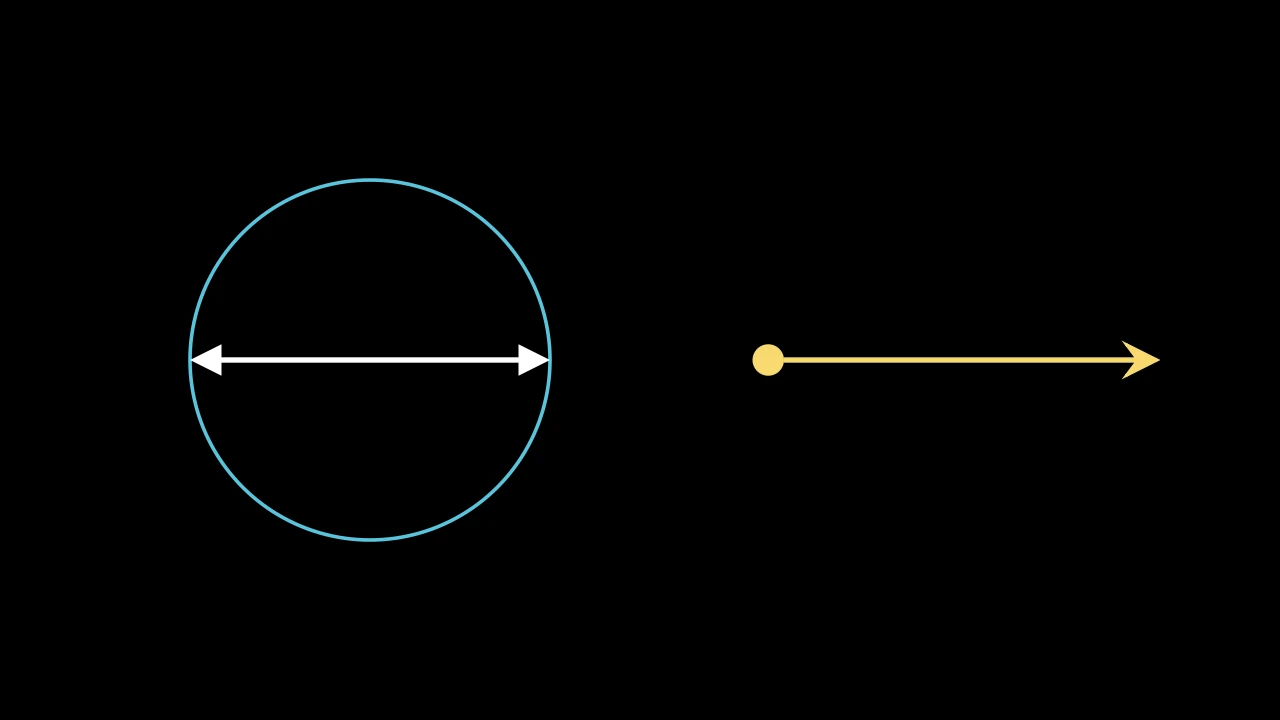
        circle = m.Circle(radius=2, color=m.BLUE).shift(3 * m.LEFT)
        diameter = m.DoubleArrow(circle.get_left(), circle.get_right(), buff=0)
        mixed = m.DoubleArrow(
            m.RIGHT,
            6 * m.RIGHT,
            tip_shape_start=m.ArrowCircleFilledTip,
            tip_shape_end=m.StealthTip,
            color=m.YELLOW,
        )
        self.add(circle, diameter, mixed)
两端各带一个尖端的箭头;未加样式时为白色,描边宽 6。
其尖端和描边按其长度(尖端到尖端)设定,如同 Arrow。
m.DoubleArrow(start=LEFT, end=RIGHT, *, tip_shape_start=ArrowTriangleFilledTip, tip_shape_end=None, **kwargs)
start其起点:一个点或一个 mobject(见 Line)。
end其终点:一个点或一个 mobject。
tip_shape_start起点尖端的类。
tip_shape_end终点尖端的类;None 表示
tip_shape关键字的值, 否则为 ArrowTriangleFilledTip。buff箭头距每端缩短多少,以场景单位计(默认 0.25)。
max_tip_length_to_length_ratio尖端最长可为多长,为其长度的比例:短箭头的尖端更短(默认 0.25)。
max_stroke_width_to_length_ratio描边最宽可为多宽,以每场景单位长度的百分之一场景单位计:短箭头更细(默认 5)。
tip_shape其尖端的类(默认 ArrowTriangleFilledTip)。
path_arc直线所弯曲的角度,以弧度计:0 为直;否则为从起点到终点的弧, 为正时逆时针(行进时向右弯),为负时顺时针(默认 0)。
color填充和描边共用的颜色(默认白色;Circle 的为 红色);None 表示类的默认值。
tip_lengthnormal_vector路径所在平面的法向量(默认 OUT)。为兼容 Manim 而接受;被忽略且不保留。
tip_style路径所生成尖端的样式关键字(默认 None:无)。除非在此给出,否则尖端的
fill_color和stroke_color取路径的颜色。fill_color填充的颜色;未给出时为
color。多个颜色沿sheen_direction构成渐变。fill_opacity填充的不透明度,取值从 0 到 1(默认 0:无填充)。
stroke_color描边的颜色;未给出时为
color。多个颜色构成渐变。stroke_opacity描边的不透明度,取值从 0 到 1(默认 1)。
stroke_width描边的宽度,以场景单位的百分之一计(默认 4;0:无描边)。
background_stroke_color绘制于填充之后的轮廓颜色(默认黑色)。
background_stroke_opacity轮廓的不透明度,取值从 0 到 1(默认 1)。
background_stroke_width轮廓的宽度,以场景单位的百分之一计(默认 0:无)。
sheen_factor颜色朝
sheen_direction变亮的程度,取值从 -1 到 1(默认 0); 负值变暗。sheen_direction颜色变亮的方向(默认
UL)。joint_type描边在路径转折处的连接方式:圆角、斜切或斜接,按二维场景的绘制方式 (参见 LineJointType;默认 AUTO:斜接)。
cap_style描边在其显示的每一端的端点样式(开放路径的端点、虚线的端点):圆头、平头 或方头,按二维场景的绘制方式(参见 CapStyleType;默认 AUTO:平头)。
shade_in_3d三维场景的光是否对该 mobject 着色。
material其表面在三维场景中如何反射场景的光(参见 Material);None:Manim 的着色(默认)。
namemobject 的名称;未给出时为其类名。
z_index其在绘制顺序中的位置:索引较高者绘制于较低者之上 (默认 0)。
targetMoveToTarget将 mobject 移动至的状态。
源码
manimgx\mobjects\shapes.py
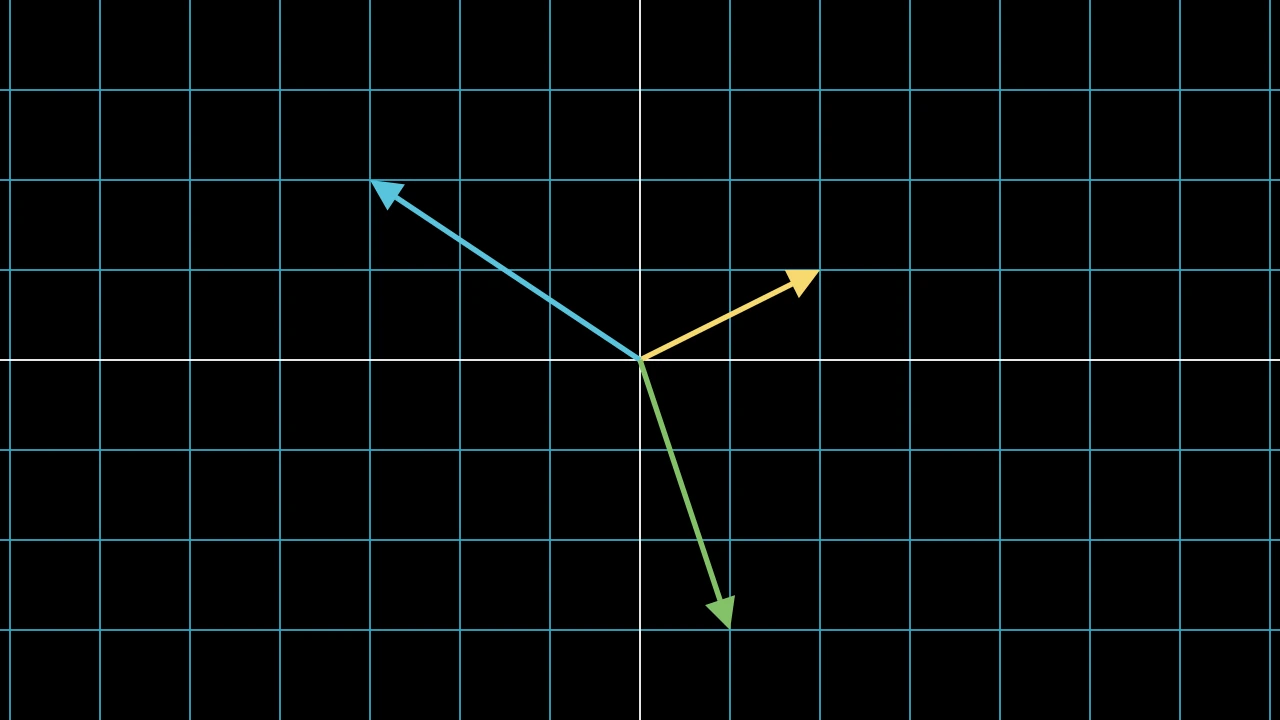
向量:从原点到某点的箭头;未加样式时为白色。
m.Vector(direction=RIGHT, buff=0, **kwargs)
direction其指向何处,从原点起:两个或三个坐标。
buff距原点和终点各缩短多少,以场景单位计。
max_tip_length_to_length_ratio尖端最长可为多长,为其长度的比例:短箭头的尖端更短(默认 0.25)。
max_stroke_width_to_length_ratio描边最宽可为多宽,以每场景单位长度的百分之一场景单位计:短箭头更细(默认 5)。
tip_shape其尖端的类(默认 ArrowTriangleFilledTip)。
path_arc直线所弯曲的角度,以弧度计:0 为直;否则为从起点到终点的弧, 为正时逆时针(行进时向右弯),为负时顺时针(默认 0)。
color填充和描边共用的颜色(默认白色;Circle 的为 红色);None 表示类的默认值。
tip_lengthnormal_vector路径所在平面的法向量(默认 OUT)。为兼容 Manim 而接受;被忽略且不保留。
tip_style路径所生成尖端的样式关键字(默认 None:无)。除非在此给出,否则尖端的
fill_color和stroke_color取路径的颜色。fill_color填充的颜色;未给出时为
color。多个颜色沿sheen_direction构成渐变。fill_opacity填充的不透明度,取值从 0 到 1(默认 0:无填充)。
stroke_color描边的颜色;未给出时为
color。多个颜色构成渐变。stroke_opacity描边的不透明度,取值从 0 到 1(默认 1)。
stroke_width描边的宽度,以场景单位的百分之一计(默认 4;0:无描边)。
background_stroke_color绘制于填充之后的轮廓颜色(默认黑色)。
background_stroke_opacity轮廓的不透明度,取值从 0 到 1(默认 1)。
background_stroke_width轮廓的宽度,以场景单位的百分之一计(默认 0:无)。
sheen_factor颜色朝
sheen_direction变亮的程度,取值从 -1 到 1(默认 0); 负值变暗。sheen_direction颜色变亮的方向(默认
UL)。joint_type描边在路径转折处的连接方式:圆角、斜切或斜接,按二维场景的绘制方式 (参见 LineJointType;默认 AUTO:斜接)。
cap_style描边在其显示的每一端的端点样式(开放路径的端点、虚线的端点):圆头、平头 或方头,按二维场景的绘制方式(参见 CapStyleType;默认 AUTO:平头)。
shade_in_3d三维场景的光是否对该 mobject 着色。
material其表面在三维场景中如何反射场景的光(参见 Material);None:Manim 的着色(默认)。
namemobject 的名称;未给出时为其类名。
z_index其在绘制顺序中的位置:索引较高者绘制于较低者之上 (默认 0)。
targetMoveToTarget将 mobject 移动至的状态。
源码
manimgx\mobjects\shapes.py
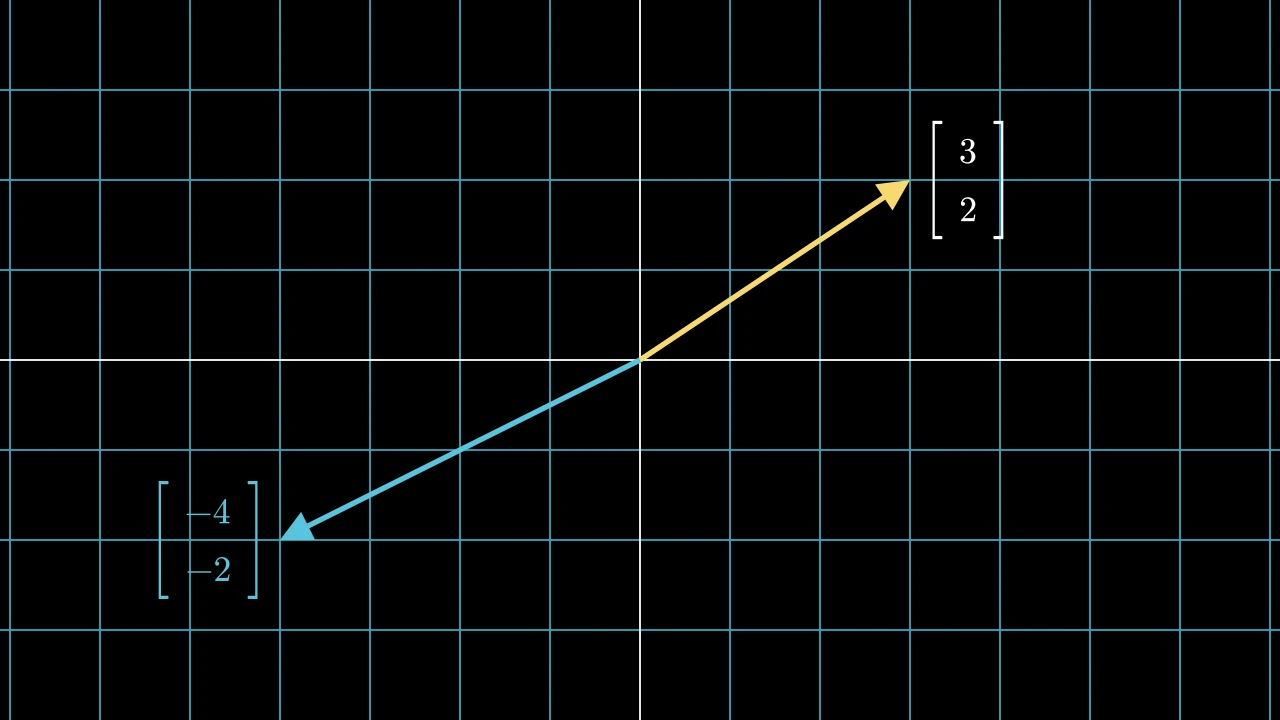
制作向量坐标的标签:其尖端旁的列矩阵。
标签以矩阵大小的 0.8 放置,在向量终点之外 0.25 处,垂直居中:向量指向右 (或正上或正下)时在其右侧,否则在其左侧。不添加到向量。
integer_labels是否将坐标四舍五入为整数。
n_dim显示多少坐标:2 为 x 和 y,3 为含 z。
v_buff各行之间的距离,以场景单位表示,从一行的条目对齐角到下一行的对齐角 (默认 0.8)。
h_buff各列之间的距离,以场景单位表示,同上(默认 1.3)。
bracket_h_buff条目与每个括号之间的间距,以场景单位表示(默认 0.25)。
bracket_v_buff当括号被拉伸时,括号在条目上下方延伸的距离,以场景单位表示 (默认 0.25)。
add_background_rectangles_to_entries每个条目是否获得一个背景矩形(默认 False)。
include_background_rectangle矩阵是否获得一个背景矩形(默认 False)。
element_alignment_corner每个条目放置在网格上的角,以方向命名:DR 使一列中的条目按其右侧对齐, UL 则按其左侧对齐(默认 DR)。
left_bracket左括号,作为 LaTeX 分隔符:
"[","(","\{","\langle","|", …(默认"[")。right_bracket右括号,作为 LaTeX 分隔符(默认
"]")。stretch_brackets括号是否被拉伸到条目的高度,并再延伸
bracket_v_buff的距离 (默认 True)。bracket_config括号的 Math 关键字: 其
color,…(默认 None:无)。element_to_mobject构造每个条目的 mobject 的函数,以条目和
element_to_mobject_config的关键字 参数调用(默认:矩阵类自身的函数,对于 Matrix 为 MathTex)。element_to_mobject_configelement_to_mobject的关键字参数(默认 None:矩阵类自身的设置,对于 Matrix 为无)。color填充与描边共用的颜色(默认白色);None 表示该类的默认值。
fill_color填充的颜色;未给出时为
color。多个颜色沿sheen_direction构成渐变。fill_opacity填充的不透明度,取值从 0 到 1(默认 0:无填充)。
stroke_color描边的颜色;未给出时为
color。多个颜色构成渐变。stroke_opacity描边的不透明度,取值从 0 到 1(默认 1)。
stroke_width描边的宽度,以场景单位的百分之一计(默认 4;0:无描边)。
background_stroke_color绘制于填充之后的轮廓颜色(默认黑色)。
background_stroke_opacity轮廓的不透明度,取值从 0 到 1(默认 1)。
background_stroke_width轮廓的宽度,以场景单位的百分之一计(默认 0:无)。
sheen_factor颜色朝
sheen_direction变亮的程度,取值从 -1 到 1(默认 0); 负值变暗。sheen_direction颜色变亮的方向(默认
UL)。joint_type描边在路径转折处的连接方式:圆角、斜切或斜接,按二维场景的绘制方式 (参见 LineJointType;默认 AUTO:斜接)。
cap_style描边在其显示的每一端的端点样式(开放路径的端点、虚线的端点):圆头、平头 或方头,按二维场景的绘制方式(参见 CapStyleType;默认 AUTO:平头)。
shade_in_3d三维场景的光是否对该 mobject 着色。
material其表面在三维场景中如何反射场景的光(参见 Material);None:Manim 的着色(默认)。
namemobject 的名称;未给出时为其类名。
z_index其在绘制顺序中的位置:索引较高者绘制于较低者之上 (默认 0)。
targetMoveToTarget将 mobject 移动至的状态。
返回 一个新矩阵。
源码
manimgx\mobjects\shapes.py
代码
import manimgx as m


class CurvedArrowExample(m.Scene):
    def construct(self) -> None:
        start, end = 3 * m.LEFT + 0.5 * m.UP, 3 * m.RIGHT + 0.5 * m.UP
        arrows = m.VGroup(
            m.CurvedArrow(start, end, color=m.BLUE),
            m.CurvedArrow(start, end, angle=m.PI, color=m.YELLOW),
            m.CurvedArrow(end, start, color=m.GREEN),
            m.CurvedArrow(end, start, radius=3.2, tip_shape=m.StealthTip),
        )
        self.add(m.Dot(start, radius=0.12), m.Dot(end, radius=0.12))
        self.play(m.Create(arrows, run_time=4))
沿弧线的箭头:一个 ArcBetweenPoints, 终点带尖端,默认行进时向右弯曲;未加样式时为白色。
start_point箭头起点。
end_point箭头指向处:其尖端的点。
tip_shape其尖端的类;None 表示 ArrowTriangleFilledTip。
angle弧线在行进中所转过的角度,以弧度计:为正时逆时针,向直线路径右侧弯曲; 为负时顺时针;为 0 时为直线段(默认 TAU / 4)。
radius弧线圆的半径,以场景单位计,代替
angle:该半径的较短弧,向右弯曲, 或为负时向左;至少为两端距离的一半(默认 None:由angle设定)。color填充和描边共用的颜色(默认白色;Circle 的为 红色);None 表示类的默认值。
tip_lengthnormal_vector路径所在平面的法向量(默认 OUT)。为兼容 Manim 而接受;被忽略且不保留。
tip_style路径所生成尖端的样式关键字(默认 None:无)。除非在此给出,否则尖端的
fill_color和stroke_color取路径的颜色。fill_color填充的颜色;未给出时为
color。多个颜色沿sheen_direction构成渐变。fill_opacity填充的不透明度,取值从 0 到 1(默认 0:无填充)。
stroke_color描边的颜色;未给出时为
color。多个颜色构成渐变。stroke_opacity描边的不透明度,取值从 0 到 1(默认 1)。
stroke_width描边的宽度,以场景单位的百分之一计(默认 4;0:无描边)。
background_stroke_color绘制于填充之后的轮廓颜色(默认黑色)。
background_stroke_opacity轮廓的不透明度,取值从 0 到 1(默认 1)。
background_stroke_width轮廓的宽度,以场景单位的百分之一计(默认 0:无)。
sheen_factor颜色朝
sheen_direction变亮的程度,取值从 -1 到 1(默认 0); 负值变暗。sheen_direction颜色变亮的方向(默认
UL)。joint_type描边在路径转折处的连接方式:圆角、斜切或斜接,按二维场景的绘制方式 (参见 LineJointType;默认 AUTO:斜接)。
cap_style描边在其显示的每一端的端点样式(开放路径的端点、虚线的端点):圆头、平头 或方头,按二维场景的绘制方式(参见 CapStyleType;默认 AUTO:平头)。
shade_in_3d三维场景的光是否对该 mobject 着色。
material其表面在三维场景中如何反射场景的光(参见 Material);None:Manim 的着色(默认)。
namemobject 的名称;未给出时为其类名。
z_index其在绘制顺序中的位置:索引较高者绘制于较低者之上 (默认 0)。
targetMoveToTarget将 mobject 移动至的状态。
源码
manimgx\mobjects\shapes.py
代码
import manimgx as m


class CurvedDoubleArrowExample(m.Scene):
    def construct(self) -> None:
        left = m.Circle(radius=1, color=m.BLUE).shift(4 * m.LEFT)
        right = m.Square(side_length=2, color=m.GREEN).shift(4 * m.RIGHT)
        top = left.get_top(), right.get_top()
        arrows = m.VGroup(
            m.CurvedDoubleArrow(*top, angle=-m.PI / 3),
            m.CurvedDoubleArrow(
                left.get_bottom(),
                right.get_bottom(),
                tip_shape_start=m.ArrowCircleFilledTip,
                tip_shape_end=m.StealthTip,
                color=m.YELLOW,
            ),
        )
        self.add(left, right)
        self.play(m.Create(arrows, run_time=2))
沿弧线且两端各带一个尖端的箭头:一个 ArcBetweenPoints, 带两个尖端,默认行进时向右弯曲;未加样式时为白色。
start_point箭头起点:其起点尖端的点。
end_point箭头终点:其终点尖端的点。
tip_shape_start起点尖端的类;None 表示 ArrowTriangleFilledTip。
tip_shape_end终点尖端的类;None 表示 ArrowTriangleFilledTip。
angle弧线在行进中所转过的角度,以弧度计:为正时逆时针,向直线路径右侧弯曲; 为负时顺时针;为 0 时为直线段(默认 TAU / 4)。
radius弧线圆的半径,以场景单位计,代替
angle:该半径的较短弧,向右弯曲, 或为负时向左;至少为两端距离的一半(默认 None:由angle设定)。color填充和描边共用的颜色(默认白色;Circle 的为 红色);None 表示类的默认值。
tip_lengthnormal_vector路径所在平面的法向量(默认 OUT)。为兼容 Manim 而接受;被忽略且不保留。
tip_style路径所生成尖端的样式关键字(默认 None:无)。除非在此给出,否则尖端的
fill_color和stroke_color取路径的颜色。fill_color填充的颜色;未给出时为
color。多个颜色沿sheen_direction构成渐变。fill_opacity填充的不透明度,取值从 0 到 1(默认 0:无填充)。
stroke_color描边的颜色;未给出时为
color。多个颜色构成渐变。stroke_opacity描边的不透明度,取值从 0 到 1(默认 1)。
stroke_width描边的宽度,以场景单位的百分之一计(默认 4;0:无描边)。
background_stroke_color绘制于填充之后的轮廓颜色(默认黑色)。
background_stroke_opacity轮廓的不透明度,取值从 0 到 1(默认 1)。
background_stroke_width轮廓的宽度,以场景单位的百分之一计(默认 0:无)。
sheen_factor颜色朝
sheen_direction变亮的程度,取值从 -1 到 1(默认 0); 负值变暗。sheen_direction颜色变亮的方向(默认
UL)。joint_type描边在路径转折处的连接方式:圆角、斜切或斜接,按二维场景的绘制方式 (参见 LineJointType;默认 AUTO:斜接)。
cap_style描边在其显示的每一端的端点样式(开放路径的端点、虚线的端点):圆头、平头 或方头,按二维场景的绘制方式(参见 CapStyleType;默认 AUTO:平头)。
shade_in_3d三维场景的光是否对该 mobject 着色。
material其表面在三维场景中如何反射场景的光(参见 Material);None:Manim 的着色(默认)。
namemobject 的名称;未给出时为其类名。
z_index其在绘制顺序中的位置:索引较高者绘制于较低者之上 (默认 0)。
targetMoveToTarget将 mobject 移动至的状态。
源码
manimgx\mobjects\shapes.py
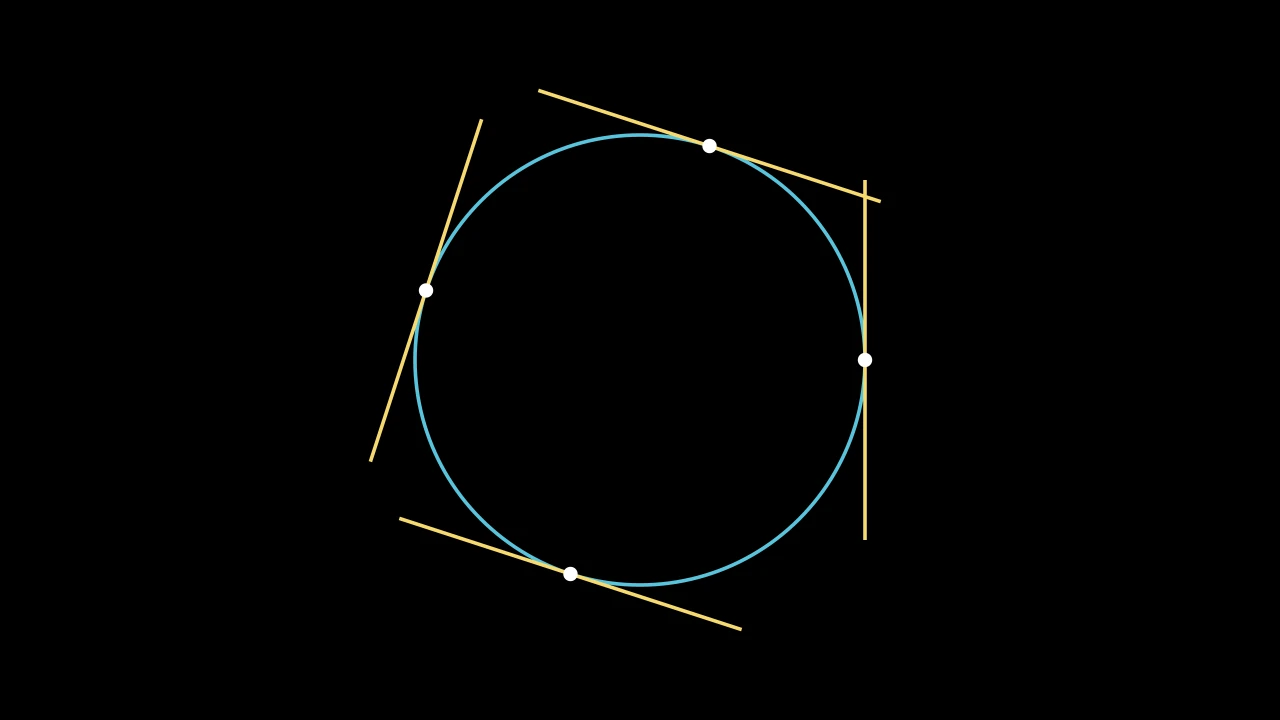
在某点沿路径与路径相切的直线,长 length,以该点为圆心;未加样式时为白色。
其方向为该点前后 d_alpha 处两点间弦的方向。
vmob路径。
alpha沿路径何处,以其长度的比例计:0 在起点,1 在终点。
length直线的长度,以场景单位计。
d_alpha该点前后路径长度的比例,其弦确定方向。
buff直线距每端缩短多少,以场景单位计;短于两倍它的直线保留其端点(默认 0)。
path_arc直线所弯曲的角度,以弧度计:0 为直;否则为从起点到终点的弧, 为正时逆时针(行进时向右弯),为负时顺时针(默认 0)。
color填充和描边共用的颜色(默认白色;Circle 的为 红色);None 表示类的默认值。
tip_lengthnormal_vector路径所在平面的法向量(默认 OUT)。为兼容 Manim 而接受;被忽略且不保留。
tip_style路径所生成尖端的样式关键字(默认 None:无)。除非在此给出,否则尖端的
fill_color和stroke_color取路径的颜色。fill_color填充的颜色;未给出时为
color。多个颜色沿sheen_direction构成渐变。fill_opacity填充的不透明度,取值从 0 到 1(默认 0:无填充)。
stroke_color描边的颜色;未给出时为
color。多个颜色构成渐变。stroke_opacity描边的不透明度,取值从 0 到 1(默认 1)。
stroke_width描边的宽度,以场景单位的百分之一计(默认 4;0:无描边)。
background_stroke_color绘制于填充之后的轮廓颜色(默认黑色)。
background_stroke_opacity轮廓的不透明度,取值从 0 到 1(默认 1)。
background_stroke_width轮廓的宽度,以场景单位的百分之一计(默认 0:无)。
sheen_factor颜色朝
sheen_direction变亮的程度,取值从 -1 到 1(默认 0); 负值变暗。sheen_direction颜色变亮的方向(默认
UL)。joint_type描边在路径转折处的连接方式:圆角、斜切或斜接,按二维场景的绘制方式 (参见 LineJointType;默认 AUTO:斜接)。
cap_style描边在其显示的每一端的端点样式(开放路径的端点、虚线的端点):圆头、平头 或方头,按二维场景的绘制方式(参见 CapStyleType;默认 AUTO:平头)。
shade_in_3d三维场景的光是否对该 mobject 着色。
material其表面在三维场景中如何反射场景的光(参见 Material);None:Manim 的着色(默认)。
namemobject 的名称;未给出时为其类名。
z_index其在绘制顺序中的位置:索引较高者绘制于较低者之上 (默认 0)。
targetMoveToTarget将 mobject 移动至的状态。
源码
manimgx\mobjects\shapes.py
箭头尖端
箭头尖端是位于线、弧或箭头末端的一个小形状。箭头会自行创建其尖端;任何其他线或弧可通过 add_tip 添加一个。tip_shape 选择其形状,tip_style 选择其样式。
可终止于箭头尖端的路径:直线、弧线和箭头的共同之处。
尖端是一个小形状(一个 ArrowTip),作为子对象添加到路径 的终点或起点,沿路径指向。尖端的点位于路径结束处,而路径被调整到在尖端底部停止。 带有尖端时,路径的 start 和 end 即为尖端的点。
m.TipableVMobject(tip_length=DEFAULT_ARROW_TIP_LENGTH, normal_vector=OUT, tip_style=None, **kwargs)
tip_lengthadd_tip 所生成尖端的长度, 以场景单位计(默认 0.35)。
normal_vector路径所在平面的法向量。为兼容 Manim 而接受;被忽略。
tip_style路径所生成尖端的样式关键字;除非在此给出,否则尖端的
fill_color和stroke_color取路径的颜色。color填充与描边共用的颜色(默认白色);None 表示该类的默认值。
fill_color填充的颜色;未给出时为
color。多个颜色沿sheen_direction构成渐变。fill_opacity填充的不透明度,取值从 0 到 1(默认 0:无填充)。
stroke_color描边的颜色;未给出时为
color。多个颜色构成渐变。stroke_opacity描边的不透明度,取值从 0 到 1(默认 1)。
stroke_width描边的宽度,以场景单位的百分之一计(默认 4;0:无描边)。
background_stroke_color绘制于填充之后的轮廓颜色(默认黑色)。
background_stroke_opacity轮廓的不透明度,取值从 0 到 1(默认 1)。
background_stroke_width轮廓的宽度,以场景单位的百分之一计(默认 0:无)。
sheen_factor颜色朝
sheen_direction变亮的程度,取值从 -1 到 1(默认 0); 负值变暗。sheen_direction颜色变亮的方向(默认
UL)。joint_type描边在路径转折处的连接方式:圆角、斜切或斜接,按二维场景的绘制方式 (参见 LineJointType;默认 AUTO:斜接)。
cap_style描边在其显示的每一端的端点样式(开放路径的端点、虚线的端点):圆头、平头 或方头,按二维场景的绘制方式(参见 CapStyleType;默认 AUTO:平头)。
shade_in_3d三维场景的光是否对该 mobject 着色。
material其表面在三维场景中如何反射场景的光(参见 Material);None:Manim 的着色(默认)。
namemobject 的名称;未给出时为其类名。
z_index其在绘制顺序中的位置:索引较高者绘制于较低者之上 (默认 0)。
targetMoveToTarget将 mobject 移动至的状态。
还接受 样式关键字。
源码
manimgx\mobjects\shapes.py
路径起点的尖端,一旦 add_tip(at_start=True) 已生成其一。
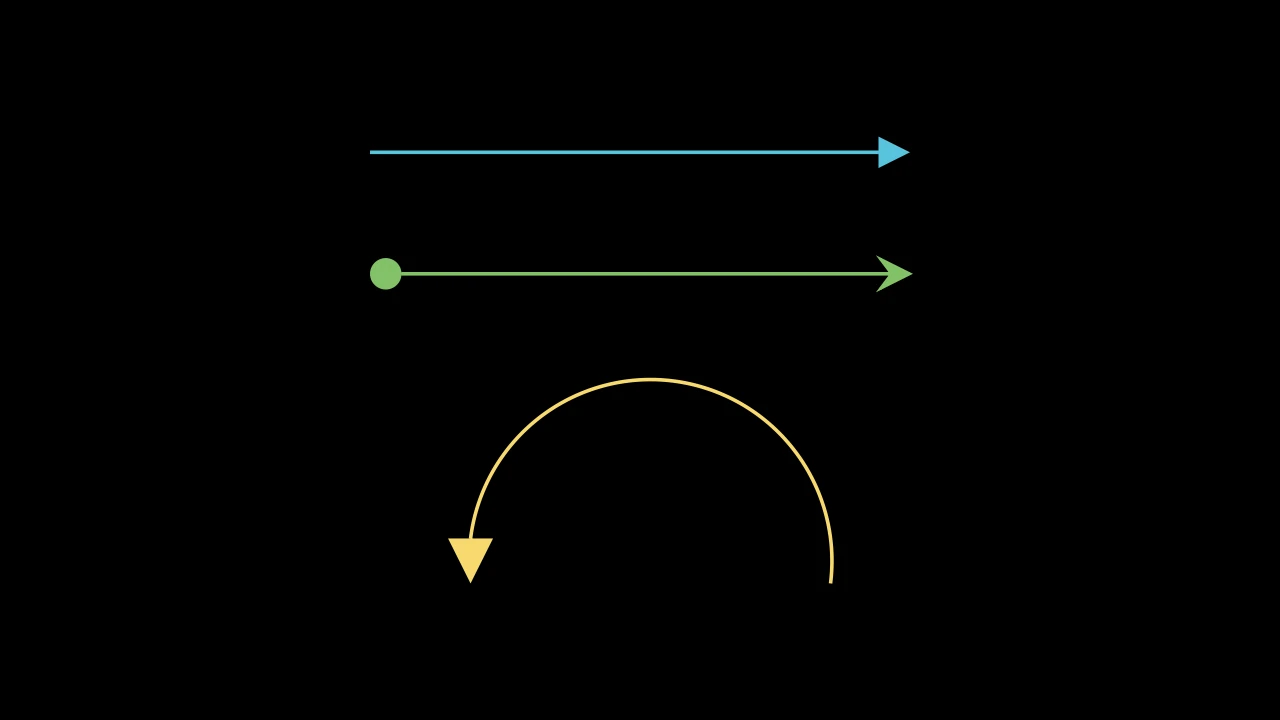
代码
import manimgx as m


class TipableVMobjectAddTipExample(m.Scene):
    def construct(self) -> None:
        line = m.Line(3 * m.LEFT, 3 * m.RIGHT, color=m.BLUE).add_tip()
        both = m.Line(3 * m.LEFT, 3 * m.RIGHT, color=m.GREEN)
        both.add_tip(tip_shape=m.StealthTip)
        both.add_tip(tip_shape=m.ArrowCircleFilledTip, at_start=True)
        arc = m.Arc(radius=2, angle=m.PI, color=m.YELLOW)
        arc.add_tip(tip_length=0.5, tip_width=0.5)
        self.add(m.VGroup(line, both, arc).arrange(m.DOWN, buff=1))
在路径终点(或起点)添加一个箭头尖端,沿该处路径指向。
尖端的点位于路径结束处,而路径关于其另一端缩放并旋转,以在尖端底部停止。
尖端是一个子对象,名为 tip(或 start_tip),
颜色取路径的颜色,除非 tip_style 另行指定。
tip预先制作的尖端,将被旋转并移动到位;None 表示新建一个。
tip_shape要制作的尖端类,一个 ArrowTip 子类; None 表示 ArrowTriangleFilledTip。
tip_length要制作的尖端长度,以场景单位计;None 表示路径的
tip_length。tip_width要制作的尖端宽度(当其为默认的填充三角形时),以场景单位计; None 表示默认长度。其他形状不接受宽度:它们仅以
tip_length制作。at_start尖端是否位于路径起点,沿路径反向指向。
源码
manimgx\mobjects\shapes.py
移除路径的尖端,并将路径恢复到其起点和终点之间原本的位置:即尖端的点。
返回 被移除的尖端,终点尖端在前,置于一个新组中(若无则为空组)。
源码
manimgx\mobjects\shapes.py
路径已具有的尖端:其 tip 和 start_tip,即其所拥有过的。
被 pop_tips 移除的尖端仍被命名, 并列于此处;has_tip 指示其是否仍在路径上。
返回 尖端,终点尖端在前,置于一个新组中。
源码
manimgx\mobjects\shapes.py
路径起始处:若有起点尖端则为该尖端的点,否则为其第一个点。
返回 该点,以场景坐标表示。
路径结束处:若有终点尖端则为该尖端的点,否则为其最后一个点。
返回 该点,以场景坐标表示。
路径起点到终点的距离,包含尖端:直线跨越,因此为弧的弦长,而非沿弧的长度。
返回 距离,以场景单位计。
除 color 外的所有样式关键字,以及可终止于箭头尖端的路径的关键字
(见 TipableVMobject)。
按位置接收 color 的类会自行声明它,其余由本类声明。
tip_lengthnormal_vector路径所在平面的法向量(默认 OUT)。为兼容 Manim 而接受;被忽略且不保留。
tip_style路径所生成尖端的样式关键字(默认 None:无)。除非在此给出,否则尖端的
fill_color和stroke_color取路径的颜色。fill_color填充的颜色;未给出时为
color。多个颜色沿sheen_direction构成渐变。fill_opacity填充的不透明度,取值从 0 到 1(默认 0:无填充)。
stroke_color描边的颜色;未给出时为
color。多个颜色构成渐变。stroke_opacity描边的不透明度,取值从 0 到 1(默认 1)。
stroke_width描边的宽度,以场景单位的百分之一计(默认 4;0:无描边)。
background_stroke_color绘制于填充之后的轮廓颜色(默认黑色)。
background_stroke_opacity轮廓的不透明度,取值从 0 到 1(默认 1)。
background_stroke_width轮廓的宽度,以场景单位的百分之一计(默认 0:无)。
sheen_factor颜色朝
sheen_direction变亮的程度,取值从 -1 到 1(默认 0); 负值变暗。sheen_direction颜色变亮的方向(默认
UL)。joint_type描边在路径转折处的连接方式:圆角、斜切或斜接,按二维场景的绘制方式 (参见 LineJointType;默认 AUTO:斜接)。
cap_style描边在其显示的每一端的端点样式(开放路径的端点、虚线的端点):圆头、平头 或方头,按二维场景的绘制方式(参见 CapStyleType;默认 AUTO:平头)。
shade_in_3d三维场景的光是否对该 mobject 着色。
material其表面在三维场景中如何反射场景的光(参见 Material);None:Manim 的着色(默认)。
namemobject 的名称;未给出时为其类名。
z_index其在绘制顺序中的位置:索引较高者绘制于较低者之上 (默认 0)。
targetMoveToTarget将 mobject 移动至的状态。
尖端形状
代码
import manimgx as m


class ArrowTriangleFilledTipExample(m.Scene):
    def construct(self) -> None:
        tip = m.ArrowTriangleFilledTip
        a, b = 3 * m.LEFT, 3 * m.RIGHT
        arrows = m.VGroup(
            m.Arrow(a, b, tip_shape=tip),
            m.Arrow(a / 3, b / 3, tip_shape=tip, color=m.BLUE),
            m.CurvedArrow(a, b, angle=-m.PI / 3, tip_shape=tip, color=m.GREEN),
            m.Line(a, b, color=m.YELLOW).add_tip(tip_shape=tip, tip_length=0.6),
        ).arrange(m.DOWN, buff=0.8)
        self.add(arrows)
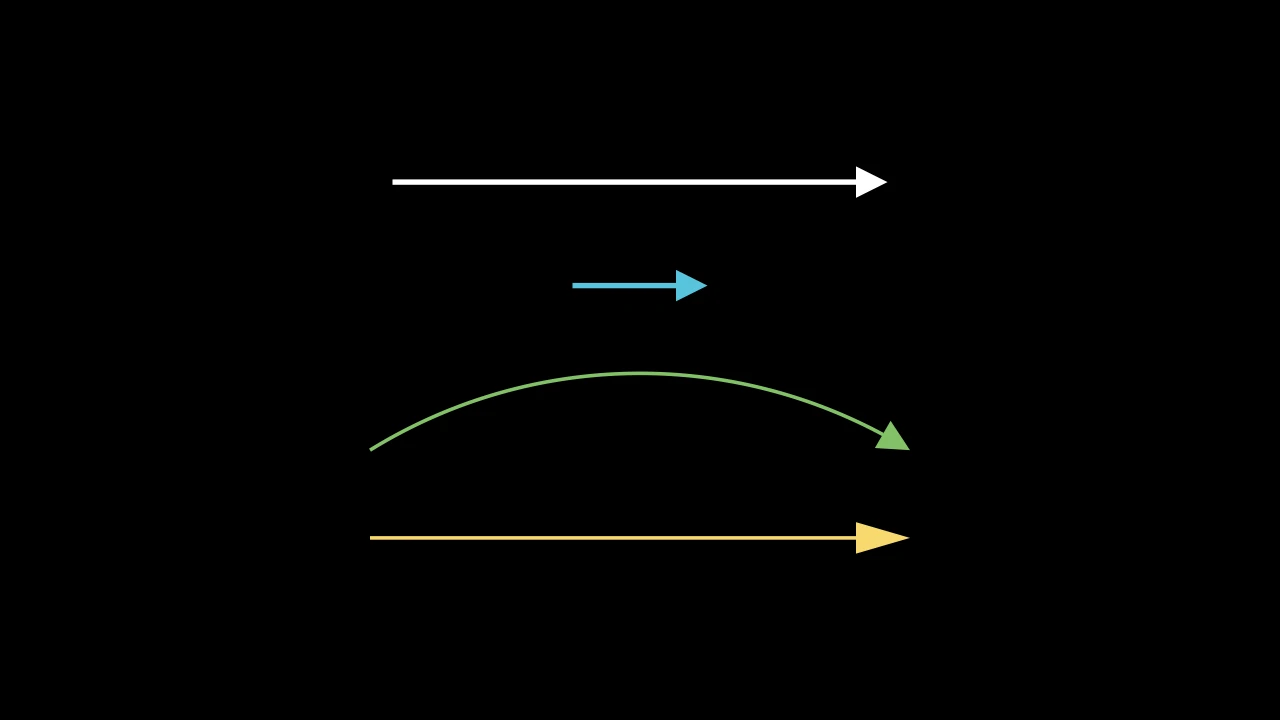
三角形尖端,填充且无轮廓:直线、弧线和箭头的默认尖端。
m.ArrowTriangleFilledTip(length=DEFAULT_ARROW_TIP_LENGTH, width=DEFAULT_ARROW_TIP_LENGTH, start_angle=PI, **kwargs)
length其长度,从底到尖点,以场景单位计。
width其宽度,跨底,以场景单位计。
start_angle制作时尖点所指方向,以弧度计(默认 PI:向左); 路径会旋转尖端以沿自身指向。
color填充与描边共用的颜色(默认白色);None 表示该类的默认值。
fill_color填充的颜色;未给出时为
color。多个颜色沿sheen_direction构成渐变。fill_opacity填充的不透明度,取值从 0 到 1(默认 0:无填充)。
stroke_color描边的颜色;未给出时为
color。多个颜色构成渐变。stroke_opacity描边的不透明度,取值从 0 到 1(默认 1)。
stroke_width描边的宽度,以场景单位的百分之一计(默认 4;0:无描边)。
background_stroke_color绘制于填充之后的轮廓颜色(默认黑色)。
background_stroke_opacity轮廓的不透明度,取值从 0 到 1(默认 1)。
background_stroke_width轮廓的宽度,以场景单位的百分之一计(默认 0:无)。
sheen_factor颜色朝
sheen_direction变亮的程度,取值从 -1 到 1(默认 0); 负值变暗。sheen_direction颜色变亮的方向(默认
UL)。joint_type描边在路径转折处的连接方式:圆角、斜切或斜接,按二维场景的绘制方式 (参见 LineJointType;默认 AUTO:斜接)。
cap_style描边在其显示的每一端的端点样式(开放路径的端点、虚线的端点):圆头、平头 或方头,按二维场景的绘制方式(参见 CapStyleType;默认 AUTO:平头)。
shade_in_3d三维场景的光是否对该 mobject 着色。
material其表面在三维场景中如何反射场景的光(参见 Material);None:Manim 的着色(默认)。
namemobject 的名称;未给出时为其类名。
z_index其在绘制顺序中的位置:索引较高者绘制于较低者之上 (默认 0)。
targetMoveToTarget将 mobject 移动至的状态。
还接受 样式关键字。
源码
manimgx\mobjects\shapes.py
代码
import manimgx as m


class ArrowTriangleTipExample(m.Scene):
    def construct(self) -> None:
        tip = m.ArrowTriangleTip
        a, b = 3 * m.LEFT, 3 * m.RIGHT
        arrows = m.VGroup(
            m.Arrow(a, b, tip_shape=tip),
            m.Arrow(a / 3, b / 3, tip_shape=tip, color=m.BLUE),
            m.CurvedArrow(a, b, angle=-m.PI / 3, tip_shape=tip, color=m.GREEN),
            m.Line(a, b, color=m.YELLOW).add_tip(tip_shape=tip, tip_length=0.6),
        ).arrange(m.DOWN, buff=0.8)
        self.add(arrows)
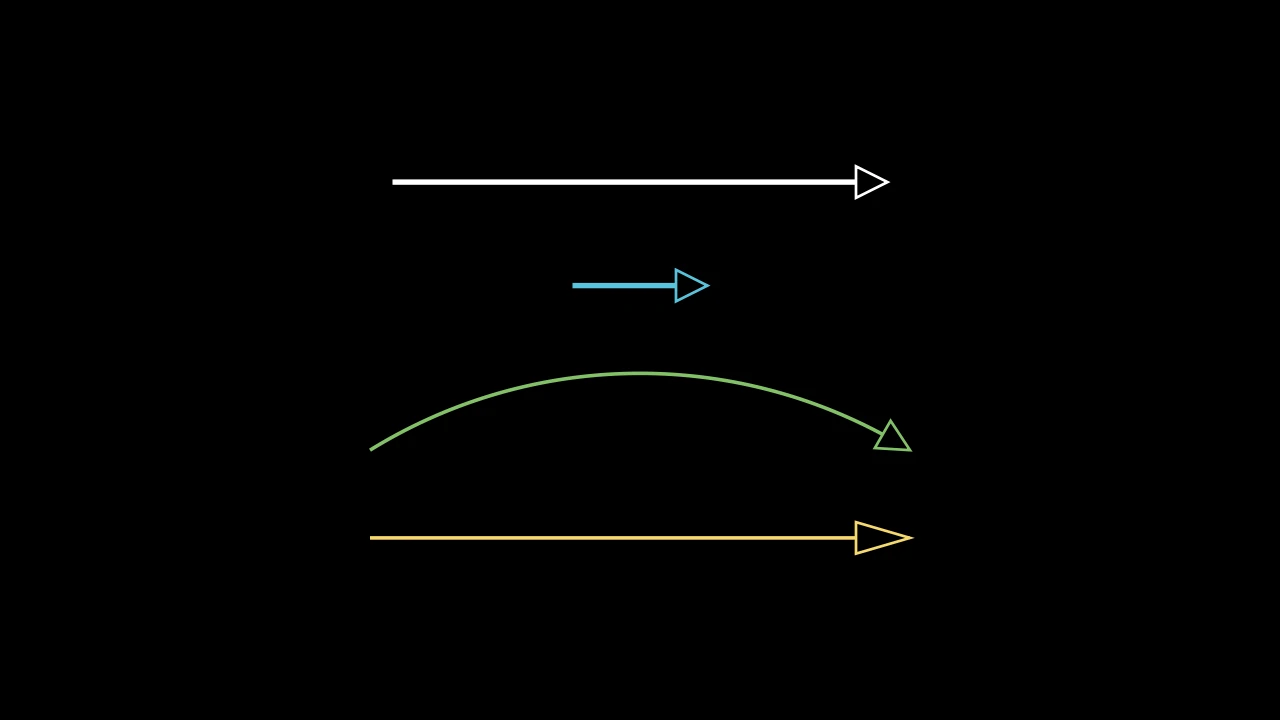
三角形尖端,带轮廓:一个长 length、宽 width 的等腰三角形,
其轮廓宽 3 且不填充。
m.ArrowTriangleTip(length=DEFAULT_ARROW_TIP_LENGTH, width=DEFAULT_ARROW_TIP_LENGTH, start_angle=PI, **kwargs)
length其长度,从底到尖点,以场景单位计。
width其宽度,跨底,以场景单位计。
start_angle制作时尖点所指方向,以弧度计(默认 PI:向左); 路径会旋转尖端以沿自身指向。
color填充与描边共用的颜色(默认白色);None 表示该类的默认值。
fill_color填充的颜色;未给出时为
color。多个颜色沿sheen_direction构成渐变。fill_opacity填充的不透明度,取值从 0 到 1(默认 0:无填充)。
stroke_color描边的颜色;未给出时为
color。多个颜色构成渐变。stroke_opacity描边的不透明度,取值从 0 到 1(默认 1)。
stroke_width描边的宽度,以场景单位的百分之一计(默认 4;0:无描边)。
background_stroke_color绘制于填充之后的轮廓颜色(默认黑色)。
background_stroke_opacity轮廓的不透明度,取值从 0 到 1(默认 1)。
background_stroke_width轮廓的宽度,以场景单位的百分之一计(默认 0:无)。
sheen_factor颜色朝
sheen_direction变亮的程度,取值从 -1 到 1(默认 0); 负值变暗。sheen_direction颜色变亮的方向(默认
UL)。joint_type描边在路径转折处的连接方式:圆角、斜切或斜接,按二维场景的绘制方式 (参见 LineJointType;默认 AUTO:斜接)。
cap_style描边在其显示的每一端的端点样式(开放路径的端点、虚线的端点):圆头、平头 或方头,按二维场景的绘制方式(参见 CapStyleType;默认 AUTO:平头)。
shade_in_3d三维场景的光是否对该 mobject 着色。
material其表面在三维场景中如何反射场景的光(参见 Material);None:Manim 的着色(默认)。
namemobject 的名称;未给出时为其类名。
z_index其在绘制顺序中的位置:索引较高者绘制于较低者之上 (默认 0)。
targetMoveToTarget将 mobject 移动至的状态。
还接受 样式关键字。
源码
manimgx\mobjects\shapes.py
代码
import manimgx as m


class StealthTipExample(m.Scene):
    def construct(self) -> None:
        tip = m.StealthTip
        a, b = 3 * m.LEFT, 3 * m.RIGHT
        arrows = m.VGroup(
            m.Arrow(a, b, tip_shape=tip),
            m.Arrow(a / 3, b / 3, tip_shape=tip, color=m.BLUE),
            m.CurvedArrow(a, b, angle=-m.PI / 3, tip_shape=tip, color=m.GREEN),
            m.Line(a, b, color=m.YELLOW).add_tip(tip_shape=tip, tip_length=0.6),
        ).arrange(m.DOWN, buff=0.8)
        self.add(arrows)
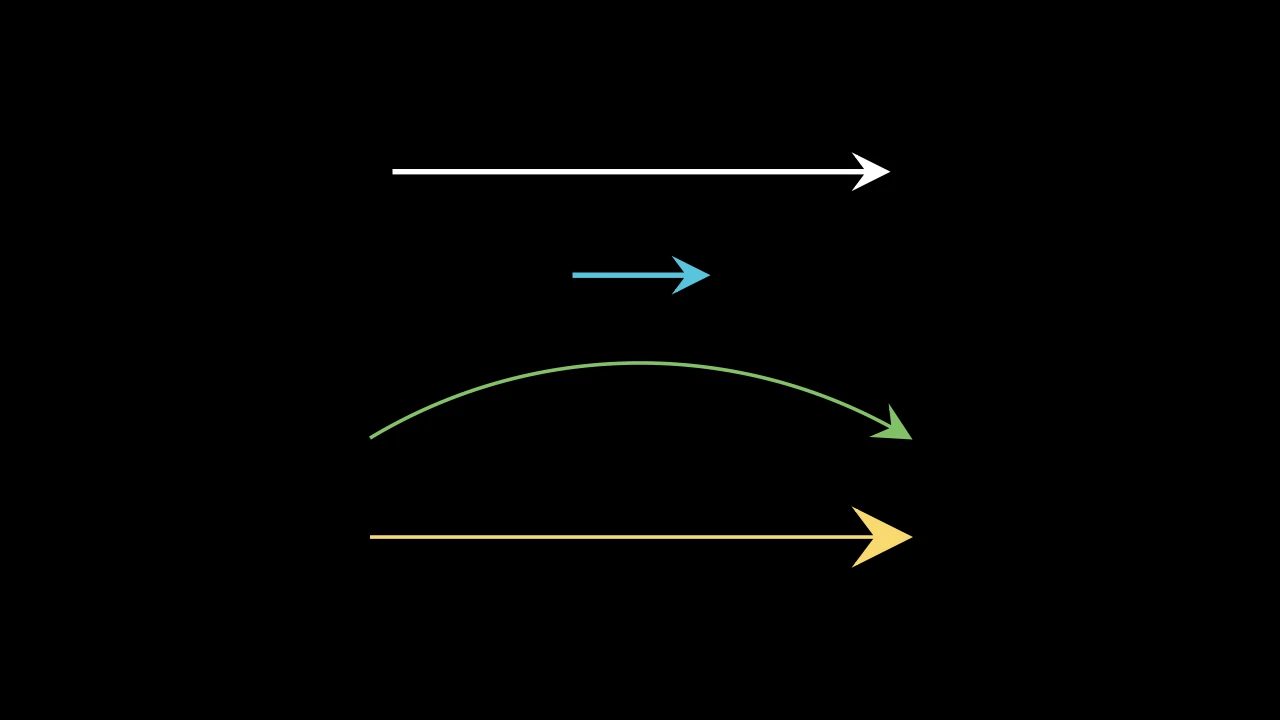
镖形尖端:一个尖点,其后掠出两个倒刺,其间有缺口,路径在此停止; 填充,描边宽 3。
其长度从倒刺到尖点;缺口在从尖点往回 ⅝ 处。除非给定长度,否则其长度为其他 尖端的一半。
m.StealthTip(length=DEFAULT_ARROW_TIP_LENGTH / 2, start_angle=PI, **kwargs)
length其长度,从倒刺到尖点,以场景单位计(默认 0.175)。
start_angle为兼容 Manim 而接受;被忽略。
color填充与描边共用的颜色(默认白色);None 表示该类的默认值。
fill_color填充的颜色;未给出时为
color。多个颜色沿sheen_direction构成渐变。fill_opacity填充的不透明度,取值从 0 到 1(默认 0:无填充)。
stroke_color描边的颜色;未给出时为
color。多个颜色构成渐变。stroke_opacity描边的不透明度,取值从 0 到 1(默认 1)。
stroke_width描边的宽度,以场景单位的百分之一计(默认 4;0:无描边)。
background_stroke_color绘制于填充之后的轮廓颜色(默认黑色)。
background_stroke_opacity轮廓的不透明度,取值从 0 到 1(默认 1)。
background_stroke_width轮廓的宽度,以场景单位的百分之一计(默认 0:无)。
sheen_factor颜色朝
sheen_direction变亮的程度,取值从 -1 到 1(默认 0); 负值变暗。sheen_direction颜色变亮的方向(默认
UL)。joint_type描边在路径转折处的连接方式:圆角、斜切或斜接,按二维场景的绘制方式 (参见 LineJointType;默认 AUTO:斜接)。
cap_style描边在其显示的每一端的端点样式(开放路径的端点、虚线的端点):圆头、平头 或方头,按二维场景的绘制方式(参见 CapStyleType;默认 AUTO:平头)。
shade_in_3d三维场景的光是否对该 mobject 着色。
material其表面在三维场景中如何反射场景的光(参见 Material);None:Manim 的着色(默认)。
namemobject 的名称;未给出时为其类名。
z_index其在绘制顺序中的位置:索引较高者绘制于较低者之上 (默认 0)。
targetMoveToTarget将 mobject 移动至的状态。
还接受 样式关键字。
源码
manimgx\mobjects\shapes.py
代码
import manimgx as m


class ArrowCircleFilledTipExample(m.Scene):
    def construct(self) -> None:
        tip = m.ArrowCircleFilledTip
        a, b = 3 * m.LEFT, 3 * m.RIGHT
        arrows = m.VGroup(
            m.Arrow(a, b, tip_shape=tip),
            m.Arrow(a / 3, b / 3, tip_shape=tip, color=m.BLUE),
            m.CurvedArrow(a, b, angle=-m.PI / 3, tip_shape=tip, color=m.GREEN),
            m.Line(a, b, color=m.YELLOW).add_tip(tip_shape=tip, tip_length=0.6),
        ).arrange(m.DOWN, buff=0.8)
        self.add(arrows)
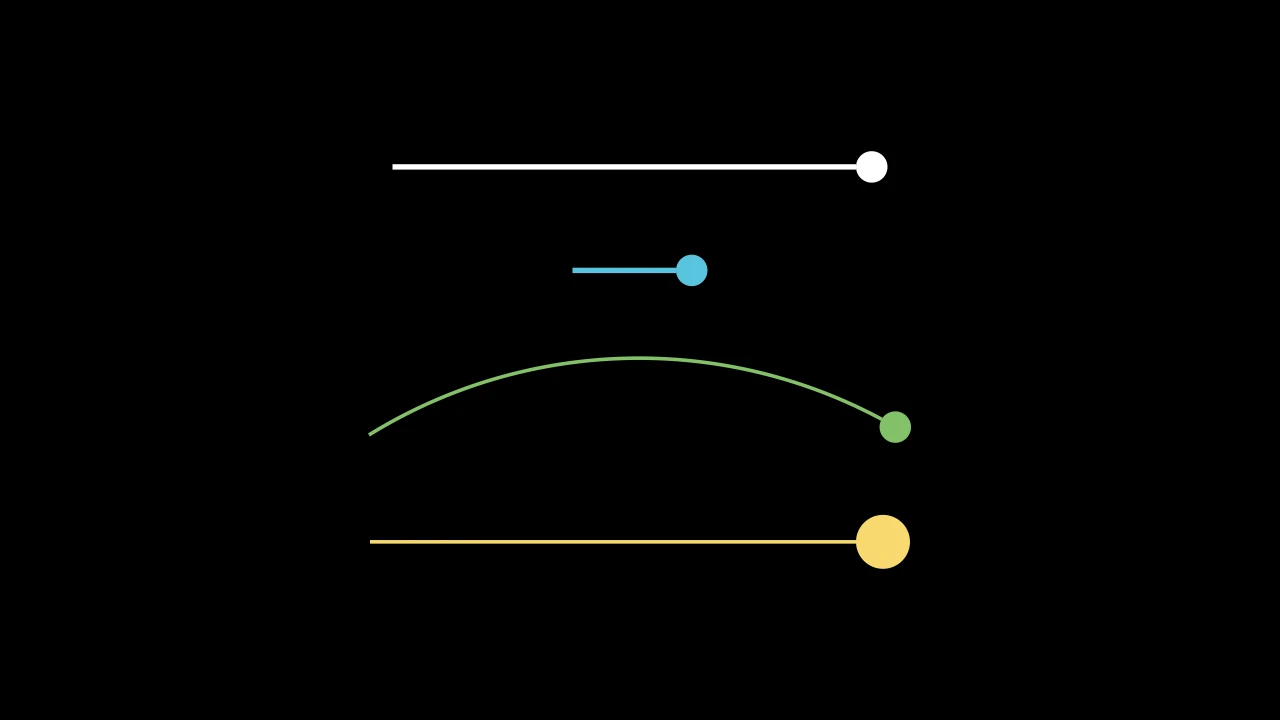
圆形尖端,填充且无轮廓:一个跨 length 的圆盘,从路径停止处到其结束处。
m.ArrowCircleFilledTip(length=DEFAULT_ARROW_TIP_LENGTH, start_angle=PI, **kwargs)
length其直径,以场景单位计。
start_angle为兼容 Manim 而接受;被忽略。
color填充与描边共用的颜色(默认白色);None 表示该类的默认值。
fill_color填充的颜色;未给出时为
color。多个颜色沿sheen_direction构成渐变。fill_opacity填充的不透明度,取值从 0 到 1(默认 0:无填充)。
stroke_color描边的颜色;未给出时为
color。多个颜色构成渐变。stroke_opacity描边的不透明度,取值从 0 到 1(默认 1)。
stroke_width描边的宽度,以场景单位的百分之一计(默认 4;0:无描边)。
background_stroke_color绘制于填充之后的轮廓颜色(默认黑色)。
background_stroke_opacity轮廓的不透明度,取值从 0 到 1(默认 1)。
background_stroke_width轮廓的宽度,以场景单位的百分之一计(默认 0:无)。
sheen_factor颜色朝
sheen_direction变亮的程度,取值从 -1 到 1(默认 0); 负值变暗。sheen_direction颜色变亮的方向(默认
UL)。joint_type描边在路径转折处的连接方式:圆角、斜切或斜接,按二维场景的绘制方式 (参见 LineJointType;默认 AUTO:斜接)。
cap_style描边在其显示的每一端的端点样式(开放路径的端点、虚线的端点):圆头、平头 或方头,按二维场景的绘制方式(参见 CapStyleType;默认 AUTO:平头)。
shade_in_3d三维场景的光是否对该 mobject 着色。
material其表面在三维场景中如何反射场景的光(参见 Material);None:Manim 的着色(默认)。
namemobject 的名称;未给出时为其类名。
z_index其在绘制顺序中的位置:索引较高者绘制于较低者之上 (默认 0)。
targetMoveToTarget将 mobject 移动至的状态。
还接受 样式关键字。
源码
manimgx\mobjects\shapes.py
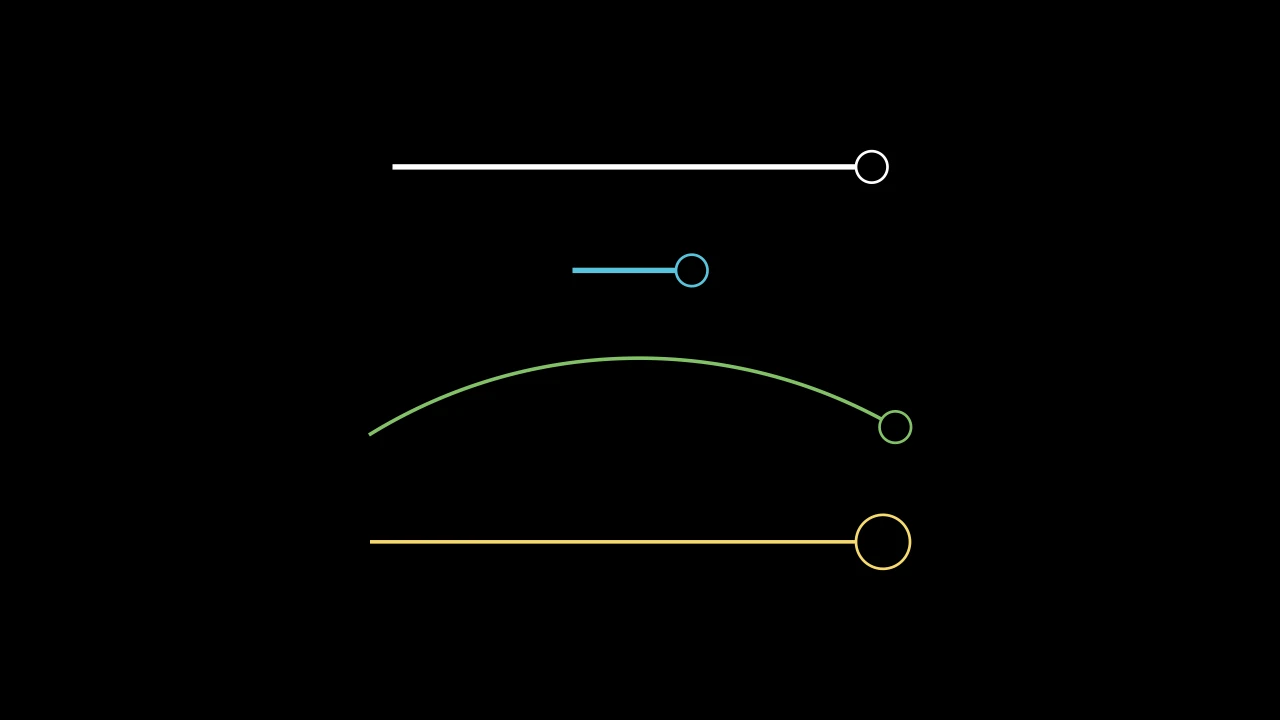
代码
import manimgx as m


class ArrowCircleTipExample(m.Scene):
    def construct(self) -> None:
        tip = m.ArrowCircleTip
        a, b = 3 * m.LEFT, 3 * m.RIGHT
        arrows = m.VGroup(
            m.Arrow(a, b, tip_shape=tip),
            m.Arrow(a / 3, b / 3, tip_shape=tip, color=m.BLUE),
            m.CurvedArrow(a, b, angle=-m.PI / 3, tip_shape=tip, color=m.GREEN),
            m.Line(a, b, color=m.YELLOW).add_tip(tip_shape=tip, tip_length=0.6),
        ).arrange(m.DOWN, buff=0.8)
        self.add(arrows)
圆形尖端,带轮廓:一个跨 length 的圆,从路径停止处到其结束处;
其轮廓宽 3 且不填充。
m.ArrowCircleTip(length=DEFAULT_ARROW_TIP_LENGTH, start_angle=PI, **kwargs)
length其直径,以场景单位计。
start_angle为兼容 Manim 而接受;被忽略。
color填充与描边共用的颜色(默认白色);None 表示该类的默认值。
fill_color填充的颜色;未给出时为
color。多个颜色沿sheen_direction构成渐变。fill_opacity填充的不透明度,取值从 0 到 1(默认 0:无填充)。
stroke_color描边的颜色;未给出时为
color。多个颜色构成渐变。stroke_opacity描边的不透明度,取值从 0 到 1(默认 1)。
stroke_width描边的宽度,以场景单位的百分之一计(默认 4;0:无描边)。
background_stroke_color绘制于填充之后的轮廓颜色(默认黑色)。
background_stroke_opacity轮廓的不透明度,取值从 0 到 1(默认 1)。
background_stroke_width轮廓的宽度,以场景单位的百分之一计(默认 0:无)。
sheen_factor颜色朝
sheen_direction变亮的程度,取值从 -1 到 1(默认 0); 负值变暗。sheen_direction颜色变亮的方向(默认
UL)。joint_type描边在路径转折处的连接方式:圆角、斜切或斜接,按二维场景的绘制方式 (参见 LineJointType;默认 AUTO:斜接)。
cap_style描边在其显示的每一端的端点样式(开放路径的端点、虚线的端点):圆头、平头 或方头,按二维场景的绘制方式(参见 CapStyleType;默认 AUTO:平头)。
shade_in_3d三维场景的光是否对该 mobject 着色。
material其表面在三维场景中如何反射场景的光(参见 Material);None:Manim 的着色(默认)。
namemobject 的名称;未给出时为其类名。
z_index其在绘制顺序中的位置:索引较高者绘制于较低者之上 (默认 0)。
targetMoveToTarget将 mobject 移动至的状态。
还接受 样式关键字。
源码
manimgx\mobjects\shapes.py
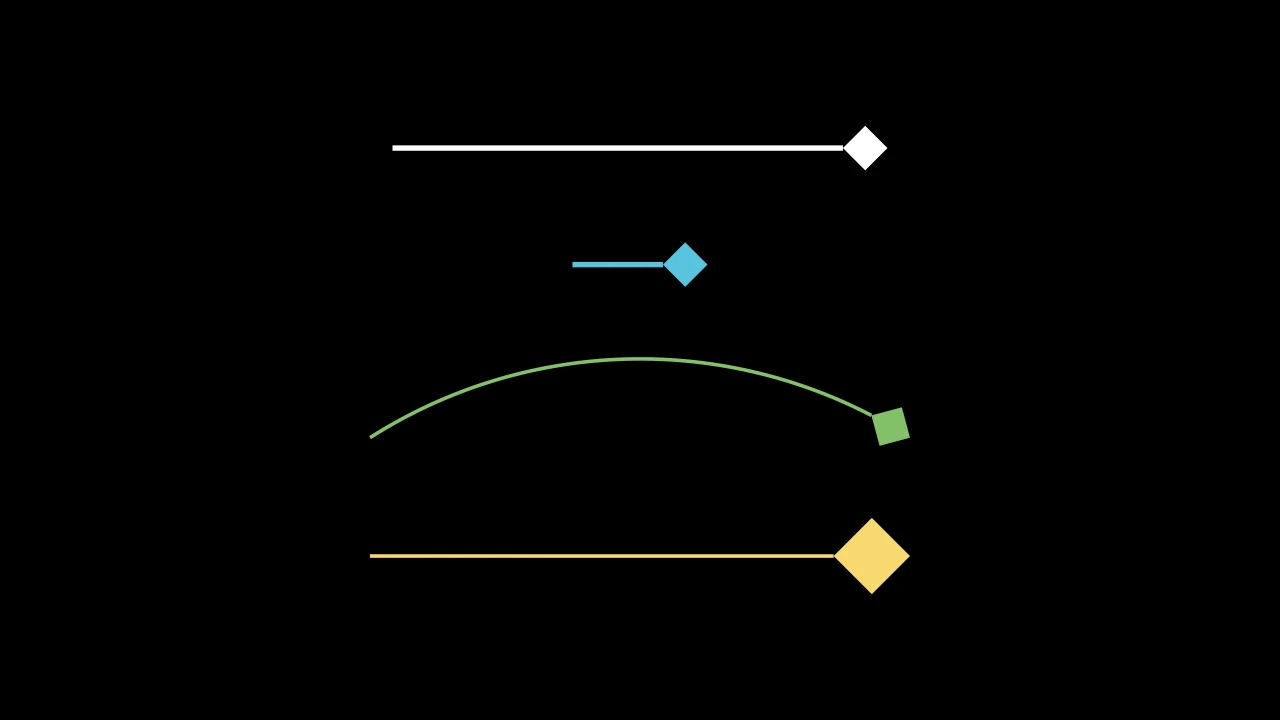
代码
import manimgx as m


class ArrowSquareFilledTipExample(m.Scene):
    def construct(self) -> None:
        tip = m.ArrowSquareFilledTip
        a, b = 3 * m.LEFT, 3 * m.RIGHT
        arrows = m.VGroup(
            m.Arrow(a, b, tip_shape=tip),
            m.Arrow(a / 3, b / 3, tip_shape=tip, color=m.BLUE),
            m.CurvedArrow(a, b, angle=-m.PI / 3, tip_shape=tip, color=m.GREEN),
            m.Line(a, b, color=m.YELLOW).add_tip(tip_shape=tip, tip_length=0.6),
        ).arrange(m.DOWN, buff=0.8)
        self.add(arrows)
方形尖端,填充且无轮廓:一个边长 length 的正方形,置于一个角上,
其对角线沿路径从路径停止处到其结束处。
其 length 即该对角线的长度。
m.ArrowSquareFilledTip(length=DEFAULT_ARROW_TIP_LENGTH, start_angle=PI, **kwargs)
length其边长,以场景单位计。
start_angle为兼容 Manim 而接受;被忽略。
color填充与描边共用的颜色(默认白色);None 表示该类的默认值。
fill_color填充的颜色;未给出时为
color。多个颜色沿sheen_direction构成渐变。fill_opacity填充的不透明度,取值从 0 到 1(默认 0:无填充)。
stroke_color描边的颜色;未给出时为
color。多个颜色构成渐变。stroke_opacity描边的不透明度,取值从 0 到 1(默认 1)。
stroke_width描边的宽度,以场景单位的百分之一计(默认 4;0:无描边)。
background_stroke_color绘制于填充之后的轮廓颜色(默认黑色)。
background_stroke_opacity轮廓的不透明度,取值从 0 到 1(默认 1)。
background_stroke_width轮廓的宽度,以场景单位的百分之一计(默认 0:无)。
sheen_factor颜色朝
sheen_direction变亮的程度,取值从 -1 到 1(默认 0); 负值变暗。sheen_direction颜色变亮的方向(默认
UL)。joint_type描边在路径转折处的连接方式:圆角、斜切或斜接,按二维场景的绘制方式 (参见 LineJointType;默认 AUTO:斜接)。
cap_style描边在其显示的每一端的端点样式(开放路径的端点、虚线的端点):圆头、平头 或方头,按二维场景的绘制方式(参见 CapStyleType;默认 AUTO:平头)。
shade_in_3d三维场景的光是否对该 mobject 着色。
material其表面在三维场景中如何反射场景的光(参见 Material);None:Manim 的着色(默认)。
namemobject 的名称;未给出时为其类名。
z_index其在绘制顺序中的位置:索引较高者绘制于较低者之上 (默认 0)。
targetMoveToTarget将 mobject 移动至的状态。
还接受 样式关键字。
源码
manimgx\mobjects\shapes.py
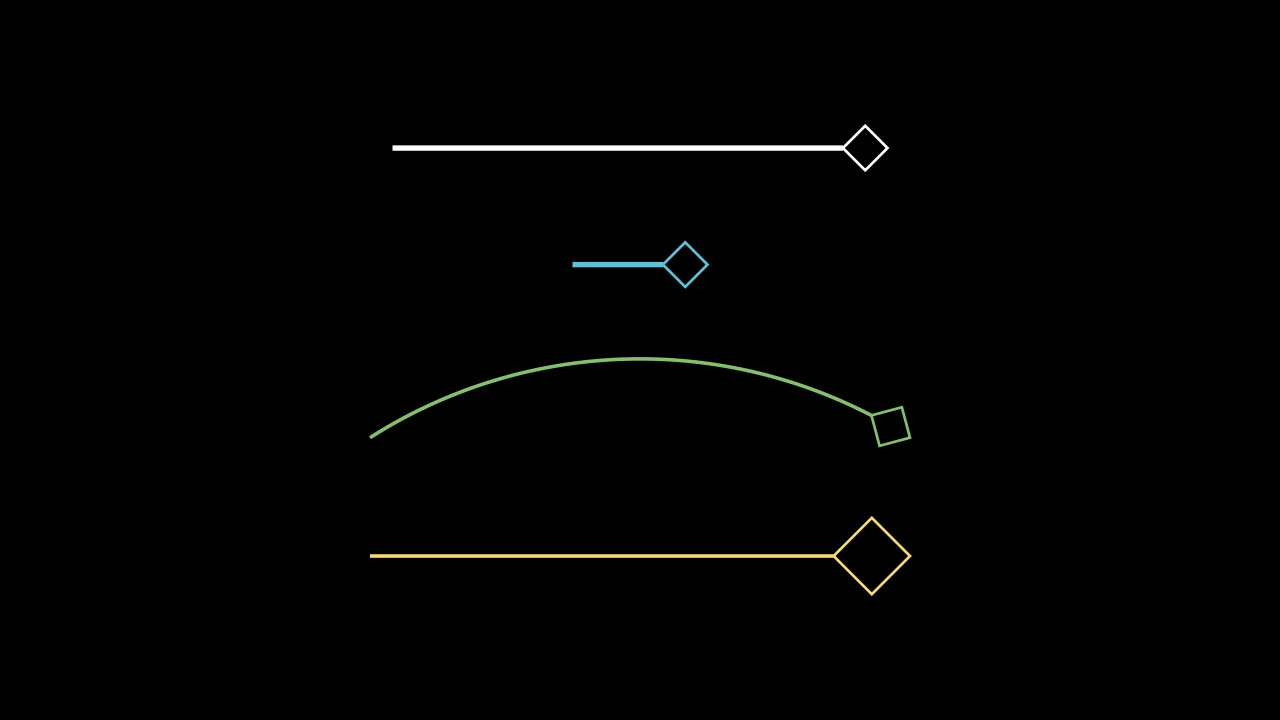
代码
import manimgx as m


class ArrowSquareTipExample(m.Scene):
    def construct(self) -> None:
        tip = m.ArrowSquareTip
        a, b = 3 * m.LEFT, 3 * m.RIGHT
        arrows = m.VGroup(
            m.Arrow(a, b, tip_shape=tip),
            m.Arrow(a / 3, b / 3, tip_shape=tip, color=m.BLUE),
            m.CurvedArrow(a, b, angle=-m.PI / 3, tip_shape=tip, color=m.GREEN),
            m.Line(a, b, color=m.YELLOW).add_tip(tip_shape=tip, tip_length=0.6),
        ).arrange(m.DOWN, buff=0.8)
        self.add(arrows)
方形尖端,带轮廓:一个边长 length 的正方形,置于一个角上,
其对角线沿路径从路径停止处到其结束处;其轮廓宽 3 且不填充。
其 length 即该对角线的长度。
m.ArrowSquareTip(length=DEFAULT_ARROW_TIP_LENGTH, start_angle=PI, **kwargs)
length其边长,以场景单位计。
start_angle为兼容 Manim 而接受;被忽略。
color填充与描边共用的颜色(默认白色);None 表示该类的默认值。
fill_color填充的颜色;未给出时为
color。多个颜色沿sheen_direction构成渐变。fill_opacity填充的不透明度,取值从 0 到 1(默认 0:无填充)。
stroke_color描边的颜色;未给出时为
color。多个颜色构成渐变。stroke_opacity描边的不透明度,取值从 0 到 1(默认 1)。
stroke_width描边的宽度,以场景单位的百分之一计(默认 4;0:无描边)。
background_stroke_color绘制于填充之后的轮廓颜色(默认黑色)。
background_stroke_opacity轮廓的不透明度,取值从 0 到 1(默认 1)。
background_stroke_width轮廓的宽度,以场景单位的百分之一计(默认 0:无)。
sheen_factor颜色朝
sheen_direction变亮的程度,取值从 -1 到 1(默认 0); 负值变暗。sheen_direction颜色变亮的方向(默认
UL)。joint_type描边在路径转折处的连接方式:圆角、斜切或斜接,按二维场景的绘制方式 (参见 LineJointType;默认 AUTO:斜接)。
cap_style描边在其显示的每一端的端点样式(开放路径的端点、虚线的端点):圆头、平头 或方头,按二维场景的绘制方式(参见 CapStyleType;默认 AUTO:平头)。
shade_in_3d三维场景的光是否对该 mobject 着色。
material其表面在三维场景中如何反射场景的光(参见 Material);None:Manim 的着色(默认)。
namemobject 的名称;未给出时为其类名。
z_index其在绘制顺序中的位置:索引较高者绘制于较低者之上 (默认 0)。
targetMoveToTarget将 mobject 移动至的状态。
还接受 样式关键字。
源码
manimgx\mobjects\shapes.py
箭头尖端的基类:一个具有两个自身点的小形状,其 tip_point(其所终止路径指向之处)和其 base(路径停止之处)。
路径以 tip_shape(length=…, **style) 制作其尖端(见
add_tip),再旋转并移动到位:尖端即其类
在该长度下所制作。其本身不被制作:其子类才是尖端。要自行制作尖端,请子类化
它和一个以给定长度制作的形状:形状的第一个点为尖端点,其轮廓中点为底。
两者均从其点读取,因此随其移动;命名其形状其他点的子类以属性方式这样做,
从不存储。
length尖端的长度,以场景单位计。
color填充与描边共用的颜色(默认白色);None 表示该类的默认值。
fill_color填充的颜色;未给出时为
color。多个颜色沿sheen_direction构成渐变。fill_opacity填充的不透明度,取值从 0 到 1(默认 0:无填充)。
stroke_color描边的颜色;未给出时为
color。多个颜色构成渐变。stroke_opacity描边的不透明度,取值从 0 到 1(默认 1)。
stroke_width描边的宽度,以场景单位的百分之一计(默认 4;0:无描边)。
background_stroke_color绘制于填充之后的轮廓颜色(默认黑色)。
background_stroke_opacity轮廓的不透明度,取值从 0 到 1(默认 1)。
background_stroke_width轮廓的宽度,以场景单位的百分之一计(默认 0:无)。
sheen_factor颜色朝
sheen_direction变亮的程度,取值从 -1 到 1(默认 0); 负值变暗。sheen_direction颜色变亮的方向(默认
UL)。joint_type描边在路径转折处的连接方式:圆角、斜切或斜接,按二维场景的绘制方式 (参见 LineJointType;默认 AUTO:斜接)。
cap_style描边在其显示的每一端的端点样式(开放路径的端点、虚线的端点):圆头、平头 或方头,按二维场景的绘制方式(参见 CapStyleType;默认 AUTO:平头)。
shade_in_3d三维场景的光是否对该 mobject 着色。
material其表面在三维场景中如何反射场景的光(参见 Material);None:Manim 的着色(默认)。
namemobject 的名称;未给出时为其类名。
z_index其在绘制顺序中的位置:索引较高者绘制于较低者之上 (默认 0)。
targetMoveToTarget将 mobject 移动至的状态。
还接受 样式关键字。
源码
manimgx\mobjects\shapes.py
直线的弯曲,带样式和尖端关键字(供自行设置缓冲的直线使用)。
path_arc直线所弯曲的角度,以弧度计:0 为直;否则为从起点到终点的弧, 为正时逆时针(行进时向右弯),为负时顺时针(默认 0)。
color填充和描边共用的颜色(默认白色;Circle 的为 红色);None 表示类的默认值。
tip_lengthnormal_vector路径所在平面的法向量(默认 OUT)。为兼容 Manim 而接受;被忽略且不保留。
tip_style路径所生成尖端的样式关键字(默认 None:无)。除非在此给出,否则尖端的
fill_color和stroke_color取路径的颜色。fill_color填充的颜色;未给出时为
color。多个颜色沿sheen_direction构成渐变。fill_opacity填充的不透明度,取值从 0 到 1(默认 0:无填充)。
stroke_color描边的颜色;未给出时为
color。多个颜色构成渐变。stroke_opacity描边的不透明度,取值从 0 到 1(默认 1)。
stroke_width描边的宽度,以场景单位的百分之一计(默认 4;0:无描边)。
background_stroke_color绘制于填充之后的轮廓颜色(默认黑色)。
background_stroke_opacity轮廓的不透明度,取值从 0 到 1(默认 1)。
background_stroke_width轮廓的宽度,以场景单位的百分之一计(默认 0:无)。
sheen_factor颜色朝
sheen_direction变亮的程度,取值从 -1 到 1(默认 0); 负值变暗。sheen_direction颜色变亮的方向(默认
UL)。joint_type描边在路径转折处的连接方式:圆角、斜切或斜接,按二维场景的绘制方式 (参见 LineJointType;默认 AUTO:斜接)。
cap_style描边在其显示的每一端的端点样式(开放路径的端点、虚线的端点):圆头、平头 或方头,按二维场景的绘制方式(参见 CapStyleType;默认 AUTO:平头)。
shade_in_3d三维场景的光是否对该 mobject 着色。
material其表面在三维场景中如何反射场景的光(参见 Material);None:Manim 的着色(默认)。
namemobject 的名称;未给出时为其类名。
z_index其在绘制顺序中的位置:索引较高者绘制于较低者之上 (默认 0)。
targetMoveToTarget将 mobject 移动至的状态。
变换所保持不动的点:给定的点,或 mobject 边界框上的一个点。
当两个关键字均未指定时,缩放、旋转或拉伸保持 mobject 的中心不动, 而函数或矩阵关于原点应用。
about_point保持不动的点,以场景坐标表示;它优先于
about_edge。about_edgemobject 边界框上保持不动的点,以方向命名: UP 表示其顶边的中点,UR 表示其右上角,ORIGIN 表示其中心。
Matrix 除条目以外的关键字参数,供将其传递下去的方法使用 (如向量的坐标标签):即条目的类型,以及其 布局、括号和样式。
v_buff各行之间的距离,以场景单位表示,从一行的条目对齐角到下一行的对齐角 (默认 0.8)。
h_buff各列之间的距离,以场景单位表示,同上(默认 1.3)。
bracket_h_buff条目与每个括号之间的间距,以场景单位表示(默认 0.25)。
bracket_v_buff当括号被拉伸时,括号在条目上下方延伸的距离,以场景单位表示 (默认 0.25)。
add_background_rectangles_to_entries每个条目是否获得一个背景矩形(默认 False)。
include_background_rectangle矩阵是否获得一个背景矩形(默认 False)。
element_alignment_corner每个条目放置在网格上的角,以方向命名:DR 使一列中的条目按其右侧对齐, UL 则按其左侧对齐(默认 DR)。
left_bracket左括号,作为 LaTeX 分隔符:
"[","(","\{","\langle","|", …(默认"[")。right_bracket右括号,作为 LaTeX 分隔符(默认
"]")。stretch_brackets括号是否被拉伸到条目的高度,并再延伸
bracket_v_buff的距离 (默认 True)。bracket_config括号的 Math 关键字: 其
color,…(默认 None:无)。element_to_mobject构造每个条目的 mobject 的函数,以条目和
element_to_mobject_config的关键字 参数调用(默认:矩阵类自身的函数,对于 Matrix 为 MathTex)。element_to_mobject_configelement_to_mobject的关键字参数(默认 None:矩阵类自身的设置,对于 Matrix 为无)。color填充与描边共用的颜色(默认白色);None 表示该类的默认值。
fill_color填充的颜色;未给出时为
color。多个颜色沿sheen_direction构成渐变。fill_opacity填充的不透明度,取值从 0 到 1(默认 0:无填充)。
stroke_color描边的颜色;未给出时为
color。多个颜色构成渐变。stroke_opacity描边的不透明度,取值从 0 到 1(默认 1)。
stroke_width描边的宽度,以场景单位的百分之一计(默认 4;0:无描边)。
background_stroke_color绘制于填充之后的轮廓颜色(默认黑色)。
background_stroke_opacity轮廓的不透明度,取值从 0 到 1(默认 1)。
background_stroke_width轮廓的宽度,以场景单位的百分之一计(默认 0:无)。
sheen_factor颜色朝
sheen_direction变亮的程度,取值从 -1 到 1(默认 0); 负值变暗。sheen_direction颜色变亮的方向(默认
UL)。joint_type描边在路径转折处的连接方式:圆角、斜切或斜接,按二维场景的绘制方式 (参见 LineJointType;默认 AUTO:斜接)。
cap_style描边在其显示的每一端的端点样式(开放路径的端点、虚线的端点):圆头、平头 或方头,按二维场景的绘制方式(参见 CapStyleType;默认 AUTO:平头)。
shade_in_3d三维场景的光是否对该 mobject 着色。
material其表面在三维场景中如何反射场景的光(参见 Material);None:Manim 的着色(默认)。
namemobject 的名称;未给出时为其类名。
z_index其在绘制顺序中的位置:索引较高者绘制于较低者之上 (默认 0)。
targetMoveToTarget将 mobject 移动至的状态。
各行之间的距离,以场景单位表示,从一行的条目对齐角到下一行的对齐角 (默认 0.8)。
各列之间的距离,以场景单位表示,同上(默认 1.3)。
条目与每个括号之间的间距,以场景单位表示(默认 0.25)。
当括号被拉伸时,括号在条目上下方延伸的距离,以场景单位表示 (默认 0.25)。
每个条目是否获得一个背景矩形(默认 False)。
矩阵是否获得一个背景矩形(默认 False)。
每个条目放置在网格上的角,以方向命名:DR 使一列中的条目按其右侧对齐, UL 则按其左侧对齐(默认 DR)。
左括号,作为 LaTeX 分隔符:"[", "(", "\{", "\langle",
"|", …(默认 "[")。
右括号,作为 LaTeX 分隔符(默认 "]")。
括号是否被拉伸到条目的高度,并再延伸 bracket_v_buff 的距离
(默认 True)。