图像与 SVG
影片代码
import manimgx as m
import numpy as np


class ImagesAndSvgHero(m.Scene):
    def construct(self) -> None:
        x = np.linspace(-1, 1, 64)
        pixels = np.zeros((64, 64, 3), dtype=np.uint8)
        pixels[..., 0] = 255 * (x[None, :] + 1) / 2
        pixels[..., 2] = 255 * (x[:, None] + 1) / 2
        image = m.ImageMobject(pixels).scale_to_fit_height(4)
        image.set_resampling_algorithm(m.RESAMPLING_ALGORITHMS["nearest"])
        self.play(m.FadeIn(image))
        self.play(image.animate.rotate(m.PI / 8).scale(0.8))
        self.wait()
图像是位于矩形上的图片:从文件(PNG、JPEG 等)读取,或由像素数组生成。它像任何 mobject 一样移动、缩放、旋转和淡入淡出;其像素保持自身不变。SVG 绘图则不同:其 形状变为路径,每条路径都是一个可着色、移动和绘制的部分,作为 ManimGX 自身的 形状。
代码
import numpy as np

import manimgx as m


class ImageMobjectExample(m.Scene):
    def construct(self) -> None:
        ramp = np.linspace(0, 255, 256)
        pixels = np.zeros((256, 256, 3), dtype=np.uint8)
        pixels[..., 0] = ramp  # red grows to the right
        pixels[..., 2] = ramp[:, np.newaxis]  # blue grows downward
        image = m.ImageMobject(pixels, scale_to_resolution=400)
        self.play(m.FadeIn(image))
代码
import numpy as np

import manimgx as m


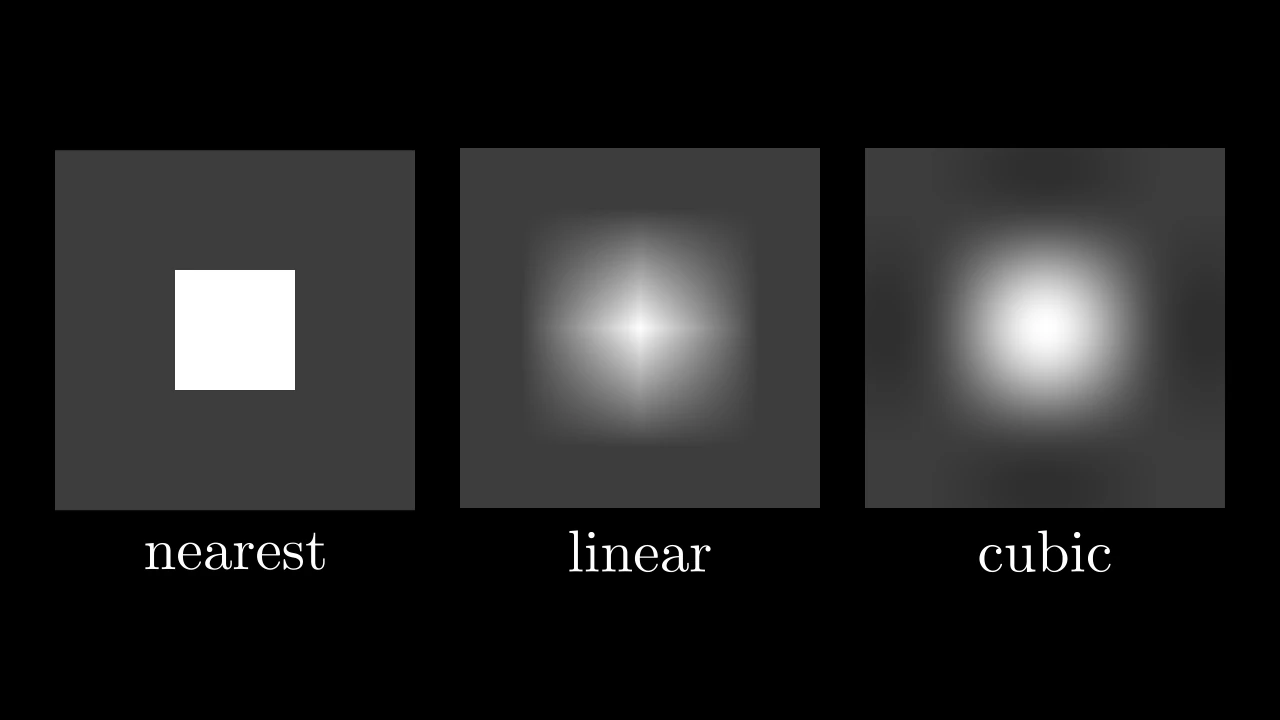
class ImageMobjectResamplingExample(m.Scene):
    def construct(self) -> None:
        pixels = np.full((3, 3), 60, dtype=np.uint8)
        pixels[1, 1] = 255  # one white pixel, amid gray ones
        images = m.Group()
        for name in ("nearest", "linear", "cubic"):
            image = m.ImageMobject(
                pixels,
                scale_to_resolution=6,
                resampling_algorithm=m.RESAMPLING_ALGORITHMS[name],
            )
            images.add(m.Group(image, m.Text(name).next_to(image, m.DOWN)))
        self.add(images.arrange(buff=0.5))
一幅图片:一个图像文件或一个像素数组,置于一个与其像素高度相当的矩形上。
一幅 scale_to_resolution 像素高(未指定时为 1080)的图像与画框短边
(默认为 8 个场景单位)等高,其他图像按比例缩放。当显示尺寸大于其像素时,
图片由 resampling_algorithm 从像素重建:默认为穿过每个像素的平滑三次曲线;
linear 混合相邻像素;nearest 将每个像素显示为其颜色的小方块。当显示尺寸
小于其像素时,图片被采样而非平均。该 mobject 的不透明度与其像素自身的相乘。
filename_or_array图片内容:图像文件的路径、文件内容 (字节串),或取值 0 到 255 的像素值数组:(h, w) 灰度、(h, w, 3) RGB 或 (h, w, 4) RGBA。
scale_to_resolution与画框短边等高的图像有多少像素高; 0 表示图像高 3 个单位,与其尺寸无关。
invert是否反转其颜色(不反转其透明度)。
image_mode文件被读入的模式,以 Pillow 库的命名方式表示: "RGBA",或 "L" 表示灰度。
resampling_algorithm图片如何从其像素重建,以 Pillow 库的编号表示: 0,nearest;2,linear;3,cubic(Keys 的三次卷积,Pillow 的 bicubic); RESAMPLING_ALGORITHMS 按名称给出这些值。
stroke_width图片周围边框的宽度,以百分之一场景单位为单位; 0 表示无边框。
stroke_color边框的颜色。
background_stroke_color绘制于填充之后的轮廓颜色(默认黑色)。
background_stroke_opacity轮廓的不透明度,取值从 0 到 1(默认 1)。
background_stroke_width轮廓的宽度,以场景单位的百分之一计(默认 0:无)。
sheen_factor颜色朝
sheen_direction变亮的程度,取值从 -1 到 1(默认 0); 负值变暗。sheen_direction颜色变亮的方向(默认
UL)。joint_type描边在路径转折处的连接方式:圆角、斜切或斜接,按二维场景的绘制方式 (参见 LineJointType;默认 AUTO:斜接)。
cap_style描边在其显示的每一端的端点样式(开放路径的端点、虚线的端点):圆头、平头 或方头,按二维场景的绘制方式(参见 CapStyleType;默认 AUTO:平头)。
shade_in_3d三维场景的光是否对该 mobject 着色。
material其表面在三维场景中如何反射场景的光(参见 Material);None:Manim 的着色(默认)。
namemobject 的名称;未给出时为其类名。
z_index其在绘制顺序中的位置:索引较高者绘制于较低者之上 (默认 0)。
targetMoveToTarget将 mobject 移动至的状态。
还接受 样式关键字。
源码
manimgx\mobjects\images.py
当前图片的 (h, w, 4) RGBA 像素,取值 0 到 255。
由该图像解码或着色的图片是只读的。当变为另一个带纹理网格时, 会采用其纹理,包括其是否可写。
将每个像素着为 color,保留其不透明度:图片变为该颜色的剪影。
alpha同时设置每个像素的不透明度,取值 0 到 1;None 保留各自的原值。
family仅为 Manim 兼容性而接受;被忽略:仅对图片本身着色。
源码
manimgx\mobjects\images.py
设置图片的不透明度,该值与其像素自身的相乘。
opacity不透明度,取值 0 到 1。
family是否设置其整个族(包括边框),还是仅设置图片本身。
alpha不透明度,使用 Manim 图像所用的名称;若给定,则优先于
opacity。
源码
manimgx\mobjects\images.py
设置在显示尺寸大于像素时,图片如何从其像素重建。
resampling_algorithm滤波器,以 Pillow 库的编号表示:0,nearest (每个像素为其颜色的小方块);2,linear;3,cubic(平滑,且 穿过每个像素); RESAMPLING_ALGORITHMS 按名称给出 这些值。
源码
manimgx\mobjects\images.py
图像重建可用的滤镜,按名称排列,各附其编号(参见 Resampling):"nearest" 或 "none"、"bilinear" 或 "linear"、"bicubic" 或 "cubic"。
Resampling = Literal[0, 2, 3]
图像在绘制尺寸大于像素尺寸时从像素重建的方式,编号与 Pillow 库的滤镜编号一致: 0,最近邻(每个像素为一个其颜色的方块);2,线性;3,三次(Keys 的三次卷积, a = −½,即 Pillow 的 BICUBIC:平滑且经过每个像素)。
从 SVG 文件中读取的绘图:其每个形状为一个部件,按文件绘制它的方式上色,高度为 2 个单位, 除非另行指定尺寸。
路径、直线、矩形(含圆角)、圆、椭圆、多边形和折线按文件中的顺序成为部件,
带有文件的填充、描边和变换;组与 <use> 会被跟随,文本会被跳过并发出警告。
文件未指定如何绘制的部分采用 SVG 的默认值,即黑色填充且无描边,
除非 svg_default 另有指定。文件的组按其 id 保留在
id_to_vgroup_dict 中。
file_nameSVG 文件。
should_center绘图是否居中于原点。
height将绘图缩放至的高度,以场景单位表示;None 保留 文件的尺寸,即每个 SVG 单位对应一个场景单位。
width将绘图缩放至的宽度,以场景单位表示,在
height之后应用(因此 它优先);None:与height的结果一致。color为兼容 Manim 而接受;无效果:各部件保留文件的 颜色(用
fill_color和stroke_color覆盖它们,或通过svg_default为文件未指定如何绘制的部分上色)。opacity为兼容 Manim 而接受;被忽略。
fill_color每个部件的填充颜色;None 保留文件的值。
fill_opacity每个部件的填充不透明度,取值 0 到 1;None 保留文件的值。
stroke_color每个部件的描边颜色;None 保留文件的值。
stroke_opacity每个部件的描边不透明度,取值 0 到 1;None 保留 文件的值。
stroke_width每个部件的描边宽度,以场景单位的百分之一表示; None 保留文件的值。
svg_default为文件未指定如何绘制的部分提供的绘制关键字; None 表示
{"stroke_width": 0}:无描边。path_string_config每条路径的SVG 路径 关键字。
use_svg_cache是否对相同的 SVG 内容和路径设置保留并复制已解析的绘图。 文件始终会被读取以检测更改。
background_stroke_color绘制于填充之后的轮廓颜色(默认黑色)。
background_stroke_opacity轮廓的不透明度,取值从 0 到 1(默认 1)。
background_stroke_width轮廓的宽度,以场景单位的百分之一计(默认 0:无)。
sheen_factor颜色朝
sheen_direction变亮的程度,取值从 -1 到 1(默认 0); 负值变暗。sheen_direction颜色变亮的方向(默认
UL)。joint_type描边在路径转折处的连接方式:圆角、斜切或斜接,按二维场景的绘制方式 (参见 LineJointType;默认 AUTO:斜接)。
cap_style描边在其显示的每一端的端点样式(开放路径的端点、虚线的端点):圆头、平头 或方头,按二维场景的绘制方式(参见 CapStyleType;默认 AUTO:平头)。
shade_in_3d三维场景的光是否对该 mobject 着色。
material其表面在三维场景中如何反射场景的光(参见 Material);None:Manim 的着色(默认)。
namemobject 的名称;未给出时为其类名。
z_index其在绘制顺序中的位置:索引较高者绘制于较低者之上 (默认 0)。
targetMoveToTarget将 mobject 移动至的状态。

还接受 样式关键字。
源码
manimgx\mobjects\svg.py
绘图的各个组,按其 id 索引:每个 <g> 元素的 id 命名其内部
形状构成的组,"root" 命名全部形状;没有 id 的元素以
"numbered_group_" 加一个数字命名。

SVG 路径如何变为曲线:SVGMobject 的
path_string_config,即它读取的每条路径的关键字。
除此之外,它们还接受样式关键字。
long_lines为兼容 Manim 而接受;被忽略(默认为 False)。
should_subdivide_sharp_curves为兼容 Manim 而接受;被忽略(默认为 False)。
should_remove_null_curves为兼容 Manim 而接受;被忽略(默认为 False)。
color填充与描边共用的颜色(默认白色);None 表示该类的默认值。
fill_color填充的颜色;未给出时为
color。多个颜色沿sheen_direction构成渐变。fill_opacity填充的不透明度,取值从 0 到 1(默认 0:无填充)。
stroke_color描边的颜色;未给出时为
color。多个颜色构成渐变。stroke_opacity描边的不透明度,取值从 0 到 1(默认 1)。
stroke_width描边的宽度,以场景单位的百分之一计(默认 4;0:无描边)。
background_stroke_color绘制于填充之后的轮廓颜色(默认黑色)。
background_stroke_opacity轮廓的不透明度,取值从 0 到 1(默认 1)。
background_stroke_width轮廓的宽度,以场景单位的百分之一计(默认 0:无)。
sheen_factor颜色朝
sheen_direction变亮的程度,取值从 -1 到 1(默认 0); 负值变暗。sheen_direction颜色变亮的方向(默认
UL)。joint_type描边在路径转折处的连接方式:圆角、斜切或斜接,按二维场景的绘制方式 (参见 LineJointType;默认 AUTO:斜接)。
cap_style描边在其显示的每一端的端点样式(开放路径的端点、虚线的端点):圆头、平头 或方头,按二维场景的绘制方式(参见 CapStyleType;默认 AUTO:平头)。
shade_in_3d三维场景的光是否对该 mobject 着色。
material其表面在三维场景中如何反射场景的光(参见 Material);None:Manim 的着色(默认)。
namemobject 的名称;未给出时为其类名。
z_index其在绘制顺序中的位置:索引较高者绘制于较低者之上 (默认 0)。
targetMoveToTarget将 mobject 移动至的状态。


