跳转至

矩阵与表格

影片代码
import manimgx as m


class MatricesAndTablesHero(m.Scene):
    def construct(self) -> None:
        matrix = m.Matrix([[2, 0], [1, 3]])
        matrix.set_column_colors(m.YELLOW, m.BLUE)
        table = m.Table(
            [["1", "2"], ["4", "8"]],
            row_labels=[m.Text("x"), m.Text("2ˣ")],
            col_labels=[m.Text("a"), m.Text("b")],
        ).scale(0.7)
        m.VGroup(matrix, table).arrange(buff=1.5)
        self.play(m.Write(matrix))
        self.play(table.create())
        self.wait()

矩阵与表格将条目按行列排列:矩阵置于方括号之间,表格置于线条之间,若提供则带有 行列标签。以值的形式给出条目,每种矩阵或表格会将其转化为各自的 mobject:数字、 整数、数学式、文本,或 mobject 本身。每一行、每一列和每一个条目都是一个 mobject, 可着色与动画化。
Matrix

MatrixExample
代码
import manimgx as m


class MatrixExample(m.Scene):
    def construct(self) -> None:
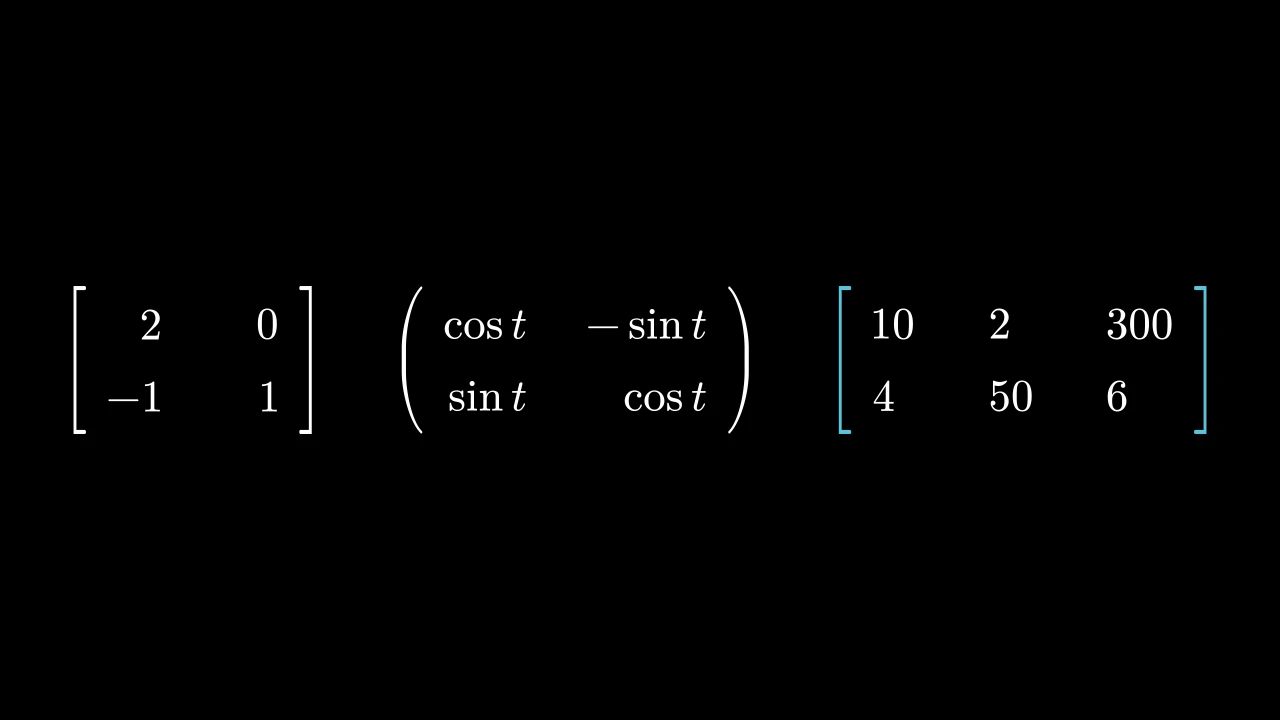
        matrices = m.VGroup(
            m.Matrix([[2, 0], [-1, 1]]),
            m.Matrix(
                [[r"\cos t", r"-\sin t"], [r"\sin t", r"\cos t"]],
                h_buff=2,
                left_bracket="(",
                right_bracket=")",
            ),
            m.Matrix(
                [[10, 2, 300], [4, 50, 6]],
                element_alignment_corner=m.UL,
                bracket_config={"color": m.BLUE},
            ),
        ).arrange(buff=1)
        self.add(matrices)

矩阵:条目按行列排列并置于括号之间;默认为白色,除非另行设置样式。

每个条目由 element_to_mobject 转换为 mobject —— 默认以 MathTex 排版为数学公式 —— 并按其右下角 (element_alignment_corner)放置在网格上,行间距为 v_buff,列间距为 h_buff: 同一列的条目按其右侧对齐。括号以 LaTeX 分隔符排版,立于两侧,拉伸至条目的高度; 矩阵以场景原点为中心。其条目和 括号可被访问、着色和动画化,其行与列亦然: get_rows() 和 get_columns() 以组的形式返回它们, set_row_colors(...) 和 set_column_colors(...) 为其着色。

布局和括号选项仅在构造期间使用;生成的单元格和括号保存矩阵的状态。

m.Matrix(matrix, v_buff=0.8, h_buff=1.3, bracket_h_buff=MED_SMALL_BUFF, bracket_v_buff=MED_SMALL_BUFF, add_background_rectangles_to_entries=False, include_background_rectangle=False, element_to_mobject=None, element_to_mobject_config=None, element_alignment_corner=DR, left_bracket='[', right_bracket=']', stretch_brackets=True, bracket_config=None, **kwargs)
matrix

条目,逐行排列:数字、数学字符串或 mobject,正如 element_to_mobject 所接受的那样。

v_buff

各行之间的距离,以场景单位表示,从一行的条目对齐角到下一行的对齐角。

h_buff

各列之间的距离,以场景单位表示,同上。

bracket_h_buff

条目与每个括号之间的间距,以场景单位表示。

bracket_v_buff

当括号被拉伸时,括号在条目上下方延伸的距离,以场景单位表示。

add_background_rectangles_to_entries

每个条目是否获得一个背景矩形, 颜色为场景的背景色(参见 add_background_rectangle)。

include_background_rectangle

矩阵是否获得一个背景矩形 (参见 add_background_rectangle)。

element_to_mobject

构造每个条目的 mobject 的函数,以条目和 element_to_mobject_config 的关键字参数调用:可以是一个类,如 DecimalNumber,或任意函数;None 表示使用 该类自身的函数(对于 Matrix 为 MathTex)。

element_to_mobject_config

element_to_mobject 的关键字参数;None 表示使用 该类自身的设置(对于 Matrix 为无)。

element_alignment_corner

每个条目放置在网格上的角,以方向命名:DR 使一列中的 条目按其右侧对齐,UL 则按其左侧对齐。

left_bracket

左括号,作为 LaTeX 分隔符:"[", "(", "\{", "\langle", "|", …。

right_bracket

右括号,作为 LaTeX 分隔符。

stretch_brackets

括号是否被拉伸到条目的高度,并再延伸 bracket_v_buff 的距离。

bracket_config

括号的 Math 关键字: 其 color,…;None 表示无。

color

填充与描边共用的颜色(默认白色);None 表示该类的默认值。

fill_color

填充的颜色;未给出时为 color。多个颜色沿 sheen_direction 构成渐变。

fill_opacity

填充的不透明度,取值从 0 到 1(默认 0:无填充)。

stroke_color

描边的颜色;未给出时为 color。多个颜色构成渐变。

stroke_opacity

描边的不透明度,取值从 0 到 1(默认 1)。

stroke_width

描边的宽度,以场景单位的百分之一计(默认 4;0:无描边)。

background_stroke_color

绘制于填充之后的轮廓颜色(默认黑色)。

background_stroke_opacity

轮廓的不透明度,取值从 0 到 1(默认 1)。

background_stroke_width

轮廓的宽度,以场景单位的百分之一计(默认 0:无)。

sheen_factor

颜色朝 sheen_direction 变亮的程度,取值从 -1 到 1(默认 0); 负值变暗。

sheen_direction

颜色变亮的方向(默认 UL)。

joint_type

描边在路径转折处的连接方式:圆角、斜切或斜接,按二维场景的绘制方式 (参见 LineJointType;默认 AUTO:斜接)。

cap_style

描边在其显示的每一端的端点样式(开放路径的端点、虚线的端点):圆头、平头 或方头,按二维场景的绘制方式(参见 CapStyleType;默认 AUTO:平头)。

shade_in_3d

三维场景的光是否对该 mobject 着色。

material

其表面在三维场景中如何反射场景的光(参见 Material);None:Manim 的着色(默认)。

name

mobject 的名称;未给出时为其类名。

z_index

其在绘制顺序中的位置:索引较高者绘制于较低者之上 (默认 0)。

target

MoveToTarget 将 mobject 移动至的状态。

还接受 样式关键字。

源码

manimgx\mobjects\grid.py

def __init__(
    self,
    matrix: Entries,
    v_buff: float = 0.8,
    h_buff: float = 1.3,
    bracket_h_buff: float = MED_SMALL_BUFF,
    bracket_v_buff: float = MED_SMALL_BUFF,
    add_background_rectangles_to_entries: bool = False,
    include_background_rectangle: bool = False,
    element_to_mobject: ElementFactory | None = None,
    element_to_mobject_config: Mapping[str, object] | None = None,
    element_alignment_corner: Vector3DLike = DR,
    left_bracket: str = "[",
    right_bracket: str = "]",
    stretch_brackets: bool = True,
    bracket_config: MathTexOptions | None = None,
    **kwargs: Unpack[Style],
):
    if bracket_config is None:
        bracket_config = {}
    super().__init__(**kwargs)
    self.cells = self._make_cells(
        matrix, element_to_mobject, element_to_mobject_config
    )
    cells = self.cells
    for i, row in enumerate(cells):
        for j, _ in enumerate(row):
            mob = cells[i][j]
            mob.move_to(
                i * v_buff * DOWN + j * h_buff * RIGHT,
                element_alignment_corner,
            )
    self.elements = VGroup(*it.chain(*self.cells))
    """条目,逐行排列:以组的形式组织,并被添加到矩阵中。"""
    self.add(self.elements)
    bracket_config = {**bracket_config}
    BRACKET_HEIGHT = 0.5977
    n = int(self.height / BRACKET_HEIGHT) + 1
    empty_tex_array = "".join(
        ["\\begin{array}{c}", *n * ["\\quad \\\\"], "\\end{array}"]
    )
    tex_left = "".join(["\\left" + left_bracket, empty_tex_array, "\\right."])
    tex_right = "".join(["\\left.", empty_tex_array, "\\right" + right_bracket])
    l_bracket = MathTex(tex_left, **bracket_config)
    r_bracket = MathTex(tex_right, **bracket_config)
    bracket_pair = VGroup(l_bracket, r_bracket)
    if stretch_brackets:
        bracket_pair.stretch_to_fit_height(self.height + 2 * bracket_v_buff)
    l_bracket.next_to(self, LEFT, bracket_h_buff)
    r_bracket.next_to(self, RIGHT, bracket_h_buff)
    self.brackets = bracket_pair
    self.add(l_bracket, r_bracket)
    self.center()
    if add_background_rectangles_to_entries:
        for mob in self.elements:
            mob.add_background_rectangle()
    if include_background_rectangle:
        self.add_background_rectangle()

entry

当构造函数未传入 element_to_mobject 时,构造每个条目的 mobject 的函数: 可以是一个类,如 MathTex,或任意函数。子类会设置其自身的 函数(IntegerMatrix 的是 Integer)。

entry_config

当构造函数未传入 element_to_mobject_config 时,调用 entry 所使用的关键字 参数(默认无,除非子类自行设置)。

elements

条目,逐行排列:以组的形式组织,并被添加到矩阵中。

get_rows

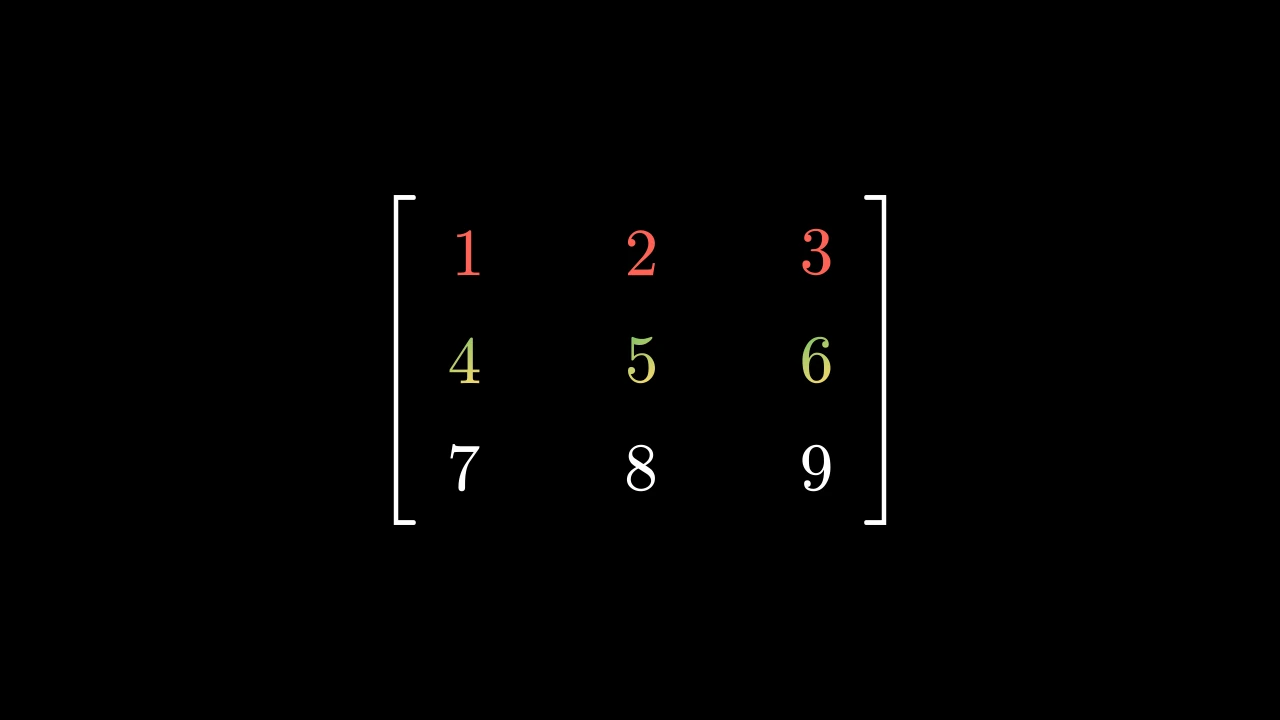
代码
import manimgx as m


class MatrixGetRowsExample(m.Scene):
    def construct(self) -> None:
        matrix = m.Matrix([[1, 2, 3], [4, 5, 6], [7, 8, 9]]).scale(1.5)
        row = m.SurroundingRectangle(matrix.get_rows()[1])
        self.add(matrix)
        self.play(m.Create(row))

各行,从上到下,每行为其条目从左到右组成的组(表格的标签也包含在内)。

matrix.get_rows()

返回 由各行组成的新组。

源码

manimgx\mobjects\grid.py

def get_rows(self) -> VGroup:
    """各行,从上到下,每行为其条目从左到右组成的组(表格的标签也包含在内)。

    Returns:
        由各行组成的新组。

    Examples:
        ```python
        import manimgx as m


        class MatrixGetRowsExample(m.Scene):
            def construct(self) -> None:
                matrix = m.Matrix([[1, 2, 3], [4, 5, 6], [7, 8, 9]]).scale(1.5)
                row = m.SurroundingRectangle(matrix.get_rows()[1])
                self.add(matrix)
                self.play(m.Create(row))
        ```
    """
    return VGroup(*(VGroup(*row) for row in self.cells))

get_columns

代码
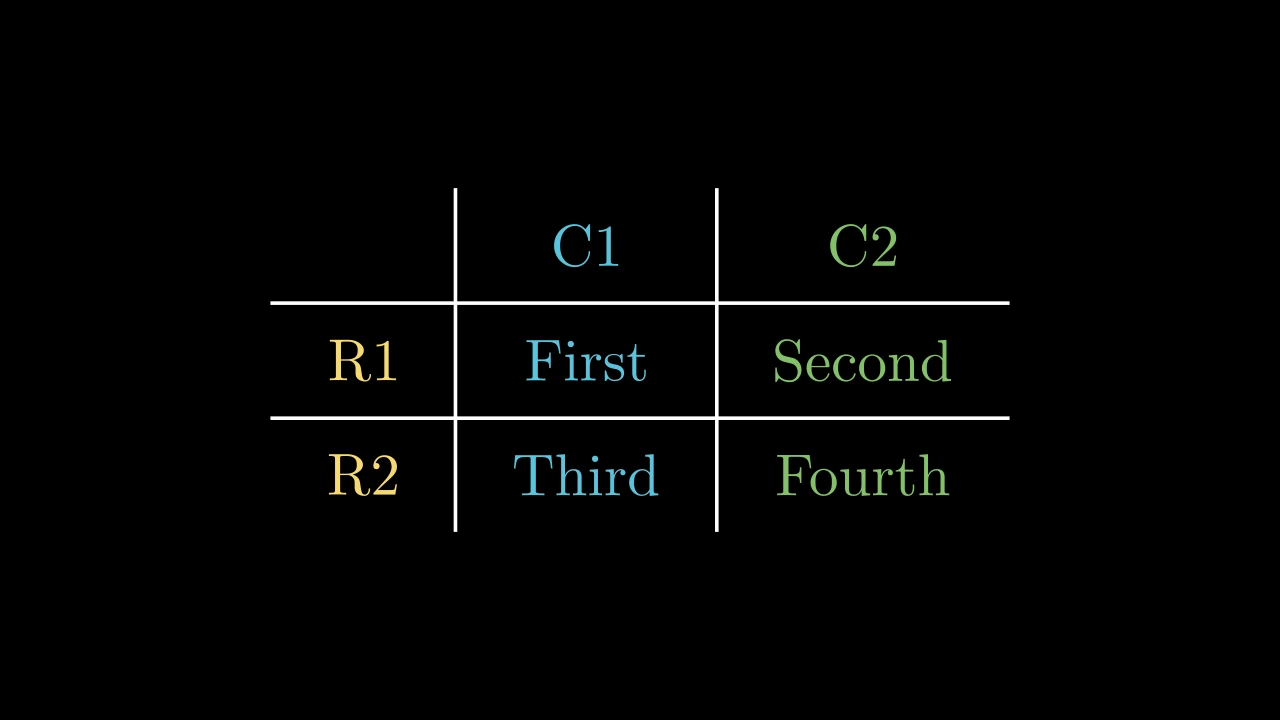
import manimgx as m


class TableGetColumnsExample(m.Scene):
    def construct(self) -> None:
        table = m.Table(
            [["First", "Second"], ["Third", "Fourth"]],
            row_labels=[m.Text("R1"), m.Text("R2")],
            col_labels=[m.Text("C1"), m.Text("C2")],
        )
        column = m.SurroundingRectangle(table.get_columns()[1])
        self.add(table)
        self.play(m.Create(column))

各列,从左到右,每列为其条目从上到下组成的组(表格的标签也包含在内)。

matrix.get_columns()

返回 由各列组成的新组。

源码

manimgx\mobjects\grid.py
def get_columns(self) -> VGroup:
    """各列,从左到右,每列为其条目从上到下组成的组(表格的标签也包含在内)。

    Returns:
        由各列组成的新组。

    Examples:
        ```python
        import manimgx as m


        class TableGetColumnsExample(m.Scene):
            def construct(self) -> None:
                table = m.Table(
                    [["First", "Second"], ["Third", "Fourth"]],
                    row_labels=[m.Text("R1"), m.Text("R2")],
                    col_labels=[m.Text("C1"), m.Text("C2")],
                )
                column = m.SurroundingRectangle(table.get_columns()[1])
                self.add(table)
                self.play(m.Create(column))
        ```
    """
    return VGroup(*(VGroup(*column) for column in zip(*self.cells, strict=False)))

set_row_colors

MatrixSetRowColorsExample
代码
import manimgx as m


class MatrixSetRowColorsExample(m.Scene):
    def construct(self) -> None:
        matrix = m.Matrix([[1, 2, 3], [4, 5, 6], [7, 8, 9]]).scale(1.5)
        self.add(matrix.set_row_colors(m.RED, [m.YELLOW, m.GREEN]))

为各行着色,从上到下:每行一个颜色,或多个颜色构成渐变 (如同 set_color 的效果);超出所给颜色数量 的行保持原有颜色。

matrix.set_row_colors(*colors)
*colors

各行的颜色,按顺序给出:每个可以是一个颜色,或一个颜色列表。

源码

manimgx\mobjects\grid.py
def set_row_colors(self, *colors: Colors) -> Self:
    """为各行着色,从上到下:每行一个颜色,或多个颜色构成渐变
    (如同 [set_color][manimgx.Mobject.set_color] 的效果);超出所给颜色数量
    的行保持原有颜色。

    Args:
        *colors: 各行的颜色,按顺序给出:每个可以是一个颜色,或一个颜色列表。

    Examples:
        ```python
        import manimgx as m


        class MatrixSetRowColorsExample(m.Scene):
            def construct(self) -> None:
                matrix = m.Matrix([[1, 2, 3], [4, 5, 6], [7, 8, 9]]).scale(1.5)
                self.add(matrix.set_row_colors(m.RED, [m.YELLOW, m.GREEN]))
        ```
    """
    for color, row in zip(colors, self.get_rows(), strict=False):
        row.set_color(color)
    return self

set_column_colors

TableSetColumnColorsExample
代码
import manimgx as m


class TableSetColumnColorsExample(m.Scene):
    def construct(self) -> None:
        table = m.Table(
            [["First", "Second"], ["Third", "Fourth"]],
            row_labels=[m.Text("R1"), m.Text("R2")],
            col_labels=[m.Text("C1"), m.Text("C2")],
        )
        self.add(table.set_column_colors(m.YELLOW, m.BLUE, m.GREEN))

为各列着色,从左到右:每列一个颜色,或多个颜色构成渐变 (如同 set_color 的效果);超出所给颜色数量 的列保持原有颜色。

matrix.set_column_colors(*colors)
*colors

各列的颜色,按顺序给出:每个可以是一个颜色,或一个颜色列表。

源码

manimgx\mobjects\grid.py

def set_column_colors(self, *colors: Colors) -> Self:
    """为各列着色,从左到右:每列一个颜色,或多个颜色构成渐变
    (如同 [set_color][manimgx.Mobject.set_color] 的效果);超出所给颜色数量
    的列保持原有颜色。

    Args:
        *colors: 各列的颜色,按顺序给出:每个可以是一个颜色,或一个颜色列表。

    Examples:
        ```python
        import manimgx as m


        class TableSetColumnColorsExample(m.Scene):
            def construct(self) -> None:
                table = m.Table(
                    [["First", "Second"], ["Third", "Fourth"]],
                    row_labels=[m.Text("R1"), m.Text("R2")],
                    col_labels=[m.Text("C1"), m.Text("C2")],
                )
                self.add(table.set_column_colors(m.YELLOW, m.BLUE, m.GREEN))
        ```
    """
    for color, column in zip(colors, self.get_columns(), strict=False):
        column.set_color(color)
    return self

get_entries

代码
import manimgx as m


class MatrixGetEntriesExample(m.Scene):
    def construct(self) -> None:
        matrix = m.Matrix([[2, 3], [1, 5]]).scale(1.5)
        entries = matrix.get_entries()
        self.add(matrix)
        self.play(entries[0].animate.set_color(m.YELLOW))
        self.play(m.Swap(entries[1], entries[2]))

矩阵的条目,逐行排列。

matrix.get_entries()

返回 条目组成的组;get_entries()[1] 是第一行的第二个条目。

源码

manimgx\mobjects\grid.py

def get_entries(self) -> VGroup:
    """矩阵的条目,逐行排列。

    Returns:
        条目组成的组;`get_entries()[1]` 是第一行的第二个条目。

    Examples:
        ```python
        import manimgx as m


        class MatrixGetEntriesExample(m.Scene):
            def construct(self) -> None:
                matrix = m.Matrix([[2, 3], [1, 5]]).scale(1.5)
                entries = matrix.get_entries()
                self.add(matrix)
                self.play(entries[0].animate.set_color(m.YELLOW))
                self.play(m.Swap(entries[1], entries[2]))
        ```
    """
    return self.elements

get_brackets

代码
import manimgx as m


class MatrixGetBracketsExample(m.Scene):
    def construct(self) -> None:
        matrix = m.Matrix([[r"\pi", 3], [1, 5]]).scale(1.5)
        left, right = matrix.get_brackets()
        self.add(matrix)
        self.play(
            left.animate.set_color(m.BLUE), right.animate.set_color(m.GREEN)
        )

矩阵的括号,左括号在前。

matrix.get_brackets()

返回 由两个括号组成的组。

源码

manimgx\mobjects\grid.py
def get_brackets(self) -> VGroup:
    r"""矩阵的括号,左括号在前。

    Returns:
        由两个括号组成的组。

    Examples:
        ```python
        import manimgx as m


        class MatrixGetBracketsExample(m.Scene):
            def construct(self) -> None:
                matrix = m.Matrix([[r"\pi", 3], [1, 5]]).scale(1.5)
                left, right = matrix.get_brackets()
                self.add(matrix)
                self.play(
                    left.animate.set_color(m.BLUE), right.animate.set_color(m.GREEN)
                )
        ```
    """
    return self.brackets

DecimalMatrix

DecimalMatrixExample
代码
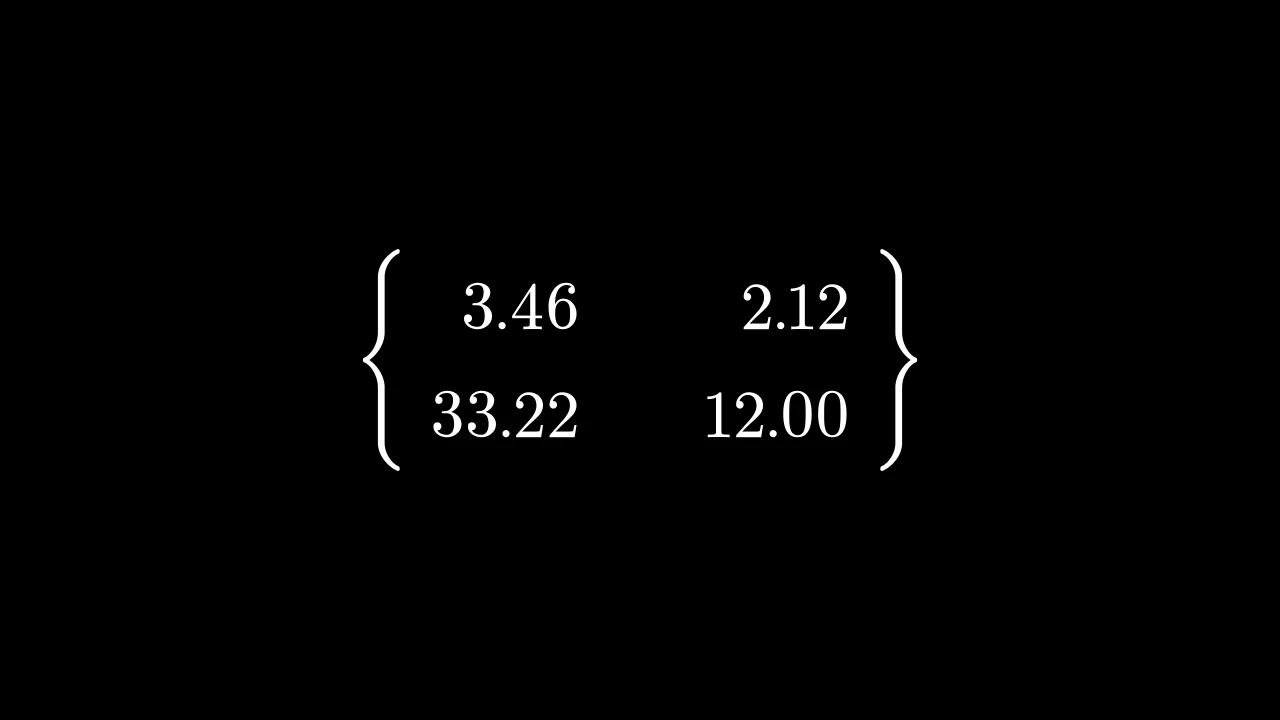
import manimgx as m


class DecimalMatrixExample(m.Scene):
    def construct(self) -> None:
        matrix = m.DecimalMatrix(
            [[3.456, 2.122], [33.2244, 12]],
            h_buff=2,
            element_to_mobject_config={"num_decimal_places": 2},
            left_bracket=r"\{",
            right_bracket=r"\}",
        )
        self.add(matrix.scale(1.5))

十进制数矩阵:每个条目以 DecimalNumber 书写, 除非另行配置,默认保留一位小数。

它接受 Matrix 的参数;其条目为数字,其 element_to_mobject_config 给出数字的 关键字,代替 {"num_decimal_places": 1}。

m.DecimalMatrix(matrix, v_buff=0.8, h_buff=1.3, bracket_h_buff=MED_SMALL_BUFF, bracket_v_buff=MED_SMALL_BUFF, add_background_rectangles_to_entries=False, include_background_rectangle=False, element_to_mobject=None, element_to_mobject_config=None, element_alignment_corner=DR, left_bracket='[', right_bracket=']', stretch_brackets=True, bracket_config=None, **kwargs)
color

填充与描边共用的颜色(默认白色);None 表示该类的默认值。

fill_color

填充的颜色;未给出时为 color。多个颜色沿 sheen_direction 构成渐变。

fill_opacity

填充的不透明度,取值从 0 到 1(默认 0:无填充)。

stroke_color

描边的颜色;未给出时为 color。多个颜色构成渐变。

stroke_opacity

描边的不透明度,取值从 0 到 1(默认 1)。

stroke_width

描边的宽度,以场景单位的百分之一计(默认 4;0:无描边)。

background_stroke_color

绘制于填充之后的轮廓颜色(默认黑色)。

background_stroke_opacity

轮廓的不透明度,取值从 0 到 1(默认 1)。

background_stroke_width

轮廓的宽度,以场景单位的百分之一计(默认 0:无)。

sheen_factor

颜色朝 sheen_direction 变亮的程度,取值从 -1 到 1(默认 0); 负值变暗。

sheen_direction

颜色变亮的方向(默认 UL)。

joint_type

描边在路径转折处的连接方式:圆角、斜切或斜接,按二维场景的绘制方式 (参见 LineJointType;默认 AUTO:斜接)。

cap_style

描边在其显示的每一端的端点样式(开放路径的端点、虚线的端点):圆头、平头 或方头,按二维场景的绘制方式(参见 CapStyleType;默认 AUTO:平头)。

shade_in_3d

三维场景的光是否对该 mobject 着色。

material

其表面在三维场景中如何反射场景的光(参见 Material);None:Manim 的着色(默认)。

name

mobject 的名称;未给出时为其类名。

z_index

其在绘制顺序中的位置:索引较高者绘制于较低者之上 (默认 0)。

target

MoveToTarget 将 mobject 移动至的状态。

还接受 样式关键字。

源码

manimgx\mobjects\grid.py
def __init__(
    self,
    matrix: Entries,
    v_buff: float = 0.8,
    h_buff: float = 1.3,
    bracket_h_buff: float = MED_SMALL_BUFF,
    bracket_v_buff: float = MED_SMALL_BUFF,
    add_background_rectangles_to_entries: bool = False,
    include_background_rectangle: bool = False,
    element_to_mobject: ElementFactory | None = None,
    element_to_mobject_config: Mapping[str, object] | None = None,
    element_alignment_corner: Vector3DLike = DR,
    left_bracket: str = "[",
    right_bracket: str = "]",
    stretch_brackets: bool = True,
    bracket_config: MathTexOptions | None = None,
    **kwargs: Unpack[Style],
):
    if bracket_config is None:
        bracket_config = {}
    super().__init__(**kwargs)
    self.cells = self._make_cells(
        matrix, element_to_mobject, element_to_mobject_config
    )
    cells = self.cells
    for i, row in enumerate(cells):
        for j, _ in enumerate(row):
            mob = cells[i][j]
            mob.move_to(
                i * v_buff * DOWN + j * h_buff * RIGHT,
                element_alignment_corner,
            )
    self.elements = VGroup(*it.chain(*self.cells))
    """条目,逐行排列:以组的形式组织,并被添加到矩阵中。"""
    self.add(self.elements)
    bracket_config = {**bracket_config}
    BRACKET_HEIGHT = 0.5977
    n = int(self.height / BRACKET_HEIGHT) + 1
    empty_tex_array = "".join(
        ["\\begin{array}{c}", *n * ["\\quad \\\\"], "\\end{array}"]
    )
    tex_left = "".join(["\\left" + left_bracket, empty_tex_array, "\\right."])
    tex_right = "".join(["\\left.", empty_tex_array, "\\right" + right_bracket])
    l_bracket = MathTex(tex_left, **bracket_config)
    r_bracket = MathTex(tex_right, **bracket_config)
    bracket_pair = VGroup(l_bracket, r_bracket)
    if stretch_brackets:
        bracket_pair.stretch_to_fit_height(self.height + 2 * bracket_v_buff)
    l_bracket.next_to(self, LEFT, bracket_h_buff)
    r_bracket.next_to(self, RIGHT, bracket_h_buff)
    self.brackets = bracket_pair
    self.add(l_bracket, r_bracket)
    self.center()
    if add_background_rectangles_to_entries:
        for mob in self.elements:
            mob.add_background_rectangle()
    if include_background_rectangle:
        self.add_background_rectangle()

IntegerMatrix

IntegerMatrixExample
代码
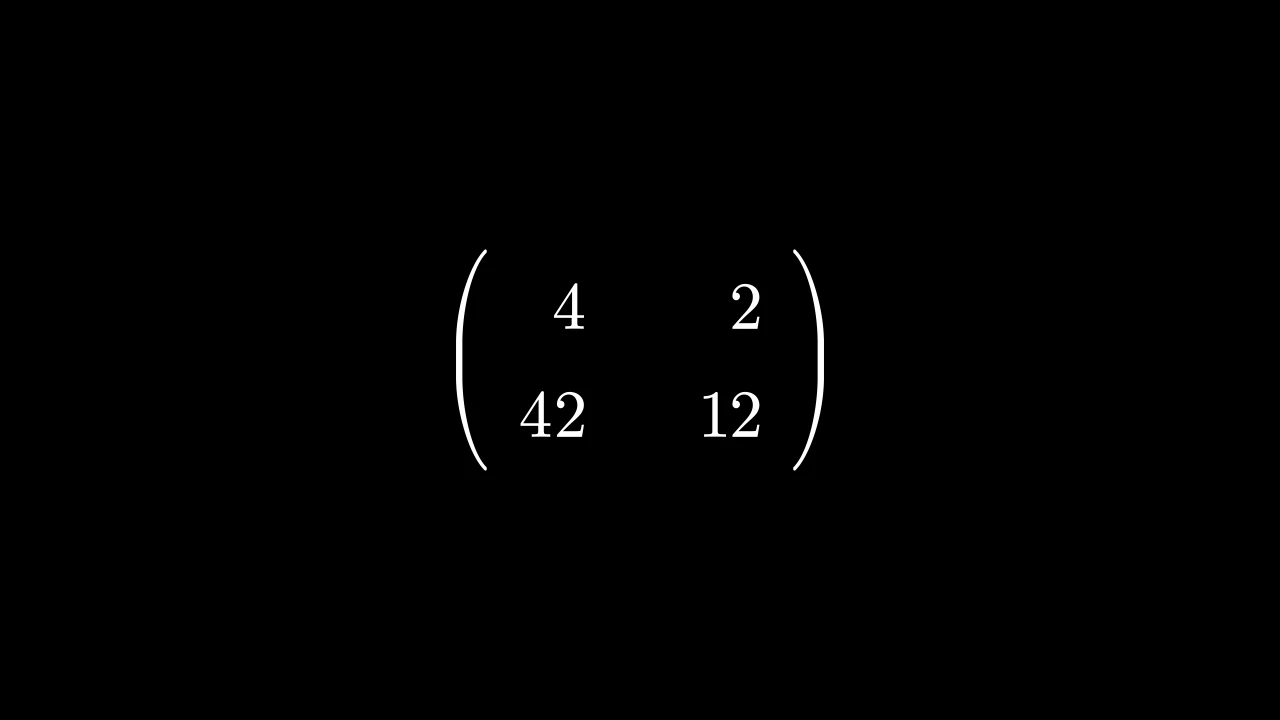
import manimgx as m


class IntegerMatrixExample(m.Scene):
    def construct(self) -> None:
        matrix = m.IntegerMatrix(
            [[3.7, 2], [42.2, 12]], left_bracket="(", right_bracket=")"
        )
        self.add(matrix.scale(1.5))

整数矩阵:每个条目以 Integer 书写,其数字四舍五入为整数。

它接受 Matrix 的参数;其条目为数字,其 element_to_mobject_config 给出数字的 关键字。

m.IntegerMatrix(matrix, v_buff=0.8, h_buff=1.3, bracket_h_buff=MED_SMALL_BUFF, bracket_v_buff=MED_SMALL_BUFF, add_background_rectangles_to_entries=False, include_background_rectangle=False, element_to_mobject=None, element_to_mobject_config=None, element_alignment_corner=DR, left_bracket='[', right_bracket=']', stretch_brackets=True, bracket_config=None, **kwargs)
color

填充与描边共用的颜色(默认白色);None 表示该类的默认值。

fill_color

填充的颜色;未给出时为 color。多个颜色沿 sheen_direction 构成渐变。

fill_opacity

填充的不透明度,取值从 0 到 1(默认 0:无填充)。

stroke_color

描边的颜色;未给出时为 color。多个颜色构成渐变。

stroke_opacity

描边的不透明度,取值从 0 到 1(默认 1)。

stroke_width

描边的宽度,以场景单位的百分之一计(默认 4;0:无描边)。

background_stroke_color

绘制于填充之后的轮廓颜色(默认黑色)。

background_stroke_opacity

轮廓的不透明度,取值从 0 到 1(默认 1)。

background_stroke_width

轮廓的宽度,以场景单位的百分之一计(默认 0:无)。

sheen_factor

颜色朝 sheen_direction 变亮的程度,取值从 -1 到 1(默认 0); 负值变暗。

sheen_direction

颜色变亮的方向(默认 UL)。

joint_type

描边在路径转折处的连接方式:圆角、斜切或斜接,按二维场景的绘制方式 (参见 LineJointType;默认 AUTO:斜接)。

cap_style

描边在其显示的每一端的端点样式(开放路径的端点、虚线的端点):圆头、平头 或方头,按二维场景的绘制方式(参见 CapStyleType;默认 AUTO:平头)。

shade_in_3d

三维场景的光是否对该 mobject 着色。

material

其表面在三维场景中如何反射场景的光(参见 Material);None:Manim 的着色(默认)。

name

mobject 的名称;未给出时为其类名。

z_index

其在绘制顺序中的位置:索引较高者绘制于较低者之上 (默认 0)。

target

MoveToTarget 将 mobject 移动至的状态。

还接受 样式关键字。

源码

manimgx\mobjects\grid.py

def __init__(
    self,
    matrix: Entries,
    v_buff: float = 0.8,
    h_buff: float = 1.3,
    bracket_h_buff: float = MED_SMALL_BUFF,
    bracket_v_buff: float = MED_SMALL_BUFF,
    add_background_rectangles_to_entries: bool = False,
    include_background_rectangle: bool = False,
    element_to_mobject: ElementFactory | None = None,
    element_to_mobject_config: Mapping[str, object] | None = None,
    element_alignment_corner: Vector3DLike = DR,
    left_bracket: str = "[",
    right_bracket: str = "]",
    stretch_brackets: bool = True,
    bracket_config: MathTexOptions | None = None,
    **kwargs: Unpack[Style],
):
    if bracket_config is None:
        bracket_config = {}
    super().__init__(**kwargs)
    self.cells = self._make_cells(
        matrix, element_to_mobject, element_to_mobject_config
    )
    cells = self.cells
    for i, row in enumerate(cells):
        for j, _ in enumerate(row):
            mob = cells[i][j]
            mob.move_to(
                i * v_buff * DOWN + j * h_buff * RIGHT,
                element_alignment_corner,
            )
    self.elements = VGroup(*it.chain(*self.cells))
    """条目,逐行排列:以组的形式组织,并被添加到矩阵中。"""
    self.add(self.elements)
    bracket_config = {**bracket_config}
    BRACKET_HEIGHT = 0.5977
    n = int(self.height / BRACKET_HEIGHT) + 1
    empty_tex_array = "".join(
        ["\\begin{array}{c}", *n * ["\\quad \\\\"], "\\end{array}"]
    )
    tex_left = "".join(["\\left" + left_bracket, empty_tex_array, "\\right."])
    tex_right = "".join(["\\left.", empty_tex_array, "\\right" + right_bracket])
    l_bracket = MathTex(tex_left, **bracket_config)
    r_bracket = MathTex(tex_right, **bracket_config)
    bracket_pair = VGroup(l_bracket, r_bracket)
    if stretch_brackets:
        bracket_pair.stretch_to_fit_height(self.height + 2 * bracket_v_buff)
    l_bracket.next_to(self, LEFT, bracket_h_buff)
    r_bracket.next_to(self, RIGHT, bracket_h_buff)
    self.brackets = bracket_pair
    self.add(l_bracket, r_bracket)
    self.center()
    if add_background_rectangles_to_entries:
        for mob in self.elements:
            mob.add_background_rectangle()
    if include_background_rectangle:
        self.add_background_rectangle()

MobjectMatrix

MobjectMatrixExample
代码
import manimgx as m


class MobjectMatrixExample(m.Scene):
    def construct(self) -> None:
        circle = m.Circle(radius=0.3, color=m.BLUE)
        triangle = m.Triangle(radius=0.35, color=m.GREEN)
        matrix = m.MobjectMatrix(
            [[circle, m.Square(0.6)], [triangle, m.Star(outer_radius=0.35)]],
            left_bracket=r"\langle",
            right_bracket=r"\rangle",
        )
        self.add(matrix.scale(1.5))

mobject 矩阵:每个条目是一个 mobject,按原样放置。

它接受 Matrix 的参数;其条目为 mobject,直接使用 (不复制)。

m.MobjectMatrix(matrix, v_buff=0.8, h_buff=1.3, bracket_h_buff=MED_SMALL_BUFF, bracket_v_buff=MED_SMALL_BUFF, add_background_rectangles_to_entries=False, include_background_rectangle=False, element_to_mobject=None, element_to_mobject_config=None, element_alignment_corner=DR, left_bracket='[', right_bracket=']', stretch_brackets=True, bracket_config=None, **kwargs)
color

填充与描边共用的颜色(默认白色);None 表示该类的默认值。

fill_color

填充的颜色;未给出时为 color。多个颜色沿 sheen_direction 构成渐变。

fill_opacity

填充的不透明度,取值从 0 到 1(默认 0:无填充)。

stroke_color

描边的颜色;未给出时为 color。多个颜色构成渐变。

stroke_opacity

描边的不透明度,取值从 0 到 1(默认 1)。

stroke_width

描边的宽度,以场景单位的百分之一计(默认 4;0:无描边)。

background_stroke_color

绘制于填充之后的轮廓颜色(默认黑色)。

background_stroke_opacity

轮廓的不透明度,取值从 0 到 1(默认 1)。

background_stroke_width

轮廓的宽度,以场景单位的百分之一计(默认 0:无)。

sheen_factor

颜色朝 sheen_direction 变亮的程度,取值从 -1 到 1(默认 0); 负值变暗。

sheen_direction

颜色变亮的方向(默认 UL)。

joint_type

描边在路径转折处的连接方式:圆角、斜切或斜接,按二维场景的绘制方式 (参见 LineJointType;默认 AUTO:斜接)。

cap_style

描边在其显示的每一端的端点样式(开放路径的端点、虚线的端点):圆头、平头 或方头,按二维场景的绘制方式(参见 CapStyleType;默认 AUTO:平头)。

shade_in_3d

三维场景的光是否对该 mobject 着色。

material

其表面在三维场景中如何反射场景的光(参见 Material);None:Manim 的着色(默认)。

name

mobject 的名称;未给出时为其类名。

z_index

其在绘制顺序中的位置:索引较高者绘制于较低者之上 (默认 0)。

target

MoveToTarget 将 mobject 移动至的状态。

还接受 样式关键字。

源码

manimgx\mobjects\grid.py
def __init__(
    self,
    matrix: Entries,
    v_buff: float = 0.8,
    h_buff: float = 1.3,
    bracket_h_buff: float = MED_SMALL_BUFF,
    bracket_v_buff: float = MED_SMALL_BUFF,
    add_background_rectangles_to_entries: bool = False,
    include_background_rectangle: bool = False,
    element_to_mobject: ElementFactory | None = None,
    element_to_mobject_config: Mapping[str, object] | None = None,
    element_alignment_corner: Vector3DLike = DR,
    left_bracket: str = "[",
    right_bracket: str = "]",
    stretch_brackets: bool = True,
    bracket_config: MathTexOptions | None = None,
    **kwargs: Unpack[Style],
):
    if bracket_config is None:
        bracket_config = {}
    super().__init__(**kwargs)
    self.cells = self._make_cells(
        matrix, element_to_mobject, element_to_mobject_config
    )
    cells = self.cells
    for i, row in enumerate(cells):
        for j, _ in enumerate(row):
            mob = cells[i][j]
            mob.move_to(
                i * v_buff * DOWN + j * h_buff * RIGHT,
                element_alignment_corner,
            )
    self.elements = VGroup(*it.chain(*self.cells))
    """条目,逐行排列:以组的形式组织,并被添加到矩阵中。"""
    self.add(self.elements)
    bracket_config = {**bracket_config}
    BRACKET_HEIGHT = 0.5977
    n = int(self.height / BRACKET_HEIGHT) + 1
    empty_tex_array = "".join(
        ["\\begin{array}{c}", *n * ["\\quad \\\\"], "\\end{array}"]
    )
    tex_left = "".join(["\\left" + left_bracket, empty_tex_array, "\\right."])
    tex_right = "".join(["\\left.", empty_tex_array, "\\right" + right_bracket])
    l_bracket = MathTex(tex_left, **bracket_config)
    r_bracket = MathTex(tex_right, **bracket_config)
    bracket_pair = VGroup(l_bracket, r_bracket)
    if stretch_brackets:
        bracket_pair.stretch_to_fit_height(self.height + 2 * bracket_v_buff)
    l_bracket.next_to(self, LEFT, bracket_h_buff)
    r_bracket.next_to(self, RIGHT, bracket_h_buff)
    self.brackets = bracket_pair
    self.add(l_bracket, r_bracket)
    self.center()
    if add_background_rectangles_to_entries:
        for mob in self.elements:
            mob.add_background_rectangle()
    if include_background_rectangle:
        self.add_background_rectangle()

Table

TableExample
代码
import manimgx as m


class TableExample(m.Scene):
    def construct(self) -> None:
        table = m.Table(
            [["1", "2", "3"], ["2", "4", "6"], ["3", "6", "9"]],
            row_labels=[m.Text("1"), m.Text("2"), m.Text("3")],
            col_labels=[m.Text("1"), m.Text("2"), m.Text("3")],
            top_left_entry=m.Text("×"),
            include_outer_lines=True,
            line_config={"color": m.BLUE},
        )
        self.add(table)

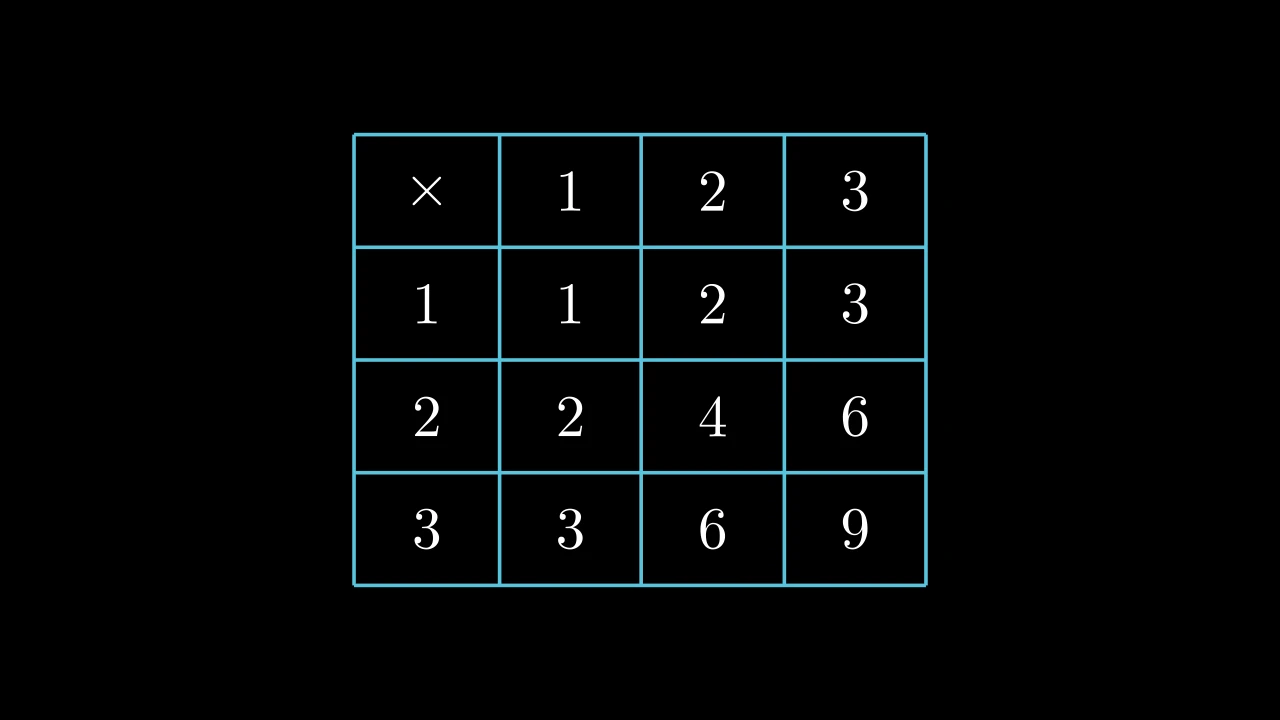
表格:条目按行列排列,其间以线条分隔,若给出则附有行标签和列标签; 默认为白色,除非另行设置样式。

每个条目由 element_to_mobject 转换为 mobject —— 默认为其文本的 Paragraph —— 单元格按网格布局排列,每个条目居中于其单元格 (参见 arrange_in_grid);表格以场景原点为中心。 行标签构成第一列,列标签构成第一行,top_left_entry 填充二者之间的角落。 线条穿过行与行、列与列之间间隙的中点,并向条目之外延伸半个间隙的距离。 其行与列可以组的形式访问,get_rows() 和 get_columns(),并可着色, set_row_colors(...) 和 set_column_colors(...),标签也包含在内。

单元格按其位置 (row, column) 寻址,从左上角的 1 开始计数,标签也包含在内: 在带有行标签和列标签的表格中,(1, 1) 是角落,第一个条目位于 (2, 2)。

网格、线条和背景选项仅在构造期间被消费;单元格、标签、线条组和间隙保存 表格的状态。

m.Table(table, row_labels=None, col_labels=None, top_left_entry=None, v_buff=0.8, h_buff=1.3, include_outer_lines=False, include_inner_lines=True, add_background_rectangles_to_entries=False, entries_background_color=BLACK, include_background_rectangle=False, background_rectangle_color=BLACK, element_to_mobject=None, element_to_mobject_config=None, arrange_in_grid_config=None, line_config=None, **kwargs)
table

条目,逐行排列,每行长度相同:字符串,供默认的 Paragraph 使用;数字或 mobject,供其他 element_to_mobject 使用。

row_labels

每行的标签,置于其左侧;None 表示无。

col_labels

每列的标签,置于其上方;None 表示无。

top_left_entry

当行标签和列标签同时存在时,位于行标签上方、列标签左侧 角落处的 mobject;None 表示留空。

v_buff

各行之间的间隙,以场景单位表示。

h_buff

各列之间的间隙,以场景单位表示。

include_outer_lines

是否有线条框住表格。

include_inner_lines

是否有线条分隔其行与列。

add_background_rectangles_to_entries

每个条目(包括标签)是否获得一个背景矩形 (参见 add_background_to_entries)。

entries_background_color

条目背景矩形的颜色。

include_background_rectangle

表格是否获得一个背景矩形 (参见 add_background_rectangle)。

background_rectangle_color

表格背景矩形的颜色。

element_to_mobject

构造每个条目的 mobject 的函数,以条目和 element_to_mobject_config 的关键字参数调用:可以是一个类,如 MathTex,或任意函数;None 表示使用该类自身的函数 (对于 Table 为 Paragraph)。

element_to_mobject_config

element_to_mobject 的关键字参数;None 表示使用 该类自身的设置(对于 Table 为无)。

arrange_in_grid_config

用于布局单元格的 Grid 关键字,覆盖表格自身的行、列和 间隙设置:cell_alignment, col_alignments, …;None 表示无。

line_config

线条的 Line 关键字: 其 color, stroke_width, …;None 表示无。

color

填充与描边共用的颜色(默认白色);None 表示该类的默认值。

fill_color

填充的颜色;未给出时为 color。多个颜色沿 sheen_direction 构成渐变。

fill_opacity

填充的不透明度,取值从 0 到 1(默认 0:无填充)。

stroke_color

描边的颜色;未给出时为 color。多个颜色构成渐变。

stroke_opacity

描边的不透明度,取值从 0 到 1(默认 1)。

stroke_width

描边的宽度,以场景单位的百分之一计(默认 4;0:无描边)。

background_stroke_color

绘制于填充之后的轮廓颜色(默认黑色)。

background_stroke_opacity

轮廓的不透明度,取值从 0 到 1(默认 1)。

background_stroke_width

轮廓的宽度,以场景单位的百分之一计(默认 0:无)。

sheen_factor

颜色朝 sheen_direction 变亮的程度,取值从 -1 到 1(默认 0); 负值变暗。

sheen_direction

颜色变亮的方向(默认 UL)。

joint_type

描边在路径转折处的连接方式:圆角、斜切或斜接,按二维场景的绘制方式 (参见 LineJointType;默认 AUTO:斜接)。

cap_style

描边在其显示的每一端的端点样式(开放路径的端点、虚线的端点):圆头、平头 或方头,按二维场景的绘制方式(参见 CapStyleType;默认 AUTO:平头)。

shade_in_3d

三维场景的光是否对该 mobject 着色。

material

其表面在三维场景中如何反射场景的光(参见 Material);None:Manim 的着色(默认)。

name

mobject 的名称;未给出时为其类名。

z_index

其在绘制顺序中的位置:索引较高者绘制于较低者之上 (默认 0)。

target

MoveToTarget 将 mobject 移动至的状态。

还接受 样式关键字。

源码

manimgx\mobjects\grid.py

def __init__(
    self,
    table: Iterable[Iterable[float | str | Mobject]],
    row_labels: Iterable[Mobject] | None = None,
    col_labels: Iterable[Mobject] | None = None,
    top_left_entry: Mobject | None = None,
    v_buff: float = 0.8,
    h_buff: float = 1.3,
    include_outer_lines: bool = False,
    include_inner_lines: bool = True,
    add_background_rectangles_to_entries: bool = False,
    entries_background_color: ParsableManimColor = BLACK,
    include_background_rectangle: bool = False,
    background_rectangle_color: ParsableManimColor = BLACK,
    element_to_mobject: ElementFactory | None = None,
    element_to_mobject_config: Mapping[str, object] | None = None,
    arrange_in_grid_config: GridArrangement | None = None,
    line_config: LineOptions | None = None,
    **kwargs: Unpack[Style],
):
    if line_config is None:
        line_config = {}
    if arrange_in_grid_config is None:
        arrange_in_grid_config = {}
    table_data = [list(row) for row in table]
    row_label_data = list(row_labels) if row_labels is not None else []
    col_label_data = list(col_labels) if col_labels is not None else []
    self.row_labels = row_label_data or None
    """行标签,从上到下;若无则为 None。"""
    self.col_labels = col_label_data or None
    """列标签,从左到右;若无则为 None。"""
    self.top_left_entry = top_left_entry
    """标签之间角落处的 mobject;若无则为 None。"""
    self.row_dim = len(table_data)
    """表格的条目行数,不含标签。"""
    self.col_dim = len(table_data[0])
    """表格的条目列数,不含标签。"""
    self.v_buff = v_buff
    """各行之间的间隙,以场景单位表示,即表格创建时的值:缩放表格不会改变该值。"""
    self.h_buff = h_buff
    """各列之间的间隙,以场景单位表示,即表格创建时的值:缩放表格不会改变该值。"""
    entries_background_color = ManimColor(entries_background_color)
    background_rectangle_color = ManimColor(background_rectangle_color)
    if any(len(row) != len(table_data[0]) for row in table_data):
        raise ValueError("Not all rows in table have the same length.")
    super().__init__(**kwargs)
    cells = self._make_cells(
        table_data, element_to_mobject, element_to_mobject_config
    )
    self.elements_without_labels = VGroup(*it.chain(*cells))
    """不含标签的条目,逐行排列。"""
    empty_corner = None
    if self.row_labels is not None:
        for k in range(len(self.row_labels)):
            cells[k] = [self.row_labels[k]] + cells[k]
    if self.col_labels is not None:
        if self.row_labels is not None:
            if self.top_left_entry is not None:
                col_labels = [self.top_left_entry] + self.col_labels
                cells.insert(0, col_labels)
            else:
                empty_corner = VMobject()
                col_labels = [empty_corner] + self.col_labels
                cells.insert(0, col_labels)
        else:
            cells.insert(0, self.col_labels)
    self.cells = cells
    self.elements = VGroup(*it.chain(*self.cells))
    """表格的每个条目,包括标签,逐行排列:以组的形式组织,并被添加到表格中。"""
    layout = GridArrangement(
        rows=len(self.cells), cols=len(self.cells[0]), buff=(h_buff, v_buff)
    )
    self.elements.arrange_in_grid(**(layout | arrange_in_grid_config))
    if empty_corner is not None:
        self.elements.remove(empty_corner)
    self.add(self.elements)
    self.center()
    for axis in (0, 1):
        divisions = self.get_rows() if axis == 0 else self.get_columns()
        along, across = (RIGHT, UP) if axis == 0 else (DOWN, LEFT)
        near = [float(part.get_corner(across) @ across) for part in divisions]
        far = [float(part.get_corner(-across) @ across) for part in divisions]
        gap = (self.v_buff, self.h_buff)[axis] / 2
        pad = (self.h_buff, self.v_buff)[axis] / 2
        start = float(self.elements.get_corner(-along) @ along) - pad
        end = float(self.elements.get_corner(along) @ along) + pad
        anchors: list[tuple[float, bool]] = []
        if include_outer_lines:
            anchors.extend(((near[0] + gap, False), (far[-1] - gap, False)))
        if include_inner_lines:
            anchors.extend(
                (b + 0.5 * (a - b), axis == 1) for a, b in zip(far[:-1], near[1:])
            )
        lines = VGroup()
        parts: list[Line] = []
        for anchor, reverse in anchors:
            offset = anchor * across
            ends = (start * along + offset, end * along + offset)
            parts.append(Line(*(ends[::-1] if reverse else ends), **line_config))
        lines.add(*parts)
        self.add(*lines)
        if axis == 0:
            self.horizontal_lines = lines
        else:
            self.vertical_lines = lines
    if add_background_rectangles_to_entries:
        self.add_background_to_entries(color=entries_background_color)
    if include_background_rectangle:
        self.add_background_rectangle(color=background_rectangle_color)

entry_config

当构造函数未传入 element_to_mobject_config 时,调用 entry 所使用的关键字 参数(默认无,除非子类自行设置)。

row_labels

行标签,从上到下;若无则为 None。

col_labels

列标签,从左到右;若无则为 None。

top_left_entry

标签之间角落处的 mobject;若无则为 None。

row_dim

表格的条目行数,不含标签。

col_dim

表格的条目列数,不含标签。

v_buff

各行之间的间隙,以场景单位表示,即表格创建时的值:缩放表格不会改变该值。

h_buff

各列之间的间隙,以场景单位表示,即表格创建时的值:缩放表格不会改变该值。

elements_without_labels

不含标签的条目,逐行排列。

elements

表格的每个条目,包括标签,逐行排列:以组的形式组织,并被添加到表格中。

get_rows

代码
import manimgx as m


class MatrixGetRowsExample(m.Scene):
    def construct(self) -> None:
        matrix = m.Matrix([[1, 2, 3], [4, 5, 6], [7, 8, 9]]).scale(1.5)
        row = m.SurroundingRectangle(matrix.get_rows()[1])
        self.add(matrix)
        self.play(m.Create(row))

各行,从上到下,每行为其条目从左到右组成的组(表格的标签也包含在内)。

table.get_rows()

返回 由各行组成的新组。

源码

manimgx\mobjects\grid.py

def get_rows(self) -> VGroup:
    """各行,从上到下,每行为其条目从左到右组成的组(表格的标签也包含在内)。

    Returns:
        由各行组成的新组。

    Examples:
        ```python
        import manimgx as m


        class MatrixGetRowsExample(m.Scene):
            def construct(self) -> None:
                matrix = m.Matrix([[1, 2, 3], [4, 5, 6], [7, 8, 9]]).scale(1.5)
                row = m.SurroundingRectangle(matrix.get_rows()[1])
                self.add(matrix)
                self.play(m.Create(row))
        ```
    """
    return VGroup(*(VGroup(*row) for row in self.cells))

get_columns

代码
import manimgx as m


class TableGetColumnsExample(m.Scene):
    def construct(self) -> None:
        table = m.Table(
            [["First", "Second"], ["Third", "Fourth"]],
            row_labels=[m.Text("R1"), m.Text("R2")],
            col_labels=[m.Text("C1"), m.Text("C2")],
        )
        column = m.SurroundingRectangle(table.get_columns()[1])
        self.add(table)
        self.play(m.Create(column))

各列,从左到右,每列为其条目从上到下组成的组(表格的标签也包含在内)。

table.get_columns()

返回 由各列组成的新组。

源码

manimgx\mobjects\grid.py

def get_columns(self) -> VGroup:
    """各列,从左到右,每列为其条目从上到下组成的组(表格的标签也包含在内)。

    Returns:
        由各列组成的新组。

    Examples:
        ```python
        import manimgx as m


        class TableGetColumnsExample(m.Scene):
            def construct(self) -> None:
                table = m.Table(
                    [["First", "Second"], ["Third", "Fourth"]],
                    row_labels=[m.Text("R1"), m.Text("R2")],
                    col_labels=[m.Text("C1"), m.Text("C2")],
                )
                column = m.SurroundingRectangle(table.get_columns()[1])
                self.add(table)
                self.play(m.Create(column))
        ```
    """
    return VGroup(*(VGroup(*column) for column in zip(*self.cells, strict=False)))

set_row_colors

MatrixSetRowColorsExample
代码
import manimgx as m


class MatrixSetRowColorsExample(m.Scene):
    def construct(self) -> None:
        matrix = m.Matrix([[1, 2, 3], [4, 5, 6], [7, 8, 9]]).scale(1.5)
        self.add(matrix.set_row_colors(m.RED, [m.YELLOW, m.GREEN]))

为各行着色,从上到下:每行一个颜色,或多个颜色构成渐变 (如同 set_color 的效果);超出所给颜色数量 的行保持原有颜色。

table.set_row_colors(*colors)
*colors

各行的颜色,按顺序给出:每个可以是一个颜色,或一个颜色列表。

源码

manimgx\mobjects\grid.py

def set_row_colors(self, *colors: Colors) -> Self:
    """为各行着色,从上到下:每行一个颜色,或多个颜色构成渐变
    (如同 [set_color][manimgx.Mobject.set_color] 的效果);超出所给颜色数量
    的行保持原有颜色。

    Args:
        *colors: 各行的颜色,按顺序给出:每个可以是一个颜色,或一个颜色列表。

    Examples:
        ```python
        import manimgx as m


        class MatrixSetRowColorsExample(m.Scene):
            def construct(self) -> None:
                matrix = m.Matrix([[1, 2, 3], [4, 5, 6], [7, 8, 9]]).scale(1.5)
                self.add(matrix.set_row_colors(m.RED, [m.YELLOW, m.GREEN]))
        ```
    """
    for color, row in zip(colors, self.get_rows(), strict=False):
        row.set_color(color)
    return self

set_column_colors

TableSetColumnColorsExample
代码
import manimgx as m


class TableSetColumnColorsExample(m.Scene):
    def construct(self) -> None:
        table = m.Table(
            [["First", "Second"], ["Third", "Fourth"]],
            row_labels=[m.Text("R1"), m.Text("R2")],
            col_labels=[m.Text("C1"), m.Text("C2")],
        )
        self.add(table.set_column_colors(m.YELLOW, m.BLUE, m.GREEN))

为各列着色,从左到右:每列一个颜色,或多个颜色构成渐变 (如同 set_color 的效果);超出所给颜色数量 的列保持原有颜色。

table.set_column_colors(*colors)
*colors

各列的颜色,按顺序给出:每个可以是一个颜色,或一个颜色列表。

源码

manimgx\mobjects\grid.py

def set_column_colors(self, *colors: Colors) -> Self:
    """为各列着色,从左到右:每列一个颜色,或多个颜色构成渐变
    (如同 [set_color][manimgx.Mobject.set_color] 的效果);超出所给颜色数量
    的列保持原有颜色。

    Args:
        *colors: 各列的颜色,按顺序给出:每个可以是一个颜色,或一个颜色列表。

    Examples:
        ```python
        import manimgx as m


        class TableSetColumnColorsExample(m.Scene):
            def construct(self) -> None:
                table = m.Table(
                    [["First", "Second"], ["Third", "Fourth"]],
                    row_labels=[m.Text("R1"), m.Text("R2")],
                    col_labels=[m.Text("C1"), m.Text("C2")],
                )
                self.add(table.set_column_colors(m.YELLOW, m.BLUE, m.GREEN))
        ```
    """
    for color, column in zip(colors, self.get_columns(), strict=False):
        column.set_color(color)
    return self

get_horizontal_lines

代码
import manimgx as m


class TableGetHorizontalLinesExample(m.Scene):
    def construct(self) -> None:
        table = m.Table(
            [["First", "Second"], ["Third", "Fourth"]],
            row_labels=[m.Text("R1"), m.Text("R2")],
            col_labels=[m.Text("C1"), m.Text("C2")],
            include_outer_lines=True,
        )
        self.add(table)
        self.play(table.get_horizontal_lines().animate.set_color(m.RED))

表格的水平线:若存在外框线,则先为外框线(先上后下),然后是各行之间的线, 从上到下。

table.get_horizontal_lines()

返回 由线条组成的组。

源码

manimgx\mobjects\grid.py

def get_horizontal_lines(self) -> VGroup:
    """表格的水平线:若存在外框线,则先为外框线(先上后下),然后是各行之间的线,
    从上到下。

    Returns:
        由线条组成的组。

    Examples:
        ```python
        import manimgx as m


        class TableGetHorizontalLinesExample(m.Scene):
            def construct(self) -> None:
                table = m.Table(
                    [["First", "Second"], ["Third", "Fourth"]],
                    row_labels=[m.Text("R1"), m.Text("R2")],
                    col_labels=[m.Text("C1"), m.Text("C2")],
                    include_outer_lines=True,
                )
                self.add(table)
                self.play(table.get_horizontal_lines().animate.set_color(m.RED))
        ```
    """
    return self.horizontal_lines

get_vertical_lines

表格的垂直线:若存在外框线,则先为外框线(先左后右),然后是各列之间的线, 从左到右。

table.get_vertical_lines()

返回 由线条组成的组。

源码

manimgx\mobjects\grid.py

def get_vertical_lines(self) -> VGroup:
    """表格的垂直线:若存在外框线,则先为外框线(先左后右),然后是各列之间的线,
    从左到右。

    Returns:
        由线条组成的组。
    """
    return self.vertical_lines

get_entries

代码
import manimgx as m


class TableGetEntriesExample(m.Scene):
    def construct(self) -> None:
        table = m.Table(
            [["First", "Second"], ["Third", "Fourth"]],
            row_labels=[m.Text("R1"), m.Text("R2")],
            col_labels=[m.Text("C1"), m.Text("C2")],
        )
        self.add(table)
        self.play(table.get_entries((2, 3)).animate.set_color(m.YELLOW))
        self.play(m.Rotate(table.get_entries((3, 2)), m.PI))

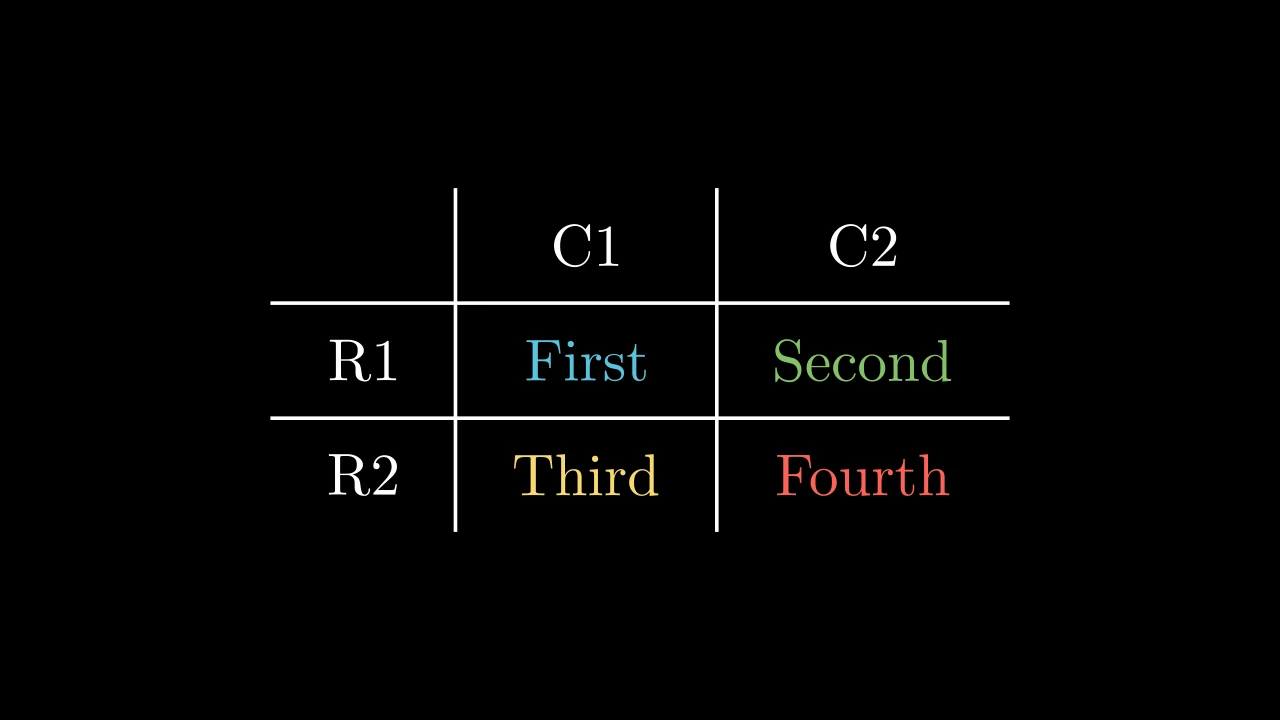
表格的条目,包括标签,或返回指定位置处的条目。

table.get_entries(pos=None)
pos

位置 (row, column),从左上角的 1 开始计数,标签也包含在内; None 表示返回所有条目。

返回 指定位置的条目;或所有条目,逐行排列,以组的形式组织。 行标签和列标签之间缺失的角落是一个空的 mobject, 在组中被省略。

源码

manimgx\mobjects\grid.py
def get_entries(self, pos: Sequence[int] | None = None) -> Mobject:
    """表格的条目,包括标签,或返回指定位置处的条目。

    Args:
        pos: 位置 `(row, column)`,从左上角的 1 开始计数,标签也包含在内;
            None 表示返回所有条目。

    Returns:
        指定位置的条目;或所有条目,逐行排列,以组的形式组织。
        行标签和列标签之间缺失的角落是一个空的 mobject,
        在组中被省略。

    Examples:
        ```python
        import manimgx as m


        class TableGetEntriesExample(m.Scene):
            def construct(self) -> None:
                table = m.Table(
                    [["First", "Second"], ["Third", "Fourth"]],
                    row_labels=[m.Text("R1"), m.Text("R2")],
                    col_labels=[m.Text("C1"), m.Text("C2")],
                )
                self.add(table)
                self.play(table.get_entries((2, 3)).animate.set_color(m.YELLOW))
                self.play(m.Rotate(table.get_entries((3, 2)), m.PI))
        ```
    """
    if pos is not None:
        return self.cells[pos[0] - 1][pos[1] - 1]
    return self.elements

get_entries_without_labels

TableGetEntriesWithoutLabelsExample
代码
import manimgx as m


class TableGetEntriesWithoutLabelsExample(m.Scene):
    def construct(self) -> None:
        table = m.Table(
            [["First", "Second"], ["Third", "Fourth"]],
            row_labels=[m.Text("R1"), m.Text("R2")],
            col_labels=[m.Text("C1"), m.Text("C2")],
        )
        entries = table.get_entries_without_labels()
        colors = [m.BLUE, m.GREEN, m.YELLOW, m.RED]
        for entry, color in zip(entries, colors):
            entry.set_color(color)
        self.add(table)

表格中除标签外的条目,或返回这些条目中指定位置处的条目。

table.get_entries_without_labels(pos=None)
pos

位置 (row, column),从左上角第一个非标签条目的 1 开始计数; None 表示返回所有此类条目。

返回 指定位置的条目;或除标签外的所有条目,逐行排列,以组的形式组织。

源码

manimgx\mobjects\grid.py

def get_entries_without_labels(self, pos: Sequence[int] | None = None) -> Mobject:
    """表格中除标签外的条目,或返回这些条目中指定位置处的条目。

    Args:
        pos: 位置 `(row, column)`,从左上角第一个非标签条目的 1 开始计数;
            None 表示返回所有此类条目。

    Returns:
        指定位置的条目;或除标签外的所有条目,逐行排列,以组的形式组织。

    Examples:
        ```python
        import manimgx as m


        class TableGetEntriesWithoutLabelsExample(m.Scene):
            def construct(self) -> None:
                table = m.Table(
                    [["First", "Second"], ["Third", "Fourth"]],
                    row_labels=[m.Text("R1"), m.Text("R2")],
                    col_labels=[m.Text("C1"), m.Text("C2")],
                )
                entries = table.get_entries_without_labels()
                colors = [m.BLUE, m.GREEN, m.YELLOW, m.RED]
                for entry, color in zip(entries, colors):
                    entry.set_color(color)
                self.add(table)
        ```
    """
    if pos is not None:
        row = pos[0] - 1 + (self.col_labels is not None)
        column = pos[1] - 1 + (self.row_labels is not None)
        return self.cells[row][column]
    return self.elements_without_labels

get_row_labels

表格的行标签,从上到下。

table.get_row_labels()

返回 由标签组成的新组;若无标签则为空组。

源码

manimgx\mobjects\grid.py

def get_row_labels(self) -> VGroup:
    """表格的行标签,从上到下。

    Returns:
        由标签组成的新组;若无标签则为空组。
    """
    if self.row_labels is not None:
        return VGroup(*self.row_labels)
    return VGroup()

get_col_labels

表格的列标签,从左到右。

table.get_col_labels()

返回 由标签组成的新组;若无标签则为空组。

源码

manimgx\mobjects\grid.py

def get_col_labels(self) -> VGroup:
    """表格的列标签,从左到右。

    Returns:
        由标签组成的新组;若无标签则为空组。
    """
    if self.col_labels is not None:
        return VGroup(*self.col_labels)
    return VGroup()

get_labels

代码
import manimgx as m


class TableGetLabelsExample(m.Scene):
    def construct(self) -> None:
        table = m.Table(
            [["First", "Second"], ["Third", "Fourth"]],
            row_labels=[m.Text("R1"), m.Text("R2")],
            col_labels=[m.Text("C1"), m.Text("C2")],
        )
        self.add(table)
        self.play(table.get_labels().animate.set_color(m.YELLOW))

表格的标签:若存在则先为左上角条目,然后是列标签,最后是行标签。

table.get_labels()

返回 由标签组成的新组;若无标签则为空组。

源码

manimgx\mobjects\grid.py

def get_labels(self) -> VGroup:
    """表格的标签:若存在则先为左上角条目,然后是列标签,最后是行标签。

    Returns:
        由标签组成的新组;若无标签则为空组。

    Examples:
        ```python
        import manimgx as m


        class TableGetLabelsExample(m.Scene):
            def construct(self) -> None:
                table = m.Table(
                    [["First", "Second"], ["Third", "Fourth"]],
                    row_labels=[m.Text("R1"), m.Text("R2")],
                    col_labels=[m.Text("C1"), m.Text("C2")],
                )
                self.add(table)
                self.play(table.get_labels().animate.set_color(m.YELLOW))
        ```
    """
    label_group = VGroup()
    if self.top_left_entry is not None:
        label_group.add(self.top_left_entry)
    for label in (self.col_labels, self.row_labels):
        if label is not None:
            label_group.add(*label)
    return label_group

add_background_to_entries

在每个条目(包括标签)后方放置一个背景矩形(参见 add_background_rectangle)。

这些矩形是各条目的 background_rectangle: create 会淡入除标签外的条目所对应的背景矩形。

table.add_background_to_entries(color=BLACK)
color

矩形的颜色。

源码

manimgx\mobjects\grid.py

def add_background_to_entries(self, color: ParsableManimColor = BLACK) -> Self:
    """在每个条目(包括标签)后方放置一个背景矩形(参见
    [add_background_rectangle][manimgx.Mobject.add_background_rectangle])。

    这些矩形是各条目的 `background_rectangle`:
    [create][manimgx.Table.create] 会淡入除标签外的条目所对应的背景矩形。

    Args:
        color: 矩形的颜色。
    """
    for mob in self.get_entries():
        mob.add_background_rectangle(color=ManimColor(color))
    return self

get_cell

代码
import manimgx as m


class TableGetCellExample(m.Scene):
    def construct(self) -> None:
        table = m.Table(
            [["First", "Second"], ["Third", "Fourth"]],
            row_labels=[m.Text("R1"), m.Text("R2")],
            col_labels=[m.Text("C1"), m.Text("C2")],
        )
        self.add(table)
        self.play(m.Create(table.get_cell((2, 2), color=m.RED)))

构造某个单元格的矩形:其高度为所在行的高度,宽度为所在列的宽度, 四周各向外延伸半个间隙的距离,以便与线条相接;默认为蓝色,除非另行设置样式。

间隙为 v_buff 和 h_buff,即表格创建时的值:对于之后缩放过的表格, 矩形向外延伸的距离与缩放前相同。

table.get_cell(pos=(1, 1), **kwargs)
pos

单元格的位置 (row, column),从左上角的 1 开始计数,标签也包含在内。

color

填充与描边共用的颜色(默认白色);None 表示该类的默认值。

fill_color

填充的颜色;未给出时为 color。多个颜色沿 sheen_direction 构成渐变。

fill_opacity

填充的不透明度,取值从 0 到 1(默认 0:无填充)。

stroke_color

描边的颜色;未给出时为 color。多个颜色构成渐变。

stroke_opacity

描边的不透明度,取值从 0 到 1(默认 1)。

stroke_width

描边的宽度,以场景单位的百分之一计(默认 4;0:无描边)。

background_stroke_color

绘制于填充之后的轮廓颜色(默认黑色)。

background_stroke_opacity

轮廓的不透明度,取值从 0 到 1(默认 1)。

background_stroke_width

轮廓的宽度,以场景单位的百分之一计(默认 0:无)。

sheen_factor

颜色朝 sheen_direction 变亮的程度,取值从 -1 到 1(默认 0); 负值变暗。

sheen_direction

颜色变亮的方向(默认 UL)。

joint_type

描边在路径转折处的连接方式:圆角、斜切或斜接,按二维场景的绘制方式 (参见 LineJointType;默认 AUTO:斜接)。

cap_style

描边在其显示的每一端的端点样式(开放路径的端点、虚线的端点):圆头、平头 或方头,按二维场景的绘制方式(参见 CapStyleType;默认 AUTO:平头)。

shade_in_3d

三维场景的光是否对该 mobject 着色。

material

其表面在三维场景中如何反射场景的光(参见 Material);None:Manim 的着色(默认)。

name

mobject 的名称;未给出时为其类名。

z_index

其在绘制顺序中的位置:索引较高者绘制于较低者之上 (默认 0)。

target

MoveToTarget 将 mobject 移动至的状态。

还接受 样式关键字。

返回 一个新的 Polygon,不会被添加到表格中。

源码

manimgx\mobjects\grid.py

def get_cell(self, pos: Sequence[int] = (1, 1), **kwargs: Unpack[Style]) -> Polygon:
    """构造某个单元格的矩形:其高度为所在行的高度,宽度为所在列的宽度,
    四周各向外延伸半个间隙的距离,以便与线条相接;默认为蓝色,除非另行设置样式。

    间隙为 `v_buff` 和 `h_buff`,即表格创建时的值:对于之后缩放过的表格,
    矩形向外延伸的距离与缩放前相同。

    Args:
        pos: 单元格的位置 `(row, column)`,从左上角的 1 开始计数,标签也包含在内。
        **kwargs: [Style 关键字][manimgx.drawing.paint.Style]。

    Returns:
        一个新的 [Polygon][manimgx.Polygon],不会被添加到表格中。

    Examples:
        ```python
        import manimgx as m


        class TableGetCellExample(m.Scene):
            def construct(self) -> None:
                table = m.Table(
                    [["First", "Second"], ["Third", "Fourth"]],
                    row_labels=[m.Text("R1"), m.Text("R2")],
                    col_labels=[m.Text("C1"), m.Text("C2")],
                )
                self.add(table)
                self.play(m.Create(table.get_cell((2, 2), color=m.RED)))
        ```
    """
    row = list(self.cells[pos[0] - 1])
    col = [row[pos[1] - 1] for row in self.cells]
    across = _family_box(_family(col))  # (the column's box: the cell's sides)
    down = _family_box(_family(row))  # (the row's box: its top and bottom)
    if across is None:
        across = np.zeros((2, 3))
    if down is None:
        down = np.zeros((2, 3))
    left = across[0, 0] - self.h_buff / 2
    right = across[1, 0] + self.h_buff / 2
    bottom = down[0, 1] - self.v_buff / 2
    top = down[1, 1] + self.v_buff / 2
    return Polygon(
        [left, top, 0],
        [right, top, 0],
        [right, bottom, 0],
        [left, bottom, 0],
        **kwargs,
    )

get_highlighted_cell

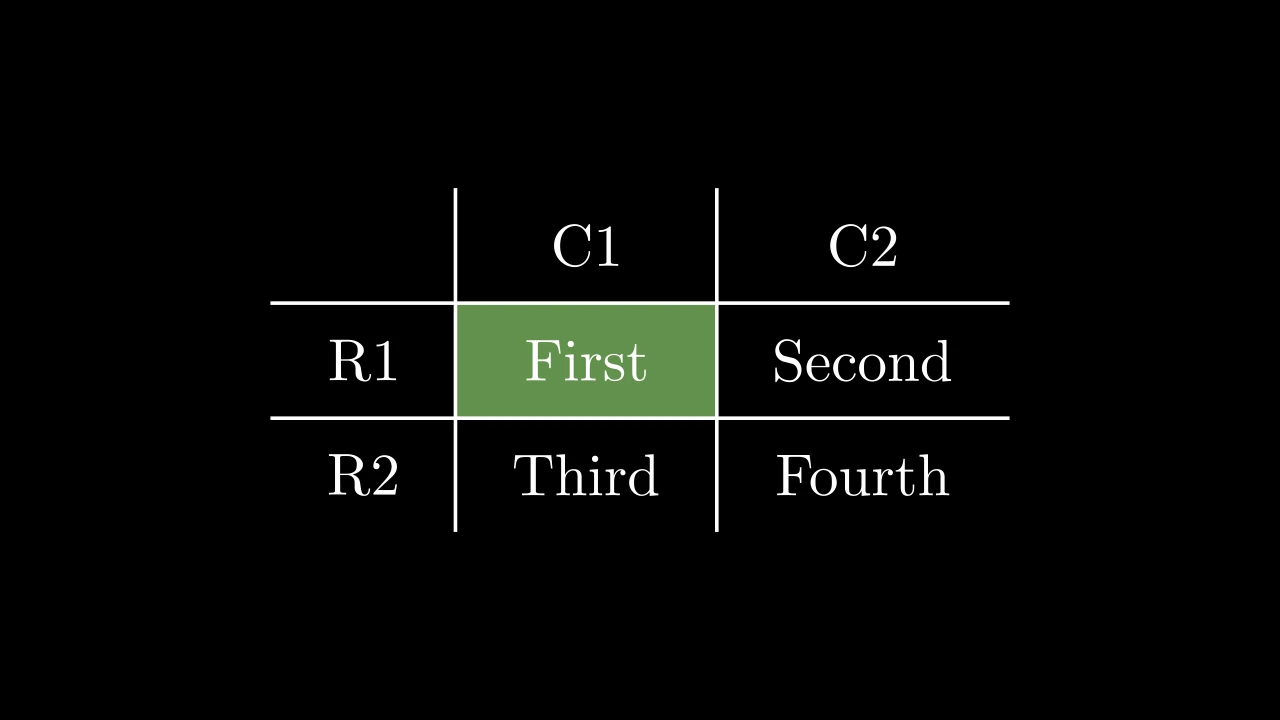
为某个单元格构造高亮:一个覆盖在 单元格矩形 之上的 BackgroundRectangle,默认为亮黄色 (PURE_YELLOW),除非另行指定颜色。

它不会被添加到表格中:请将其置于条目之后,正如 add_highlighted_cell 所做的那样。

table.get_highlighted_cell(pos=(1, 1), **kwargs)
pos

单元格的位置 (row, column),从左上角的 1 开始计数,标签也包含在内。

buff

围绕 mobject 的边距,以场景单位表示:一个值用于所有边,或 (水平, 垂直)(默认为:环绕矩形周围 0.1,背景矩形后面 0)。

corner_radius

矩形圆角的半径,以场景单位表示(默认 0:直角)。

color

填充与描边共用的颜色(默认白色);None 表示该类的默认值。

fill_color

填充的颜色;未给出时为 color。多个颜色沿 sheen_direction 构成渐变。

fill_opacity

填充的不透明度,取值从 0 到 1(默认 0:无填充)。

stroke_color

描边的颜色;未给出时为 color。多个颜色构成渐变。

stroke_opacity

描边的不透明度,取值从 0 到 1(默认 1)。

stroke_width

描边的宽度,以场景单位的百分之一计(默认 4;0:无描边)。

background_stroke_color

绘制于填充之后的轮廓颜色(默认黑色)。

background_stroke_opacity

轮廓的不透明度,取值从 0 到 1(默认 1)。

background_stroke_width

轮廓的宽度,以场景单位的百分之一计(默认 0:无)。

sheen_factor

颜色朝 sheen_direction 变亮的程度,取值从 -1 到 1(默认 0); 负值变暗。

sheen_direction

颜色变亮的方向(默认 UL)。

joint_type

描边在路径转折处的连接方式:圆角、斜切或斜接,按二维场景的绘制方式 (参见 LineJointType;默认 AUTO:斜接)。

cap_style

描边在其显示的每一端的端点样式(开放路径的端点、虚线的端点):圆头、平头 或方头,按二维场景的绘制方式(参见 CapStyleType;默认 AUTO:平头)。

shade_in_3d

三维场景的光是否对该 mobject 着色。

material

其表面在三维场景中如何反射场景的光(参见 Material);None:Manim 的着色(默认)。

name

mobject 的名称;未给出时为其类名。

z_index

其在绘制顺序中的位置:索引较高者绘制于较低者之上 (默认 0)。

target

MoveToTarget 将 mobject 移动至的状态。

返回 一个新的背景矩形。

源码

manimgx\mobjects\grid.py
def get_highlighted_cell(
    self,
    pos: Sequence[int] = (1, 1),
    **kwargs: Unpack[FrameOptions],
) -> BackgroundRectangle:
    """为某个单元格构造高亮:一个覆盖在
    [单元格矩形][manimgx.Table.get_cell] 之上的
    [BackgroundRectangle][manimgx.BackgroundRectangle],默认为亮黄色
    (`PURE_YELLOW`),除非另行指定颜色。

    它不会被添加到表格中:请将其置于条目之后,正如
    [add_highlighted_cell][manimgx.Table.add_highlighted_cell] 所做的那样。

    Args:
        pos: 单元格的位置 `(row, column)`,从左上角的 1 开始计数,标签也包含在内。
        **kwargs: [Frame 关键字][manimgx.mobjects.annotations.FrameOptions]:
            其 `color`, `buff`, `fill_opacity`, …。

    Returns:
        一个新的背景矩形。
    """
    if kwargs.get("color") is None:  # not given, None too
        kwargs["color"] = PURE_YELLOW
    bg_cell = BackgroundRectangle(self.get_cell(pos), **kwargs)
    return bg_cell

add_highlighted_cell

TableAddHighlightedCellExample
代码
import manimgx as m


class TableAddHighlightedCellExample(m.Scene):
    def construct(self) -> None:
        table = m.Table(
            [["First", "Second"], ["Third", "Fourth"]],
            row_labels=[m.Text("R1"), m.Text("R2")],
            col_labels=[m.Text("C1"), m.Text("C2")],
        )
        table.add_highlighted_cell((2, 2), color=m.GREEN)
        self.add(table)

高亮某个单元格:将一个高亮置于 表格中所有内容之后。

该高亮是位于 pos 处条目的 background_rectangle: create 会将其淡入,除非该条目是标签。

table.add_highlighted_cell(pos=(1, 1), **kwargs)
pos

单元格的位置 (row, column),从左上角的 1 开始计数,标签也包含在内。

buff

围绕 mobject 的边距,以场景单位表示:一个值用于所有边,或 (水平, 垂直)(默认为:环绕矩形周围 0.1,背景矩形后面 0)。

corner_radius

矩形圆角的半径,以场景单位表示(默认 0:直角)。

color

填充与描边共用的颜色(默认白色);None 表示该类的默认值。

fill_color

填充的颜色;未给出时为 color。多个颜色沿 sheen_direction 构成渐变。

fill_opacity

填充的不透明度,取值从 0 到 1(默认 0:无填充)。

stroke_color

描边的颜色;未给出时为 color。多个颜色构成渐变。

stroke_opacity

描边的不透明度,取值从 0 到 1(默认 1)。

stroke_width

描边的宽度,以场景单位的百分之一计(默认 4;0:无描边)。

background_stroke_color

绘制于填充之后的轮廓颜色(默认黑色)。

background_stroke_opacity

轮廓的不透明度,取值从 0 到 1(默认 1)。

background_stroke_width

轮廓的宽度,以场景单位的百分之一计(默认 0:无)。

sheen_factor

颜色朝 sheen_direction 变亮的程度,取值从 -1 到 1(默认 0); 负值变暗。

sheen_direction

颜色变亮的方向(默认 UL)。

joint_type

描边在路径转折处的连接方式:圆角、斜切或斜接,按二维场景的绘制方式 (参见 LineJointType;默认 AUTO:斜接)。

cap_style

描边在其显示的每一端的端点样式(开放路径的端点、虚线的端点):圆头、平头 或方头,按二维场景的绘制方式(参见 CapStyleType;默认 AUTO:平头)。

shade_in_3d

三维场景的光是否对该 mobject 着色。

material

其表面在三维场景中如何反射场景的光(参见 Material);None:Manim 的着色(默认)。

name

mobject 的名称;未给出时为其类名。

z_index

其在绘制顺序中的位置:索引较高者绘制于较低者之上 (默认 0)。

target

MoveToTarget 将 mobject 移动至的状态。

源码

manimgx\mobjects\grid.py

def add_highlighted_cell(
    self,
    pos: Sequence[int] = (1, 1),
    **kwargs: Unpack[FrameOptions],
) -> Self:
    """高亮某个单元格:将一个[高亮][manimgx.Table.get_highlighted_cell]置于
    表格中所有内容之后。

    该高亮是位于 `pos` 处条目的 `background_rectangle`:
    [create][manimgx.Table.create] 会将其淡入,除非该条目是标签。

    Args:
        pos: 单元格的位置 `(row, column)`,从左上角的 1 开始计数,标签也包含在内。
        **kwargs: [Frame 关键字][manimgx.mobjects.annotations.FrameOptions]:
            其 `color`, `buff`, `fill_opacity`, …。

    Examples:
        ```python
        import manimgx as m


        class TableAddHighlightedCellExample(m.Scene):
            def construct(self) -> None:
                table = m.Table(
                    [["First", "Second"], ["Third", "Fourth"]],
                    row_labels=[m.Text("R1"), m.Text("R2")],
                    col_labels=[m.Text("C1"), m.Text("C2")],
                )
                table.add_highlighted_cell((2, 2), color=m.GREEN)
                self.add(table)
        ```
    """
    bg_cell = self.get_highlighted_cell(pos, **kwargs)
    self.add_to_back(bg_cell)
    entry = self.get_entries(pos)
    entry.background_rectangle = bg_cell
    return self

create

代码
import manimgx as m


class TableCreateExample(m.Scene):
    def construct(self) -> None:
        table = m.Table(
            [["First", "Second"], ["Third", "Fourth"]],
            row_labels=[m.Text("R1"), m.Text("R2")],
            col_labels=[m.Text("C1"), m.Text("C2")],
            include_outer_lines=True,
        )
        table.add_highlighted_cell((2, 2), color=m.GREEN)
        self.play(table.create())

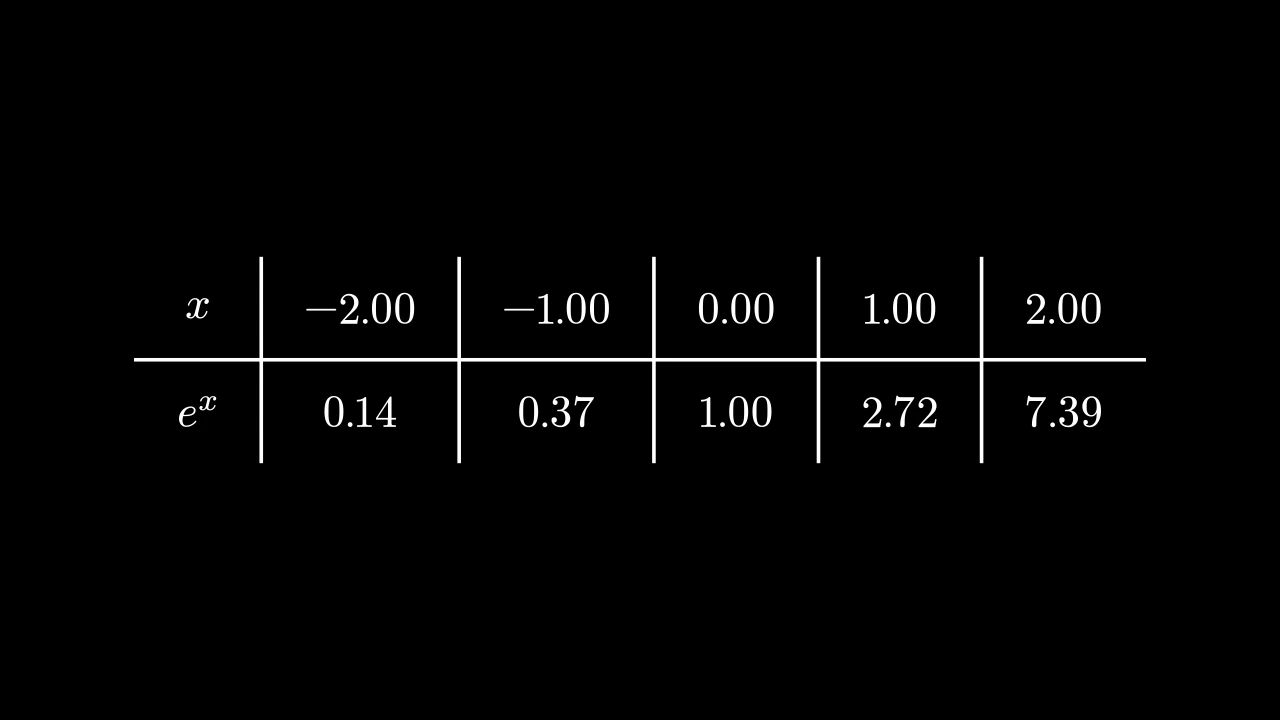
构造一个构建表格的动画:先绘制线条,然后是条目,然后是标签, 最后是每个条目的背景矩形,依次进行。

每个部分都是独立的动画,以所给选项构造;各部分通过 lag_ratio 依次衔接, 默认为 1,除非另行指定。除标签外的条目会被移至 z-index 2,位于背景和高亮 之上。

table.create(line_animation=Create, label_animation=Write, element_animation=Create, entry_animation=FadeIn, **kwargs)
line_animation

绘制线条的动画。

label_animation

绘制标签的动画。

element_animation

绘制除标签外条目的动画。

entry_animation

引入每个条目背景矩形的动画(即 add_highlighted_cell 的高亮)。

run_time

动画播放时长,以秒为单位(默认 1)。

lag_ratio

mobject 各部分如何交错:每个部分在其前一个部分开始后,经过其运行时长的该分数比例后开始 (默认 0:全部同时;1:一个接一个)。

rate_func

动画进度如何随时间运行:一个从 [0, 1] 到 [0, 1] 的函数 (默认为 smooth;参见 rate functions)。

reverse_rate_function

是否反向运行动画(默认 False)。

name

动画的名称。

remover

动画结束时 mobject 是否离开场景 (默认 False)。

suspend_mobject_updating

动画期间 mobject 的更新器是否在其下运行(默认 True):它们 持续作用于 mobject,每一帧显示动画应用于其结果。 若为 False,则它们作用于被动画的 mobject 本身。

introducer

动画开始时 mobject 是否加入场景(默认 False); 否则若场景缺少它,play 在其开始时将其带入。

use_override

若某 mobject 的类用另一个动画代替此动画播放,是否如此执行 (默认 True)。

还接受 动画关键字。

返回 一个新的动画组。

源码

manimgx\mobjects\grid.py
def create(
    self,
    line_animation: Callable[..., Animation] = Create,
    label_animation: Callable[..., Animation] = Write,
    element_animation: Callable[..., Animation] = Create,
    entry_animation: Callable[..., Animation] = FadeIn,
    **kwargs: Unpack[AnimationOptions],
) -> AnimationGroup:
    """构造一个构建表格的动画:先绘制线条,然后是条目,然后是标签,
    最后是每个条目的背景矩形,依次进行。

    每个部分都是独立的动画,以所给选项构造;各部分通过 `lag_ratio` 依次衔接,
    默认为 1,除非另行指定。除标签外的条目会被移至 z-index 2,位于背景和高亮
    之上。

    Args:
        line_animation: 绘制线条的动画。
        label_animation: 绘制标签的动画。
        element_animation: 绘制除标签外条目的动画。
        entry_animation: 引入每个条目背景矩形的动画(即
            [add_highlighted_cell][manimgx.Table.add_highlighted_cell] 的高亮)。
        **kwargs: 每个部分的 [动画选项][manimgx.animation.timeline.AnimationOptions]
            (`run_time` 为每个部分各自的运行时间),以及整体的 `lag_ratio`:
            1 表示各部分依次播放,0 表示同时播放。

    Returns:
        一个新的动画组。

    Examples:
        ```python
        import manimgx as m


        class TableCreateExample(m.Scene):
            def construct(self) -> None:
                table = m.Table(
                    [["First", "Second"], ["Third", "Fourth"]],
                    row_labels=[m.Text("R1"), m.Text("R2")],
                    col_labels=[m.Text("C1"), m.Text("C2")],
                    include_outer_lines=True,
                )
                table.add_highlighted_cell((2, 2), color=m.GREEN)
                self.play(table.create())
        ```
    """
    # the parts: lines, entries, labels (if any), then the entries' backgrounds;
    # the other options go to each part
    lag_ratio = kwargs.pop("lag_ratio", 1)
    animations: list[Animation] = [
        line_animation(
            VGroup(self.vertical_lines, self.horizontal_lines), **kwargs
        ),
        element_animation(self.elements_without_labels.set_z_index(2), **kwargs),
    ]
    if self.get_labels():
        animations += [label_animation(self.get_labels(), **kwargs)]
    if self.get_entries():
        for entry in self.elements_without_labels:
            if entry.background_rectangle is not None:
                animations.append(
                    entry_animation(entry.background_rectangle, **kwargs)
                )
    return AnimationGroup(*animations, lag_ratio=lag_ratio)

DecimalTable

DecimalTableExample
代码
import numpy as np

import manimgx as m


class DecimalTableExample(m.Scene):
    def construct(self) -> None:
        xs = [-2, -1, 0, 1, 2]
        table = m.DecimalTable(
            [xs, np.exp(xs)],
            row_labels=[m.MathTex("x"), m.MathTex("e^x")],
            h_buff=1,
            element_to_mobject_config={"num_decimal_places": 2},
        )
        self.add(table)

十进制数表格:每个条目以 DecimalNumber 书写, 除非另行配置,默认保留一位小数。

它接受 Table 的参数;其条目为数字,其 element_to_mobject_config 给出它们的 number 关键字,代替 {"num_decimal_places": 1}。

m.DecimalTable(table, row_labels=None, col_labels=None, top_left_entry=None, v_buff=0.8, h_buff=1.3, include_outer_lines=False, include_inner_lines=True, add_background_rectangles_to_entries=False, entries_background_color=BLACK, include_background_rectangle=False, background_rectangle_color=BLACK, element_to_mobject=None, element_to_mobject_config=None, arrange_in_grid_config=None, line_config=None, **kwargs)
color

填充与描边共用的颜色(默认白色);None 表示该类的默认值。

fill_color

填充的颜色;未给出时为 color。多个颜色沿 sheen_direction 构成渐变。

fill_opacity

填充的不透明度,取值从 0 到 1(默认 0:无填充)。

stroke_color

描边的颜色;未给出时为 color。多个颜色构成渐变。

stroke_opacity

描边的不透明度,取值从 0 到 1(默认 1)。

stroke_width

描边的宽度,以场景单位的百分之一计(默认 4;0:无描边)。

background_stroke_color

绘制于填充之后的轮廓颜色(默认黑色)。

background_stroke_opacity

轮廓的不透明度,取值从 0 到 1(默认 1)。

background_stroke_width

轮廓的宽度,以场景单位的百分之一计(默认 0:无)。

sheen_factor

颜色朝 sheen_direction 变亮的程度,取值从 -1 到 1(默认 0); 负值变暗。

sheen_direction

颜色变亮的方向(默认 UL)。

joint_type

描边在路径转折处的连接方式:圆角、斜切或斜接,按二维场景的绘制方式 (参见 LineJointType;默认 AUTO:斜接)。

cap_style

描边在其显示的每一端的端点样式(开放路径的端点、虚线的端点):圆头、平头 或方头,按二维场景的绘制方式(参见 CapStyleType;默认 AUTO:平头)。

shade_in_3d

三维场景的光是否对该 mobject 着色。

material

其表面在三维场景中如何反射场景的光(参见 Material);None:Manim 的着色(默认)。

name

mobject 的名称;未给出时为其类名。

z_index

其在绘制顺序中的位置:索引较高者绘制于较低者之上 (默认 0)。

target

MoveToTarget 将 mobject 移动至的状态。

还接受 样式关键字。

源码

manimgx\mobjects\grid.py

def __init__(
    self,
    table: Iterable[Iterable[float | str | Mobject]],
    row_labels: Iterable[Mobject] | None = None,
    col_labels: Iterable[Mobject] | None = None,
    top_left_entry: Mobject | None = None,
    v_buff: float = 0.8,
    h_buff: float = 1.3,
    include_outer_lines: bool = False,
    include_inner_lines: bool = True,
    add_background_rectangles_to_entries: bool = False,
    entries_background_color: ParsableManimColor = BLACK,
    include_background_rectangle: bool = False,
    background_rectangle_color: ParsableManimColor = BLACK,
    element_to_mobject: ElementFactory | None = None,
    element_to_mobject_config: Mapping[str, object] | None = None,
    arrange_in_grid_config: GridArrangement | None = None,
    line_config: LineOptions | None = None,
    **kwargs: Unpack[Style],
):
    if line_config is None:
        line_config = {}
    if arrange_in_grid_config is None:
        arrange_in_grid_config = {}
    table_data = [list(row) for row in table]
    row_label_data = list(row_labels) if row_labels is not None else []
    col_label_data = list(col_labels) if col_labels is not None else []
    self.row_labels = row_label_data or None
    """行标签,从上到下;若无则为 None。"""
    self.col_labels = col_label_data or None
    """列标签,从左到右;若无则为 None。"""
    self.top_left_entry = top_left_entry
    """标签之间角落处的 mobject;若无则为 None。"""
    self.row_dim = len(table_data)
    """表格的条目行数,不含标签。"""
    self.col_dim = len(table_data[0])
    """表格的条目列数,不含标签。"""
    self.v_buff = v_buff
    """各行之间的间隙,以场景单位表示,即表格创建时的值:缩放表格不会改变该值。"""
    self.h_buff = h_buff
    """各列之间的间隙,以场景单位表示,即表格创建时的值:缩放表格不会改变该值。"""
    entries_background_color = ManimColor(entries_background_color)
    background_rectangle_color = ManimColor(background_rectangle_color)
    if any(len(row) != len(table_data[0]) for row in table_data):
        raise ValueError("Not all rows in table have the same length.")
    super().__init__(**kwargs)
    cells = self._make_cells(
        table_data, element_to_mobject, element_to_mobject_config
    )
    self.elements_without_labels = VGroup(*it.chain(*cells))
    """不含标签的条目,逐行排列。"""
    empty_corner = None
    if self.row_labels is not None:
        for k in range(len(self.row_labels)):
            cells[k] = [self.row_labels[k]] + cells[k]
    if self.col_labels is not None:
        if self.row_labels is not None:
            if self.top_left_entry is not None:
                col_labels = [self.top_left_entry] + self.col_labels
                cells.insert(0, col_labels)
            else:
                empty_corner = VMobject()
                col_labels = [empty_corner] + self.col_labels
                cells.insert(0, col_labels)
        else:
            cells.insert(0, self.col_labels)
    self.cells = cells
    self.elements = VGroup(*it.chain(*self.cells))
    """表格的每个条目,包括标签,逐行排列:以组的形式组织,并被添加到表格中。"""
    layout = GridArrangement(
        rows=len(self.cells), cols=len(self.cells[0]), buff=(h_buff, v_buff)
    )
    self.elements.arrange_in_grid(**(layout | arrange_in_grid_config))
    if empty_corner is not None:
        self.elements.remove(empty_corner)
    self.add(self.elements)
    self.center()
    for axis in (0, 1):
        divisions = self.get_rows() if axis == 0 else self.get_columns()
        along, across = (RIGHT, UP) if axis == 0 else (DOWN, LEFT)
        near = [float(part.get_corner(across) @ across) for part in divisions]
        far = [float(part.get_corner(-across) @ across) for part in divisions]
        gap = (self.v_buff, self.h_buff)[axis] / 2
        pad = (self.h_buff, self.v_buff)[axis] / 2
        start = float(self.elements.get_corner(-along) @ along) - pad
        end = float(self.elements.get_corner(along) @ along) + pad
        anchors: list[tuple[float, bool]] = []
        if include_outer_lines:
            anchors.extend(((near[0] + gap, False), (far[-1] - gap, False)))
        if include_inner_lines:
            anchors.extend(
                (b + 0.5 * (a - b), axis == 1) for a, b in zip(far[:-1], near[1:])
            )
        lines = VGroup()
        parts: list[Line] = []
        for anchor, reverse in anchors:
            offset = anchor * across
            ends = (start * along + offset, end * along + offset)
            parts.append(Line(*(ends[::-1] if reverse else ends), **line_config))
        lines.add(*parts)
        self.add(*lines)
        if axis == 0:
            self.horizontal_lines = lines
        else:
            self.vertical_lines = lines
    if add_background_rectangles_to_entries:
        self.add_background_to_entries(color=entries_background_color)
    if include_background_rectangle:
        self.add_background_rectangle(color=background_rectangle_color)

IntegerTable

IntegerTableExample
代码
import manimgx as m


class IntegerTableExample(m.Scene):
    def construct(self) -> None:
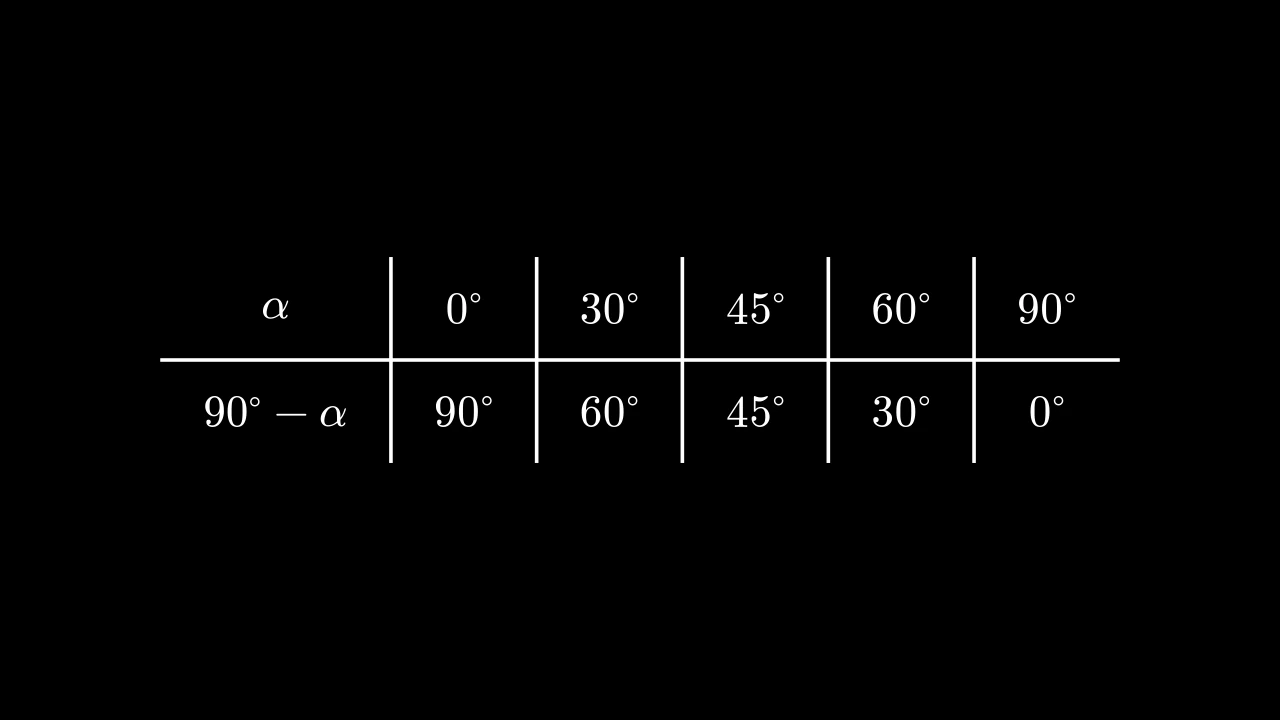
        table = m.IntegerTable(
            [[0, 30, 45, 60, 90], [90, 60, 45, 30, 0]],
            row_labels=[m.MathTex(r"\alpha"), m.MathTex(r"90^\circ - \alpha")],
            h_buff=1,
            element_to_mobject_config={"unit": r"^\circ"},
        )
        self.add(table)

整数表格:每个条目以 Integer 书写,其数字四舍五入为整数。

它接受 Table 的参数;其条目为数字,其 element_to_mobject_config 给出它们的 number 关键字。

m.IntegerTable(table, row_labels=None, col_labels=None, top_left_entry=None, v_buff=0.8, h_buff=1.3, include_outer_lines=False, include_inner_lines=True, add_background_rectangles_to_entries=False, entries_background_color=BLACK, include_background_rectangle=False, background_rectangle_color=BLACK, element_to_mobject=None, element_to_mobject_config=None, arrange_in_grid_config=None, line_config=None, **kwargs)
color

填充与描边共用的颜色(默认白色);None 表示该类的默认值。

fill_color

填充的颜色;未给出时为 color。多个颜色沿 sheen_direction 构成渐变。

fill_opacity

填充的不透明度,取值从 0 到 1(默认 0:无填充)。

stroke_color

描边的颜色;未给出时为 color。多个颜色构成渐变。

stroke_opacity

描边的不透明度,取值从 0 到 1(默认 1)。

stroke_width

描边的宽度,以场景单位的百分之一计(默认 4;0:无描边)。

background_stroke_color

绘制于填充之后的轮廓颜色(默认黑色)。

background_stroke_opacity

轮廓的不透明度,取值从 0 到 1(默认 1)。

background_stroke_width

轮廓的宽度,以场景单位的百分之一计(默认 0:无)。

sheen_factor

颜色朝 sheen_direction 变亮的程度,取值从 -1 到 1(默认 0); 负值变暗。

sheen_direction

颜色变亮的方向(默认 UL)。

joint_type

描边在路径转折处的连接方式:圆角、斜切或斜接,按二维场景的绘制方式 (参见 LineJointType;默认 AUTO:斜接)。

cap_style

描边在其显示的每一端的端点样式(开放路径的端点、虚线的端点):圆头、平头 或方头,按二维场景的绘制方式(参见 CapStyleType;默认 AUTO:平头)。

shade_in_3d

三维场景的光是否对该 mobject 着色。

material

其表面在三维场景中如何反射场景的光(参见 Material);None:Manim 的着色(默认)。

name

mobject 的名称;未给出时为其类名。

z_index

其在绘制顺序中的位置:索引较高者绘制于较低者之上 (默认 0)。

target

MoveToTarget 将 mobject 移动至的状态。

还接受 样式关键字。

源码

manimgx\mobjects\grid.py

def __init__(
    self,
    table: Iterable[Iterable[float | str | Mobject]],
    row_labels: Iterable[Mobject] | None = None,
    col_labels: Iterable[Mobject] | None = None,
    top_left_entry: Mobject | None = None,
    v_buff: float = 0.8,
    h_buff: float = 1.3,
    include_outer_lines: bool = False,
    include_inner_lines: bool = True,
    add_background_rectangles_to_entries: bool = False,
    entries_background_color: ParsableManimColor = BLACK,
    include_background_rectangle: bool = False,
    background_rectangle_color: ParsableManimColor = BLACK,
    element_to_mobject: ElementFactory | None = None,
    element_to_mobject_config: Mapping[str, object] | None = None,
    arrange_in_grid_config: GridArrangement | None = None,
    line_config: LineOptions | None = None,
    **kwargs: Unpack[Style],
):
    if line_config is None:
        line_config = {}
    if arrange_in_grid_config is None:
        arrange_in_grid_config = {}
    table_data = [list(row) for row in table]
    row_label_data = list(row_labels) if row_labels is not None else []
    col_label_data = list(col_labels) if col_labels is not None else []
    self.row_labels = row_label_data or None
    """行标签,从上到下;若无则为 None。"""
    self.col_labels = col_label_data or None
    """列标签,从左到右;若无则为 None。"""
    self.top_left_entry = top_left_entry
    """标签之间角落处的 mobject;若无则为 None。"""
    self.row_dim = len(table_data)
    """表格的条目行数,不含标签。"""
    self.col_dim = len(table_data[0])
    """表格的条目列数,不含标签。"""
    self.v_buff = v_buff
    """各行之间的间隙,以场景单位表示,即表格创建时的值:缩放表格不会改变该值。"""
    self.h_buff = h_buff
    """各列之间的间隙,以场景单位表示,即表格创建时的值:缩放表格不会改变该值。"""
    entries_background_color = ManimColor(entries_background_color)
    background_rectangle_color = ManimColor(background_rectangle_color)
    if any(len(row) != len(table_data[0]) for row in table_data):
        raise ValueError("Not all rows in table have the same length.")
    super().__init__(**kwargs)
    cells = self._make_cells(
        table_data, element_to_mobject, element_to_mobject_config
    )
    self.elements_without_labels = VGroup(*it.chain(*cells))
    """不含标签的条目,逐行排列。"""
    empty_corner = None
    if self.row_labels is not None:
        for k in range(len(self.row_labels)):
            cells[k] = [self.row_labels[k]] + cells[k]
    if self.col_labels is not None:
        if self.row_labels is not None:
            if self.top_left_entry is not None:
                col_labels = [self.top_left_entry] + self.col_labels
                cells.insert(0, col_labels)
            else:
                empty_corner = VMobject()
                col_labels = [empty_corner] + self.col_labels
                cells.insert(0, col_labels)
        else:
            cells.insert(0, self.col_labels)
    self.cells = cells
    self.elements = VGroup(*it.chain(*self.cells))
    """表格的每个条目,包括标签,逐行排列:以组的形式组织,并被添加到表格中。"""
    layout = GridArrangement(
        rows=len(self.cells), cols=len(self.cells[0]), buff=(h_buff, v_buff)
    )
    self.elements.arrange_in_grid(**(layout | arrange_in_grid_config))
    if empty_corner is not None:
        self.elements.remove(empty_corner)
    self.add(self.elements)
    self.center()
    for axis in (0, 1):
        divisions = self.get_rows() if axis == 0 else self.get_columns()
        along, across = (RIGHT, UP) if axis == 0 else (DOWN, LEFT)
        near = [float(part.get_corner(across) @ across) for part in divisions]
        far = [float(part.get_corner(-across) @ across) for part in divisions]
        gap = (self.v_buff, self.h_buff)[axis] / 2
        pad = (self.h_buff, self.v_buff)[axis] / 2
        start = float(self.elements.get_corner(-along) @ along) - pad
        end = float(self.elements.get_corner(along) @ along) + pad
        anchors: list[tuple[float, bool]] = []
        if include_outer_lines:
            anchors.extend(((near[0] + gap, False), (far[-1] - gap, False)))
        if include_inner_lines:
            anchors.extend(
                (b + 0.5 * (a - b), axis == 1) for a, b in zip(far[:-1], near[1:])
            )
        lines = VGroup()
        parts: list[Line] = []
        for anchor, reverse in anchors:
            offset = anchor * across
            ends = (start * along + offset, end * along + offset)
            parts.append(Line(*(ends[::-1] if reverse else ends), **line_config))
        lines.add(*parts)
        self.add(*lines)
        if axis == 0:
            self.horizontal_lines = lines
        else:
            self.vertical_lines = lines
    if add_background_rectangles_to_entries:
        self.add_background_to_entries(color=entries_background_color)
    if include_background_rectangle:
        self.add_background_rectangle(color=background_rectangle_color)

MathTable

MathTableExample
代码
import manimgx as m


class MathTableExample(m.Scene):
    def construct(self) -> None:
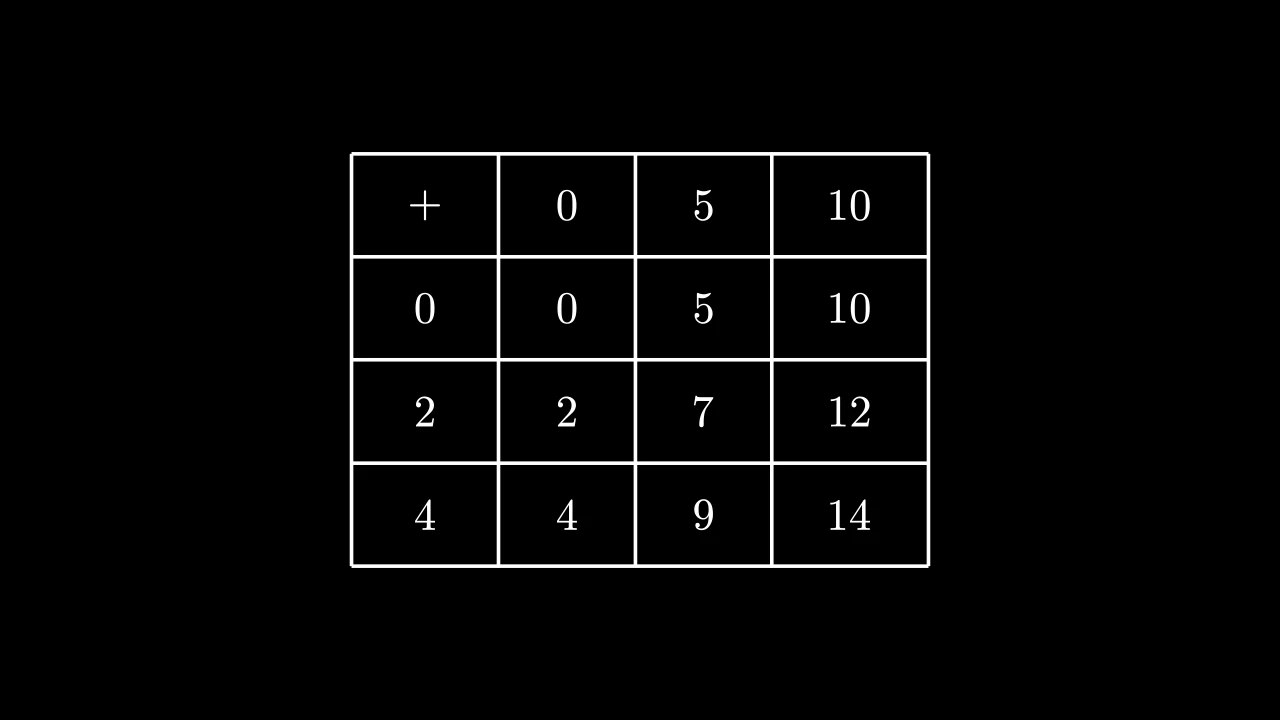
        table = m.MathTable(
            [["+", 0, 5, 10], [0, 0, 5, 10], [2, 2, 7, 12], [4, 4, 9, 14]],
            include_outer_lines=True,
        )
        self.add(table)

数学表格:每个条目以 MathTex 排版为数学公式。

它接受 Table 的参数;其条目为数学字符串或数字,其 element_to_mobject_config 给出它们的 math 关键字。

m.MathTable(table, row_labels=None, col_labels=None, top_left_entry=None, v_buff=0.8, h_buff=1.3, include_outer_lines=False, include_inner_lines=True, add_background_rectangles_to_entries=False, entries_background_color=BLACK, include_background_rectangle=False, background_rectangle_color=BLACK, element_to_mobject=None, element_to_mobject_config=None, arrange_in_grid_config=None, line_config=None, **kwargs)
color

填充与描边共用的颜色(默认白色);None 表示该类的默认值。

fill_color

填充的颜色;未给出时为 color。多个颜色沿 sheen_direction 构成渐变。

fill_opacity

填充的不透明度,取值从 0 到 1(默认 0:无填充)。

stroke_color

描边的颜色;未给出时为 color。多个颜色构成渐变。

stroke_opacity

描边的不透明度,取值从 0 到 1(默认 1)。

stroke_width

描边的宽度,以场景单位的百分之一计(默认 4;0:无描边)。

background_stroke_color

绘制于填充之后的轮廓颜色(默认黑色)。

background_stroke_opacity

轮廓的不透明度,取值从 0 到 1(默认 1)。

background_stroke_width

轮廓的宽度,以场景单位的百分之一计(默认 0:无)。

sheen_factor

颜色朝 sheen_direction 变亮的程度,取值从 -1 到 1(默认 0); 负值变暗。

sheen_direction

颜色变亮的方向(默认 UL)。

joint_type

描边在路径转折处的连接方式:圆角、斜切或斜接,按二维场景的绘制方式 (参见 LineJointType;默认 AUTO:斜接)。

cap_style

描边在其显示的每一端的端点样式(开放路径的端点、虚线的端点):圆头、平头 或方头,按二维场景的绘制方式(参见 CapStyleType;默认 AUTO:平头)。

shade_in_3d

三维场景的光是否对该 mobject 着色。

material

其表面在三维场景中如何反射场景的光(参见 Material);None:Manim 的着色(默认)。

name

mobject 的名称;未给出时为其类名。

z_index

其在绘制顺序中的位置:索引较高者绘制于较低者之上 (默认 0)。

target

MoveToTarget 将 mobject 移动至的状态。

还接受 样式关键字。

源码

manimgx\mobjects\grid.py

def __init__(
    self,
    table: Iterable[Iterable[float | str | Mobject]],
    row_labels: Iterable[Mobject] | None = None,
    col_labels: Iterable[Mobject] | None = None,
    top_left_entry: Mobject | None = None,
    v_buff: float = 0.8,
    h_buff: float = 1.3,
    include_outer_lines: bool = False,
    include_inner_lines: bool = True,
    add_background_rectangles_to_entries: bool = False,
    entries_background_color: ParsableManimColor = BLACK,
    include_background_rectangle: bool = False,
    background_rectangle_color: ParsableManimColor = BLACK,
    element_to_mobject: ElementFactory | None = None,
    element_to_mobject_config: Mapping[str, object] | None = None,
    arrange_in_grid_config: GridArrangement | None = None,
    line_config: LineOptions | None = None,
    **kwargs: Unpack[Style],
):
    if line_config is None:
        line_config = {}
    if arrange_in_grid_config is None:
        arrange_in_grid_config = {}
    table_data = [list(row) for row in table]
    row_label_data = list(row_labels) if row_labels is not None else []
    col_label_data = list(col_labels) if col_labels is not None else []
    self.row_labels = row_label_data or None
    """行标签,从上到下;若无则为 None。"""
    self.col_labels = col_label_data or None
    """列标签,从左到右;若无则为 None。"""
    self.top_left_entry = top_left_entry
    """标签之间角落处的 mobject;若无则为 None。"""
    self.row_dim = len(table_data)
    """表格的条目行数,不含标签。"""
    self.col_dim = len(table_data[0])
    """表格的条目列数,不含标签。"""
    self.v_buff = v_buff
    """各行之间的间隙,以场景单位表示,即表格创建时的值:缩放表格不会改变该值。"""
    self.h_buff = h_buff
    """各列之间的间隙,以场景单位表示,即表格创建时的值:缩放表格不会改变该值。"""
    entries_background_color = ManimColor(entries_background_color)
    background_rectangle_color = ManimColor(background_rectangle_color)
    if any(len(row) != len(table_data[0]) for row in table_data):
        raise ValueError("Not all rows in table have the same length.")
    super().__init__(**kwargs)
    cells = self._make_cells(
        table_data, element_to_mobject, element_to_mobject_config
    )
    self.elements_without_labels = VGroup(*it.chain(*cells))
    """不含标签的条目,逐行排列。"""
    empty_corner = None
    if self.row_labels is not None:
        for k in range(len(self.row_labels)):
            cells[k] = [self.row_labels[k]] + cells[k]
    if self.col_labels is not None:
        if self.row_labels is not None:
            if self.top_left_entry is not None:
                col_labels = [self.top_left_entry] + self.col_labels
                cells.insert(0, col_labels)
            else:
                empty_corner = VMobject()
                col_labels = [empty_corner] + self.col_labels
                cells.insert(0, col_labels)
        else:
            cells.insert(0, self.col_labels)
    self.cells = cells
    self.elements = VGroup(*it.chain(*self.cells))
    """表格的每个条目,包括标签,逐行排列:以组的形式组织,并被添加到表格中。"""
    layout = GridArrangement(
        rows=len(self.cells), cols=len(self.cells[0]), buff=(h_buff, v_buff)
    )
    self.elements.arrange_in_grid(**(layout | arrange_in_grid_config))
    if empty_corner is not None:
        self.elements.remove(empty_corner)
    self.add(self.elements)
    self.center()
    for axis in (0, 1):
        divisions = self.get_rows() if axis == 0 else self.get_columns()
        along, across = (RIGHT, UP) if axis == 0 else (DOWN, LEFT)
        near = [float(part.get_corner(across) @ across) for part in divisions]
        far = [float(part.get_corner(-across) @ across) for part in divisions]
        gap = (self.v_buff, self.h_buff)[axis] / 2
        pad = (self.h_buff, self.v_buff)[axis] / 2
        start = float(self.elements.get_corner(-along) @ along) - pad
        end = float(self.elements.get_corner(along) @ along) + pad
        anchors: list[tuple[float, bool]] = []
        if include_outer_lines:
            anchors.extend(((near[0] + gap, False), (far[-1] - gap, False)))
        if include_inner_lines:
            anchors.extend(
                (b + 0.5 * (a - b), axis == 1) for a, b in zip(far[:-1], near[1:])
            )
        lines = VGroup()
        parts: list[Line] = []
        for anchor, reverse in anchors:
            offset = anchor * across
            ends = (start * along + offset, end * along + offset)
            parts.append(Line(*(ends[::-1] if reverse else ends), **line_config))
        lines.add(*parts)
        self.add(*lines)
        if axis == 0:
            self.horizontal_lines = lines
        else:
            self.vertical_lines = lines
    if add_background_rectangles_to_entries:
        self.add_background_to_entries(color=entries_background_color)
    if include_background_rectangle:
        self.add_background_rectangle(color=background_rectangle_color)

MobjectTable

MobjectTableExample
代码
import manimgx as m


class MobjectTableExample(m.Scene):
    def construct(self) -> None:
        def o() -> m.Circle:
            return m.Circle(radius=0.45, color=m.RED)

        def x() -> m.VGroup:
            cross = m.VGroup(m.Line(m.UL, m.DR), m.Line(m.UR, m.DL))
            return cross.scale(0.45).set_color(m.BLUE)

        table = m.MobjectTable(
            [[o(), x(), o()], [x(), o(), o()], [o(), x(), x()]]
        )
        self.add(table)

mobject 表格:每个条目是一个 mobject,按原样放置。

它接受 Table 的参数;其条目为 mobject,直接使用 (不复制)。

m.MobjectTable(table, row_labels=None, col_labels=None, top_left_entry=None, v_buff=0.8, h_buff=1.3, include_outer_lines=False, include_inner_lines=True, add_background_rectangles_to_entries=False, entries_background_color=BLACK, include_background_rectangle=False, background_rectangle_color=BLACK, element_to_mobject=None, element_to_mobject_config=None, arrange_in_grid_config=None, line_config=None, **kwargs)
color

填充与描边共用的颜色(默认白色);None 表示该类的默认值。

fill_color

填充的颜色;未给出时为 color。多个颜色沿 sheen_direction 构成渐变。

fill_opacity

填充的不透明度,取值从 0 到 1(默认 0:无填充)。

stroke_color

描边的颜色;未给出时为 color。多个颜色构成渐变。

stroke_opacity

描边的不透明度,取值从 0 到 1(默认 1)。

stroke_width

描边的宽度,以场景单位的百分之一计(默认 4;0:无描边)。

background_stroke_color

绘制于填充之后的轮廓颜色(默认黑色)。

background_stroke_opacity

轮廓的不透明度,取值从 0 到 1(默认 1)。

background_stroke_width

轮廓的宽度,以场景单位的百分之一计(默认 0:无)。

sheen_factor

颜色朝 sheen_direction 变亮的程度,取值从 -1 到 1(默认 0); 负值变暗。

sheen_direction

颜色变亮的方向(默认 UL)。

joint_type

描边在路径转折处的连接方式:圆角、斜切或斜接,按二维场景的绘制方式 (参见 LineJointType;默认 AUTO:斜接)。

cap_style

描边在其显示的每一端的端点样式(开放路径的端点、虚线的端点):圆头、平头 或方头,按二维场景的绘制方式(参见 CapStyleType;默认 AUTO:平头)。

shade_in_3d

三维场景的光是否对该 mobject 着色。

material

其表面在三维场景中如何反射场景的光(参见 Material);None:Manim 的着色(默认)。

name

mobject 的名称;未给出时为其类名。

z_index

其在绘制顺序中的位置:索引较高者绘制于较低者之上 (默认 0)。

target

MoveToTarget 将 mobject 移动至的状态。

还接受 样式关键字。

源码

manimgx\mobjects\grid.py

def __init__(
    self,
    table: Iterable[Iterable[float | str | Mobject]],
    row_labels: Iterable[Mobject] | None = None,
    col_labels: Iterable[Mobject] | None = None,
    top_left_entry: Mobject | None = None,
    v_buff: float = 0.8,
    h_buff: float = 1.3,
    include_outer_lines: bool = False,
    include_inner_lines: bool = True,
    add_background_rectangles_to_entries: bool = False,
    entries_background_color: ParsableManimColor = BLACK,
    include_background_rectangle: bool = False,
    background_rectangle_color: ParsableManimColor = BLACK,
    element_to_mobject: ElementFactory | None = None,
    element_to_mobject_config: Mapping[str, object] | None = None,
    arrange_in_grid_config: GridArrangement | None = None,
    line_config: LineOptions | None = None,
    **kwargs: Unpack[Style],
):
    if line_config is None:
        line_config = {}
    if arrange_in_grid_config is None:
        arrange_in_grid_config = {}
    table_data = [list(row) for row in table]
    row_label_data = list(row_labels) if row_labels is not None else []
    col_label_data = list(col_labels) if col_labels is not None else []
    self.row_labels = row_label_data or None
    """行标签,从上到下;若无则为 None。"""
    self.col_labels = col_label_data or None
    """列标签,从左到右;若无则为 None。"""
    self.top_left_entry = top_left_entry
    """标签之间角落处的 mobject;若无则为 None。"""
    self.row_dim = len(table_data)
    """表格的条目行数,不含标签。"""
    self.col_dim = len(table_data[0])
    """表格的条目列数,不含标签。"""
    self.v_buff = v_buff
    """各行之间的间隙,以场景单位表示,即表格创建时的值:缩放表格不会改变该值。"""
    self.h_buff = h_buff
    """各列之间的间隙,以场景单位表示,即表格创建时的值:缩放表格不会改变该值。"""
    entries_background_color = ManimColor(entries_background_color)
    background_rectangle_color = ManimColor(background_rectangle_color)
    if any(len(row) != len(table_data[0]) for row in table_data):
        raise ValueError("Not all rows in table have the same length.")
    super().__init__(**kwargs)
    cells = self._make_cells(
        table_data, element_to_mobject, element_to_mobject_config
    )
    self.elements_without_labels = VGroup(*it.chain(*cells))
    """不含标签的条目,逐行排列。"""
    empty_corner = None
    if self.row_labels is not None:
        for k in range(len(self.row_labels)):
            cells[k] = [self.row_labels[k]] + cells[k]
    if self.col_labels is not None:
        if self.row_labels is not None:
            if self.top_left_entry is not None:
                col_labels = [self.top_left_entry] + self.col_labels
                cells.insert(0, col_labels)
            else:
                empty_corner = VMobject()
                col_labels = [empty_corner] + self.col_labels
                cells.insert(0, col_labels)
        else:
            cells.insert(0, self.col_labels)
    self.cells = cells
    self.elements = VGroup(*it.chain(*self.cells))
    """表格的每个条目,包括标签,逐行排列:以组的形式组织,并被添加到表格中。"""
    layout = GridArrangement(
        rows=len(self.cells), cols=len(self.cells[0]), buff=(h_buff, v_buff)
    )
    self.elements.arrange_in_grid(**(layout | arrange_in_grid_config))
    if empty_corner is not None:
        self.elements.remove(empty_corner)
    self.add(self.elements)
    self.center()
    for axis in (0, 1):
        divisions = self.get_rows() if axis == 0 else self.get_columns()
        along, across = (RIGHT, UP) if axis == 0 else (DOWN, LEFT)
        near = [float(part.get_corner(across) @ across) for part in divisions]
        far = [float(part.get_corner(-across) @ across) for part in divisions]
        gap = (self.v_buff, self.h_buff)[axis] / 2
        pad = (self.h_buff, self.v_buff)[axis] / 2
        start = float(self.elements.get_corner(-along) @ along) - pad
        end = float(self.elements.get_corner(along) @ along) + pad
        anchors: list[tuple[float, bool]] = []
        if include_outer_lines:
            anchors.extend(((near[0] + gap, False), (far[-1] - gap, False)))
        if include_inner_lines:
            anchors.extend(
                (b + 0.5 * (a - b), axis == 1) for a, b in zip(far[:-1], near[1:])
            )
        lines = VGroup()
        parts: list[Line] = []
        for anchor, reverse in anchors:
            offset = anchor * across
            ends = (start * along + offset, end * along + offset)
            parts.append(Line(*(ends[::-1] if reverse else ends), **line_config))
        lines.add(*parts)
        self.add(*lines)
        if axis == 0:
            self.horizontal_lines = lines
        else:
            self.vertical_lines = lines
    if add_background_rectangles_to_entries:
        self.add_background_to_entries(color=entries_background_color)
    if include_background_rectangle:
        self.add_background_rectangle(color=background_rectangle_color)